
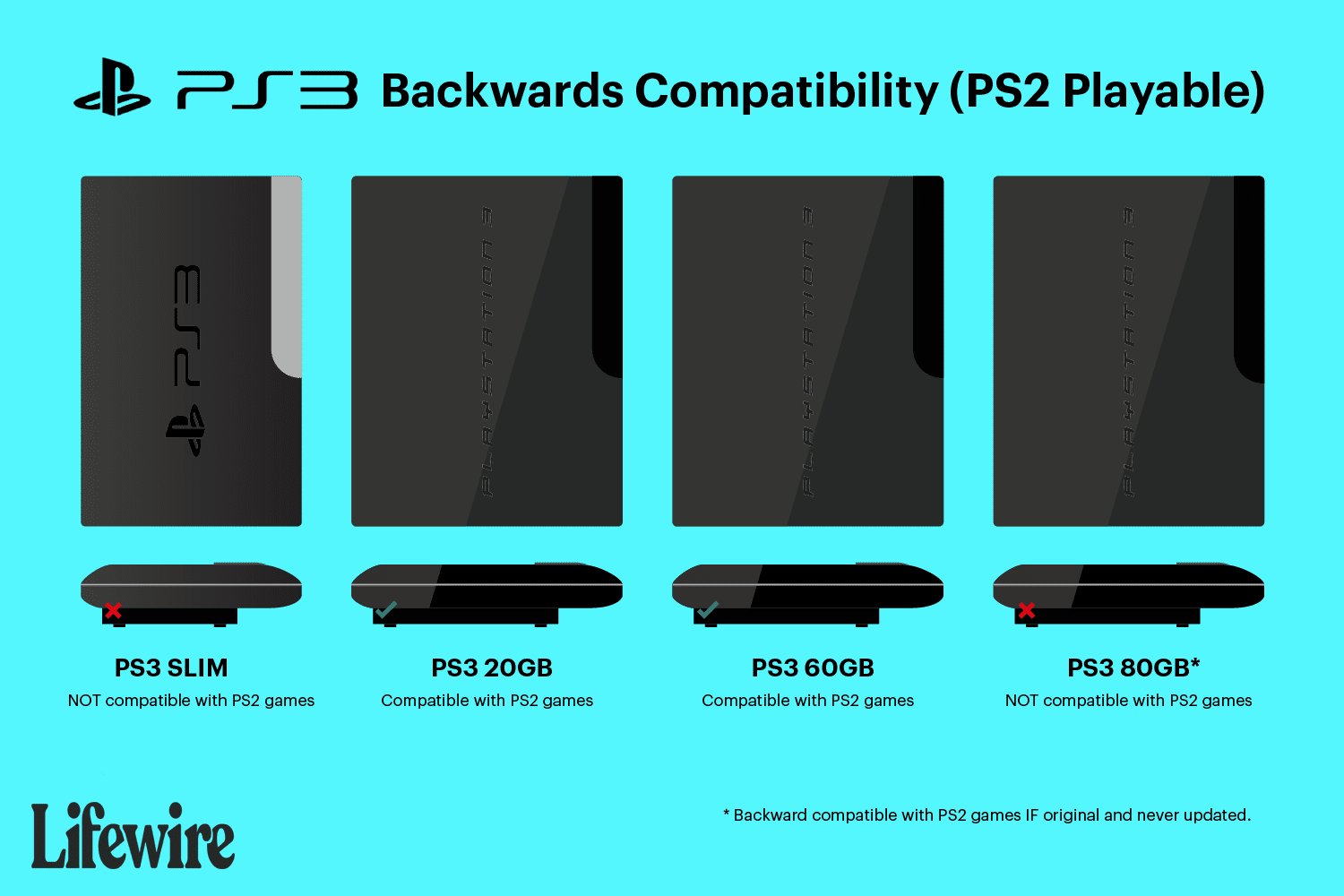
No, the PS3 Slim does not play PS2 games.
Many people wonder does the ps3 slim play ps2 games, and it’s a common question among gamers. The original PlayStation 3 models had backward compatibility, allowing them to play both PS3 and PS2 titles. This feature excited many.
However, the PS3 Slim and subsequent models removed this functionality. Cost reductions and hardware changes meant that they are not capable of playing physical PS2 discs. You can still find some PS2 games available digitally through the PlayStation Network though.

Does the PS3 Slim Play PS2 Games?
That’s a great question, and one that many gamers have asked! The answer is a bit tricky, and it depends on the specific PlayStation 3 Slim model you have. Let’s explore this topic carefully so you know exactly what to expect from your console. We’ll dig into the different PS3 Slim models, why some play PS2 games and others don’t, and even what you can do if yours isn’t compatible. Get ready to jump into the world of PlayStation backward compatibility!
The Mystery of Backward Compatibility
Let’s start with the term “backward compatibility.” This means that a newer console can play games from older consoles. For example, if your brand new system is backward compatible with an older one, it means you can play older games on it. Now, not all PS3 consoles are created equal in this regard. The very first generation of PlayStation 3 consoles had hardware built inside them to play PlayStation 2 games. This feature made those early PS3s very special.
The Original PS3 (Fat Model) and PS2 Games
The original, “fat” PS3 consoles were released before the Slim model. These original models came in two main types:
- 20GB and 60GB Models: These were the first and they came with a secret weapon! They had the actual hardware, or the guts, of a PS2 inside. This means that when you popped in a PS2 game, the console would actually act like a PS2. Think of it like having two consoles in one! They provided full compatibility, handling nearly all PS2 game library smoothly.
- Later 80GB Models: Some of the later “fat” PS3 consoles did not include full hardware compatibility like the 20GB and 60GB models. Instead, they used something called “software emulation.” This method uses the PS3’s own processor to imitate the PS2’s functions. The list of playable titles was a bit more limited on these 80 GB models.
These early models were truly capable of playing a large number of PlayStation 2 titles. This feature was something that made them highly valued by fans.
The PS3 Slim: A Different Story
Now, here’s where the PS3 Slim comes in. The PS3 Slim was designed to be smaller, cheaper, and more energy efficient. In order to make it that way, Sony had to make some changes. One major change was the removal of the actual PS2 hardware inside.
Why the Change?
Why did they remove the PS2 hardware? Well, including the actual PS2 guts inside a PS3 was expensive. It also made the console bigger and used more power. Sony’s goal was to reduce the cost of production, and make the console more affordable for everyone. Taking out the PS2 chips helped make the PS3 Slim a lot more compact and less expensive.
No PS2 Hardware = No PS2 Game Play
Because the PS3 Slim doesn’t have that PS2 hardware built inside, it cannot play PS2 games in the way the old “fat” models could. This means that if you have a PS3 Slim, you won’t be able to simply insert a PlayStation 2 disc and expect it to work like the first PS3s.
The Different PS3 Slim Models: A Closer Look
It’s crucial to understand that not all PS3 Slim models are the same. While the core design is consistent, the internal components can vary. These variations are important when talking about game compatibility.
- CECH-2000, CECH-2100, CECH-2500, CECH-3000 Series: All of these are PS3 slim models, and none of them have the hardware to play PlayStation 2 games. So, if your PS3 slim model number starts with CECH-2000, 2100, 2500 or 3000, it is not going to play your PS2 game discs.
Let’s dive into a little more detail on these models. They all share the same basic design and functionality, but with minor improvements over time. Remember, regardless of the subtle upgrades, they do not feature the hardware necessary to directly play PS2 games.
Understanding Model Numbers
You can easily find your PS3 Slim model number on the back or bottom of the console. It is often on a label, usually starting with “CECH.” Knowing your exact model number is crucial to avoid confusion about PS2 compatibility.
Software Emulation: A Possible Solution?
While the PS3 Slim doesn’t have the hardware for PS2 games, Sony did explore some other options. Some very late PS3 “fat” models, as mentioned previously, used software emulation. This software emulation works by getting the PS3’s processing power to act like the PS2. While Sony didn’t bring this kind of software emulation to the PS3 Slim for physical discs, there’s something that is a little bit related and exciting for PlayStation gamers!
PS2 Classics on the PlayStation Store
Sony made some PlayStation 2 games available as digital downloads through the PlayStation Network (PSN) store. These are often called “PS2 Classics.” These games are specifically designed to work on the PS3, even the Slim models. You can buy these games and play them directly on your PS3, no original disc needed!
How to Find PS2 Classics
To find them, just go to the PlayStation Store on your PS3. You can search for them by title or browse the PS2 Classics category. The number of available titles has changed over time, but there are still some great PS2 games available to play on your PS3 Slim this way!
Important Things About PS2 Classics
- Digital Only: PS2 Classics are only available as digital downloads. You can’t use your original PS2 game discs.
- Not Every Game is Available: Not every PS2 game is available as a PS2 Classic. It all depends on Sony and what they have chosen to port over.
- They are not Emulated from your disc These aren’t just the old PS2 game files thrown on the PS3. These games are specifically adapted to work on the PS3.
While not true backwards compatibility, the availability of PS2 Classics on the PSN Store offers a great opportunity to experience or re-experience some of the great PlayStation 2 games.
Workarounds and Alternatives
If you’re really wanting to play those old PS2 games, even though the PS3 slim might not support it directly with the disc. Let’s take a look at some things you could consider.
Finding an Original PS3
If you absolutely need to play PS2 games from the disc, the best option is to hunt for a used “fat” PS3 model that has full hardware backward compatibility. These consoles may be more expensive and harder to find, but are the only way to get full backwards compatibility from physical discs.
- Check Model Numbers: Be very careful with checking model numbers, to ensure you get the exact version you want. The 20 GB and 60 GB fat models with full backward compatibility are the only version that will do the trick.
- Check its Condition: Because they are older consoles, make sure they are in working condition, and have been taken care of.
- Price Considerations: Due to their scarcity, these models can be more expensive than a slim or a super-slim.
Using a PS2 Console
Another simple way is to grab the original PlayStation 2! If you still have your old system, it’s a fun way to play those PS2 games directly. It’s a blast to revisit gaming the way it was originally meant to be played.
- Original Experience: The original PlayStation 2 hardware will play the games exactly as they were designed to be played.
- Easy Setup: If you have a TV with appropriate connections, setting up the old console is straightforward.
- Affordable Option: The cost of a used PS2 is relatively low compared to a backward-compatible PS3, so that may be an option to consider.
PlayStation Now/PlayStation Plus Premium
For more modern options, you can explore PlayStation’s subscription services. While not directly playing with your PS2 discs, you can stream many PlayStation games (including some PS2 titles) through PlayStation Plus Premium on PS4, PS5, or even a PC. This is a modern approach to backwards compatibility using the cloud.
- Streaming: The games are streamed, not played directly on your device, which might be affected by internet quality and performance.
- Game Library: While many games are available, not every PS2 game will be accessible, and the library can vary.
- Subscription Required: This option needs a PlayStation Plus Premium subscription.
Why Backward Compatibility Matters
Why do people care about backward compatibility? There are actually many great reasons!
- Preserving gaming history: Backward compatibility lets you experience all the older games. Without it, some games might disappear as hardware ages.
- Nostalgia: Many gamers like playing their favorite games from childhood. It brings back special memories and is just plain fun!
- Affordable Play: Instead of buying separate consoles, you can enjoy old games on a newer system. This can save space and be friendlier to your pocket.
In Conclusion: PS3 Slim and PS2 Games
To recap, if you have a PS3 Slim, it will not play PlayStation 2 game discs. The PS3 Slim was designed to be less expensive, and that included removing the PS2 hardware inside the console. However, you can purchase some PS2 games through the PlayStation Store, called PS2 Classics, which are compatible with the console. While not traditional backward compatibility with your discs, it is a great way to enjoy your old favorite games. There are also alternative options, such as finding an older “fat” PS3 model with hardware backward compatibility, getting an original PS2, or using a streaming service like PlayStation Plus Premium. Each option offers a path to those classic games, allowing you to keep playing these favorites! Ultimately, you can choose the method that best suits your personal preferences and gaming needs.
Are ps2 games compatible with the ps3 slim?
Final Thoughts
The PS3 Slim does not have hardware to play PlayStation 2 games. Sony removed this feature to reduce costs and make the console more affordable. This means you cannot play your old PS2 discs directly on a PS3 Slim.
Therefore, the answer to “does the ps3 slim play ps2 games” is a definite no. It is an important distinction to know when choosing your console. The original PS3 models possess that specific capability.

