
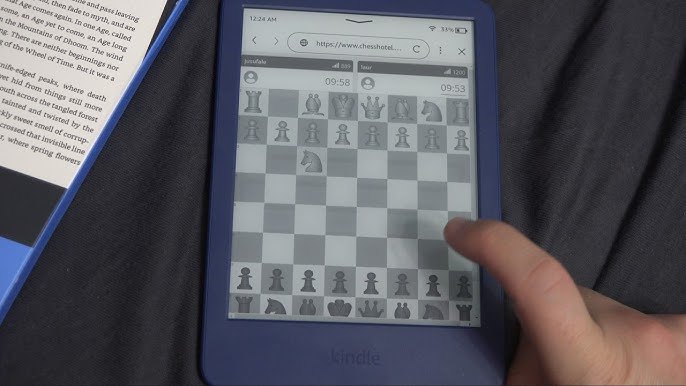
Here’s the deal: the Kindle Paperwhite can play simple games, mostly black and white puzzle and word games, but don’t expect graphics-heavy experiences.
Ever wondered if your Kindle Paperwhite could do more than just display e-books? It’s true, you can actually play games on Kindle Paperwhite! They’re not the typical high-definition titles you might find on a phone or tablet.
These games on Kindle Paperwhite are designed for simple, enjoyable entertainment. Think about classic puzzles like Sudoku or word games that are perfect for relaxing.
These are the kind of games that play well on the e-ink screen. So next time you’re reading, remember you’ve got a simple gaming device in your hands, too!

Games on Kindle Paperwhite
The Kindle Paperwhite, primarily known for reading, surprisingly supports a selection of games. These games offer a simple way to pass the time. They are not graphically intensive.
Let’s explore the world of Kindle Paperwhite games. We will delve into available titles and how to access them.
Understanding Kindle Paperwhite Gaming Capabilities
The Kindle Paperwhite isn’t a gaming device in the traditional sense. Its e-ink display and processor are optimized for reading. Therefore, expectations need to be adjusted.
Do not expect high-fidelity graphics or fast-paced action. Instead, think of these games as simple diversions. They are akin to classic mobile games of the early 2000s.
Available Games on Kindle Paperwhite
The selection of games available on the Kindle Paperwhite is limited. It depends on the model and software version. Amazon often rotates the available games.
Here are some common games that have been available:
- Minesweeper: A classic puzzle game. Players must clear a minefield without detonating any mines.
- Sudoku: A number-placement puzzle. Fill a 9×9 grid with numbers so that each row, column, and 3×3 section contain all digits between 1 and 9.
- Word Find: Search for hidden words in a grid of letters. This is a relaxing and engaging word puzzle.
- Chess: The classic strategy board game. Challenge the Kindle’s AI or play against another person (if supported).
- Solitaire: Another popular card game available on many Kindles. Many versions may be included.
Accessing Games on Your Kindle Paperwhite
Finding and playing games on your Kindle Paperwhite requires a few steps. The method may differ slightly based on your device’s software.
1. Check the Active Content: On the home screen, look for an “Active Content” or “Apps” section. Games are often located here. This is the most common location.
2. Explore the Kindle Store: Sometimes, Amazon offers games through the Kindle Store. Search for specific titles or browse the “Games” category if available. Note that availability may be regional.
3. Use the Search Function: Use the Kindle’s search bar to search for game titles directly. This helps if you know the specific game you want.
4. Check Settings: In some older Kindle models, games might be hidden within the settings menu. Look for options like “Experimental” or “Hidden Features”. Be cautious when exploring these options.
How to Play Games on Kindle Paperwhite
Playing games on the Kindle Paperwhite is straightforward. Use the device’s physical buttons or touchscreen to interact with the game.
Navigation: Use the directional buttons or touchscreen to navigate menus. This helps select options or move game pieces.
Selection: Press the “Select” button or tap the screen to confirm your choice. This confirms your selections within the game.
In-Game Actions: Follow the on-screen instructions for specific game actions. Actions vary based on the game.
The e-ink display means that animations are minimal. Expect a slower refresh rate compared to LCD screens. This is normal for e-readers.
Tips for Enjoying Games on Kindle Paperwhite
Playing games on your Kindle Paperwhite can be a pleasant experience with the right mindset. Embrace the simplicity and limitations of the device.
Adjust Expectations: Remember that these are simple games. Don’t expect console-level graphics or complex gameplay.
Battery Life: Playing games will drain your battery faster than reading. Keep an eye on the battery level, especially on long trips.
Lighting Conditions: The e-ink display works best in well-lit environments. Use the built-in backlight in darker conditions. This will improve visibility.
Take Breaks: Staring at the e-ink display for extended periods can cause eye strain. Take regular breaks to rest your eyes.
Explore All Options: Many Kindle games have different difficulty levels. Experiment with these to find the right challenge.
Kindle Paperwhite vs. Dedicated Gaming Devices
The Kindle Paperwhite is not a substitute for dedicated gaming devices. Consoles and smartphones offer a far superior gaming experience. The Paperwhite is designed primarily for reading.
Here’s a comparison:
Display: The Kindle Paperwhite uses e-ink. This is great for reading but not ideal for fast-paced games. Gaming devices use LCD or OLED screens with high refresh rates.
Processing Power: The Kindle Paperwhite has a low-powered processor. This is enough for simple games but not for complex ones. Gaming devices have powerful processors and graphics cards.
Game Selection: The Kindle Paperwhite has a very limited game selection. Gaming devices have access to thousands of games.
Controls: The Kindle Paperwhite uses basic buttons or a touchscreen. Gaming devices have dedicated controllers.
Purpose: The Kindle Paperwhite is designed for reading. Gaming devices are designed for gaming.
Troubleshooting Common Issues
Sometimes, you might encounter issues while playing games on your Kindle Paperwhite. Here are some common problems and how to solve them.
Game Not Loading: Try restarting your Kindle. This often resolves minor software glitches.
Game Freezing: Force a restart by holding down the power button. This will close the unresponsive game.
Game Missing: Check the “Active Content” section again. Ensure the game is still installed.
Software Updates: Ensure your Kindle has the latest software updates. These updates often fix bugs and improve performance.
Contact Support: If problems persist, contact Amazon Kindle support. They can provide further assistance.
The Future of Gaming on Kindle Paperwhite
The future of gaming on the Kindle Paperwhite is uncertain. Amazon’s focus remains on reading. But there is potential for improvement.
Improved Processing Power: Future Kindle models may have more powerful processors. This could allow for more complex games.
Enhanced E-Ink Technology: Advances in e-ink technology could lead to faster refresh rates. This would make games more enjoyable.
Expanded Game Library: Amazon could expand the selection of available games. This would increase the appeal of gaming on the Kindle.
Cloud Gaming: Cloud gaming services could potentially stream games to the Kindle. This would bypass the limitations of the device’s hardware.
However, for now, the gaming capabilities of the Kindle Paperwhite remain limited. Keep your expectations reasonable.
Exploring Hidden Features and Easter Eggs
Kindle devices, including the Paperwhite, sometimes have hidden features and easter eggs. These can provide extra functionality or fun surprises.
Developer Options: Some older Kindle models allowed access to developer options. These options could unlock advanced features, but use them cautiously.
Hidden Games: Some users have discovered hidden games not listed in the main menu. These are often simple text-based games.
Easter Egg Messages: Certain commands or actions might trigger hidden messages. These messages are usually humorous or informative.
To find these hidden features, search online forums and communities. Be aware that accessing these features might void your warranty. Proceed with caution.
Alternative Uses for Your Kindle Paperwhite
Besides reading and gaming, your Kindle Paperwhite can be used for other purposes. These alternative uses can extend the device’s functionality.
Simple Web Browsing: The Kindle Paperwhite has a basic web browser. Use it to access simple websites or look up information.
Document Viewing: The Kindle can display PDF and other document formats. This is useful for reading articles or manuals.
Audiobook Playback: Listen to audiobooks through headphones or speakers. This is a great alternative to reading.
Note Taking: Use the built-in note-taking feature to jot down ideas or highlight text. This helps with studying or research.
Dictionary: The Kindle has a built-in dictionary. This is useful for looking up unfamiliar words while reading.
Optimizing Your Kindle Paperwhite for Gaming
Optimize your Kindle Paperwhite for the best possible gaming experience. Tweaking certain settings can improve performance.
Reduce Animations: Disable unnecessary animations in the settings menu. This can improve responsiveness.
Close Background Apps: Close any unnecessary apps running in the background. This frees up memory and processing power.
Clear Cache: Regularly clear the Kindle’s cache. This removes temporary files and improves performance.
Optimize Storage: Keep your Kindle’s storage clean by deleting unused files. This prevents slowdowns.
Use Airplane Mode: Enable airplane mode to disable Wi-Fi. This can reduce battery drain and improve performance.
Game Recommendations for Different Kindle Paperwhite Models
The specific games available may vary between Kindle Paperwhite models. Here are some recommendations based on different generations.
Older Kindle Paperwhite Models (e.g., 1st, 2nd Generation):
Focus on classic games like Minesweeper and Sudoku. These games are usually pre-installed.
Explore any “Active Content” section for available options. Older models may have limited choices.
Newer Kindle Paperwhite Models (e.g., 10th, 11th Generation):
Check the Kindle Store for downloadable games. Amazon sometimes offers new titles.
Look for games that are optimized for the Paperwhite’s touchscreen. These games are easier to control.
All Kindle Paperwhite Models:
Try accessing the web browser and playing browser-based games. Simple HTML5 games may work.
Experiment with sideloading compatible games (if possible). This requires technical knowledge and may void your warranty.
Always check the game’s compatibility with your specific Kindle Paperwhite model. This ensures a smooth gaming experience.
The Social Aspect of Gaming on Kindle Paperwhite
Gaming on the Kindle Paperwhite is generally a solitary activity. The device lacks multiplayer capabilities. However, there are ways to connect with other players.
Share Your Scores: Share your high scores on social media. This allows you to compete with friends and family.
Join Online Forums: Participate in online forums and communities. Discuss Kindle Paperwhite games and share tips.
Compare Strategies: Exchange strategies and techniques with other players. This can improve your gameplay.
Create Leaderboards: Create your own leaderboards with friends and family. This adds a competitive element.
Organize Challenges: Organize gaming challenges with others. This makes gaming more engaging.
While the Kindle Paperwhite is not designed for social gaming, you can still find ways to connect with other players.
DON'T buy a Kindle before watching this😳#tech
Final Thoughts
In essence, while not designed as a gaming powerhouse, the Kindle Paperwhite offers simple, text-based games. These games provide a relaxing, low-stakes entertainment option, great for commutes or downtime.
You must consider their limited graphics and gameplay, as the focus remains reading.
Therefore, if you are seeking basic entertainment, the selection of games on kindle paperwhite may suffice. They are great for a quick diversion while embracing your e-reader.

