
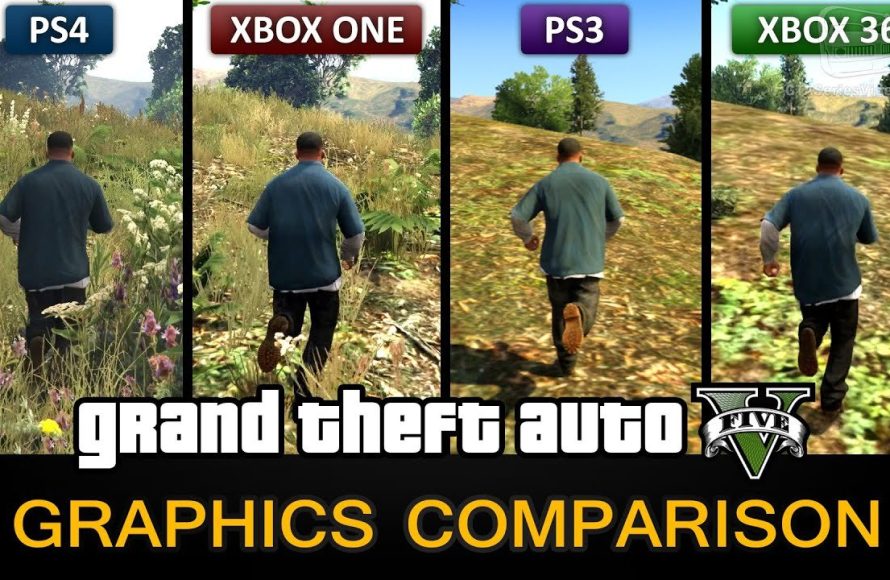
The GTA 5 graphics comparison shows a significant difference between the original console versions and the enhanced PC and later console editions, with improved textures, lighting, and overall visual fidelity.
Let’s dive into the visual evolution of one of gaming’s biggest hits: Grand Theft Auto V. We’ll explore the differences that emerge in a thorough gta 5 graphics comparison. This game has seen many releases across multiple platforms.
From its initial launch on older consoles, to the subsequent versions on PC and the latest generation, the game’s appearance varies substantially. Improvements include higher resolutions and enhanced draw distances and a whole other level of visual effects. These changes make revisiting Los Santos a vastly different experience each time.

GTA 5 Graphics Comparison: A Deep Dive
Let’s talk about how Grand Theft Auto 5 looks! This game has been around for a while, but it still looks pretty amazing, right? It’s like comparing a picture you drew a long time ago to one you just finished – there’s a big difference! So, what makes the graphics in GTA 5 so special? And how has it changed over time and across different devices? We’re going to explore all that in this article. We will look at the different versions and how they stack up to each other, so you can see what makes each version unique. Get ready to see some cool details and understand how they impact the gameplay.
A Look Back: GTA 5 on Release
When GTA 5 first came out on the PlayStation 3 and Xbox 360, it blew minds. Remember how excited everyone was? It was like, “Wow, a world this big and detailed on those consoles?” The graphics, while limited by the old hardware, were still pretty incredible for that time. The city of Los Santos felt alive, with cars buzzing around, people walking on the sidewalks, and trees swaying in the breeze. But even then, players noticed that it wasn’t perfect. The draw distances weren’t always great, meaning things far away sometimes looked a little blurry or popped into view suddenly. Textures, like the surfaces of buildings and roads, were good for that generation, but they weren’t as sharp or detailed as they would become.
Key Features of the Original Release:
- Good sense of scale and open world feel for the time
- Detailed environments (for that console generation)
- Character models that looked pretty realistic
- Basic lighting and shadow effects
The original versions really pushed the boundaries of what those consoles could do. It was clear that developers were trying to make something special, and they largely succeeded. But, tech moves quickly, and better versions were just around the corner.
The Jump to New Generation: PlayStation 4 and Xbox One
Then came the PlayStation 4 and Xbox One, and GTA 5 got a major upgrade! It was like getting a brand-new pair of glasses. Everything became sharper, clearer, and more vibrant. The game looked so much better. The developers were able to use the extra power of these new consoles to create a much more immersive experience. Textures got a big boost, so everything looked more realistic. The lighting effects were much more advanced, making the world feel more dynamic. Sunlight shone through buildings, shadows fell in more detailed ways, and the night felt more like night. We got a taste of what the world was truly meant to be like.
Improvements in the PS4 and Xbox One Versions:
- Improved draw distances, showing more of the world at once
- Higher resolution textures, making details pop
- Advanced lighting and shadow effects
- Smoother frame rates, which made the game feel faster and more responsive
- More detailed character models
- Added foliage and environmental effects
This upgrade was a real game changer. It was like playing a whole new experience, and many people who played on the older consoles bought it again just to see the difference. This shows you just how big of an improvement it was.
The Ultimate Experience: PC Version
But, the ultimate version of GTA 5, in terms of graphics, is the PC version. Why? Because it allows players to customize the graphics settings based on the power of their computer. If you have a powerful gaming computer, you can make GTA 5 look absolutely jaw-dropping. You can increase the resolution way beyond what the consoles could offer, add more detail to shadows, and have the most detailed textures possible. The PC version has different settings like MSAA, TXAA, and FXAA, that help the image look clearer and smoother. It also has something called “Grass Quality” settings, that can make the grass look super realistic. You can have reflections so clear they look like real mirrors on cars. You can crank up all the settings so that trees look more bushy, and even the far off hills look sharp and clear. Everything is super crisp, detailed, and real. You can make the game look the best it possibly can, if you have the right computer. However, this is also where it gets tricky, because it means you need a pretty powerful machine to run it well. If your computer is not up to the task, it might struggle with all of the intense visual details.
PC Version Features and Advantages:
- Extremely high resolutions, such as 4K and even higher
- Adjustable graphics settings
- Advanced anti-aliasing options (MSAA, TXAA, FXAA) for smoother images
- Improved texture quality
- Increased draw distances and view range
- Support for mods, which can add even better graphics
- Higher frame rates, if your hardware supports it
The PC version of GTA 5 is the benchmark for game graphics. It shows just how much better the game can look when the limitations of consoles are taken away. It’s truly a showcase of modern graphics. But not everyone can run it at its max settings. So it’s good that it has many options so that different types of computers can play it.
Visual Details: Comparing Different Aspects
Let’s look at some specific areas that show big differences across the different versions of GTA 5.
Textures:
Textures are like the skin of the game, covering every surface. On the older consoles, these textures could be a little blurry or simple. Think of the bricks on a wall, or the surface of the road. On the PS3 and Xbox 360, those were pretty basic. The surfaces looked alright, but not as realistic. The PS4 and Xbox One versions had a significant improvement in texture quality, making every surface look more realistic. You could see the individual stones in a wall and each crack in the pavement. But the PC version can take it even further. With high resolution textures, you can see every detail – dirt on a car, scratches on the wall, the grain of wood on a fence. The difference is like comparing a sketch to a high-resolution photograph.
Lighting and Shadows:
Lighting and shadows add so much to the realism of a scene. They make the world feel alive. On older consoles, lighting was simple. Shadows were often very basic and not very detailed. On the newer consoles, lighting was much more advanced. The world felt more dynamic, with light reflecting off surfaces and casting more realistic shadows. When you compare this to PC, shadows became even more detailed and realistic. They could bend and move based on the objects, and things that cast shadows. The light from the sun could stream realistically through trees or shine off cars, adding more drama and depth to the scenes. The PC version can make the lighting look like something out of a movie!
Draw Distance:
Draw distance is how far you can see in the game. On the PS3 and Xbox 360, the draw distance was shorter, which could cause objects or buildings to suddenly pop into view as you got closer. On the PS4 and Xbox One, this was improved. You could see further into the horizon without the game having to load it. On the PC, the draw distance can be taken to another level. You can look way off into the distance and see all the details without it ever having to suddenly appear, because the game shows everything farther away without any pop-in. This makes the world feel bigger and more real. No more pop-in, just continuous details as far as your eyes can see.
Foliage and Environmental Effects:
Foliage refers to things like grass and trees. On the old consoles, these were often simple and looked a bit repetitive. In the PS4 and Xbox One versions, there were more trees, more plants, and more variation in environmental details. But on the PC, if your PC can handle it, the foliage becomes incredibly lush. The leaves on the trees sway in the wind, the grass looks thick and real, and there are small details like bushes and flowers scattered around the world. This makes the world feel so alive and dynamic. Little things like fog, rain, or dust can be seen in detail, adding even more to the realistic world.
Frame Rates: The Impact on Gameplay
Frame rate is how many images the game shows you every second. Higher frame rates make the game feel smoother and more responsive. On the PS3 and Xbox 360, the game often ran at around 30 frames per second (fps). This is good, but it could feel a bit slow sometimes, especially during fast-paced scenes. On the PS4 and Xbox One, the game also mostly ran at 30 fps, but it was more consistent and felt a bit smoother. On the PC, with the right hardware, you can get 60 fps or even higher. This makes the game feel incredibly responsive and fluid. Every movement feels fast and precise. If you have a monitor with a high refresh rate, it can make the game even better. When you play at 60fps or above, its very hard to go back to 30fps, because you start to see the blurriness.
Why High Frame Rates Matter:
- Smoother motion
- More responsive gameplay
- Better aiming and control
- Reduced motion blur
- Overall better experience
Frame rates have a huge impact on how the game feels. If you are playing a fast game like GTA, 60fps and above is a great experience.
Mods: Taking PC Graphics to the Next Level
One of the biggest advantages of the PC version of GTA 5 is the ability to use mods. Mods are changes to the game made by players. There are graphics mods that make the game look even better, even more than it already can look. Some mods add new textures, making the entire game look photo-realistic. Some add brand new effects, like better rain and lighting. These mods take what was already a beautiful-looking game and make it even more amazing. You can customize your game as you like, choosing from a wide variety of mods. Some mods can do things like change the color of the car, change how the city looks like, and even make it look like night time during the day. With mods, you are in control of your GTA 5 experience.
Types of Graphics Mods:
- Texture packs, which replace old textures with new, high-resolution ones
- Lighting mods, which enhance the lighting and shadow effects
- ENB Series mods, which provide realistic color and post-processing effects
- Reshade mods, which let you adjust things like color, sharpness, and contrast
- Foliage mods, which can add more detailed trees and plants
The modding community is amazing, and they are constantly creating new ways to improve the game’s visuals, so you can customize your gameplay however you want.
The Differences in Summary
Here’s a table that summarizes the main differences in graphics between the versions of GTA 5:
| Feature | PS3/Xbox 360 | PS4/Xbox One | PC |
|---|---|---|---|
| Resolution | Lower (720p) | Higher (1080p) | Variable (up to 4K and beyond) |
| Textures | Basic | Improved | Highly detailed |
| Lighting | Simple | More advanced | Advanced with dynamic shadows |
| Draw Distance | Shorter | Improved | Longest |
| Frame Rate | Mostly 30 fps | Mostly 30 fps | Variable (30 fps to 144+ fps) |
| Foliage | Basic | More detailed | Lush and realistic |
| Mods | Not available | Not available | Available (vast range of graphics enhancements) |
This table provides a clear view of where each version shines and shows just how much the game has advanced over the years.
It’s clear that GTA 5 has had quite a journey, graphics-wise. It went from looking amazing for its time on older consoles, to looking even better on newer ones. And it finally reached its full potential on the PC. Each version offers a different experience. The older console versions, while showing their age, still provide that classic feel. The PS4 and Xbox One versions were a significant upgrade, enhancing the overall detail and immersion. The PC version offers the most customization and the most impressive visual experience for those who have a powerful enough machine.
GTA 5 Graphics Comparison – PC / PS4 / Xbox One / PS3 / Xbox 360
Final Thoughts
Ultimately, the GTA 5 graphics comparison reveals significant improvements across platforms and versions. Players see better textures, lighting, and overall detail in newer iterations. These enhancements heighten immersion and visual fidelity within the game’s world.
Whether you’re on older consoles, current-gen, or PC, each version offers a unique visual experience. The differences shown in gta 5 graphics comparison are quite substantial. It is up to the player to decide which offers the most enjoyable experience.

