
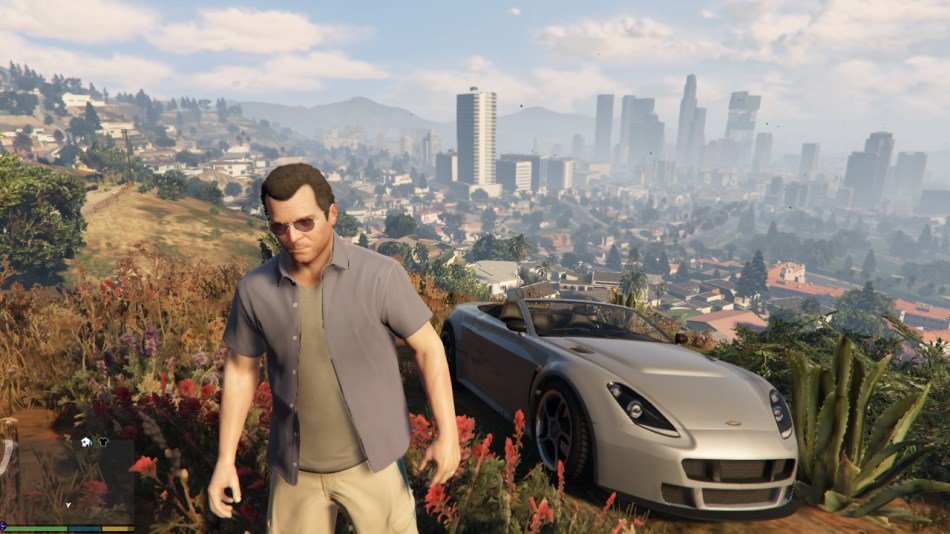
GTA 5 graphics vary based on platform and settings; they can range from fairly basic to quite impressive, offering detailed environments and character models.
Ever wondered about the visual quality of Los Santos? The world of GTA 5 graphics can appear incredibly different depending on how you play. A console from 2013 will look different than a modern PC setup.
It’s true, the detail you see is directly tied to your chosen platform and the specific graphic settings selected. You can make adjustments to these to improve or optimize performance. Finding the right balance is key for the best play experience.

GTA 5 Graphics: A Deep Dive into Los Santos’ Visuals
Grand Theft Auto V, or GTA 5 as most people call it, is known for many things, like the super fun open world and the crazy stories. But one thing that really makes the game special is its graphics. Have you ever stopped and looked at the way the sun sets over Los Santos? It’s pretty amazing! Let’s explore the details that make GTA 5 look so good, and learn what goes into making a game look this real.
The World of Los Santos: A Detailed Landscape
The game’s world is massive, and it’s not just big, it’s also incredibly detailed. Every street corner, every building, every mountain has been carefully designed. This attention to detail makes Los Santos feel like a real place you can explore. It’s more than just pretty pictures; it’s an entire world you can lose yourself in.
Cityscapes and Urban Details
Think about the city. You see huge skyscrapers reflecting the sky, cars zipping around, and people walking on the sidewalks. The city is alive! The developers paid close attention to the small things, like graffiti on walls, trash on the streets, and the way the lights flicker at night. All this adds to the realism and makes the city feel busy and lived-in.
Nature and Rural Areas
It’s not all city; there’s so much more to see beyond the buildings! GTA 5 has beaches, forests, mountains, and even deserts. These areas are beautiful and full of their own details. You can see the waves crashing on the shore, animals running through the trees, and cacti growing in the desert. The variety keeps the game visually interesting, and it makes exploring a lot of fun.
Character Models and Animations: Making People Look Real
The people in GTA 5 aren’t just cardboard cutouts; they have distinct looks and personalities, and their expressions are just the beginning. Let’s look at how character models and animations make them seem so alive.
Facial Details and Expressions
The characters’ faces are very expressive. You can see them get angry, happy, or sad, and these expressions make you feel more connected to the characters. The details in their eyes, mouths, and even the wrinkles on their faces make them look realistic and believable. It’s like you’re watching a movie, not just playing a game.
Body Movement and Actions
Characters in GTA 5 move in a way that feels very natural. They walk, run, jump, and even drive cars smoothly. Their movements are carefully made so they look real, and it makes the game feel much better. This is important because it helps us believe that we are part of the world.
Lighting and Shadows: Creating Mood and Atmosphere
Lighting and shadows play a big role in how a game looks. In GTA 5, the way light is used changes the mood of the game and makes it more exciting.
Day and Night Cycles
The game has a full day and night cycle. During the day, the sun shines brightly and casts long shadows. At night, the city lights up, and the moon creates a soft glow. These changes make the world feel like it’s actually moving through time, which adds to the real feeling of the game.
Weather Effects
Weather makes a big difference in GTA 5. When it rains, the roads get wet and shiny, and it makes everything look darker. When the sun comes out, everything looks bright and clear. Different weather conditions change the look and feel of the game, and makes it more interesting. You will see a big change when the lighting is dull or bright.
Textures and Surfaces: How Things Feel and Look
Textures are the way the surfaces of objects look and feel in the game. They make things feel real. Let’s check the details in GTA 5’s textures.
Materials: From Concrete to Fabric
Different materials in GTA 5 have different textures. The way concrete feels rough, how fabric looks soft, or the way metal looks shiny. The detail in these textures makes them look just like the real stuff. It’s a small thing, but it makes a big difference in the game’s looks.
Environmental Textures
The textures of the environment also play a vital role. The details on the roads, buildings, and nature spots are also very important. The way the grass looks, the lines on the streets, and the patterns on the buildings add to the realistic look of the game. These textures make the world feel like a real, breathing place.
Special Effects: Making Things Look Cool
Special effects are the things that make the game look even more amazing. In GTA 5, the special effects are not just cool-looking, but they make the game feel even more real.
Explosions and Fire
Explosions in the game look awesome. When something blows up, you can see the fire, smoke, and debris flying around. Fire looks hot and realistic, and the explosions are very dynamic. These effects add a level of excitement and action to the game.
Water and Reflections
The water in GTA 5 is not just a flat surface. You can see ripples, reflections, and even the way light shines through it. When cars drive through the water, you can see the splashes and waves that they create. These effects make the water look very real, and they also enhance the graphics overall.
How GTA 5’s Graphics Evolved
When GTA 5 came out, it pushed the boundaries of what we thought was possible on game consoles. It looked so much better than other games at the time. It was a big step forward in how games were made and how they looked.
The Initial Release
When it was released in 2013, GTA 5 was a big jump from the previous games. The graphics were much more detailed, and the game world was huge. People were blown away by how real the game looked.
Enhanced Versions
Later on, the game was released on newer consoles like PlayStation 4 and Xbox One. The newer versions had even better graphics, with clearer textures and improved lighting. The PC version allowed gamers to enjoy the highest quality visuals with advanced settings.
Continuing Improvements
The game has received updates over time which have made it better looking than ever. These updates improve the graphics, which makes it look even better and more real. This shows that developers are always trying to improve the game even years after its release.
The Impact of GTA 5’s Graphics
The detailed graphics in GTA 5 did more than just make the game pretty; they made the game more immersive. These visuals pulled players into the story, and made them feel like they were part of Los Santos. And that’s why the game is a visual masterpiece.
Immersive Experience
The game’s details make the world feel more real and helps players feel more involved in the story. It’s like watching a movie where you are the star, and it’s this experience that makes it so much fun to play.
Setting New Standards
GTA 5 changed how people looked at open-world games. It made game developers try harder to make games that not only looked good, but also had real and interesting worlds. GTA 5 showed us that it is possible to make games look very detailed and feel real, which became the standard for other game developers.
Optimizing GTA 5 Graphics for Your PC
If you play GTA 5 on your computer, you can change the graphics settings to make it look even better, or to make it run smoother. Here are some tips on how to adjust the graphics settings.
Understanding Graphics Settings
The game has many options you can change like texture quality, shadow quality, and anti-aliasing. These settings will affect how the game looks and how well it runs on your computer. Changing them can help you find the best combination of looks and performance.
Balancing Performance and Visuals
Finding the right balance between graphics and game speed is very important. If you have a powerful computer, you can play with the highest settings and see all the details. If you have an older computer, you may need to turn some settings down to make the game run smoothly. Finding the perfect balance is a key to having a great experience.
GTA 5 Graphics: A Testament to Detail
In summary, the graphics in GTA 5 are amazing because of all the attention to detail. The game is very realistic because of the detailed buildings, lifelike characters, impressive lighting, and a variety of textures. All these things make the game visually stunning and very engaging. Whether you are walking in the city, or driving in nature, the visuals add to the fun of playing the game.
The graphics of GTA 5 is a mix of art and technology. The developers used advanced techniques to create a game that not only looks good, but it also feels real. And that’s why GTA 5 is remembered as one of the best-looking games ever made. The game continues to amaze players with its detailed and stunning world.
GTA 6 vs GTA 5 Graphics Comparison…
Final Thoughts
In short, GTA 5 graphics still impress many players even years after its release. The game offers visually appealing environments and character models. Players can enjoy detailed textures and lighting effects.
The modding community continues to improve upon GTA 5 graphics, pushing the visual boundaries further. These community efforts ensure the game remains a beautiful experience for new and veteran players alike.

