
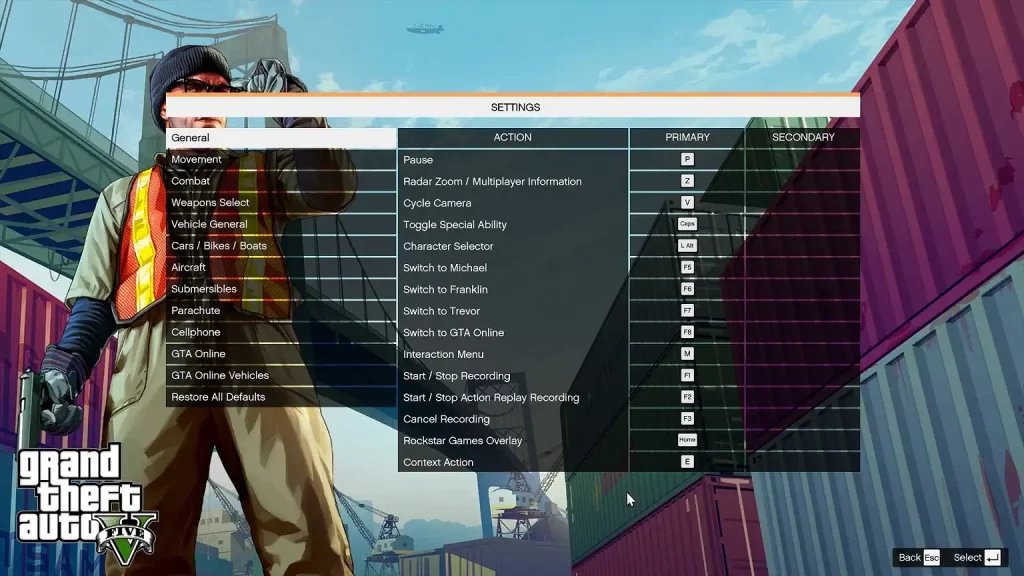
The complete list of GTA 5 Online keyboard shortcuts includes controls for movement, combat, vehicles, menus, and specific actions, varying slightly depending on platform and context.
Navigating the chaotic world of Los Santos in GTA 5 Online requires quick reflexes and a good memory for commands. You’re not alone if you’ve ever struggled to remember what key does what while being chased by the cops or planning your next heist. Knowing gta 5 online all keyboard shortcuts is vital for smooth gameplay and gives you a competitive edge.
This guide will help you understand various essential key bindings. With this knowledge, you can improve your response time and game experience overall.

GTA 5 Online: All Keyboard Shortcuts You Need to Know
Ready to become a total pro in Los Santos? Knowing your keyboard shortcuts in GTA 5 Online is like having a secret weapon. They can help you move faster, fight better, and even just enjoy the game more. We’re going to break down all the important keys you need to know, so you can get around the city like you own it!
Movement and Navigation Shortcuts
Moving around is the most basic thing you’ll do in GTA 5 Online, but even here, there are some important shortcuts. Let’s learn to move like a seasoned gangster.
Basic Movement Keys
- W, A, S, D: These are your main movement keys. W moves you forward, A and D move you left and right, and S moves you backwards. You’ll use these ALL the time.
- Left Shift: Holding down Left Shift makes you sprint. Perfect for outrunning the cops or chasing after a getaway car.
- Space Bar: Press Space to jump. You can jump over fences, low walls, or just to get some air.
- Ctrl: This makes you crouch. Crouching can be helpful when you want to sneak around or take cover.
Advanced Movement
- C: Press ‘C’ to switch between walking, running and sprinting. Useful for when you need to be a bit quieter.
- Q and E: These keys let you peek around corners in cover, a tactic that can be very useful during shootouts.
- V: Tap ‘V’ to switch to First-Person View. It can change up how you play the game, making things more immersive. Tap again to go back to third-person view.
Combat and Weapon Shortcuts
Fighting is a big part of GTA 5 Online. Knowing the right keyboard shortcuts can give you a huge advantage. Let’s get into it.
Weapon Selection and Use
- Mouse Wheel: The mouse wheel is how you cycle through your weapons. Scroll up or down to pick the weapon you want.
- 1-9 Keys: These number keys quickly select your weapons in a specific slot. 1 is for your melee weapon, 2 for your pistol, 3 for a submachine gun, and so on.
- R: Pressing ‘R’ reloads your current weapon. You don’t want to be caught with an empty clip.
- Left Mouse Button: This is your main shooting button. Aim and fire with the left mouse button.
- Right Mouse Button: Hold this down to aim your weapon. You’ll need this for precision shots.
- G: This throws a grenade or any other explosive you have. Be careful where you throw it.
- B: If you’re close enough, ‘B’ will make you perform a melee attack. Good for close-quarters combat.
Combat Maneuvers
- Space Bar (in cover): While you’re in cover, pressing the space bar will make you roll out of cover. This can be helpful when trying to avoid incoming fire.
- Ctrl (while sprinting): While sprinting, tap Ctrl to do a combat roll to evade attacks quickly.
Vehicle Shortcuts
Cars, bikes, helicopters, and even boats – they’re all part of the fun in GTA 5 Online. Knowing your vehicle keys is super important for driving in the game.
Basic Vehicle Controls
- W: Accelerate your vehicle. Press it to go forward.
- S: Apply the brakes or reverse. This will stop you in your tracks, or make you go backward.
- A and D: Steer your vehicle left and right. These are the same keys you use to move your character.
- Space Bar: Use this as your handbrake. It’s helpful for quick turns.
- Left Shift: Hold this to go faster when you’re driving a vehicle.
Advanced Vehicle Controls
- F: When you’re in a vehicle, pressing ‘F’ will turn your headlights on or off.
- E: Use ‘E’ to enter or exit a vehicle.
- Q: Cycle between the weapons that are available in your vehicle, if you have them.
- Right Mouse Button (while driving): Look backwards. You’ll need to see who’s tailgating you!
- H: Activate the horn. Great for letting others know you’re around!
Special Vehicle Controls
- Left Ctrl: This key activates special abilities for some of your vehicles, like the Ramp Buggy or the Ruiner 2000.
- Numeric Keypad 5: Pressing 5 on the numeric keypad toggles between the vehicle’s lights and its special features. Useful for various vehicles and their upgrades.
Interaction and Menu Shortcuts
These shortcuts will help you navigate menus, interact with the world, and do other essential tasks in GTA 5 Online.
Basic Interaction
- E: Use ‘E’ to interact with objects and people. This can be used to pick up items, talk to NPCs, enter vehicles, and more.
- Tab: Hold down the ‘Tab’ key to bring up your weapon wheel or hold to view player list.
Menu Navigation
- Esc: Press ‘Esc’ to access the main menu. This is where you can change settings, look at the map, and more.
- M: The ‘M’ key opens the interaction menu. Here, you can do things like register as a CEO, access your inventory, and set waypoints.
- Up and Down Arrows: Use the up and down arrow keys to navigate menus and options.
- Enter: Select an option.
- Backspace: Go back in the menus.
Phone and Contacts
- Up Arrow: Brings up your in-game phone, where you can call contacts, access websites, and more.
- Arrow Keys (in Phone): Use them to scroll through your contacts and app list.
- Enter (in Phone): Selects what you click on the phone
- Backspace (in Phone): Closes the phone.
Map and Navigation Shortcuts
The map is your best friend in GTA 5 Online. You’ll use it to get around, find missions, and set waypoints. Knowing the shortcuts makes it easier to use.
- Esc: Press ‘Esc’ to open the main menu and see the full map.
- Right Mouse Button (in Map): Hold right click while in the map menu, and move your mouse to pan around the map.
- Mouse Wheel (in Map): Scroll the mouse wheel to zoom in and out of the map.
- Left Mouse Button (in Map): Use left click to set a waypoint on the map.
Communication Shortcuts
Talking to other players is an important part of the online experience. Use these keys to keep in touch with your friends or make new ones.
- T: Press ‘T’ to open the in-game chat box. Type your message and press enter to send it.
- Y: Voice chat is activated by the key ‘Y’. While you hold the button down, you can talk to other players.
Miscellaneous Shortcuts
These are the shortcuts that don’t fit in other categories but are still useful to know.
- F1: Open the game’s help menu. You can also go to the ‘Settings’ menu in the main game.
- Z: This is a shortcut for opening your player inventory, allowing you to quick access your body armor, snacks and much more.
- P: While your in game, press P to toggle your passive mode on or off.
This guide should provide the vast majority of the keyboard controls in GTA 5 Online. Remembering them will make you move much faster, improve your combat skills, and help you be a more proficient player in the game. Practice makes perfect, so keep at it!
So, there you have it – almost every keyboard shortcut you could ever need in GTA 5 Online. It might seem like a lot, but as you play more, these will become second nature. You’ll soon be driving, fighting, and navigating Los Santos like a true champion. Remember to keep practicing and experiment with the controls to find what works best for you. Have fun and stay safe out there in the city!
101 Tips Every GTA Online Player Should Know
Final Thoughts
Learning gta 5 online all keyboard shortcuts significantly improves gameplay. You can navigate menus, interact quickly, and perform actions efficiently. This knowledge gives you a competitive edge.
Utilizing these shortcuts makes playing faster and more enjoyable. Practice these combinations frequently. You will find that you can perform more complex maneuvers in-game with ease.
Remember gta 5 online all keyboard shortcuts and adapt your gaming style. This knowledge will serve you well and give you greater control over your character.

