
GTA 5 Online mouse controls
encompass aiming, shooting, navigating menus, and driving vehicles, allowing for precise interactions within the game.
Ever wondered how players perform those seemingly impossible stunts in Los Santos? A big part of it comes down to knowing your controls. Understanding the intricacies of GTA 5 Online all mouse controls can significantly improve your gameplay.
This isn’t just about aiming better; it’s also about navigating the complex menus and handling vehicles with more finesse. A proper grasp of these controls opens up so many more possibilities for players in the online world.

GTA 5 Online All Mouse Controls
Let’s dive into the world of Grand Theft Auto 5 Online and explore how your trusty mouse helps you navigate this wild and wonderful virtual playground. If you’re new to the game or just want to brush up on your skills, understanding all the mouse controls is key to becoming a true Los Santos legend. The mouse is your main way of interacting with the game, whether you are walking around, driving fast cars, or aiming your weapons. So, buckle up as we break down every click, scroll, and movement!
Basic Movement and Camera Control
Your mouse isn’t just for shooting; it’s your eyes and legs in the game. Getting comfortable with movement and how the camera moves around you is essential. These are the fundamentals you’ll use almost every second of your gameplay.
Moving the Camera
The most basic use of your mouse in GTA 5 Online is moving the camera. Simply moving your mouse around will change your view, letting you look in any direction. This is how you see what’s going on around your character, spot hidden goodies, or aim precisely. Think of it like looking around in the real world – whatever direction you move your mouse, that’s what you’ll see in the game. It’s a really important control that will help you in so many different scenarios.
Key Point: The more you move the mouse quickly, the faster the camera moves in the game.
Looking Around While Driving
When you’re behind the wheel of a vehicle, your mouse works the same way. This is how you can check your surroundings, make sure no cops are on your tail, or just admire the beautiful scenery as you cruise through the city. Quickly shifting the camera during a chase can help you see where the police are coming from, and it is really important for your survival in online mode.
Using the Mouse Wheel
The mouse wheel has multiple uses in the game. The most basic use is zooming in and out in the game. For example if you are using binoculars or you are watching through the scope of a sniper, you can zoom in or out by rotating the mouse wheel.
Key Point: You should rotate the mouse wheel forward to zoom in the view and rotate the mouse wheel backward to zoom out.
Combat Controls: Aiming and Shooting
Now, let’s talk about the exciting stuff – combat! Your mouse is vital in firefights, and knowing how to aim and shoot accurately can mean the difference between success and failure. Get ready to make those headshots!
Aiming Your Weapon
To aim your weapon in GTA 5 Online, you will need to first bring up the weapon wheel by holding “TAB” key on your keyboard, then select the gun that you want to use by moving the mouse over the selected gun in the weapon wheel. After selecting your desired gun, now just like the camera, you move your mouse around to move the crosshair on the screen. This allows you to aim at your targets and make those critical hits. Proper aiming skills are something that every player should master if they want to be better in the game. It’s all about quick reflexes and smooth movements of the mouse.
Key Point: Practice aiming on moving targets to really get better at it.
Shooting Your Weapon
Shooting your selected gun in the game is really simple. You only need to click your mouse’s left button to fire your selected gun. The faster you click the left mouse button, the faster you will fire the selected gun, if you have a gun that does not have the option to automatically fire your gun with continuous firing. But, if you have a gun with the option of continuous fire, then if you keep holding the left mouse button, the gun will keep on firing. Some guns will fire burst fire on a single mouse click.
Using Scopes
When you are using a sniper rifle or a gun with a scope, your mouse will behave a little differently. Once you aim down sights, the sensitivity of your mouse movements will decrease for more precise aiming. This helps you line up the perfect shot. It will also be the same when you’re using binoculars or any other tool for long-distance viewing. You need more precise mouse movements for long distance view.
Key Point: You can also use your mouse wheel to zoom in or zoom out with scoped weapons.
Changing Weapon
You can easily change weapons in the game by pressing the “TAB” key on your keyboard and then selecting the weapon that you want to equip. you can also use your mouse wheel to switch to the previous weapon or next weapon in the equipped category. It is not recommended to use the mouse wheel to switch weapons during intense fight, so it is better to open the weapon wheel to select the gun.
Vehicle Controls
Driving is a huge part of GTA 5 Online. From speeding down highways in sports cars to flying aircraft over the city, your mouse plays an important role in how you control them.
Steering Vehicles
While you primarily use the keyboard keys to steer vehicles, your mouse will move the camera, which is really important when you are driving in the game. You can look around while driving to see the traffic or police behind you.
Controlling Aircraft
While flying a plane or helicopter, the mouse will behave differently than a car. It will change the aircraft’s direction by moving the camera. When you move the mouse upward it will make the plane to pitch down and when you move the mouse downwards it will make the plane pitch up. You have to master these controls to be a good pilot in the game.
Interaction Controls
Apart from movement and combat, your mouse is also used to interact with the world around you.
Using the Phone
When you bring up your in-game phone by pressing the “UP” arrow key on the keyboard, you will use your mouse to select the options and use the phone. You will need to move the mouse pointer over the phone options and then click the left mouse button to select the specific option.
Interacting with Objects
When you are near an object that you can interact with, like a door or a vehicle, you will see the “prompt” to interact. By moving the mouse over the specific prompt and pressing the left mouse button you can interact with it. For example, to get in a car or open a door.
Navigating Menus
Throughout the game, you will find yourself navigating different menus. Whether you are buying items from Ammu-Nation or upgrading your car in the Los Santos Customs, your mouse is your primary tool to browse and choose your selections. Just move the mouse to select the options and click the left mouse button to confirm your selection.
Advanced Mouse Techniques
Now, let’s look into some advanced ways to use your mouse to get a competitive edge in GTA 5 Online.
Quick Turns and Drifting
Mastering quick turns and drifts can get you out of sticky situations, whether you’re escaping the cops or trying to win a race. While keyboard input is used to control the vehicles, you need to have a good camera view to anticipate the next turn, and you achieve this using the mouse to change the view.
Precision Aiming
While engaging in gunfights, learning the precision aiming is crucial to get headshots or accurately hit targets at a long distance. You should have better mouse control to move the crosshair of the gun to the right place at the right time. You can practice this in free roam by targeting moving vehicles to improve your accuracy.
Flying Maneuvers
Good mouse control is also needed for flying a helicopter or a plane. You need to move the mouse in the right direction to make the needed maneuvers in the air. You have to be really comfortable and have good control of your mouse for becoming a good pilot in GTA Online.
Adjusting Your Mouse Sensitivity
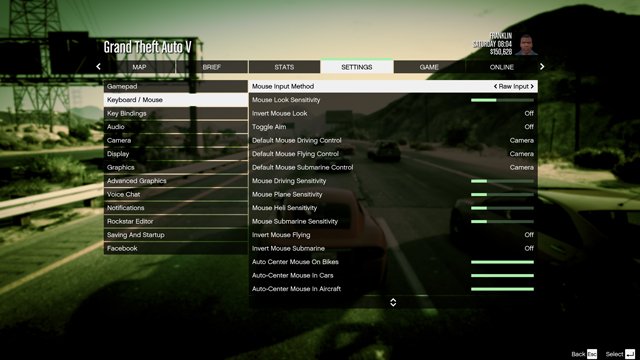
Every player is different, and what works for someone might not work for you. Luckily, GTA 5 Online lets you adjust your mouse sensitivity to suit your play style. If you feel your mouse is too fast or too slow, you can change that in the game settings. Finding the right sensitivity can greatly impact your precision and control, so experiment and find what feels best.
To change the sensitivity, follow these steps:
- Open the pause menu.
- Go to the “Settings” option.
- Select “Controls” menu.
- Look for the “Mouse Sensitivity” option.
- Use the slider to adjust the sensitivity to your liking.
Test the sensitivity in free roam to find the perfect setting for your gameplay.
Tips for Better Mouse Control
Improving your mouse control can really increase your skills in GTA Online. Here are some tips you can use to improve your skills.
- Use a Good Mousepad: Make sure you have a quality mousepad for smooth and consistent mouse movements.
- Adjust DPI: You can also change your mouse DPI settings from mouse software, that will make your movement faster or slower.
- Practice: Spend some time in free roam doing aiming practice to improve your mouse accuracy.
- Be Patient: Do not change your mouse setting very frequently. Give the setting a good time to get used to it.
Remember that becoming a pro takes time and a lot of practice. So, keep playing and gradually improve your game skills by practicing.
With all these techniques and tips, you should be more comfortable and skilled using your mouse in Grand Theft Auto 5 Online. Practice these tips and skills to become a better player in GTA Online, and remember to have fun!
So there you have it – a detailed overview of all the mouse controls in GTA 5 Online. From basic movement to advanced combat maneuvers, your mouse is your most important tool in the game. Now get out there, explore Los Santos, and remember: practice makes perfect!
5 Secret Settings in GTA 5😱
Final Thoughts
Effectively using all mouse controls in GTA 5 Online gives you a significant edge. Players find aiming, navigating menus, and performing actions smoother with practice. Familiarity with all the available mouse functions increases reaction time.
Optimizing your settings for comfortable gameplay helps greatly. Understanding how each button and wheel movement works is key. The precision of ‘gta 5 online all mouse controls’ impacts your overall experience.

