
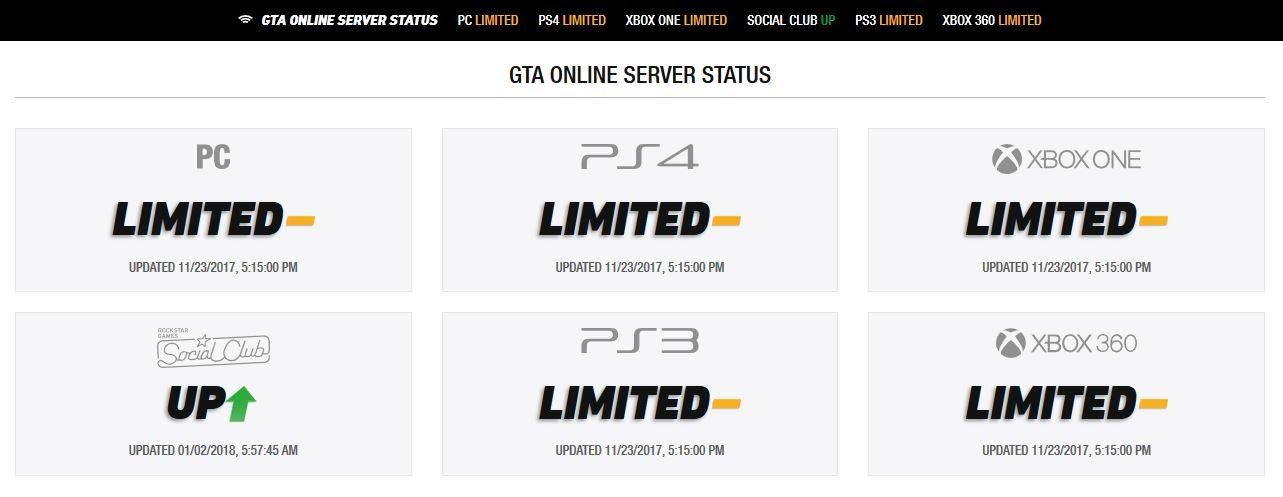
GTA 5 online server maintenance typically involves temporary downtime for Rockstar Games to implement updates, fix bugs, or improve server performance.
Ever find yourself staring blankly at your screen, unable to join the chaotic fun of Los Santos? This usually indicates that gta 5 online server maintenance is underway. It’s a necessary process, even if it interrupts your heists and races.
These scheduled downtimes allow Rockstar to keep the game running smoothly. They also implement new features and address any issues that players encounter. Server maintenance is a part of keeping the experience enjoyable.

GTA 5 Online Server Maintenance: What You Need to Know
Ever been in the middle of a high-stakes heist or a crazy car chase in GTA 5 Online, only to get kicked back to the loading screen? Chances are, you’ve run into server maintenance. It’s a necessary part of keeping the game running smoothly, but it can be frustrating when it interrupts your fun. Let’s dive into what server maintenance actually means for GTA 5 Online, why it happens, and what you can expect.
Why Does GTA 5 Online Need Maintenance?
Think of GTA 5 Online like a giant, bustling city. Just like a real city needs regular upkeep, so does the game’s online world. Rockstar Games, the company behind GTA 5, needs to perform server maintenance for several important reasons:
- Bug Fixing: Sometimes, small errors (bugs) creep into the game’s code. These can cause all sorts of problems, like glitches that let players cheat or strange things happening that shouldn’t. Maintenance lets Rockstar fix these problems and keep the game fair for everyone.
- Adding New Content: New cars, weapons, missions, and other cool stuff doesn’t just magically appear. Rockstar needs to update the game’s servers to include all this new content. Maintenance is the time when they install these updates.
- Server Optimization: Imagine trying to drive a car on a road full of potholes. It would be slow and bumpy, right? The same thing can happen with game servers. Maintenance lets Rockstar make the servers faster and more efficient, so that more players can play without lag or connection problems.
- Security Updates: In today’s digital world, security is a big deal. Maintenance allows Rockstar to implement security patches that can help protect your account from hackers and cheaters. This is a really important part of keeping your gaming experience safe.
- Preparing for Events: Special in-game events often need some extra backend work to make sure they run correctly. Server maintenance might be performed before or after a big event to ensure everything works without issues.
Understanding Maintenance Schedules
Rockstar usually doesn’t give a lot of advance notice for server maintenance. However, they generally try to schedule maintenance during times when fewer people are likely to be playing. This means that maintenance often happens in the early morning hours (Eastern Time), when many of us are sleeping. But that doesn’t mean we won’t experience maintenance in the middle of a playing session.
How To Stay Informed About Server Downtime?
Though official notices might be scarce, there are ways to stay in the loop:
- Rockstar Games Social Media: Keep an eye on Rockstar’s official Twitter, Facebook and other social media accounts. They often post information about planned or emergency maintenance there.
- Community Forums and Websites: Websites and online communities dedicated to GTA 5 Online are great places to check for maintenance updates. Players often report issues and share information on these platforms.
- Game Status Pages: Sometimes, Rockstar will have a dedicated “server status” page on their website where you can see if the game is having issues. Checking this page can give you a quick view of the current situation.
What Happens During GTA 5 Online Maintenance?
When server maintenance begins, here’s what typically happens:
- Disconnects: If you’re playing during maintenance, the game might disconnect you. You may see a message saying that the servers are unavailable.
- Game is Offline: You won’t be able to access GTA 5 Online during maintenance. This includes trying to join a session, start a mission, or even just browse your garage.
- Loading Screens: Trying to connect to online will likely result in being stuck on a loading screen. It’s important to be patient and not restart your game repeatedly, as this won’t speed up the process.
- Website Access Issues: At times, the Rockstar Social Club website may also be down or experiencing issues during server maintenance, because everything is connected to the same network.
Types of GTA 5 Online Maintenance
Maintenance isn’t always the same thing. It can vary in purpose and duration. Here are a few different types to understand:
Regular Maintenance
This is the planned maintenance we mentioned earlier. It’s usually done to fix bugs, make the game faster, and generally keep things running smoothly. This maintenance is more predictable, even though exact timing might not always be communicated in advance. These can occur at regular intervals, even weekly.
Emergency Maintenance
Sometimes, something unexpected happens and the game needs an immediate fix. This could be a new security threat, a game breaking bug, or something else that needs to be addressed right away. Emergency maintenance is much less predictable, but it’s important to get things back online safely.
Update Rollouts
When Rockstar releases major updates with new content, this can also lead to server maintenance. These updates usually mean the servers need to be offline longer than regular maintenance periods, because more changes are being made to the game. These are usually announced with a little more fanfare, and there is usually more clear details on the content being introduced.
How Long Does GTA 5 Online Maintenance Last?
The length of maintenance varies. It can last anywhere from a few minutes to several hours. Regular maintenance is often shorter, while bigger updates and emergency maintenance can take longer. There is no exact schedule so it can be hard to say.
Here’s a rough idea of the different durations:
- Short Maintenance: Can last anywhere between 15 minutes to 1 hour. These are typically bug fixes or very minor updates.
- Medium Maintenance: These are more significant maintenance periods, usually about 1 to 3 hours. These can include minor to moderate game changes.
- Long Maintenance: These can take 3 hours or more, and might even extend for half a day or more. These longer periods occur when new content is added or major server changes are made.
Remember, this is just a general guide. The time it takes for maintenance can depend on how much work needs to be done. It is not usually easy to predict the exact timeframe.
Dealing With Downtime
Okay, so your game is down for maintenance. What can you do? Don’t worry, there are ways to pass the time:
- Offline Modes: You can still play the single-player story mode of GTA 5. It’s a great way to revisit old favorites or just explore Los Santos without any distractions.
- Try Another Game: If you have other games in your collection, this is a good opportunity to play something different.
- Watch Some Videos: Catch up on your favorite GTA 5 content creators on YouTube or Twitch.
- Get Something Done: If it’s convenient, use the time to get real life things done, like chores or homework!
Tips for a Smoother GTA Online Experience
While you can’t control maintenance, you can take steps to make your online experience better:
- Check your internet: A stable internet connection can prevent some issues. Ensure you have a reliable connection.
- Be patient during updates: Trying to constantly reload or restart will only slow things down and frustrate you. Be patient, and let the maintenance run its course.
- Avoid peak hours: If you can, play during off-peak times to potentially experience less lag, particularly if you have slower internet.
- Close unnecessary apps: Before playing GTA 5 Online, make sure to close down other programs running on your computer or console, because this can use resources.
- Restart Device: Before opening the game again, restarting your console, computer or even internet can make things run smoother.
What If Maintenance Goes Wrong?
Sometimes, despite Rockstar’s best efforts, things don’t go as planned during maintenance. Here are a few scenarios:
- Extended Downtime: The maintenance might last longer than expected. This can be due to unforeseen technical issues.
- Issues After Maintenance: After maintenance, you might still experience bugs or glitches. This means the maintenance might have not been as smooth as anticipated.
- Rollbacks: In very rare cases, game progress can be lost due to issues during maintenance. This is not something that happens regularly but is not impossible.
If you encounter any of these issues, be sure to check the official Rockstar support channels or online communities. Reporting issues can help Rockstar find and fix these problems quickly.
Server maintenance is a necessary part of keeping GTA 5 Online fun and functional. It’s a way for the developers to make the game better for everyone. While it can be annoying when it interrupts your gameplay, understanding why it happens and what to expect can make the experience less frustrating.
GTA ONLINE IS GETTING ATTACKED | DDOS Attacks, Servers Down, Review Bombing & Anti-Cheat Update
Final Thoughts
In short, ‘gta 5 online server maintenance’ periods occur to improve the game’s performance and fix issues. These downtimes are necessary to provide a smoother experience for all players. So, while frustrating, they ultimately benefit the game. Always check official Rockstar channels for the most accurate timing information on these maintenances.

