
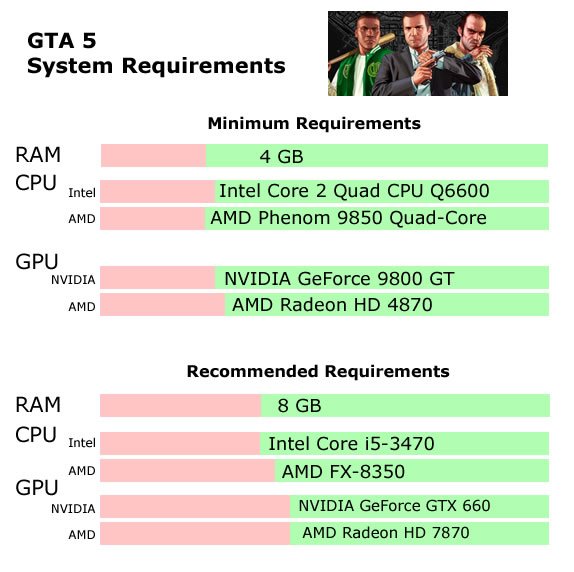
The minimum GTA 5 requirements include an Intel Core 2 Quad CPU Q6600 or AMD Phenom 9850, 4GB of RAM, and an NVIDIA 9800 GT or AMD HD 4870 with 1GB VRAM.
Ever wondered if your PC can handle the chaos of Los Santos? Many players ask about the gta 5 requirements before jumping into the game. It’s understandable because you want a smooth, enjoyable experience.
Knowing the specifications before you buy makes a huge difference. You won’t want to waste your money if your computer falls short. Check your system against the suggested specifications and prepare for action.

GTA 5 Requirements: What You Need to Play
So, you want to dive into the crazy world of Los Santos in Grand Theft Auto 5, or GTA 5 as most people call it? That’s awesome! But before you start stealing cars and causing mayhem, it’s super important to make sure your computer is strong enough to run the game. Nobody wants a slideshow instead of a fun gaming experience, right? This article will explain all about the necessary GTA 5 requirements so that you can enjoy the game perfectly!
Understanding Minimum vs. Recommended Specs
When we talk about game requirements, you’ll usually see two lists: minimum and recommended. Think of it like this: the minimum specs are the absolute lowest your computer needs to be to even start the game. It might run, but probably not very smoothly. The recommended specs are what you need to really have a great, smooth experience with pretty graphics. It’s like comparing riding a bike with a flat tire (minimum) to riding a brand new one (recommended).
Minimum System Requirements for GTA 5
Let’s start with the bare minimum. If your computer meets these specifications, you should at least be able to run GTA 5, although you might have to play with lower graphics settings. Here’s what you need:
- Operating System: Windows 10 64 Bit, Windows 8.1 64 Bit, Windows 8 64 Bit, Windows 7 64 Bit Service Pack 1
- Processor: Intel Core 2 Quad CPU Q6600 @ 2.40GHz (4 CPUs) / AMD Phenom 9850 Quad-Core Processor (4 CPUs) @ 2.5GHz
- Memory (RAM): 4 GB
- Graphics Card: NVIDIA 9800 GT 1GB / AMD HD 4870 1GB (DX 10, 10.1, 11)
- Sound Card: 100% DirectX 10 compatible
- Hard Drive Space: 72 GB
Let’s break this down a bit. The operating system has to be a 64-bit version of Windows, you can’t play it on the older 32-bit windows. This is a common requirement for modern games. The processor is the brain of your computer, and it needs to be at least as powerful as an Intel Core 2 Quad or AMD Phenom. RAM is like your computer’s short-term memory, and 4 GB is the minimum here. The graphics card is what makes the game look good, and the minimum is a bit older like the NVIDIA 9800 GT or an AMD HD 4870. Finally, you’ll need a good amount of hard drive space, 72 GB! That’s a big chunk of space.
Recommended System Requirements for GTA 5
Now, if you want GTA 5 to look its best and run super smoothly, you’ll need to aim for the recommended specs. These are the parts that will give you the best gaming experience. Here’s the recommended list:
- Operating System: Windows 10 64 Bit, Windows 8.1 64 Bit, Windows 8 64 Bit, Windows 7 64 Bit Service Pack 1
- Processor: Intel Core i5 3470 @ 3.2GHZ (4 CPUs) / AMD X8 FX-8350 @ 4GHZ (8 CPUs)
- Memory (RAM): 8 GB
- Graphics Card: NVIDIA GTX 660 2GB / AMD HD7870 2GB
- Sound Card: 100% DirectX 10 compatible
- Hard Drive Space: 72 GB
As you can see, the recommended specs are quite a step up from the minimum ones. The processor is more powerful, you need double the RAM (8 GB), and the graphics cards are more modern, such as the NVIDIA GTX 660 or the AMD HD7870. If your computer meets or exceeds these specs, you’re likely to enjoy smooth gameplay with higher graphics settings.
Breaking Down Key Components
Let’s dive a bit deeper into why each of these components is important for running GTA 5:
CPU (Processor): The Brain of the Operation
The Central Processing Unit, or CPU, is basically the brain of your computer. It does all the calculations to make the game work. Think about it like this: if your CPU is slow, it’s like having a really slow brain that can’t process all the information needed for the game, which can cause lagging and stuttering. For GTA 5, a quad-core processor, meaning one that has four processing units, is the minimum. However, the recommended processor, which is more powerful, would be better for smooth gameplay.
RAM (Memory): Short-Term Storage
RAM, or Random Access Memory, is like your computer’s short-term memory. The game loads important data into RAM so it can be accessed quickly. Having more RAM means your computer can juggle more tasks at once. If you don’t have enough RAM, your computer might start using your hard drive as extra memory, but that’s much slower and can cause the game to be laggy. For GTA 5, 8GB of RAM is highly recommended to keep things running smoothly, especially if you have other programs open while playing.
GPU (Graphics Card): The Visual Master
The Graphics Processing Unit, or GPU, is what makes the game look good. It renders all the graphics you see on the screen, like the cars, the characters, and the buildings. A good GPU is super important for a smooth and visually appealing gaming experience. Without a good GPU, the game might look blocky, and you could experience choppy frame rates. The minimum graphics cards, NVIDIA 9800 GT or AMD HD 4870, are quite old, so if you’re still using them, it may be time for an upgrade. The recommended cards, NVIDIA GTX 660 or AMD HD 7870, are much better for modern games like GTA 5.
Hard Drive Space: Where the Game Lives
GTA 5 is a massive game with a lot of files, so it needs a good chunk of space on your hard drive. Both the minimum and recommended specs require 72 GB of space. Make sure you have enough space available on your hard drive before installing the game. You may consider an SSD (Solid State Drive) for faster load times. While not a hard requirement, it’s a very nice improvement for gaming.
Operating System: The Foundation
The operating system is like the foundation of your computer. It allows the software and hardware to communicate. For GTA 5, you need a 64-bit version of Windows (7, 8, 8.1, or 10). Using a 32-bit system is not supported. If you’re unsure whether your system is 32 or 64 bit, you can easily find that information in your system settings.
Why Meeting the Recommended Specs Is Important
You might be thinking, “Well, I meet the minimum specs, so I’m good to go!” While that might be technically true, there are several great reasons to try to meet the recommended specs:
- Smoother Gameplay: Games run smoother when they have more power at their disposal. This can result in a more enjoyable gaming experience with fewer stutters, freezes, and lags.
- Higher Graphics Settings: With better specs, you can turn up the graphics settings. This makes the game look much better, and you can see all the fine details and vibrant colors that the developers included in GTA 5.
- Better Frame Rates: Frame rate is the number of images your computer shows each second. Higher frame rates mean smoother motion and response in the game. The recommended specs will give you higher frame rates, making your experience a lot better.
- Reduced Loading Times: Better RAM and processors can mean faster load times for the game. No one wants to sit and stare at a loading screen for a long time.
- Future-Proofing: Meeting the recommended specs will mean your machine will handle not just this game, but also other games for some time to come.
Checking Your System Specs
Okay, now that you know what the requirements are, how do you actually find out what your computer has? Here’s a quick guide on how to check your system specifications on Windows:
- Press the Windows Key + I: This will open the Settings app.
- Click on System: It’s usually the first option.
- Click on “About”: This is usually at the bottom left of the side menu.
- Look for “Device Specifications”: This area shows your processor and RAM information.
- For the processor (CPU) you can find out the model (e.g. Intel Core i5) and the speed (e.g. 3.2GHz).
- For the RAM you can find out how much is installed.
- Check for Graphics Card Information
- In the search bar at the bottom of windows type “device manager” and open it.
- Click on “Display Adapters” to expand the list.
- Your graphics card will be listed here.
- Check for Windows Version: Look for the “Windows Specifications” section in the “About” screen. It will show you whether it is 64-bit.
Compare your results with the minimum and recommended requirements for GTA 5, and you’ll get an idea of how well the game might run on your PC.
What if Your Computer Doesn’t Meet the Requirements?
Don’t be sad if your computer doesn’t quite meet the requirements for GTA 5. There are a few things you can try:
- Lower Graphics Settings: Even if your system doesn’t hit the recommended settings, you might still be able to play the game by lowering the graphics settings. Turning settings like shadows, reflections and texture quality down to low will reduce the demand on your machine.
- Close Other Applications: Before you start the game, make sure to close any other programs running in the background. This will free up resources for the game.
- Upgrade Your Components: If you want to get the full experience of the game, consider upgrading some of your components. The graphics card and RAM are often the best places to start if you are on a budget.
- Consider a Console: If upgrading your computer is not an option, you could consider playing GTA 5 on a console like PlayStation or Xbox, as the game has been optimized for them.
Final Thoughts about GTA 5 PC Requirements
Getting your system ready for GTA 5 can make all the difference between a frustrating and an awesome gaming experience. By paying attention to both the minimum and recommended system requirements for GTA 5, you’ll be able to make sure the game will run at its best on your machine. A solid understanding of the different components and their roles will help you have a great time exploring all that Los Santos has to offer!
GTA 5 requirements for PC & Laptop. How much Processor, RAM, Graphics is required. Can you run it?
Final Thoughts
Meeting the minimum ‘gta 5 requirements’ is essential for smooth gameplay. Players must have adequate system specifications before running the game. Failing to do so can lead to performance issues.
A dedicated graphics card and sufficient RAM are key components. Check the official Rockstar Games website for the most current details. Ignoring these requirements often results in a poor gaming experience.
Therefore, double-check your PC’s capability to ensure you can play without problems. This guarantees the game runs as intended.

