
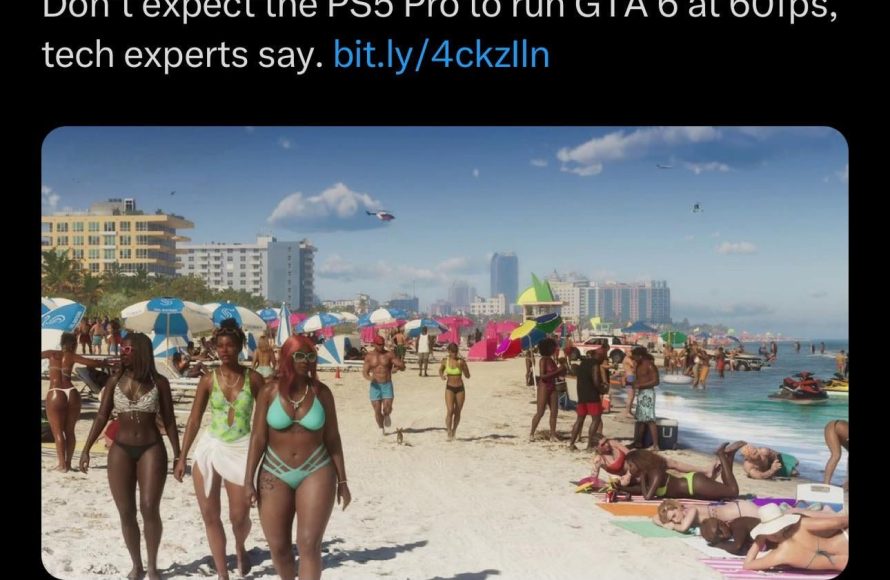
GTA 6 frame rate performance details will likely vary across platforms, with PC expected to have the most customization options for achieving higher frame rates, while consoles may target a more stable 30 or 60 FPS.
The anticipation for GTA 6 is immense, and naturally, everyone wants to know how it will perform. Gamers are particularly focused on achieving the smoothest experience possible. The question on many minds is, what can we expect from GTA 6 Frame Rate Performance Details?
Knowing the frame rate is crucial for gameplay, especially for a high-paced open world like Grand Theft Auto. We’ll explore the factors influencing the frame rate on different gaming devices. This will help you plan ahead for optimal play, be it on PC or console.

GTA 6 Frame Rate Performance Details
Alright, gamers! We’ve all been waiting for it – the next big adventure in the Grand Theft Auto world: GTA 6! And one of the biggest questions on everyone’s mind, besides the story and characters, is how well it’s going to run. We’re talking about frame rates, the magic number that determines how smooth and enjoyable our gameplay is going to be. So, let’s dive deep into what we know (and what we can guess) about GTA 6’s performance, getting into the nitty-gritty details to prepare ourselves for launch day.
Understanding Frame Rates: The Basics
Before we get into specifics, let’s break down what frame rates actually are. Imagine a flipbook: each page is a still image, and when you flip through the pages fast enough, it creates the illusion of movement. In gaming, those “pages” are frames. The frame rate, measured in Frames Per Second (FPS), tells you how many of those still images are being shown on your screen each second. The higher the FPS, the smoother and more responsive the game will feel. Think of it this way:
- 30 FPS: Generally considered the minimum for playable gameplay. It can feel a bit choppy at times.
- 60 FPS: A sweet spot for most games, offering smooth visuals and good responsiveness.
- 120 FPS and above: Super smooth, often preferred for competitive gaming where fast reflexes matter.
Now, different platforms (like consoles and PCs) handle frame rates a little differently, and what we can expect from GTA 6 will vary depending on the device we are playing it on.
Console Performance: What to Expect on PS5 and Xbox Series X/S
Let’s start with the consoles. We know that GTA 6 will be coming to the PlayStation 5 and Xbox Series X/S. These consoles have powerful hardware but also have some limitations that affect frame rate.
PlayStation 5
The PS5 is likely targeting 60 FPS, but achieving that consistently might be a bit of a challenge. Rockstar Games will likely aim for a smooth 60 FPS experience at a standard resolution of 4K. However, this may involve some techniques like dynamic resolution scaling, where the resolution of the game changes slightly during intense moments to maintain that target. It is possible that a Performance Mode will be available for smoother gameplay, even if it means playing at a slightly lower resolution. We could also see Ray Tracing, especially in puddles, car surfaces and reflections to enhance the visual fidelity, however this may come at a cost to performance. So, the game may run at a 30 FPS mode with advanced visual features enabled, offering better graphics at the cost of frame rate.
- Target FPS: 60 FPS (aiming for)
- Possible Resolution: 4K, may vary dynamically
- Visual Modes: Likely a performance mode and a quality mode, giving players the option to choose between higher framerates and better graphics.
Xbox Series X
The Xbox Series X, being the more powerful of the two current gen consoles, should achieve a similar level of performance to the PlayStation 5. We expect it to target 60 FPS in 4K and the flexibility to prioritize performance, but it is uncertain if the Xbox Series X will be able to deliver a consistent 60 FPS, and might also use dynamic resolution scaling to achieve it. Like the PS5, we could see optional graphic features like Ray Tracing. It is possible to have both a visual mode and performance mode to give the gamers the choice between resolution and performance.
- Target FPS: 60 FPS (aiming for)
- Possible Resolution: 4K, possibly with dynamic adjustments
- Visual Modes: Likely a performance mode and a quality mode similar to the PS5, maybe giving the xbox series X an edge over PS5.
Xbox Series S
The Xbox Series S, being the more affordable version of the Xbox consoles, is generally expected to run at a lower frame rate and lower resolutions than the Series X. We can expect the game to target 30 FPS, possibly with dynamic resolution scaling to maintain a stable performance. It is likely that this console might miss out on some of the higher end graphical settings to maintain performance targets. It’s crucial for us to be aware that the Series S is the most likely console to have the biggest drop in visuals to reach performance targets.
- Target FPS: 30 FPS (likely)
- Possible Resolution: Lower than 4K, potentially 1080p or 1440p
- Visual Modes: Probably limited visual options and a focus on performance
PC Performance: A Wide Range of Possibilities
Now, let’s move to the world of PCs. PC gaming offers the most flexibility when it comes to frame rates, but it also has a lot more variables involved. The performance of GTA 6 on PC will depend heavily on your computer’s specs. Here’s what we need to consider:
Graphics Card (GPU)
Your GPU is the main workhorse when it comes to gaming graphics. For GTA 6, you’ll need a powerful card to push high frame rates, especially at higher resolutions. Cards like the NVIDIA RTX 3000 and 4000 series and AMD Radeon RX 6000 and 7000 series will be good options for those chasing high resolutions and high frame rates. If you’re aiming for 60 FPS or more at 1080p resolution, a mid-range card might suffice. However, for 4K resolution and ray tracing, you’ll require a high-end GPU.
Central Processing Unit (CPU)
Your CPU also plays a vital role in the performance. While the GPU handles the graphics, the CPU is responsible for the game’s logic and calculations. For GTA 6, a powerful multi-core processor is necessary, something like an Intel Core i7 or an AMD Ryzen 7 and upwards is recommended for best results. Even if you have a powerful graphics card, a bottlenecked CPU can hold the frame rates back, so it’s important to balance your PC build.
RAM (Random Access Memory)
Having enough RAM is important for smooth gaming. You might be aiming for 16 GB or more, and a faster RAM with a higher clock speed can sometimes help boost frame rates slightly, but usually not as significant as a GPU or CPU.
Storage
While storage doesn’t directly impact frame rates, using an SSD will drastically reduce load times, and will allow the game to access the required files quicker, which can contribute to less stuttering in game. HDD’s are still a viable option to run the game, but you are likely to have a worse experience.
PC Settings and Customization
The best thing about PC gaming is the ability to tweak in-game settings to get the performance you want. You can customize graphics settings like:
- Resolution: The number of pixels on your screen. Higher resolutions look clearer but require more power. 1080p, 1440p and 4k are the most common settings.
- Texture Quality: How detailed the textures in the game look, higher textures need more graphics memory.
- Shadows: How detailed the game shadows are, this can be very performance heavy.
- Anti-Aliasing: Smooths out jagged edges on objects, can impact performance.
- Draw Distance: How far objects are rendered, higher settings can be performance heavy.
- Ray Tracing: Adds realistic lighting and reflections, but can significantly reduce FPS.
By adjusting these settings, you can find the right balance between visual quality and smooth performance, and it will heavily depend on your PC specs. If you are struggling to get a good frame rate, lowering these settings will be a good way to find better frame rates.
Also, if you have an NVIDIA or AMD graphics card, you can use specific software to optimize settings that is developed by them (for example, NVIDIA’s GeForce Experience) that can optimize the game settings for the system to achieve target FPS. These tools can be useful to get better performance and should be checked out.
Potential Frame Rate Targets for PC
Here’s a rough idea of what you might expect on PC, depending on your hardware:
- Low-End PCs: Aiming for 30-60 FPS at 1080p with low or medium settings.
- Mid-Range PCs: Targeting 60-100+ FPS at 1080p or 1440p, with medium to high settings.
- High-End PCs: Chasing 100+ FPS at 1440p or 4K, with high or ultra settings, and possibly ray tracing if it isn’t too performance heavy.
It’s important to remember that these are just estimations. Rockstar Games will likely put out minimum and recommended PC specs before release, which we will definitely need to consider to get the best frame rates.
The Importance of Optimization
Even with powerful hardware, game optimization is very important to good performance. A poorly optimized game can struggle even on high end hardware, while a well optimized game can run surprisingly well on less powerful hardware. We can hope that Rockstar will take their time to optimize GTA 6 so that it runs as good as possible.
Day-One Patches and Driver Updates
It is likely that there will be a day one patch for GTA 6, and that they will fix any issues or bugs that will improve performance. Game developers regularly work to improve the game’s performance, so it is important to keep the game updated. Also, graphics card companies such as NVIDIA and AMD are always optimizing their drivers for the latest games, which can help a lot with performance. If your game is not performing to your expectations, be sure to update to the latest drivers.
Anticipated Features Affecting Performance
We can try to speculate some features that could affect GTA 6’s performance. Here are a few features that are common in modern games which might impact frame rates:
- Dynamic Weather: Advanced weather systems can be demanding, especially with rain and fog effects.
- Detailed Environments: The sheer level of detail in the world can impact performance, for example having a lot of objects on screen.
- Advanced AI: Smarter NPCs (Non-Playable Characters) require more processing power.
- Physics and Destruction: Realistic physics and destructible environments can be heavy on resources.
- Multiplayer Features: Online play can add another layer of complexity and may influence frame rates in a big way.
- Ray Tracing: The most modern method to render lighting and reflections, which is very heavy on performance.
Monitoring Your Frame Rate
Once GTA 6 is released, it’s a good idea to monitor your frame rate in real time. Here’s how you can do that:
- In-Game Settings: Many games have an in-game frame rate counter, that can be toggled in settings.
- PC Tools: Programs like MSI Afterburner, or the NVIDIA overlay (if you have an NVIDIA GPU) can show you your FPS in real-time.
- Console Settings: Consoles like the PlayStation 5 and Xbox Series X/S also have performance overlays that you can access.
By keeping track of your frame rate, you can adjust settings to achieve your target performance. For example, if your average FPS is below 60, you may want to lower the graphics settings.
So, there you have it – a comprehensive overview of what we can expect from GTA 6’s frame rate performance. Remember that these are based on speculation and what is known about current-gen hardware, but we will know for sure once the game is released. Keep an eye out for updates, and get ready for an amazing gaming experience!
Why The "GTA 6 Not Hitting 60 FPS On PS5 Pro" Argument IS OVERBLOWN
Final Thoughts
Ultimately, GTA 6 frame rate performance details remain unclear. We anticipate variations based on platforms and settings. Players should temper expectations until concrete information arrives.
Expect a balance between visual fidelity and smoothness. Performance testing will be crucial after the game’s release. Gamers need to optimize their hardware for the best experience.
Initial analysis suggests potential for both high and low frame rates depending on the setup. Therefore, prepare for different gameplay experiences regarding GTA 6 Frame Rate Performance Details.

