
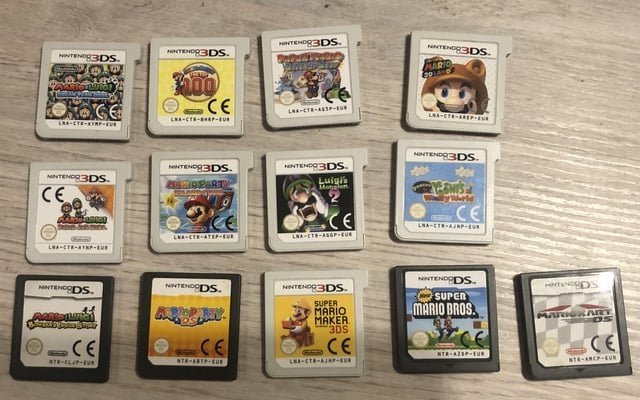
3DS game sizes generally range from a few hundred megabytes to around 4 gigabytes, with most falling in the 1 to 2 gigabyte range.
Ever wondered about the storage space these portable wonders consume? We often get asked, “how big are 3ds games?” It’s a valid question given the digital nature of most games these days. Thinking about downloading a new title? You’ll want to know how much space it’ll occupy on your SD card.
The size of 3DS games does vary depending on the title. Some games are compact and others take up quite a bit more space. Having a better idea helps you manage your storage.

How Big Are 3DS Games?
Okay, let’s talk about 3DS games! You’ve probably wondered how much space these little cartridges, or digital downloads, actually take up. It’s a good question, especially if you’re trying to figure out how many games you can fit on your Nintendo 3DS or SD card. Unlike the large games on home consoles, 3DS game sizes are quite small, but that doesn’t mean they’re all the same size. Let’s explore what determines how big these games are, how that affects you, and what you can expect in terms of storage.
Understanding 3DS Game Sizes
3DS games come in two main forms: physical cartridges and digital downloads from the Nintendo eShop. The physical game cartridges are generally small in size, they will always be the same in size, but digital downloads can differ. The amount of storage space they use, in terms of megabytes (MB) or gigabytes (GB), varies from game to game. The difference in file sizes comes down to a few different things. One key factor is the type of game. For example, a big adventure game with lots of locations and characters will generally be bigger than a small puzzle game. Similarly, games with lots of detailed graphics and sound effects will often take up more space than games with simpler designs. The storage size also relates to the amount of data the game needs to run, such as textures, character models, music, and other content. Let’s explore the factors that impact file size.
Factors Affecting Game Size
Several elements contribute to how big a 3DS game file is. These factors work together to determine the total amount of storage needed:
- Graphics: Games with detailed 3D graphics and high-resolution textures use more data. Think of games with lots of shiny objects, elaborate characters, or beautiful environments; these visual elements contribute to file size.
- Sound & Music: High-quality audio, like detailed sound effects and full musical scores, adds to the overall size. A game with a big orchestra soundtrack will be larger than a game with simpler tunes.
- Gameplay Complexity: Games that have complex mechanics, lots of levels, and a long story usually take more space. The amount of gameplay content adds to its size.
- Number of Characters: Games with many different characters, each having their own unique looks and animations, will be larger. Each of those character models needs to be stored in the game files.
- Cutscenes & Movies: If the game includes lots of animated cutscenes or movies, they will add to the total file size, just like video files take more space on your computer.
Typical 3DS Game Sizes
While the size of a game varies significantly, let’s look at some common ranges to give you a sense of the scale. Most 3DS games fit into a relatively compact space, especially when compared to games on other systems.
Size Ranges
Here’s a general guide to the size of 3DS games:
- Small Games: These are often puzzle games, simple platformers, or smaller indie titles. These usually range from 100 MB to 500 MB.
- Mid-Size Games: Many popular 3DS titles, including some RPGs and action games, fall into this category, usually between 500 MB and 1.5 GB.
- Large Games: The biggest 3DS games, often full-fledged RPGs or expansive open-world games, can get up to 2 GB or sometimes a bit more.
As you can see, the range is pretty broad, but even the biggest games don’t usually take up much space compared to games on other modern consoles.
Examples of Game Sizes
Let’s look at a few actual game examples to get a better picture:
- Pokémon X and Y, and Omega Ruby/Alpha Sapphire: These popular RPGs fall in the 1.5 – 2 GB range, showcasing detailed environments and lots of Pokémon.
- The Legend of Zelda: A Link Between Worlds: Another larger game, weighing in at around 1.6 GB.
- Super Mario 3D Land: This one is a bit smaller, sitting around 500MB to 700MB.
- Animal Crossing: New Leaf: A pretty large game, usually around 1 GB.
- Puzzle & Dragons Z + Puzzle & Dragons: Super Mario Bros. Edition: This one comes in at a smaller size of roughly 200 – 300MB.
- Smaller eShop Titles: Many indie and smaller downloadable games can be as small as 50 MB.
Remember, these are approximate sizes, and some may be a bit smaller or larger depending on specific versions or updates. These examples will help you get a better understanding of the range of storage 3DS games might use.
Comparing Physical Cartridges vs. Digital Downloads
One of the key differences when talking about 3DS game size is the delivery method. Physical cartridges and digital downloads both have their advantages and disadvantages, including how game sizes play a role.
Physical Cartridges
Physical game cartridges have their pros and cons. Here’s a quick look:
- Pros:
- No storage space needed on your device: Because the game is on the cartridge, it doesn’t take up space on your 3DS’s memory or SD card.
- Easy to lend and trade: You can share your games with friends easily.
- Collector Value: Many people like having the physical copies of games to collect.
- Cons:
- Can be lost or damaged: Physical cartridges can be misplaced, lost or damaged easily.
- Must physically swap cartridges to change games: If you have several games, you’ll need to change cartridges every time you want to play a different one.
- Limited Availability: Some games may become harder to find and expensive to buy after they are out of print.
Digital Downloads
Digital downloads are another way to get games, and they have their own pros and cons:
- Pros:
- Convenient Access: You can instantly download and play games from the eShop without needing physical copies.
- No risk of losing or damaging: Because the games are saved on the system’s SD card, you don’t have to worry about losing them.
- Availability: It can be easier to buy digital versions of games that may be out of print as physical versions.
- Cons:
- Takes up storage space: Digital downloads require space on your SD card, which can fill up quickly if you have a lot of games.
- Limited Sharing: It is more difficult to share or sell digital games.
- Dependence on Nintendo’s Store: Digital games depend on Nintendo’s infrastructure which may go offline in the future.
The most crucial difference is the storage space. If you prefer to have lots of games on hand without swapping cartridges, you need to consider your 3DS’s SD card size and the sizes of your digital games. Understanding these trade-offs can help you decide what’s best for your gaming needs.
Managing Storage on Your 3DS
When you choose digital downloads for your 3DS, you will be using your system’s memory. This means that you need to understand how to manage your storage. Here are some tips:
Checking Available Space
First, let’s check how much space you have. You can do this by:
- Go to the System Settings on your 3DS.
- Tap on Data Management.
- Choose Nintendo 3DS.
This shows you how much space is free on your SD card and internal storage. Having this information allows you to know how much room you have left before downloading more games.
SD Card Sizes
The Nintendo 3DS uses SD cards for storage expansion. Here are the common sizes you might encounter:
- 2GB – 4GB: This is often the size of the SD card that comes with the system and can store some games, but it fills up quickly.
- 8GB – 16GB: These sizes are a good starting point for a digital library, letting you store several games.
- 32GB: A 32 GB card is a good upgrade for having multiple larger games.
- 64GB and Up: For those who want a large digital collection, you can use these bigger SD cards. The 3DS system may have limits on some cards, so checking the Nintendo support page is good to verify compatibility.
Tips for Managing Storage
Managing your storage effectively can prevent frustration. Here are some strategies:
- Delete Games You Don’t Play Often: If you have a game you don’t play very often, you can delete it to free up space. You can always re-download it from the eShop later if you want.
- Backup to a Computer: You can backup your SD card data to your computer in case you need to free up the storage space or for safekeeping. You can copy the data back on your SD card whenever you need.
- Consider Physical Cartridges for Large Games: If you have several large games, it might be better to buy physical copies so you are not using a lot of the storage space.
- Periodically Review Your Digital Library: Regularly check which games you play to make sure you’re not wasting storage space on titles you won’t play.
Why Game Size Matters
The size of your 3DS games has a very direct impact on your gaming experience. It helps in deciding what type of games you will purchase, and what storage you need for your device.
Storage Space and Game Choice
If you are using the internal storage or a small SD card, you may find yourself having to choose what games you keep on the system. This can mean less flexibility if you would like to play a variety of titles. If you have a larger storage, you have the ability to have more options for games.
Download Times
Larger games mean longer download times. If you have a fast internet connection, it may not be as big of a deal, but if your internet is slower, large games may take much longer to download than a smaller game. Download times can be frustrating when you are excited to play a new game.
Managing a Digital Library
A digital library allows you to have many games in one place, but it does come with the need to manage storage. It is very easy to fill up your storage quickly and you will need to make choices about what games to keep on the device and what you need to remove. Understanding your game size helps to make better decisions.
Future-Proofing Your 3DS Game Collection
Even though the Nintendo 3DS is an older system now, many players still enjoy playing these titles. Knowing how game sizes work can help you keep playing for a long time to come. Knowing your game sizes, managing your storage and choosing between digital and physical copies will allow you to maximize your gaming experience.
Understanding 3DS game sizes isn’t just about how much space they take. It’s about how you organize your gaming life, plan your purchases, and have the best possible time with your Nintendo 3DS. Whether you’re a physical cartridge collector or a digital download enthusiast, this knowledge will help you make the most out of your 3DS gaming experience.
Ranking ALL 3DS/2DS models…
Final Thoughts
3DS games typically range from a few hundred megabytes to 4 gigabytes, with most falling somewhere in between. Cartridge size and game complexity influence the overall storage requirements. Larger, more ambitious titles obviously consume more space.
How big are 3DS games often depends on the individual game and its features. Generally, you can expect a decent library to fit comfortably on a standard SD card or larger storage.

