
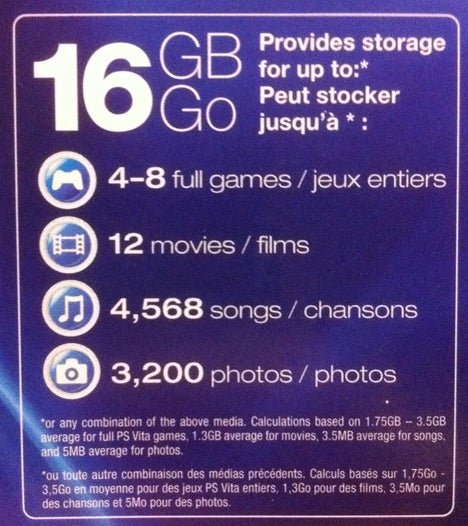
Vita games typically range in size from a few hundred megabytes to several gigabytes, depending on the game’s complexity and content.
Ever wondered about the storage space required for your PlayStation Vita games? It’s a valid question considering the device’s limited storage. Knowing how big are vita games before downloading them is crucial for managing space and avoiding frustration.
We often underestimate the storage space needed by game files, especially those packed with rich textures and detailed environments. Let’s explore this further and provide some clarity.

How Big Are Vita Games?
Let’s dive into the fascinating world of PlayStation Vita games and explore how much space they actually take up. It’s a question that many gamers ask, especially if they’re trying to manage their memory cards! The size of a game is super important because it tells you how much space it will need on your memory card to download and play. It also affects how many games you can keep on your Vita at one time. We’ll look at the different types of Vita games, what makes them vary in size, and some examples to help you understand better. So, are Vita games small, big, or somewhere in between? Let’s find out!
Understanding Vita Game Storage
Before we get into specific game sizes, it’s important to know about the different ways Vita games are stored. It’s not as simple as just downloading a file! Here’s a quick breakdown:
- Physical Cartridges: Just like the old days, some Vita games come on physical game cards. These don’t take up any space on your memory card because the game data is all on the cartridge itself. So, if you love having physical games, this is a great option, and you won’t need to worry about the download sizes on your memory card.
- Digital Downloads: Most of the games on the PlayStation Vita are purchased and downloaded digitally from the PlayStation Store. This means you need enough space on your memory card to store them. This is where understanding game sizes becomes really important.
- Game Updates & Patches: Sometimes, games get updates or patches that add new features or fix problems. These updates also take up space on your memory card, so it’s something to keep in mind. A small game might grow a little after you’ve installed a few updates.
- Save Data: Your game saves will also use up some memory, even though save files are usually quite small compared to game files.
Factors Affecting Vita Game Size
Several things determine the size of a Vita game. It’s not just a random number; it depends on many elements of the game.
Graphics and Visuals
Games with really detailed graphics, amazing animations, and lots of visual effects need more storage space. Think about it like comparing a simple drawing to a really intricate, colorful painting; the painting will need more space to store all the detail. Games with 3D graphics and many textures are generally larger than 2D games or simple visuals. The quality of the textures also affects the size; higher resolution textures means bigger file size.
Game Content
The amount of stuff in a game can greatly affect its size. Games with large open worlds that you can explore, many levels to play through, or a long story are likely to be bigger. For example, a role-playing game (RPG) with many characters, maps, and cutscenes will be larger than a simple puzzle game. Games that have a lot of different environments that change a lot require more resources and will take up more space. Games with tons of cutscenes that are very high quality video can add a substantial amount to the overall size of a game as well.
Audio Quality
Games often include music, sound effects, and voice acting. If these audio elements are high quality, they will take up more space. Just like how a high-quality image file is bigger than a lower-quality one, the same goes for audio. Games with multiple different tracks and voices also have larger sizes due to all the different audio files they need to contain. Some games will also include multiple different languages and voiceovers, and that can further increase a game’s size.
Game Engine and Programming
The software used to create a game, known as the game engine, also influences size. Some engines are better at compressing game files than others. Also, how the game is programmed can impact the final size, with well-optimized games sometimes taking up less space than poorly optimized ones that have larger file sizes even with less content. A more powerful game engine can allow for more detail, but might need more space as a consequence, as well.
Digital Distribution and Compression
When digital games are distributed, some compression is usually applied to help make the file size more manageable for downloads. The type and amount of compression applied can also vary, which will lead to some variation in sizes between games. Sometimes game developers and publishers will opt for slightly more compression to save space and cost in downloads, even at the cost of some minor quality loss. Digital game files have to be as small as possible, so compression is needed, and it impacts sizes, especially on systems that have lower storage capacities.
Typical Size Ranges of Vita Games
Now that we know what affects game size, let’s get an idea of the typical ranges. Keep in mind these are just general estimates, and the size of individual games can vary quite a bit.
- Small Games (Under 500MB): These are often puzzle games, smaller indie titles, classic retro games, or very simple arcade-style games. They are perfect if you are a casual gamer looking for a quick playing session without worrying about lots of space usage.
- Medium Games (500MB to 2GB): Many Vita games fall into this range, including platformers, action-adventure games, and some smaller role-playing games. These tend to provide more depth in terms of gameplay and story than the smaller games, but are not as expansive as very large games.
- Large Games (2GB to 4GB): These are typically the bigger, more complex games such as RPGs, more advanced action games, or games with a lot of content. Examples include some of the bigger Japanese games and action titles on the system. These are the kind of games that usually have very detailed visuals and a complex story that takes a while to get through.
- Very Large Games (Over 4GB): A handful of Vita games can be over 4GB. These include some of the most ambitious and large-scale games on the system. These games will typically have lots of very detailed graphics and a complex story, open worlds and many elements and locations to explore, and are usually full of many hours of gameplay. These are the games that really challenge the system and usually have an impressive visual experience.
It’s also worth noting that games that were also released on other platforms might have slightly different file sizes. It’s not uncommon for the same game to be a little different in size on Vita when compared to its PlayStation 3, PlayStation 4 or other console versions.
Examples of Vita Game Sizes
To give you a better picture, let’s take a look at some examples of actual Vita game sizes. Remember, these sizes are approximate and can differ a little:
| Game Title | Approximate Size | Game Type |
|---|---|---|
| Persona 4 Golden | 3.2 GB | RPG |
| Gravity Rush | 1.6 GB | Action-Adventure |
| LittleBigPlanet PS Vita | 1.8 GB | Platformer |
| Rayman Origins | 1.7 GB | Platformer |
| Muramasa Rebirth | 1.0 GB | Action RPG |
| Hotline Miami | 130 MB | Indie Action |
| Spelunky | 80 MB | Indie Platformer |
| The Binding of Isaac: Rebirth | 500 MB | Indie Action Roguelike |
| Ys: Memories of Celceta | 1.7 GB | Action RPG |
| Tearaway | 2.1 GB | Adventure Platformer |
These examples show how a big RPG like Persona 4 Golden takes up considerably more space than a small indie game like Hotline Miami. Understanding these differences can help you plan your memory card storage!
Memory Cards for the Vita
The PlayStation Vita requires special memory cards, and they came in different sizes. It’s really important to keep the sizes of the games in mind when buying a memory card. Let’s take a look at what options were available.
Available Memory Card Sizes
Sony offered the following memory card sizes for the Vita:
- 4 GB
- 8 GB
- 16 GB
- 32 GB
- 64 GB (released in Japan only)
As you can see, these memory cards had a limit to the space that they could offer, and for users that wanted to store many games, even the 32GB card could fill up pretty quickly, especially if you had larger games.
Practical Considerations
It is very easy to fill up the memory cards quickly, and even if you buy a large card, you still need to keep in mind the size of the games you will be downloading. This means some careful planning may be needed before you download, so that you do not run out of space. If you are planning to play many larger games, you should make sure to buy one of the larger memory cards.
Here are some tips for managing your Vita memory card space:
- Prioritize Your Games: Think about which games you play most often, and keep those on your system. You can always download other games again later.
- Use Cloud Saves: If you have PlayStation Plus, you can save your game data in the cloud and remove the local save data if you need to free up space.
- Archive Less-Played Games: If you have a large game you’re not playing at the moment, you could remove it. You’ll be able to download it again later from your purchase history.
- Consider Physical Copies: If you want to avoid using memory space, buy physical copies of the games you want to play.
- Organize Your Content: Use folders and the Content Manager on your Vita to keep your games and other content organized.
Why Game Sizes Matter
You might be wondering why game sizes are such a big deal. Here are a few reasons:
- Storage Management: Knowing the sizes of games allows you to manage your available memory card space better. Nobody wants to start a download and then realize they don’t have enough space!
- Download Time: Larger games take longer to download, so you need to plan for that and it also needs a stable and faster internet connection. If you are on a poor connection and don’t have much time to wait, then you should consider downloading smaller games or games that you have downloaded before.
- Number of Games: The size of the games directly impacts the number of games you can keep on your system at once. The larger the games, the fewer games you can install on the same sized memory card.
- Convenience: If your memory card is full, you may have to spend time deleting and redownloading games to play what you want. Proper memory management can prevent this problem.
- Play on the Go: A fully stocked memory card allows you to play your favorite games whenever you want, without needing to always be connected to the internet to download them.
So, managing your memory card space is very important for a smooth and enjoyable experience playing games on your PlayStation Vita.
Understanding the sizes of the games is a key element of enjoying the Vita, and allows you to get the most out of it without worrying about how much space games will take up on your memory cards.
Hopefully, with this information, you have a much better idea about how big Vita games are and how they impact your gaming experience. By knowing what makes a game larger or smaller and using smart storage management practices, you can get the most out of your Vita without frustration.
Top 10 PS Vita Games
Final Thoughts
Vita games typically range from a few hundred megabytes to several gigabytes in size, depending on the title’s complexity and content. Smaller indie games require less space than AAA titles.
The physical game cards are limited in storage, so many digital releases are on the smaller side. Consider the storage limitations before adding lots of vita games.
Ultimately, ‘how big are vita games’ is relative, but most are manageable by average storage capacities.

