
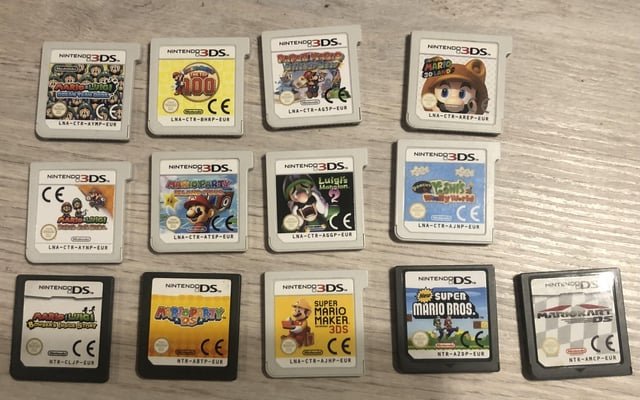
A 3DS game typically ranges from a few hundred megabytes to around 4 gigabytes in size.
Ever wondered how much space those fun 3DS games actually take up? Considering how many titles were released for the console, the variation in file sizes is quite interesting. The question, “how big is a 3ds game?” often pops up when managing storage on the handheld device.
Knowing the size beforehand can help you plan which games to download or purchase. It will let you better manage the limited space. This also helps to organize digital game libraries with ease.

How Big is a 3DS Game?
Ever wondered how much space a Nintendo 3DS game takes up? It’s a great question, especially if you’re trying to figure out how many games you can fit on your system or its memory card! The size of a 3DS game isn’t like picking a shirt size – it’s all about the digital information it holds. Let’s dive into understanding these game sizes, covering everything from physical game cards to digital downloads.
Understanding Physical Game Card Sizes
Let’s start with the physical 3DS game cartridges. These little cards store game data. You might think they are enormous, but the actual memory they hold is quite compact, often different than what you might assume by looking at them. The memory capacity of a game card directly affects how big a game can be.
Typical Game Card Capacities
Nintendo 3DS game cards come in different sizes, and they’re measured in gigabytes (GB). Here are the most common sizes:
- 1 GB Cards: These were common for smaller games, especially in the early days of the 3DS.
- 2 GB Cards: Many medium-sized games use these. You’ll find a good mix of adventures, platformers, and puzzle titles here.
- 4 GB Cards: This is the most frequent size for larger, more complex games.
- 8 GB Cards: A few very large games use these, typically those with extensive world maps, lots of characters, or detailed graphics.
Think of each gigabyte as a container that holds information. A larger container (more GB) can hold more data, allowing for bigger and more detailed games. While the physical game card size is consistent on the outside, it’s the internal memory that changes the most.
Digital Download Sizes: What You Need to Know
Now, let’s look at the digital side of things. When you buy a 3DS game from the Nintendo eShop, you’re downloading the game files onto your console or SD card. Digital game sizes can vary greatly, and understanding them is vital to managing space.
How Digital Size Differs from Physical
Even if a game comes on a physical card, its digital download size may not always match the card capacity precisely. This is because the physical card is the maximum storage it can hold. The actual digital download size is often smaller because the game developers optimize the data they’re sending. It’s like a shipping company using the right size box for the items inside.
Factors Affecting Digital Download Size
Several elements influence how big a digital 3DS game file is:
- Game Complexity: Games with rich worlds, detailed characters, and lots of levels tend to have larger file sizes. Think of role-playing games (RPGs) with expansive maps or action games with lots of animations.
- Graphics Quality: More detailed graphics usually mean more data. Games with highly detailed 3D models or very fancy effects use more space.
- Audio: High-quality music, voice acting, and sound effects all take up space. If a game has a full orchestral score or a lot of spoken dialogue, the file will grow.
- Extra Content: If the game has a lot of extra content like downloadable content (DLC), it also affects the digital download size.
- Compression Techniques: Developers use clever tricks to make game files smaller without losing quality. Compression is like squeezing a bunch of clothes into a suitcase, to save space.
So, a game might have a 4 GB physical card, but the digital download might be a bit smaller, let’s say, 3.2 GB. It all depends on how much optimization the developers do.
Checking Digital Game Sizes on Your 3DS
Want to know exactly how big a game is before you download it? Here’s how to check on your 3DS:
- Go to the Nintendo eShop.
- Search for the game you’re interested in.
- Tap or select the game.
- Look for the “Download Size” on the game’s page. It’s usually listed near the price.
This is a straightforward process and makes planning your storage space much easier.
How Game Size Impacts Your 3DS Experience
The size of a 3DS game matters because it affects how much storage space you need. Having enough space is crucial for downloading games and ensuring your system runs smoothly.
Internal Memory vs. SD Cards
The 3DS comes with internal storage, but it’s quite limited. The actual usable storage within the internal memory is much lower than the total stated space. Typically, the standard 3DS and 3DS XL systems have very little built-in storage. You’ll run out of space quickly, especially if you’re downloading games. This is why using an SD card is important.
- Internal Memory: Generally, you can’t store a lot of games here. It’s mainly used for system files and a few small downloads.
- SD Cards: These expand your storage space. They come in different sizes, measured in gigabytes (GB).
Most gamers quickly learn that an SD card is a must. It lets you store many more digital games, photos, videos, and other data.
Choosing the Right SD Card Size
Selecting the right SD card size depends on your gaming habits. Here’s a simple guide:
- 4 GB or 8 GB SD Card: Good if you only plan on having a few digital games.
- 16 GB or 32 GB SD Card: Ideal for average gamers with some digital games.
- 64 GB or 128 GB SD Card: Great for dedicated gamers or those who love having lots of games ready to play.
Remember, the larger the SD card, the more games you can keep on hand. If you love downloading games and trying out different titles, getting a larger SD card is a wise decision. It can also save you the hassle of switching out SD cards.
Managing Your Storage Space
Even with a large SD card, managing your storage space wisely is important. Here are a few tips:
- Delete Unplayed Games: If you’ve finished a game and know you won’t replay it soon, consider deleting it to free up space. You can always re-download it from the eShop later.
- Back Up Save Data: Save data isn’t large, but make sure to back up your save files when deleting a game. This lets you pick up where you left off if you decide to play it again.
- Regularly Check Storage: Keep an eye on how much space you have available and delete files you no longer need to manage it effectively.
By managing your space, you can ensure that your system runs efficiently, and you don’t miss the opportunity to download the latest games or updates.
Examples of Popular 3DS Game Sizes
Let’s look at the size of a few popular 3DS games, so you get a sense of the variations:
Physical and Digital Size Comparison
The table below helps to visualize typical game sizes:
| Game Title | Typical Physical Card Size | Approximate Digital Download Size |
|---|---|---|
| The Legend of Zelda: Ocarina of Time 3D | 4 GB | Approximately 3350 blocks (418MB) |
| Animal Crossing: New Leaf | 4 GB | Approximately 6710 blocks (838.75MB) |
| Pokémon X/Y | 4 GB | Approximately 16750 blocks (2.09GB) |
| Super Mario 3D Land | 2 GB | Approximately 3187 blocks (398.375MB) |
| Fire Emblem Awakening | 2 GB | Approximately 6715 blocks (839MB) |
Please note, the digital download sizes shown are approximate. The actual size can vary slightly and is usually shown in “blocks”. One block is about 128 kilobytes, so dividing the number of blocks by 8 gives you megabytes. You’ll see that games often are slightly less than their physical card capacity.
Analyzing the Differences
You can see that while many games use a 4 GB card, their digital sizes are all over the place. A smaller game like Super Mario 3D Land uses up less space than a big RPG like Pokémon X/Y. This demonstrates the effects of the graphics, audio and complexity of a game. Game optimization and compression play a crucial role. The Legend of Zelda: Ocarina of Time 3D, a very detailed game, takes more storage, but is still smaller than something like Pokémon X/Y, which demonstrates better compression over time in game development.
Is Game Size a Concern?
While having a lot of game data can impact storage capacity, it’s not usually something to worry about. With an SD card, you can store lots of games. As long as you manage your storage, the size of a 3DS game shouldn’t cause many issues.
Looking Ahead: Future Proofing
Though the 3DS is no longer the current console from Nintendo, having good knowledge of how storage on the console works ensures that any new or used console purchase is ready to play. Thinking about future storage needs means you won’t have to worry about running out of space soon.
By understanding 3DS game sizes, you’ll be able to plan for your games library effectively. With a good SD card and careful space management, you can make the most of your Nintendo 3DS experience. It’s all about balancing fun with smart organization!
The size of a 3DS game, whether physical or digital, is determined by factors like complexity, graphics, and audio, with digital downloads often being smaller due to optimization. Understanding these sizes and managing your system’s storage with a proper SD card can ensure a smooth and enjoyable gaming experience, allowing you to keep all your favorite titles readily available for play.
Nintendo’s Exploding 3DS…
Final Thoughts
3DS game sizes vary, typically from a few hundred megabytes to a few gigabytes. Cartridge capacity and game complexity influence the final size. Some titles use smaller file sizes, while others, particularly those with more content, require larger ones.
“How big is a 3ds game” ultimately depends on the game itself. File sizes might also impact how many games a user can store. Many factors determine the ultimate storage amount a 3ds game will need.

