
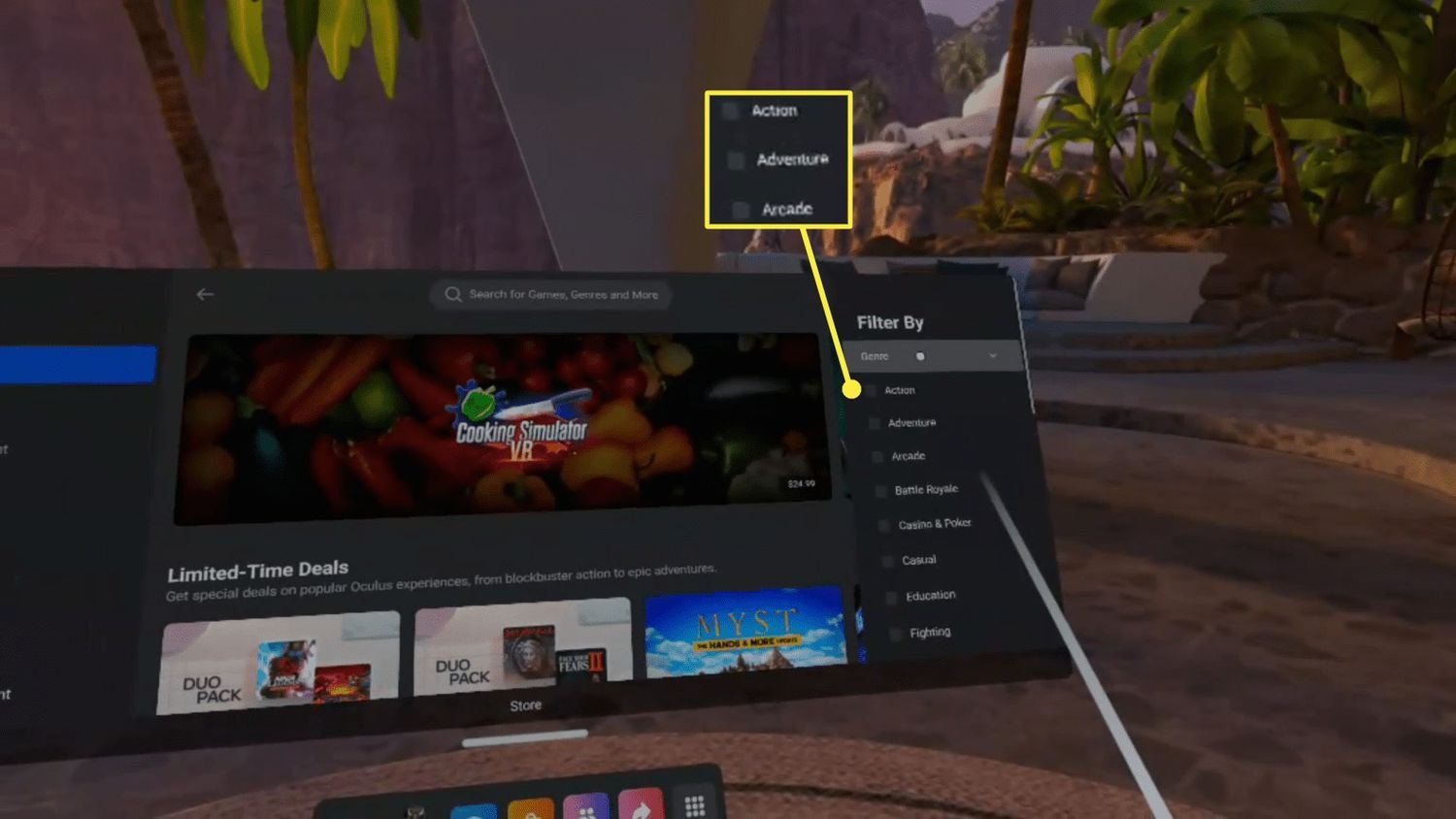
To buy VR games, you typically purchase them through a digital store associated with your VR headset, like the Oculus Store, SteamVR, or PlayStation Store.
Ever wondered how do you buy vr games? It’s a common question for newcomers eager to dive into virtual reality. The process is quite straightforward once you know the basic steps.
Typically, you’ll access a digital store on your VR device or computer. From there you can browse the available titles, select the games you want, and complete the purchase.
Different headsets use different stores, so keep that in mind. Once purchased, you can download and start playing your new virtual world.

How Do You Buy VR Games?
Okay, so you’ve got your awesome VR headset ready to go, and you’re itching to jump into some amazing virtual worlds. But how do you actually get those cool VR games you see everyone playing? It might seem a little confusing at first, but don’t worry! Buying VR games is pretty straightforward once you know the ropes. This guide will walk you through everything you need to know, from choosing your platform to actually hitting that purchase button.
Choosing Your VR Platform
Before you can buy any games, you need to know what kind of VR system you have. This is super important because games are designed to work on specific platforms. Think of it like buying a video game; a game for a PlayStation won’t work on an Xbox, and the same goes for VR.
PC-Powered VR
If you have a VR headset like the Oculus Rift, HTC Vive, or Valve Index, you’ll be using a computer to power your virtual adventures. These headsets connect to your gaming computer, which does all the heavy lifting for the visuals.
- SteamVR: This is a big hub for many VR games. If you have a PC-powered headset, chances are you’ll be using Steam a lot. It’s like a giant online store for games.
- Oculus Store (for Oculus Rift): If you have an Oculus Rift, you will likely use the Oculus store for many of your games. It has games made specifically for their platform.
To buy games for these platforms, you will usually download a launcher program onto your computer.
Think of it like getting a game on your computer. you need to have a Steam launcher for playing steam games, you need to have a EPIC games launcher for playing epic games. Same goes here
Standalone VR Headsets
Standalones are VR headsets that have all their computing power built right in, no computer required! Think of the Meta Quest series. These are very popular. This means it’s much simpler to get into VR. They also have a separate store for the games.
- Meta Quest Store: If you have a Meta Quest, Quest 2, Quest 3 or Meta Quest Pro, this is where you will be buying most of your games. The app store is included in the headset itself.
The standalone headsets have their own app store built into the system. You don’t need to use a computer to purchase or play games, everything is handled through the headset. It’s like buying an app on your phone.
Understanding Game Stores
Just like regular video games, VR games are available in digital stores. Here is a quick rundown of the most common places you’ll be shopping for your VR adventures:
Steam
As mentioned before, Steam is huge! It has tons of VR games for PC-powered headsets. It’s a great place to start looking for a good selection of games at various prices. You can find indie gems and big-budget experiences.
- User Reviews: Steam has a fantastic user review system. This is super useful to see if others think the game is fun. Pay attention to what people are saying.
- Sales: Steam often has sales, so keep an eye out for discounts! Wishlisting games helps you get notified when they go on sale.
You will need to have Steam installed on your computer to use the Steam store for buying games.
Meta Quest Store
The Meta Quest store is the main marketplace for standalone Meta Quest headsets. This store has many high-quality games built specifically for the Meta Quest’s hardware. Everything is streamlined in the device itself.
- Easy Access: You can browse and buy games directly from your headset.
- Curated Content: Meta carefully picks and checks games on the store, so you can usually count on good quality.
- Bundles: Meta often offers game bundles which can be a good way to save money if you like several of the included games.
Other Smaller Stores
Sometimes, you might find VR games on other platforms like:
- Viveport: This is a subscription service where you can access a range of VR games. It’s worth checking out for the variety of titles.
- Itch.io: This site is a great place for indie game developers. You can discover some unique and unusual VR games here.
Each of these stores works in a similar way, and you can use them if you want to explore more options.
How To Actually Buy a Game
Okay, so you have a platform, you know the stores. Now let’s dive into the actual process of buying the game. It is quite simple actually. Here is how it goes:
Browsing and Searching
First, head to the store of your chosen platform. You can search for specific games, browse by category, or see what’s popular. Here are some tips:
- Read Descriptions: Take your time to read the game descriptions and see if they seem fun.
- Watch Trailers: Videos and trailers help to give you a quick look at gameplay.
- Check Compatibility: Make sure the game works with your particular VR setup. Some games need a more powerful computer or specific controllers.
- User Ratings: See how others rate the game. A lot of good reviews mean the game is probably going to be fun.
Adding Games to Your Cart
Once you’ve found a game you like, you’ll see a button that says something like “Add to Cart” or “Buy Now”. Click on that button to add the game to your shopping cart.
Think of it like putting your groceries in your shopping cart when you go to the store. You can continue adding games and go to the next step once you are ready.
The Checkout Process
Once you’ve added all the games you want to buy, it’s time to checkout. Here’s what that usually involves:
- Payment Options: You’ll have a few options to pay: credit/debit cards, PayPal, or sometimes other payment options.
- Billing Information: You will need to add your billing address.
- Confirmation: Double check everything is correct before confirming the purchase.
Once you confirm everything, the store will process the payment. You will get a digital copy of the game.
Downloading Your Game
Now the fun begins! After buying your game, you will need to download it. The game will start downloading automatically.
- Check Download Size: Look at the game’s file size. Some games can be quite large and will take time to download.
- Stable Internet: Make sure you have a good, stable internet connection to prevent interruptions during the download process.
- Free Space: Ensure you have sufficient free space on your device or computer for the game.
Launching and Playing Your Game
Once the game has downloaded, it will be ready to play! Follow the instructions to launch the game from your store library or your headset.
Tips For Smart VR Game Buying
Before you start clicking ‘buy’ on everything that looks cool, here are some helpful tips for buying VR games:
Read the Reviews
User reviews are invaluable. Take a look at what people say about the game before spending your money. Pay special attention to:
- Gameplay: Do people enjoy the way the game plays?
- Bugs: Are there any glitches or issues reported by other players?
- Comfort: Is the game comfortable to play in VR? Some VR games can cause motion sickness.
Check Game Compatibility
It’s crucial to make sure that the game works with your headset and your computer specs. Some PC VR games need a powerful computer to play well.
- Minimum Specs: Look for the “minimum requirements” section on the game page. Check your computer’s specifications against these requirements.
Take Advantage of Sales
Like other game stores, VR game stores often have sales and deals. Keep an eye out for these promotions to save some money.
- Wishlists: Add games to your wishlist to get notifications when they are on sale.
- Holidays/Special Events: Big sales usually happen around holidays and special events.
Start with Demos
Some games have demos or free trial versions. Try these out first before purchasing to make sure you actually like the game. This is a great way to test a game without spending any money.
Consider Subscriptions
If you play a lot of games, subscription services might be a good option. Viveport offers a library of games for a subscription fee.
Research Game Genres
Figure out what types of games you like best! Are you into action games, puzzle games, or story-driven experiences? Knowing your preferences will help you find games you enjoy.
Join VR Communities
Joining VR communities and forums is an awesome way to find great game recommendations. Talk to other VR players, ask for advice, and get some insight on which games are worth it.
Free VR Games
Yes, you read it right! There are some great free VR games out there. You can find free games on platforms like Steam and even on the Oculus store. Here is what you can expect to get:
Steam Free Games
Steam has a selection of free VR games, ranging from fun little experiences to fully fleshed out games. You can try some really nice games, without having to pay any money.
Oculus Store Free Games
The Meta Quest store also has a selection of free VR games and applications. These games can be a nice introduction to the world of VR games.
Why are Games Free?
Developers might make games free to:
- Showcase the possibilities of VR.
- Get their name out there and build an audience.
- Offer a smaller experience or demo of a bigger game.
What to do if Something Goes Wrong
Sometimes, technology can be a little tricky. Here’s what you should do if you encounter any problems:
Game Won’t Download or Install
If you have problems downloading or installing a game:
- Check your internet connection: Make sure your internet is working.
- Check disk space: Make sure you have enough free space on your device or computer.
- Restart: Try restarting your computer or device and the download program.
Game is Not Working
If the game won’t start or is having problems:
- Check your game compatibility: Make sure the game is compatible with your VR headset.
- Update: Make sure your game and the store launcher are updated.
- Restart: Try restarting your computer or your VR headset.
Contact Customer Support
If the problem persists, don’t be afraid to contact the game store’s customer support. They can usually help solve any problems that you might encounter.
Buying VR games is all about understanding your platform, finding your favorite stores, and picking the right games for you. Remember to read reviews, check compatibility, and keep an eye out for good deals. Have fun exploring the amazing world of VR gaming!
Endless FREE Quest 2 Games! #metaquest #quest #virtualrealityheadset
Final Thoughts
You acquire VR games primarily through digital stores associated with your headset. These platforms, such as SteamVR, Oculus Store, or PlayStation Store, offer a wide selection. Simply browse, select, and purchase the game using your account.
How do you buy VR games? It’s a straightforward digital transaction. Payments are typically done via credit card or through digital wallets. Game installation begins immediately after your purchase.

