
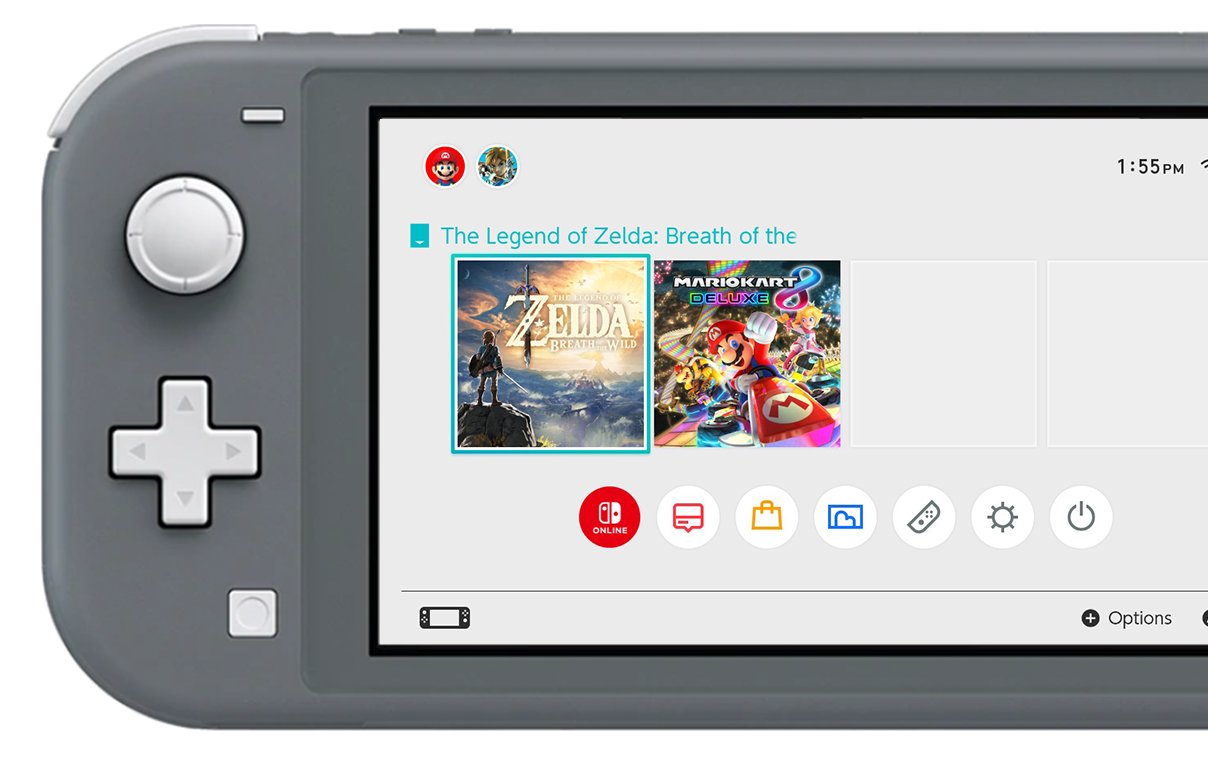
You get games for your Nintendo Switch Lite by purchasing them digitally through the Nintendo eShop or by buying physical game cartridges from retailers.
So, you’ve got a Nintendo Switch Lite and you’re eager to dive into some amazing games. The burning question is: how do you get games for nintendo switch lite? It’s a common question for new owners and thankfully, it’s quite straightforward.
You have a couple of options, primarily choosing between digital downloads or physical game copies. Both methods provide access to a huge library of entertainment.

How Do You Get Games for Nintendo Switch Lite?
So, you’ve got a shiny new Nintendo Switch Lite! It’s perfect for gaming on the go, right? But now you’re probably wondering, “How do I actually get some cool games to play on this thing?” Don’t worry, getting games for your Switch Lite is actually pretty easy, and there are a bunch of different ways you can do it. Let’s dive in and explore all the options you have for building your very own gaming library.
Digital Downloads: The Nintendo eShop
The most common way to get games for your Nintendo Switch Lite is by downloading them directly from the Nintendo eShop. It’s like a digital store for games right on your console! Here’s how it works:
Connecting to the Internet
First things first, your Switch Lite needs to be connected to the internet. You’ll do this through your Wi-Fi network, just like your phone or laptop. Here’s the simple process:
- Go to the home menu of your Nintendo Switch Lite.
- Select “System Settings” (the gear icon at the bottom).
- Choose “Internet.”
- Pick your Wi-Fi network from the list.
- Enter your Wi-Fi password if needed.
Once connected, you’re good to go!
Navigating the Nintendo eShop
Now, let’s get to the store itself! To open the eShop:
- Go to the home menu.
- Select the orange shopping bag icon which is the “eShop”.
You will find yourself in the main screen of the Nintendo eShop. There are different areas to look through:
- Search: If you already know the specific title, use this to find the game.
- Featured: Nintendo showcases their new or highlighted games here.
- Current Releases: Check out this section for the very latest games that are available.
- Best Sellers: See what the most popular games are at the moment.
- Deals: Want to find some bargains? Check here for games that are on sale.
Purchasing Games
When you find a game you want, here’s what to do to buy it:
- Select the game.
- Look for “Proceed to Purchase,” or something similar.
- Choose your payment method. You can use credit cards or Nintendo eShop cards.
- Follow the steps to complete the transaction.
Once the purchase is done, the game will begin to download onto your Switch Lite. You can keep an eye on the progress on the home menu.
Advantages of Digital Downloads
- Convenience: Games are always available on your console as long as you have space. You don’t have to carry around game cards.
- Instant access: You can buy and start playing a new game right away.
- Sales: The eShop frequently has sales and special offers, making games affordable.
Disadvantages of Digital Downloads
- Storage Space: Digital games take up space on your Switch Lite’s internal storage. You might need to get a microSD card to add more space.
- Can’t be Resold: Once you have digitally purchased a game, it’s tied to your account and you cannot sell it.
Physical Game Cards: The Traditional Way
Another way to get games for your Nintendo Switch Lite is by buying physical game cards. These are small, plastic cards that contain the game data. This is like the old days of video games! Here’s a detailed breakdown:
Where to Buy Physical Game Cards
You can find Nintendo Switch game cards at many different places:
- Major Retail Stores: Stores like Walmart, Target, and Best Buy usually have a good selection of games.
- Gaming Stores: GameStop or other video game specialty stores are great if you want to see more niche or older titles.
- Online Retailers: Amazon, eBay, and other online marketplaces are places where you can buy new or used physical game cards.
- Used Game Stores: Check out places that deal in used media. They often have a decent game section where you might find a good deal.
Inserting a Game Card
Putting a game card into your Switch Lite is simple:
- Look at the top of your Nintendo Switch Lite.
- You’ll see a small slot covered by a little door.
- Open the small door.
- Take the game card and align the label to face the same way as the screen of your Switch Lite.
- Push the game card all the way into the slot until you feel a little click.
You’ll see the game’s icon appear on your Switch Lite’s home menu and you can just click on that to start playing.
Removing a Game Card
When you want to remove a game card:
- Make sure that you are not playing the game.
- Gently push the game card in a little bit further.
- The card will pop out a little and you can now take the game card out of the console.
- Close the game card slot’s little door.
Advantages of Physical Game Cards
- Collectible: Some people like to have the physical case and artwork of their games.
- Resale Value: If you’re done playing a game, you can sell or trade your physical copy with your friend or online.
- Don’t use up storage: The game data is on the card, not taking up space on your Switch Lite.
Disadvantages of Physical Game Cards
- Can get lost: Physical game cards are small and easy to misplace.
- Need to be swapped: You have to physically change game cards to switch between different games.
- Price: Physical games can sometimes be more expensive than their digital counterparts, depending on where you are looking to buy them.
Nintendo Switch Online: Accessing a Growing Library of Games
Nintendo Switch Online is a paid subscription service that has a lot of perks. One big benefit for players is access to a large library of classic games!
What is Nintendo Switch Online?
Think of Nintendo Switch Online like a membership. When you subscribe to the service, you get lots of benefits, including:
- Online Play: Ability to play games online with friends and other players.
- Cloud Saves: You can back up your game progress in case anything happens to your console.
- Access to Classic Games: Play a growing library of NES and SNES games.
- Exclusive App Access: Gain access to the Nintendo Switch Online app which enables voice chat.
- Special Offers: Sometimes, you get special deals and discounts on other games.
How to Subscribe
- Go to the home menu of your Nintendo Switch Lite.
- Select the “eShop” icon.
- Go to the menu on the left hand side of the eShop.
- Scroll down until you see “Nintendo Switch Online.”
- Follow the instructions to choose a plan and pay for the service.
Accessing the Classic Game Libraries
Once you are subscribed, accessing the classic games is easy.
- Go to the home menu of your Nintendo Switch Lite.
- You will find icons for the NES and SNES apps.
- Click on one and you will see all the available games.
- Just choose a game and start playing!
Expanding your Game Collection with Nintendo Switch Online
Nintendo Switch Online is a wonderful option for anyone wanting to play retro classics and expand their collection without paying for each game individually. It gives you the chance to enjoy old favourites and discover some new games.
Free-to-Play Games: Enjoy Gaming Without Spending Money
Yes, you can have fun without spending money! There is a number of good quality free-to-play games that are available on the Nintendo eShop. These games are completely free to download and play. Here are some common types of free-to-play games:
- Fortnite: One of the most popular games on any platform, which is a battle royale experience.
- Apex Legends: Another popular battle royale style shooter.
- Warframe: A very well-made action-adventure game that has a strong fanbase.
- Fall Guys: A fun-filled multiplayer game that is a great experience with others.
Finding Free Games on the eShop
Finding free games is easy enough. You can find them in the eShop’s dedicated sections or you can just use the search function.
- Go to the eShop.
- Go to the search bar at the top of the screen.
- Type “free-to-play” or “free games” to find all available games in this category.
Important points about free-to-play games
Even though the games are free to start playing, they often have some of the following elements in the game.
- In-game purchases: Many free-to-play games have optional in-game purchases that allow you to buy virtual items like skins and other cosmetic items.
- Microtransactions: Some games have microtransactions to purchase in-game advantages. You may not want to do this if you don’t want to spend any money.
Demo Games: Try Before You Buy
You may be interested in trying a game before spending money on it! Some developers offer free demo versions of their games on the eShop. These demos let you play a part of the game, so you can see if you like it.
Finding Game Demos
- Open the eShop.
- Look through the “Search” function or “Current Releases” section.
- Some games will have an option saying “Download Demo”.
Demo Limitations
Demos are usually limited by one or more of these restrictions:
- Play time: They may only let you play for a certain amount of time.
- Content: You may not be able to access the whole game. Demos often restrict which areas or characters can be played.
Sharing Games with Friends: How it works
If you have friends who also own Nintendo Switch consoles, you can sometimes share games. This works best with physical games. Here’s how:
- Borrowing Game Cards: You can borrow a physical game card from your friend and play it on your Switch Lite.
- Lending Game Cards: You can also lend your physical games to others.
Remember, with digital games that are linked to an account, sharing is not straightforward and is not usually supported by Nintendo.
Keeping Track of Your Games
As you build your game library, it’s important to keep track of everything. Here are a few tips for keeping things organised:
Digital Games
Your digital games are always tied to your Nintendo Account, and they will appear on your Switch Lite home menu. You can arrange the game icons in the order that you want to keep things organised. You can also archive digital games you are not playing and then download them again at any time.
Physical Games
- Game Cases: Keeping your physical game cards in their cases helps protect them from damage and keeps them organised.
- Storage: You can also use game card storage cases if you have a number of physical games.
MicroSD Cards: Expanding Your Storage
If you are looking at buying a lot of digital games, the Switch Lite’s internal storage can fill up quickly. You can add extra storage space with a microSD card.
Buying a MicroSD Card
When you are buying one of these cards, look at these points:
- Compatibility: Your Switch Lite will use a microSD, microSDHC or microSDXC card.
- Size: Depending on how many digital games you want, you can choose a size from 64GB all the way to 1TB.
- Speed: The speed rating of the card is important for how fast games load. A card with a rating of UHS-I should be enough.
Inserting a MicroSD Card
- Make sure your Switch Lite is turned off.
- Open the stand on the back of your Switch Lite.
- You’ll see the microSD card slot at the bottom of the stand.
- Put the microSD card into the slot until it clicks in place.
- Close the stand.
Now your Switch Lite has extra space for games and other data.
Getting games for your Nintendo Switch Lite is easy. Whether you prefer the convenience of digital downloads, the joy of physical game cards, or exploring free-to-play titles, there’s something for everyone. Happy gaming!
How to Download Any Free Games on Nintendo Switch Lite
Final Thoughts
You get games for Nintendo Switch Lite primarily through the Nintendo eShop, a digital store available directly on the device. You can browse and purchase games for instant download. Physical game cartridges also work; you just insert them into the slot.
These are the two main ways you acquire software. Remember, how do you get games for Nintendo Switch Lite? It’s either by digital purchase or buying physical cartridges. It is quite straightforward.

