
To invite someone to a game on PS4, go to the game’s menu, select their name from your friends list, and choose “Invite to Game.”
Ever been ready for a game night, but unsure how to get your friends in on the action? It can feel frustrating when you just want to play together. The question of ‘how do you invite someone to a game on ps4’ often pops up, especially if you’re new to the console.
This quick guide will walk you through the super simple process. No more waiting around, it’s time for some serious gaming. Let’s get started now and see how easy it is to invite your friends into your virtual world.

How Do You Invite Someone to a Game on PS4?
Playing games with friends is one of the most fun things you can do on your PlayStation 4 (PS4)! It’s awesome to team up or compete against each other. But sometimes, figuring out how to invite your friends to join your game can feel a little tricky. Don’t worry! This guide will show you all the different ways you can send game invites on your PS4, making it easy to play with anyone you want. We will cover everything from the simple, direct invites to some of the more helpful features that PlayStation offers. Let’s get started!
Inviting Through the Quick Menu
The Quick Menu is your go-to for fast actions on the PS4, and it’s super easy to send invites from there. Think of it like your PS4’s shortcut menu.
How to Access the Quick Menu
First, while you’re in a game, press the PlayStation button on your controller (that’s the one with the PlayStation logo in the middle). This will pop up the Quick Menu on the left side of your screen. This menu has lots of helpful options, but we’re going to focus on inviting your friends.
Sending an Invite from the Quick Menu
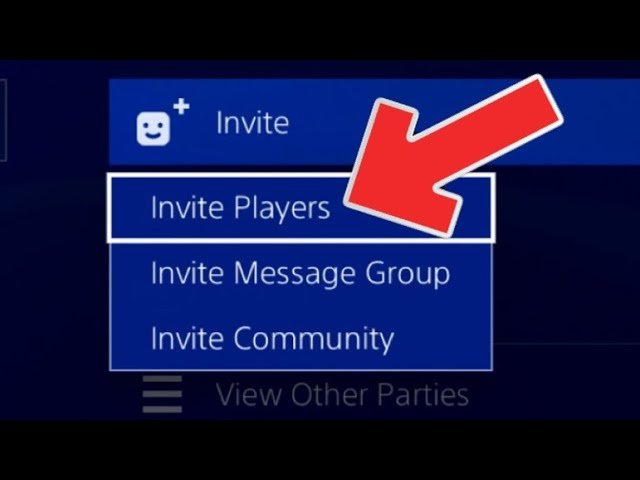
Once the Quick Menu is open, use your controller’s left stick or the directional buttons (D-pad) to navigate through the options. You should see an option called “Party”. Select this option. Now you have a few options. You will see the ‘Start Party’ button, if you are not already in a party, or your existing party. You can either create a party, if you want to play and chat with more than one friend, or if you have an existing party with your friends, you can select it. Now, Select “Invite Players.” This will open up a list of all your friends. Scroll through the list, find the friend you want to invite and then select that friend. After selecting your friend, a game invite will be sent to that friend if the game you are in is able to be joined by other players, and the recipient is eligible to join your game. If the friend is not online, you can still send an invite but they will receive it when they are online. It’s that simple!
Things to Remember About the Quick Menu
The Quick Menu is accessible while you’re playing a game, making it super fast to invite people.
You can see who is already in your party or start a new one from here.
The party feature allows you to voice chat with your friends while playing.
Inviting Through the Friends List
Another straightforward method is to invite friends directly through your Friends list. This is a reliable option, especially if you are not yet in a game.
Accessing Your Friends List
To access your Friends list, press the PlayStation button on your controller. This will take you back to the main screen of your PS4. Use the left stick or directional buttons to navigate to the “Friends” icon. It’s usually the one with the two stylized people. Select it and you will be able to see your list of friends.
Sending an Invite from the Friends List
Once in your Friends list, find the friend you want to play with. Select that friend and you will be taken to their profile page. On the profile, you’ll see a few options, including “Play Game.” If your friend is online and playing a game that allows for invites, the “Play Game” option will be available. Select this option and then you can choose “Invite to Game.” After you’ve clicked the button, the game invitation will be sent to the friend you chose. They will see a notification on their PS4. If that friend is not online, or playing a game that allows for invites, that invite option will not be available.
Friend List Insights
You can see who is online and what they are playing.
You can manage your friend requests and block players.
It’s a good way to quickly see if your friends are available to play.
Using the Game’s Built-in Invite System
Some games have their own in-game systems for inviting friends. This can sometimes be easier to use, especially if the game has many players online.
Finding the In-Game Invite Option
The exact steps for using a game’s built-in system differ from game to game. Generally, you can find it by pausing the game or by going into the game’s menus. Look for options like “Invite Friends,” “Multiplayer,” or “Party.” The wording may vary, but the idea is the same, that is inviting others to the same game that you are playing. You will generally find this option in the multiplayer section of the game. The button may be different as well, but it is often a button you can press to open your friends list directly from the game itself.
How to Use the Game’s System
Once you’ve found the in-game invite option, you will most likely be presented with a list of your PlayStation friends. Select the friend you wish to invite and press the correct button, as explained on the screen, to send them a game invitation.
In-Game System Perks
Often tailored to the specific game, making invites more relevant.
Sometimes includes options for inviting people to specific game modes.
Can be more convenient as you don’t need to leave the game.
Utilizing the Party Feature for Invites
Parties are a great way to play and communicate with multiple friends simultaneously. You can invite everyone in a party to your game all at once.
Starting a Party
To create a party, go to the Quick Menu (by pressing the PlayStation button) and select the “Party” option. If you don’t already have a party, click “Start Party”. Then you can add any of your friends, that are online, to your party. When you’ve added everyone, you’ll have your party screen.
Inviting Party Members to a Game
If you’re in a game that allows for multiple players, you can invite your party members by starting the game and then selecting the “Invite to Game” option from the party menu. Or if you are already in the game, then you can select “Invite Players” from the party menu. This will send out an invite to everyone in your party to join the game you are playing.
Party Feature Advantages
Easily invite multiple friends at once.
Voice chat is integrated so everyone can talk while playing.
Great for playing games where teamwork is key.
Understanding the Different Types of Game Invites
Not all game invites are the same. Some may lead to different game modes or may have certain restrictions.
Game-Specific Invites
Some games have specific types of invites that are unique to that game. For example, you may be able to invite friends directly to a specific mission, map, or game mode.
Session-Based Invites
Sometimes, an invite will bring your friend into a session that has already started. This means they will join the game already in progress. Depending on the game, you may have to set up or start a new session for friends to join.
Public vs. Private Invites
Most invites are private and go directly to the friend you chose. However, some games may have the option to post game invites publicly, letting anyone join your game session. You should always be mindful of who can join your game, based on which invite you send.
Troubleshooting Common Invite Problems
Sometimes invites don’t work as expected. Here are some common issues and how to fix them.
Invite Not Appearing
If your friend doesn’t get the invite, first, make sure they are actually online and that they have a stable internet connection. Also, double-check that you have sent the invite to the correct person. Sometimes, closing the game and restarting it can fix the problem. Make sure the game and your PS4 are up-to-date with the latest patches and system updates. Also, a friend may have their notification settings configured in a way that prevents them from receiving game invitations from others. Make sure to check with your friend as they may have to change their settings to receive game invites from other players.
Game Compatibility Issues
If your game doesn’t allow for invites, or your friend is not eligible to join the game, then you will not be able to invite that friend into that specific game. Be aware that some games don’t allow players to join mid-game, or have other limitations. Also, a game may require the recipient to have a particular level, or progress, before they can join a game session. And make sure that you both have the most up to date version of the game.
NAT Type Conflicts
Sometimes, if you or your friend have certain NAT types on your internet connection, it can cause problems with invites. You can adjust your internet settings to change your NAT type. A NAT type of 1 or 2 is generally better than NAT type 3. Generally, if you are unsure about adjusting your NAT type, you should get assistance from a network professional.
Further Troubleshooting Steps
Restart your PS4 and router.
Check the PSN status for server problems.
Contact PlayStation Support if problems persist.
Tips for Better Inviting Experiences
Let’s go over some tips to make the invitation process smoother.
Communicate with Your Friends
Use messaging on the PS4 to coordinate game times with your friends. It can be helpful to decide beforehand which game you are going to play, and who is going to host, so that everyone knows what is going to happen. This ensures that when you send an invite, the other person is ready to receive it. You can do this through messages on the PSN network, or using the chat feature in a party.
Be Aware of Game Limitations
Some games have limits to how many players can join, so be aware of this when inviting people. Some games also require you to have a particular amount of game progress before you can invite friends.
Check Game Settings
Sometimes, game settings can affect invites, such as the privacy options for game sessions. Make sure that your game settings allow your friends to join your sessions, and also make sure that your privacy settings on PSN allow you to receive and send invites.
Use the PlayStation App
You can use the PlayStation App on your phone to send game invites and coordinate with your friends even when you’re not on your PS4. This app is handy when you want to set up a game session ahead of time.
Inviting friends to play on your PS4 is a great way to have fun and make the most of your gaming experiences. By using the Quick Menu, your Friends list, or the game’s built-in invite system, you can easily get your friends in on the action. Make sure to communicate, understand any game limitations, and adjust settings as needed to ensure everything goes smoothly. Remember that playing with friends is what makes gaming so enjoyable.
How To Send Game Invite On PS4 – Full Guide
Final Thoughts
To invite a friend, navigate to your PlayStation’s main menu. Select ‘Friends’ then choose the friend you want to invite. Next, go to their profile and select ‘Invite to Game’. This sends them a notification.
They must accept the invite to join your gameplay. The process is straightforward. This simple method answers ‘how do you invite someone to a game on ps4’. This is the must process you have to use.

