
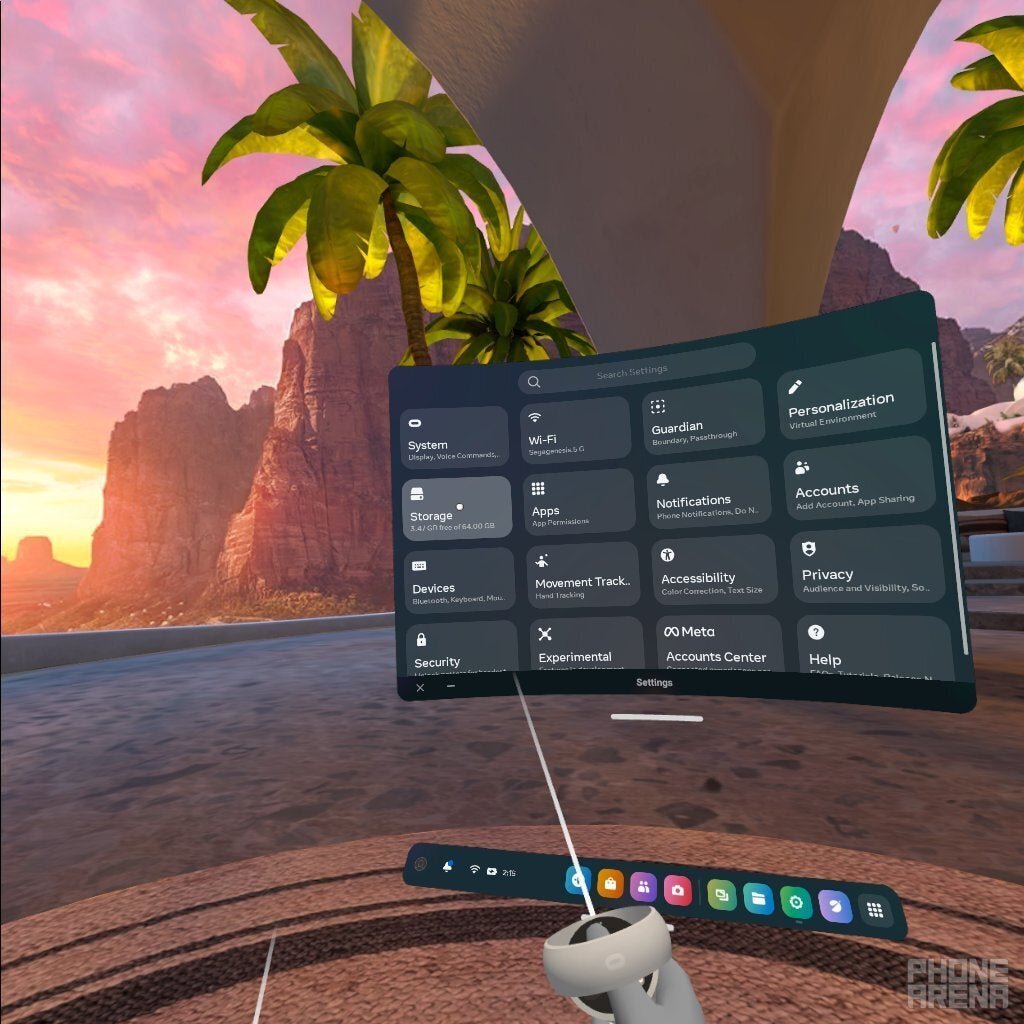
The number of games a 128GB Oculus Quest 2 can hold varies, but you can typically expect to fit around 20-30 average-sized VR games.
Ever wondered how many games can oculus quest 2 128gb hold? It’s a common question for new and seasoned VR gamers alike. Storage can become a precious commodity quite fast, particularly with larger titles.
The exact number really depends on game size; some games are small, while others are much larger. So, you can’t get a definite one-size-fits-all answer, but this is a good ballpark to guide you.

How Many Games Can Oculus Quest 2 128GB Hold?
Okay, so you’re super excited about your Oculus Quest 2, and you’re itching to fill it with awesome VR games! You’ve got the 128GB version, which is a great choice, but you might be wondering just how many games you can actually cram into that space. It’s a really good question because those VR experiences can take up more storage than you might think. Let’s dive in and figure out exactly what you can expect.
Understanding Storage Space on Your Quest 2
First things first, it’s important to know that the 128GB advertised on the box isn’t exactly what you have available for games and apps. A little bit of space is used up by the operating system and other essential software. So, you’re not starting with a completely empty 128GB hard drive. Think of it like buying a new bag of chips. It might say “large,” but some of the space is taken up by the bag itself!
The actual usable storage space is typically around 120GB or slightly less. This is still a large amount of space but it’s good to keep that in mind when you’re planning your game library. When you install a game, it needs room to exist on your device, and it can also require additional space for updates and save data. Over time, this can add up.
Game Size: The Key Factor
The size of a VR game is not like the size of a phone app. VR games are larger because they require lots of high-quality graphics and audio to create immersive experiences. Think of it like comparing a small drawing to a huge, detailed painting. The painting needs a lot more space!
Game sizes can vary a lot. Some simple games can be less than 1 GB, while others, such as graphically-intense simulations or big adventure games, can easily surpass 10 GB. Some of the most popular games, like Beat Saber or Superhot VR, aren’t usually the largest games, but games with a lot of content, like The Walking Dead: Saints & Sinners or Medal of Honor: Above and Beyond can take up a significant amount of storage.
Typical Game Sizes You Might Encounter:
- Small Games: 0.5GB – 2GB (e.g., some puzzle games, simple rhythm games)
- Medium Games: 2GB – 5GB (e.g., many adventure games, some action games)
- Large Games: 5GB – 10GB+ (e.g., games with open worlds, lots of high-quality assets, and complex simulations.)
Estimating How Many Games You Can Install
Okay, so how does this translate into how many games you can realistically hold on your 128GB Oculus Quest 2? Let’s try to make an estimate. Let’s say we have our 120 GB space, and we will try to give an overview of it with different game sizes. The number of games you will be able to store is an estimate and will change based on your own usage.
- Only Small Games: If every game you install is only a couple of gigabytes you could store up to 60-80 small games.
- Only Medium Sized Games: A game that takes up 3-4 GB means you could probably fit about 30-40 games before filling up your device.
- Mixture of Large and Small: If you like to play those bigger, more impressive games, you will not be able to fit too many before running out of space. You could possibly store 5-10 games with an average of 7-10GB.
Remember, it’s likely you’ll have a mix of different sizes. Maybe a few big blockbuster titles, a bunch of medium-sized adventure games, and some quick-play, smaller titles. Because of this mixing, a good rule of thumb is that you can probably fit between 20 and 40 games on your 128GB Quest 2, but this can be very different based on the specific games you download.
Here is an illustration to show a potential scenario:
| Game Size | Average Size | Number of Games | Total Size |
|---|---|---|---|
| Large (AAA) | 8 GB | 5 | 40GB |
| Medium (Adventure) | 3 GB | 15 | 45GB |
| Small (Puzzle/Rhythm) | 1 GB | 10 | 10GB |
| Other (Apps) | 2GB | 5 | 10GB |
| Total | – | 35 | 105GB |
As you can see, using an assortment of game sizes means you are able to fit a large number of games. However, if you decided that you wanted to play several large and graphically impressive titles, then you would need to make sure to uninstall games to create space for them.
Managing Your Oculus Quest 2 Storage
Running out of space on your Oculus Quest 2 isn’t the end of the world. The good news is you can manage your storage space by uninstalling games you’re not playing anymore. Here’s how you can do it:
Uninstalling Games
- Go to your Oculus menu.
- Select ‘Settings’.
- Select ‘Storage’.
- Here, you will see all the apps and games currently installed on your device, with how much space they are taking up.
- Select the game or app you want to remove.
- Select ‘Uninstall’.
By uninstalling games, you can clear up space to make room for new ones. Don’t worry, you can always download them again later, as long as you still own them on your account. The download times can be affected by internet speed, but it’s a great way to keep your device from getting too cluttered.
Other Ways to Keep Your Storage Organized
- Regularly Check Storage: Make a habit of checking your storage every so often. Knowing how much space you’re using will help you be strategic about what you keep installed.
- Prioritize Games: If you know you’re going to be playing a new game, consider which games you can remove to make space. That way, you can fit a new game on without removing a number of games.
- Cloud Saves: Luckily, most of your game progress is saved in the cloud, so you don’t need to worry about losing your place. This means you can uninstall games without worrying about losing hours of hard work!
The Importance of Considering Updates
Another thing that is important to remember when estimating how many games your device can hold is that games receive updates regularly. These updates often add new content, improve performance, or fix bugs. However, they also usually increase the size of the game. A small update may not be noticeable, but a large content update could add another gigabyte or two to the overall size.
This means that your 128GB space will slowly be used over time. It is important to plan ahead for these updates and make sure that you have the space for your favorite games to update so you can continue playing them! It’s a good idea to leave some extra space available so these updates don’t cause your device to run out of storage.
Tips for Making the Most of Your Storage
Here are some extra tips that will make sure you can make the most of your 128 GB space.
- Check Game Sizes Before Downloading: Before downloading a large game, check how much space it takes up. This will give you a better idea of what to expect. You can do this by viewing the details of the game in the Oculus Store.
- Use Cloud Storage: As mentioned, most game saves are stored in the cloud. This means you don’t need to keep all of your games installed all the time, which allows you to store a larger library overall.
- Manage Media: Photos and videos you take on your Quest 2 will also take up storage. Consider using cloud storage or moving these files to a computer to save space.
- Consider an External Drive: Although the Oculus Quest 2 doesn’t officially support external storage, this is something you may be able to look into in the future. However, this is currently more relevant to side-loaded content.
- Free Up Storage Regularly: Even when you think you have plenty of space, it’s a good habit to look through your installed content and uninstall anything you don’t need.
Do You Need More Storage?
If you find yourself constantly uninstalling games, or you have a particularly large collection, you may want to consider if the 256 GB version would be a better fit for you. Although the 128 GB version is a fantastic option, the 256 GB version will give you even more space for all of your VR games. If you plan on playing many large games, or have a huge library of small ones, then that would certainly be something to keep in mind. You may even be able to sell your 128GB device to fund the upgrade.
Of course, you do not need to buy the 256 GB version to enjoy VR gaming. The 128GB is more than sufficient for most users. Knowing how to manage your space effectively will allow you to play many different titles over time.
In conclusion, while the exact number of games you can store on your 128GB Oculus Quest 2 will vary depending on game sizes, it’s generally a good amount of space for the average player. Understanding how to manage your storage by uninstalling old games and regularly checking the storage space will help you get the most out of your device. Remember, you can always reinstall games that you own, so you can experience a variety of games.
128gb vs 256gb Which OCULUS QUEST 2 should you buy?
Final Thoughts
A 128GB Oculus Quest 2 can hold a varied number of games. The exact number depends on individual game file sizes. Larger, more complex titles occupy more storage space.
Smaller, less graphically intensive games use considerably less. Users typically install somewhere between 20 and 40 games before filling the storage. Therefore, this directly answers the question: how many games can oculus quest 2 128gb hold?

