
You can game share with one other person on the PS5.
Ever wondered how many friends can jump into your digital library on the PS5? It’s a common question, especially when trying to maximize your gaming budget. So, exactly how many people can u game share with on ps5? Let’s dive straight into it.
The PS5’s game sharing feature lets you share your digital library with a single other console. This means you designate one other PlayStation 5 as your “console share” device. This offers great opportunity for playing your collection.

How Many People Can You Game Share With on PS5?
Let’s dive into the exciting world of game sharing on the PlayStation 5! It’s a great way to let your friends and family enjoy your digital games without everyone needing to buy their own copies. But, like any good sharing system, there are some rules about how many people can use it at once. Understanding these limits will help you make the most of game sharing and avoid any frustrating situations.
Understanding PlayStation 5 Game Sharing
First, let’s break down how game sharing actually works on the PS5. PlayStation refers to this feature as “Console Sharing and Offline Play.” Essentially, you’re designating a specific PS5 as your “primary” console. This means that all other accounts on that primary PS5 can play your games, even when you’re not logged in or if the console isn’t connected to the internet. This is a pretty cool feature, allowing everyone in your household to play your purchased games without needing multiple profiles linked to your primary account.
The magic happens through your PlayStation Network (PSN) account. When you buy a digital game, it’s linked to your account. The “Console Sharing and Offline Play” setting lets another PS5 access those games. This feature extends beyond just games; it also applies to other content like digital movies and tv shows you might purchase through the PlayStation Store. The great thing about this system is that it is made for households with multiple users.
The Key Setting: Console Sharing and Offline Play
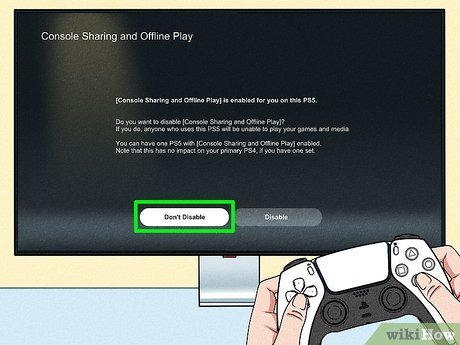
To start sharing your games, you need to enable the “Console Sharing and Offline Play” feature on one PS5. Here’s how you do it:
- Go to Settings on your PS5.
- Select Users and Accounts.
- Choose Other.
- Select Console Sharing and Offline Play.
- Click Enable to activate console sharing.
Important! You can only have one PS5 activated as your primary console at any given time. If you activate a new PS5 as your primary, the old one will be deactivated, and any users playing on the old console can lose access to games that were originally purchased by the account used to activate a different console as the primary. This also applies to the users currently playing the game that are using the primary console.
The One-Account, One-Primary Limit
So, here’s the important part: While you can have multiple accounts on a single primary PS5 that can play games through your main account, you can only enable the “Console Sharing and Offline Play” feature for one console at a time. This means only users on that single PlayStation 5 can play games purchased by you through game sharing. Even though multiple accounts can have your games access, the access is still only limited to one console as primary. So how many other consoles can you game share with? Zero, game sharing only allows you to designate one single primary console.
Think of it like a library. You, as the game purchaser, own the book (the game). You can share that book with anyone in your household who visits the library (the primary console) but can not allow anyone outside of your household that is located in different library to borrow that book. This limit is to prevent people from sharing their games with all their friends and acquaintances. The idea is to keep people purchasing game as well. If it was easy to share games with many people, there would be less incentives for people to purchase games.
What This Means for Your Gaming Circle
This one-primary console limit means you can’t game share with multiple friends who have their own PS5s. You can’t make your friend’s PS5 the primary console for your account while your PS5 is already set as a primary device. If you attempted this, it would deactivate your own primary console for the friend’s, thus not allowing your family members at home to enjoy your games. This can be a bit tricky if you were hoping to share with a lot of people, but that’s not how the game share system is designed.
Here’s a practical example:
- You have a PS5 at home. You set it as your primary console and enable game sharing.
- Your brother also has a PS5 at his house.
- If you want your brother to play your games, he can only access them while logged into your account, so you would have to login to your account on his PS5 to allow him to access and download the game for your account on his console. He cannot use his account on his PS5 to play your games unless he is playing on the same console as yours which is set as primary and logged in to your account or unless he buys the game himself.
Playing Games on Your Non-Primary PS5
If your PS5 is not your primary console, you can still play your digital games, but it requires you to sign into your account. So it is different if another console is set to primary, rather than a secondary console playing on your account, in that the users on primary console can access all your games by logging into their own account, rather than yours. On a non-primary console, you will not be able to play your games if the console is offline. A non-primary console will always need to check with Sony servers to verify that you own the game. As long as your console can connect to the internet, you can play all the digital games that you own using your profile. If you have the physical copy of the game, you can still play your games on a non-primary console, even if the console has no access to the internet.
Account Switching
Another important thing to consider is account switching. While you are logged into a non-primary console, other people cannot use that same account on other devices, even other PlayStation devices. The system will lock the secondary account and force you to re-login in your secondary console. This is to prevent abuse of the game sharing feature. While you can access the game on your secondary console if you have access to internet, other people on the primary console, can also play all the games you bought by accessing those games on their own account, so multiple members of your household can play games that you have bought, even if they are playing at the same time.
The Benefit of Having a Primary Console
The primary console setting is incredibly useful for households with multiple people. Everyone on the primary PS5 can play your games without needing to use your account. This is a big convenience, as it allows for everyone to keep their own save data, trophy progress, and settings, while still being able to access and play the games that you bought. If you did not have the primary console feature, everyone in your household would be forced to use your account, which would not be ideal. Additionally, everyone on your primary console can play your games, even if you are not online or playing the games on your account. If you have more than one PS5 in your household, deciding which one to mark as primary is important, to allow everyone who lives there to have access to the games purchased.
Tips for Managing Your Primary Console
Here are a few handy tips to help you manage your primary console:
- Choose Wisely: Carefully select which PS5 you want as your primary, as you can only have one active at a time. This should be the console that is mostly used by members of your household.
- Plan for Travel: If you plan to travel with your PS5, remember it might not always be your primary console when you get back home if you activate another PS5 as the primary. It’s best to keep your primary console consistent if possible.
- Deactivate if Necessary: If you sell your PS5 or give it to someone else, make sure to deactivate it as your primary console first. You can deactivate the console via the methods shown above.
- Account Safety: Remember to keep your account and passwords secure. This protects your game library and prevents unauthorized access to your PSN account.
The Limitation of the System
While the game share system is great for family and household members, it has its limitations, and it is not designed to allow sharing with multiple friends at multiple households. Sony designed the game sharing system to be for household use, and for that goal, it does a very good job. If you have friends who want to play the games that you have bought, you will have to allow them to play at your own house, and you will have to allow them to log in to your account on their console. If you have physical disc versions of the game, you can always lend them the disc. But the game sharing system was not designed for sharing with multiple friends that live in different locations.
Alternative Options for Sharing Games
While you can’t directly game share with multiple friends on their own PS5s, there are some alternatives you might explore:
- Physical Discs: If you have games on physical discs, you can lend them to friends so they can play on their own consoles. This is the good old fashioned way that games were shared before online and digital purchases of games became prevalent.
- Play Together Online: Many PlayStation games offer multiplayer modes. You can still enjoy playing games together, even if everyone owns their own copy of the game.
- Playstation Plus: Having a PlayStation Plus subscription will allow you to have access to a large catalog of games. You can also share your PlayStation Plus benefits with other users of your primary console. While this does not allow for direct game sharing, it allows you and the members of your household to have access to a catalog of games.
Why the Limits?
So, why these restrictions? Sony puts these limitations in place to protect its games, and prevent game sharing abuse by having users purchase new copies of games instead of sharing them with multiple people. Without these rules, many more users would not buy any games, and instead rely on friends and family who have bought the game. This can impact sales and the overall game ecosystem. By keeping game sharing primarily within a single household, Sony tries to strike a balance between user convenience and fairness for game developers and publishers. So the goal of the system is to allow easy game sharing inside the household, while preventing users from easily sharing games outside of their household.
In short, you can game share with multiple accounts on one primary PS5. But you can only designate one console as your primary at a time, and therefore can only allow multiple users on that single console to game share using your purchases. While you can log into your secondary consoles and play the games that you purchased, you cannot game share with other users of a different secondary console without them having access to your account and being logged into it. Hopefully, this clarifies any confusion about the PlayStation 5 game sharing system!
How to GameShare on PS5 – OverSimplified (2024)
Final Thoughts
You can game share with one other person on your PlayStation 5. This feature lets you share your digital library with a friend. Both players can enjoy the games simultaneously.
Keep in mind that ‘how many people can u game share with on ps5’ is limited to this single sharing partner. Only one account can access your games this way.

