
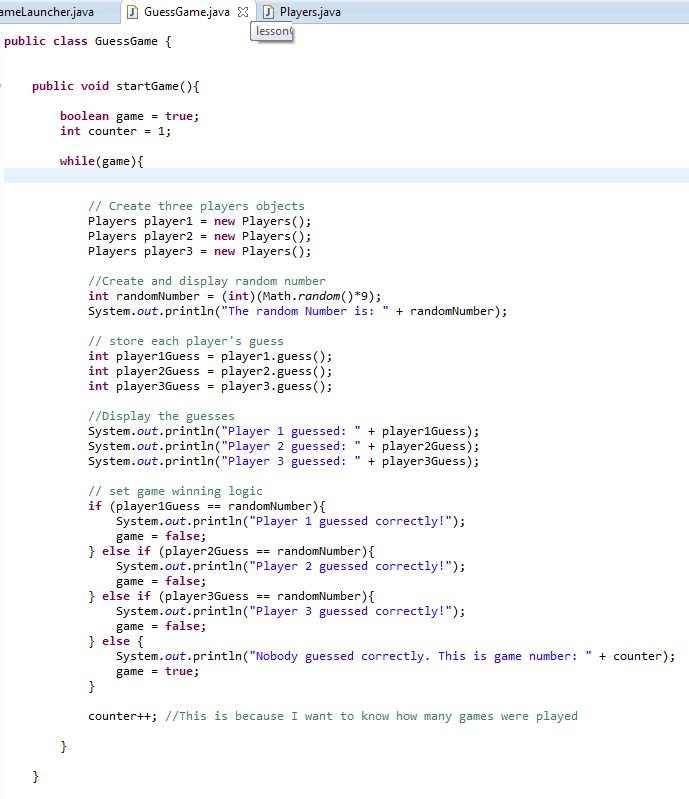
To add a guess counter to a game in Java, initialize an integer variable to zero. Increment this variable each time the player makes a guess. You can then display or use this variable as needed within your game logic.
Ever wondered how to add a sense of challenge or limit in your Java game? Implementing a guess counter is a simple yet effective way to do just that. This will help you track player attempts.
Adding this feature also can make your game more engaging by establishing boundaries and encouraging strategic thinking. Let’s explore how to add a guess counter to a game java.

How to Add a Guess Counter to a Game in Java
So, you’re making a cool game in Java, and you want to keep track of how many guesses your players are making? That’s a fantastic idea! A guess counter isn’t just about numbers; it adds a layer of challenge and fun to your game. It lets players see how well they’re doing and can even be used to make the game harder or easier. Let’s explore how to get this done, step-by-step.
Understanding the Basics: What is a Guess Counter?
Before we dive into the code, let’s make sure we’re all on the same page. A guess counter, simply put, is a variable that keeps a running total of how many attempts a player has made during a game. Every time the player makes a guess, we increase this counter by one. It’s a simple concept, but it’s a powerful tool for game design. Think of games like “Guess the Number” where you try to figure out the computer’s secret number. A guess counter tells you if you’re getting closer or if you need to rethink your strategy. It’s also very useful in games like Hangman, Wordle, or even more complex strategy games.
Setting Up the Initial Counter
First things first, we need to create a variable to store our guess count. We’ll use a variable of the int type (short for integer) since we’re dealing with whole numbers. Let’s call this variable guessCount and we should give it starting value 0. Because, before starting any game, user have to make any guess. We also need to have a game in which we will implement it. For simplicity, let’s use a very basic ‘Guess the Number’ game as an example. Let’s look at how we would set up our initial counter in Java:
 public class GuessingGame {
    public static void main(String[] args) {
        int secretNumber = 42; // The secret number the player needs to guess
        int guessCount = 0;    // Our guess counter, starting at zero
        int guess;

       java.util.Scanner input = new java.util.Scanner(System.in);

       System.out.println("Welcome to Guess the Number game!");

       do {
        System.out.print("Enter your guess: ");
        guess = input.nextInt();
        guessCount++;

          if(guess > secretNumber){
           System.out.println("Too High! Try Again.");
          } else if(guess < secretNumber){
           System.out.println("Too Low! Try Again.");
          }
       } while (guess != secretNumber);

       System.out.println("Congratulations! You guessed the number in " + guessCount + " tries.");
       input.close();
    }
}
In this code:
- int guessCount = 0; declares the variable that will keep track of the number of guesses. We initialize it to 0 because, at the start of the game, no guesses have been made.
Incrementing the Guess Counter
The heart of our guess counter lies in increasing its value each time the player takes a shot at guessing. This process is called incrementing. We do this by using the ++ operator or using guessCount = guessCount + 1. Let's incorporate this into our game loop. If you look at the previous code, you will find out that the guessCount++ is already there, so let's make it clear. Consider the code block below:
    do {
       System.out.print("Enter your guess: ");
       guess = input.nextInt();
       guessCount++; // Incrementing the counter
       // code for checking the guess
    } while (guess != secretNumber);
Here's how it works:
- After the player enters a guess, we use guessCount++; to increase the value of guessCount by one.
- The loop continues until the player correctly guesses the secretNumber.
Displaying the Guess Count to the Player
It’s great that we’re keeping track of the number of guesses, but the player needs to see it too! We can show the guessCount at any time but it’s particularly helpful after the player has made a guess. Let’s display the final guess count to the user once the game has ended:
System.out.println("Congratulations! You guessed the number in " + guessCount + " tries.");
This line of code prints a congratulatory message along with the total number of guesses the player took to win the game. By displaying the count, we give the player a sense of accomplishment and challenge.
Using the Guess Counter to Limit the Number of Guesses
Sometimes, you might want to give players only a limited number of tries. You can easily achieve that using our guessCount variable. We can combine the guessCount with conditional checks to stop a game when the player has reached a specific number of tries. Here’s how you can do that:
 public class GuessingGameLimitedTries {
    public static void main(String[] args) {
        int secretNumber = 42;
        int guessCount = 0;
        int guess;
        int maxTries = 5; // Maximum number of allowed tries
        java.util.Scanner input = new java.util.Scanner(System.in);

        System.out.println("Welcome to Guess the Number game! You have " + maxTries + " tries.");

        while (guessCount < maxTries) {
            System.out.print("Enter your guess: ");
            guess = input.nextInt();
            guessCount++;

            if (guess > secretNumber) {
                System.out.println("Too High! Try Again. You have " + (maxTries - guessCount) + " tries left.");
            } else if (guess < secretNumber) {
                System.out.println("Too Low! Try Again. You have " + (maxTries - guessCount) + " tries left.");
            } else {
               System.out.println("Congratulations! You guessed the number in " + guessCount + " tries.");
                break; // Player guessed correctly, exit loop.
            }
        }

      if(guessCount >= maxTries && guess != secretNumber){
       System.out.println("Sorry! You have used all " + maxTries + " attempts. The number was " + secretNumber);
       }
     input.close();
    }
}
- int maxTries = 5; sets the maximum number of guesses.
- The while (guessCount < maxTries) loop ensures that the game continues until the guess count reaches maxTries or the player guesses the number correctly.
- If the player doesn’t guess correctly after maxTries attempts, the game ends with a message showing the correct number.
Using Guess Counter in Different Types of Games
Guess counter is not just limited to number guessing games, but you can also implement in different games.
Word Guessing Game
Consider a Word Guessing game like Hangman. Here, a player guesses letters to find a hidden word. The counter increments when the player guesses an incorrect letter, and if the guess count reaches the maximum limit, then the player losses the game. Consider the code given below:
 import java.util.Scanner;
 public class WordGuessingGame {

   public static void main(String[] args) {
      String secretWord = "example";
      int maxTries = 6;
      int guessCount = 0;
      StringBuilder displayWord = new StringBuilder();

      for(int i = 0; i < secretWord.length(); i++){
        displayWord.append("_"); // initialize the display with underscores.
      }

      Scanner input = new Scanner(System.in);

      System.out.println("Welcome to the Word Guessing game!");
      System.out.println("Guess this word: " + displayWord);

       while(guessCount < maxTries && displayWord.toString().contains("_")){
        System.out.print("Guess a letter: ");
        char guess = input.next().charAt(0);
        boolean found = false;

        for(int i = 0; i < secretWord.length(); i++){
          if(secretWord.charAt(i) == guess){
           displayWord.setCharAt(i, guess);
           found = true;
          }
        }

        if(!found){
           guessCount++;
           System.out.println("Wrong Guess! " + (maxTries - guessCount) + " tries remaining.");
          }
        System.out.println("Word: " + displayWord);
      }

       if(!displayWord.toString().contains("_")){
       System.out.println("Congratulations! You guessed the word " + secretWord + " in " + guessCount + " tries");
       } else{
       System.out.println("Sorry! You couldn't guess the word. It was " + secretWord + ".");
       }
       input.close();
    }
 }
In this example:
- The guess counter increments when an incorrect guess is made, and the game continues until the player runs out of tries or finds out the secret word.
Multiple Choice Questions
If you are creating a game like quiz with multiple choices, then you can also use a guess counter. You can give the user a limited number of attempts and increase the guess counter every time when the user selects the wrong option.
 import java.util.Scanner;

 public class QuizGame {
     public static void main(String[] args) {
        String[] questions = {
                "What is the capital of France?",
                "What is 2 + 2?",
                "Who painted the Mona Lisa?"
        };

        String[][] options = {
                {"a) London", "b) Paris", "c) Berlin", "d) Rome"},
                {"a) 3", "b) 4", "c) 5", "d) 6"},
                {"a) Leonardo da Vinci", "b) Van Gogh", "c) Picasso", "d) Monet"}
        };
        char[] answers = {'b', 'b', 'a'};

        int maxTriesPerQuestion = 2;
        int score = 0;
        int guessCount = 0;

        Scanner input = new Scanner(System.in);

        for (int i = 0; i < questions.length; i++) {
            System.out.println("Question " + (i + 1) + ": " + questions[i]);
            for (String option : options[i]) {
                System.out.println(option);
            }

            guessCount = 0;
            char playerGuess;
            do {
                System.out.print("Enter your answer (a, b, c, or d): ");
                playerGuess = input.next().charAt(0);
                guessCount++;
                if (playerGuess == answers[i]) {
                    System.out.println("Correct!");
                    score++;
                } else {
                    System.out.println("Incorrect. You have " + (maxTriesPerQuestion - guessCount) + " tries left for this question.");
                }
            } while(playerGuess != answers[i] && guessCount < maxTriesPerQuestion);

             if(guessCount >= maxTriesPerQuestion && playerGuess != answers[i]){
              System.out.println("Out of attempts for this question. Correct Answer is " + answers[i]);
             }
        }

        System.out.println("Quiz completed! Your final score is: " + score + " out of " + questions.length);
        input.close();
     }
 }
Here, the counter increments each time when the user answers incorrectly. If the user answers incorrectly and attempts reach the max try limit, then that question becomes wrong, and it prints the correct answer. In this case, the guess counter is reset on each question and only limits the tries per question.
Advanced Use Cases for Guess Counters
While tracking and limiting attempts are the most common uses, you can get more creative with your guess counters. For example, you can provide hints to the player after a certain number of tries. For number guessing games, if the user make 3 incorrect attempts, you can give the hint like, if the hidden number is even or odd. Let’s take a look at the modified code.
 import java.util.Scanner;

 public class NumberGuessingWithHints {
   public static void main(String[] args){
        int secretNumber = 42;
        int guessCount = 0;
        int guess;
        int maxTries = 5;
        Scanner input = new Scanner(System.in);

       System.out.println("Welcome to Guess the Number game! You have " + maxTries + " tries.");

        while(guessCount < maxTries){
         System.out.print("Enter your guess: ");
         guess = input.nextInt();
         guessCount++;

         if(guess > secretNumber){
          System.out.println("Too High! Try Again. You have " + (maxTries - guessCount) + " tries left.");
           if(guessCount % 3 == 0)
            System.out.println("Hint: The number is less than " + guess);
         } else if(guess < secretNumber){
           System.out.println("Too Low! Try Again. You have " + (maxTries - guessCount) + " tries left.");
           if(guessCount % 3 == 0)
             System.out.println("Hint: The number is greater than " + guess);
         } else{
            System.out.println("Congratulations! You guessed the number in " + guessCount + " tries.");
             break;
          }
        }

        if(guessCount >= maxTries && guess != secretNumber){
          System.out.println("Sorry! You have used all " + maxTries + " attempts. The number was " + secretNumber);
        }
       input.close();
    }
 }
In the modified code, if the player makes 3 attempts and the number is still not guessed correctly, a hint is provided based on whether the last attempt was less than or greater than the secret number. This is done using the modulus operator %.
Key Principles for Effective Guess Counter Usage
- Clarity: Make sure the player knows how many guesses they have made and how many are remaining. Clear instructions and feedback make the game easier to play.
- Balance: Set an appropriate number of guesses for the difficulty of the game. Too few tries can be frustrating, while too many can make the game too easy.
- Feedback: Provide helpful feedback to the player. If you’re using a limited number of guesses, show how many tries they have left. If you're giving hints, do so at strategic points in the game.
- User Experience: Make sure that the output of the guess counter is in a human readable format. User should find it comfortable and easy to understand.
Implementing a guess counter in Java is straightforward, but it brings considerable improvements to your games. It helps to make games more engaging, challenging, and fun for players. So go ahead and add one into your project.
4.18. Random Number Guessing Game Enhancement - Java
Final Thoughts
To add a guess counter, initialize an integer variable to zero. Increment it each time a user makes a guess. Then, display the current count to the player. The game can use this counter to limit the number of attempts.
You can easily implement this within your game loop. Ensure the counter's value reflects the actual guesses made by the player. "how to add a guess counter to a game java" is actually a simple process. This mechanism adds structure and challenge to your game.

