
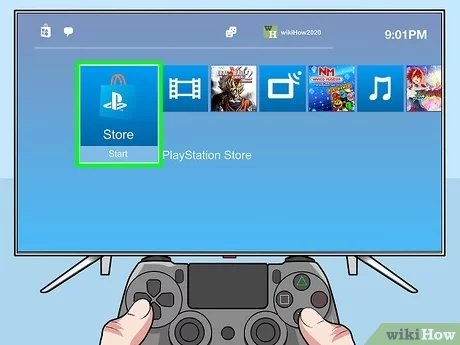
Buying PS4 games online typically involves visiting digital stores like the PlayStation Store, adding games to your cart, and completing the purchase with your payment method.
Ready to expand your PS4 gaming library? Knowing how to buy PS4 games online opens up a vast world of entertainment at your fingertips. You don’t even have to leave your couch to grab the latest releases.
This process is fairly simple and you can usually find great deals too. We’ll walk you through the steps, making sure you get your next game quickly and easily.

How to Buy PS4 Games Online
Buying PlayStation 4 games online is super easy and can save you a trip to the store. Plus, you often find better deals! It’s like having a giant video game store right at your fingertips. But with so many places to buy games, where do you even begin? Let’s explore all the different ways you can get your hands on the latest adventures for your PS4.
Understanding Digital vs. Physical Copies
Before we dive into specific stores, let’s quickly talk about the two main types of games you can buy: digital and physical. Knowing the difference is key to deciding what works best for you.
Digital Games
Digital games are downloaded directly to your PS4. You don’t get a disc; instead, the game is tied to your PlayStation Network account. Here’s what makes them special:
- Instant Access: You can start playing as soon as the game finishes downloading. No waiting for shipping!
- No Discs to Lose: Say goodbye to scratched or lost discs. Your games are stored safely on your console.
- Easy Switching: Switching between games is simple, just go to your game library.
- Pre-Loading: Many games allow you to download most of the game before it officially releases, so you can play right away on launch day.
- Take up Storage: Digital games take up space on your PS4’s hard drive, so you may need to consider external storage if you have a lot of games.
Physical Games
Physical games come on a disc. You need to insert the disc into your PS4 to play. Here are their perks:
- Collectability: Many gamers like having physical copies on their shelves, especially if they are special editions.
- Trade and Sell: You can trade or sell physical games when you’re done playing them.
- Doesn’t Take up Storage: Physical copies don’t use up your PS4’s storage space.
- Less reliant on Internet: If your internet is slow or unreliable, physical games are the perfect option.
- Disc Required to play: You need to have the disc in the console to play the game.
So, which type is right for you? It depends on what you value most. If you like convenience and having games always available, digital is great. If you like collecting or the ability to trade or sell games, then physical is the right path.
Where to Buy PS4 Games Online
Now, let’s get to the good stuff: where you can buy these games! There are several reputable places, each with its own perks.
PlayStation Store (Digital Games)
The PlayStation Store is the most obvious place to buy digital games. It’s built right into your PS4. You access it from the main menu. Here is what makes it special:
- Direct Access: It’s the official store, so you get games directly from the source.
- Easy to Use: The interface is user-friendly and simple to navigate.
- Frequent Sales: The store often has sales and discounts. Be sure to check regularly.
- Pre-orders: You can pre-order upcoming games and sometimes get bonus content.
- PS Plus Benefits: PlayStation Plus members get extra discounts and free monthly games.
How to Buy on the PlayStation Store:
- Turn on your PS4 and make sure it’s connected to the internet.
- Go to the PlayStation Store icon on the main menu. It looks like a shopping bag.
- Browse or search for the game you want.
- Click on the game and review the details (price, storage size etc.)
- Add the game to your cart.
- Go to checkout and use your payment method of choice.
- The game will start downloading once your payment is confirmed.
Amazon (Digital and Physical Games)
Amazon is a popular choice for both digital and physical games. It offers a lot of convenience and variety. Here are some of the reasons it’s good:
- Wide Selection: Amazon has a very large collection of new and used games.
- Customer Reviews: You can read reviews from other buyers before making a decision.
- Fast Shipping: If you’re getting a physical copy, Amazon often has quick delivery.
- Competitive Prices: Amazon often has good deals and promotions.
- Digital codes: Amazon sells digital codes which you can redeem on PS store, some people prefer this because of the convenience.
How to Buy Games on Amazon:
- Go to Amazon’s website or app.
- Use the search bar to look for the game you want, making sure to select PlayStation 4.
- Check if the game is physical or digital.
- For physical, add the game to your cart and complete the purchase, then wait for the item to be shipped.
- For digital, you will usually receive a code or download link, which you can redeem on the Playstation Store.
Best Buy (Physical Games)
Best Buy is another great place to buy physical PS4 games, especially if you’d like to pick them up in person or if you also want to purchase other electronic items at the same place. Here’s why it’s a good option:
- Physical Store Presence: If you want to buy the game in person, you can easily do so with best buy.
- Rewards Program: Best Buy has a rewards program that can give you discounts in the future.
- Trade-In Program: You can trade in your old games for credit toward new ones.
- Reliable Service: Best Buy is known for good customer service.
- Sales: Best buy have sales throughout the year which allows you to get the games on a discount.
How to Buy Games on Best Buy:
- Go to Best Buy’s website or use their app.
- Search for the PS4 game you want.
- Select if you want it to be shipped or pick it up at a store near you.
- Add it to your cart and complete the purchase.
GameStop (Physical and Used Games)
GameStop is a good place to buy used games, especially if you are on a budget. Here’s what you should know:
- Used Games: GameStop sells used games which can be cheaper than new games.
- Trade-In Program: You can trade in your old games for store credit or cash.
- Physical Stores: They have many store locations across the country.
- Sales and Promotions: GameStop often offers deals and promotions.
- Variety of games: They carry a lot of games, new and used.
How to Buy Games on GameStop:
- Go to GameStop’s website or use their app.
- Search for the game you want.
- Choose if you want a new or used copy.
- Add it to your cart and complete the purchase.
Other Online Retailers
Don’t forget about other retailers! There are many other sites where you may find games, each with their own advantages:
- Walmart: Like Amazon and Best Buy, Walmart sells new games and has delivery options.
- Target: Target also carries games both online and in physical store.
- Ebay: You might find used games on Ebay from other users. Be sure to check the seller’s rating.
- Newegg: Primarily known for computer parts, Newegg also carries games sometimes.
Tips for Buying PS4 Games Online
Buying games online can be exciting, but it’s always smart to make good decisions. Here are some tips to help you get the best experience:
Compare Prices
Don’t jump at the first price you see! Take the time to compare prices from different retailers. Prices can vary, and you might find a better deal by shopping around.
Check for Sales
Many stores have regular sales, especially around holidays. It’s worth checking if the game you want is on sale. You might find a significant discount if you are patient.
Read Reviews
Before buying a game, read what other players have said about it. Reviews can give you an idea of whether you’ll actually enjoy the game. Be sure to check the rating of the game from the official store and game critics if the game is new.
Understand Return Policies
Make sure you know the return policy of the store you’re buying from. This is especially important for digital games, which might not be returnable once they’re downloaded.
Be Aware of Region Locks
Physical PS4 games are region-free, so you can use games from one country on a console from another. But digital games can sometimes have region-based DLC (downloadable content) so make sure the game you are purchasing is compatible with your console region.
Secure Payment Methods
Make sure you are using secure payment methods and buying from reliable websites. Don’t give your credit card information to a website that looks suspicious.
Check System Requirements
Although unlikely for PS4 games, always make sure that the game you are buying will work on your console. Some games may be optimized for PlayStation 4 Pro.
Be Mindful of Used Games
If you buy a used game, make sure it is in good condition and has all the components such as disc or case. If you buy from a trusted retailer like Gamestop, you won’t have to worry that much because they usually check the conditions of these used games.
Digital Game Storage
Digital game takes a lot of storage in your PS4, so make sure you have enough space. If you don’t, you might need to delete old games or buy an external hard drive.
Understanding PlayStation Plus
If you are serious about PlayStation gaming, getting a PlayStation Plus subscription is a great idea. It gives you many benefits that are well worth the money.
Monthly Free Games
Every month, PS Plus subscribers get free games that they can play as long as they have an active subscription. These are games that are completely free for you to play and can sometimes be very good AAA titles.
Online Multiplayer
If you like to play games with your friends online, you’ll need PS Plus for that. This lets you join or play with others in multiplayer mode.
Exclusive Discounts
PS Plus members also get special discounts on some games and DLC on PlayStation Store, which can help you save a lot of money over time.
Cloud Saves
Your game save data can be backed up in the cloud if you have PS Plus. This means you won’t lose your progress if your console breaks.
Buying games online is a fantastic way to get the games you want at a good price. Whether you prefer the convenience of digital downloads or the thrill of having physical games, there are plenty of options available. Remember to compare prices, read reviews, and be smart about where you buy from. With a little bit of research, you can have a library of great PS4 games to keep you entertained.
How To Buy A Game On The PS4
Final Thoughts
To purchase PS4 games online, you can visit the PlayStation Store directly on your console or through their website. Browse titles, add them to your cart, and complete the payment using your preferred method. Digital downloads become available immediately.
Alternatively, many retailers like Amazon and Best Buy also offer codes for digital games. These codes get redeemed in the PlayStation Store. Physical copies are easily bought through such sites.
Remember to check ratings and reviews before you buy. This helps you make an informed purchase. Now you know how to buy ps4 games online with ease and confidence.

