
To buy Switch games in the Japan eShop, you need a Japanese Nintendo account and either a Japanese eShop gift card or a payment method accepted in Japan.
Want access to exclusive titles and early releases? Figuring out how to buy Switch games in Japan eShop can feel tricky, but it is achievable. Many gamers want to get their hands on regional releases.
You simply need a few specific tools. You’ll need to create a new Nintendo account set to Japan, a Japanese eShop gift card or a compatible payment option that works in Japan. This allows you to navigate the process smoothly.

How to Buy Switch Games in the Japan eShop
So, you’re excited to play those awesome Japanese Nintendo Switch games, but you’re not sure how to get them? Don’t worry, it’s easier than you might think! This guide will walk you through all the steps to purchase games from the Japanese eShop, even if you’re not in Japan. Let’s dive in and get you playing!
Why Buy from the Japan eShop?
You might be wondering, “Why go through all the trouble?” Well, the Japan eShop often has games that aren’t available in other regions. Sometimes, games are released there much earlier, or they might have special versions or exclusive content that you just can’t find anywhere else. Also, some gamers love playing games in their original language, especially if they’re studying Japanese. It adds a special charm to the game! So, accessing the Japan eShop provides you with a wider variety of games and a unique gaming experience. Think of it as getting a sneak peek at what’s popular in Japan’s gaming scene!
What You’ll Need Before You Start
Before we jump into the steps, let’s make sure you have all the necessary tools. Don’t worry; these aren’t complicated at all:
- A Nintendo Switch: This one’s obvious! You’ll need your Nintendo Switch console.
- A Nintendo Account: You should already have one, but you’ll need to create a new one specifically for Japan.
- An Internet Connection: You’ll need a stable Wi-Fi connection to download games.
- A Payment Method: This is where things get a little more interesting. We’ll go over options like Japanese Nintendo eShop gift cards and other methods in the next section.
- A little patience: Sometimes things can take a few minutes, so be ready to go at a gentle pace.
Creating Your Japanese Nintendo Account
The first major step is making a Japanese Nintendo Account. This account will be your key to accessing the Japanese eShop. Here’s how to do it:
Step-by-Step Guide to Creating a Japanese Nintendo Account
- Visit the Nintendo Account Website: Go to the official Nintendo Account website using your computer or phone.
- Start a New Account Creation: Click the option to create a new account.
- Choose Japan as Your Region: This is very important! When asked for your country, be sure to select Japan.
- Fill in Your Details: Enter your date of birth, and then create your user name, create a password and enter your email address. You don’t need a Japanese address or phone number here.
- Agree to Terms: Check the box to agree to the terms and conditions.
- Verify Your Email: Nintendo will send you an email with a verification code. Enter this code to verify your account.
- Link Account to Your Switch: Go to your Nintendo Switch. Select “System Settings,” then “Users,” and add a new user. Choose “Sign In & Link” and use the login you just made. Now you have a Japanese account on your Switch!
Navigating the Japanese eShop
Now that you have your Japanese Nintendo Account set up, let’s look at how to get around the Japanese eShop on your Switch:
Switching Between Accounts
You can easily switch between your accounts on the Nintendo Switch. When you select the eShop icon, you will be asked which account you want to use. Just choose your Japanese account when you want to visit the Japan eShop.
Exploring the eShop
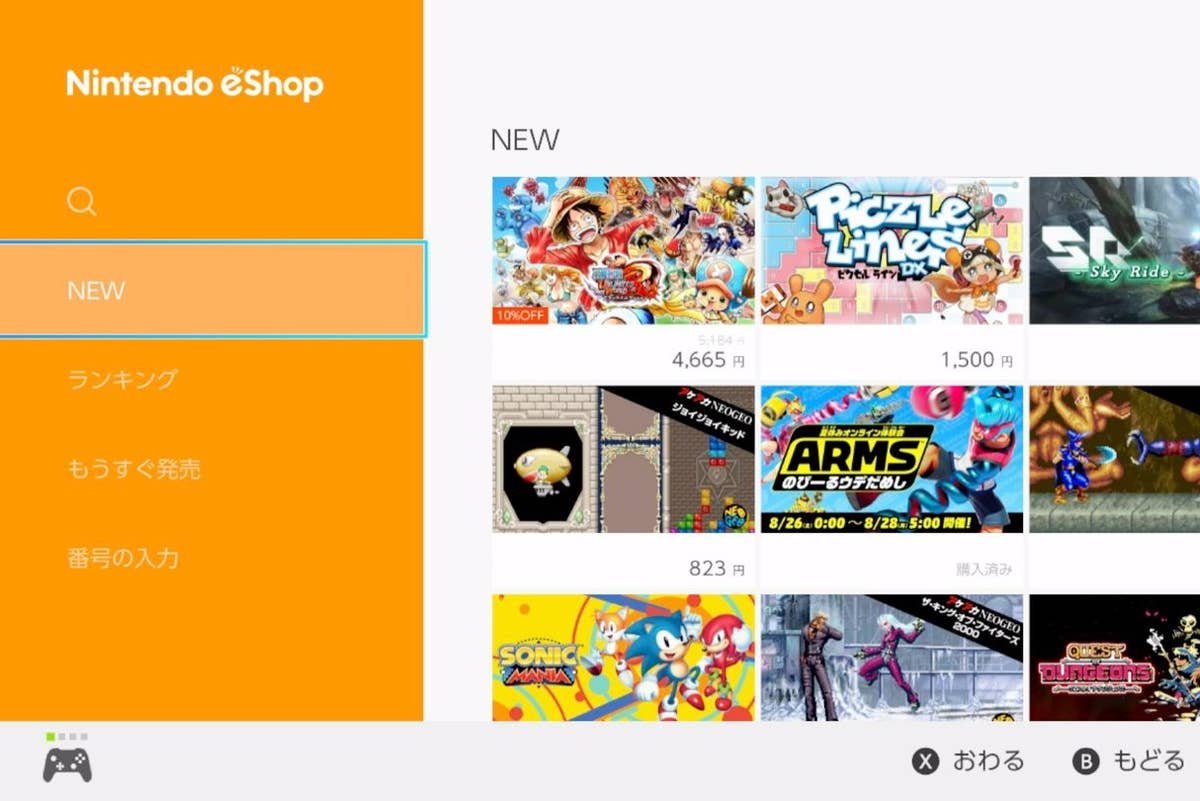
Once you’re in the Japanese eShop, things might look a bit different. Don’t panic! Here’s a quick guide:
- The Language: Everything will be in Japanese, obviously. But the icons and pictures are often pretty clear, so you can still navigate around without knowing Japanese.
- Categories: Look for the usual game categories, like “New Releases,” “Coming Soon,” or “Top Downloads.” The pictures will give you a good idea of what each category is about.
- Game Pages: Clicking on a game will take you to its specific page. Here, you can often see screenshots, trailers, and more.
- The Search Bar: You can use the search bar if you know the title of the game you want. You can also search in English, sometimes they have English titles listed.
Payment Methods for the Japan eShop
This can be a tricky part, as your regular credit or debit card may not work on the Japanese eShop. So, what can you use to pay? Here are your options:
Japanese Nintendo eShop Gift Cards
This is the most popular and often the easiest way to buy games from the Japan eShop. You can buy these gift cards from online retailers like Playasia, Amazon Japan (requires a Japanese address for shipment, unless it’s a digital code), or other specialist websites. Here’s how they work:
- Purchase a Gift Card: Buy a gift card online for the amount you need. These come in various denominations (like 1000, 3000, 5000, or 9000 yen).
- Receive Your Code: You’ll usually get a digital code sent to your email.
- Redeem the Code: On your Switch, go into the eShop and find the “Redeem Code” option. Enter the code from your email, and the funds will be added to your Japanese Nintendo Account.
- Use the Funds: You can now use the funds to buy games.
Other Payment Options
While gift cards are the most straightforward, here are some other methods to consider:
- Some Credit Cards: Some people report that some international credit cards may work, but this can be very unpredictable, and it’s generally not reliable.
- PayPal: You might be able to use PayPal with certain workarounds, but it’s not officially supported by the Nintendo eShop, so it’s not the best method.
Which Payment Method Should You Choose?
For most people, Japanese Nintendo eShop gift cards are the best way to go. They are easy to obtain, reliable, and you don’t have to worry about credit card issues. Always remember to buy from reputable sources.
Purchasing Your Game
Now that you have your funds ready, let’s purchase your game! Here’s how to do it step-by-step:
Step-by-Step Guide to Buying a Game
- Find Your Game: Browse or search for the game you want.
- Select Your Game: Click on the game to go to its page.
- Add to Cart: Click the button that looks like a shopping cart (usually located on the right).
- Proceed to Checkout: Go to your cart and click the button to start the checkout process.
- Confirm Your Purchase: Follow the prompts, and the game will start downloading to your Switch.
Understanding Japanese Game Ratings
Before you buy a game, you might want to know its rating. Just like in your region, Japan has its own rating system. Here’s a simple guide to help you understand:
Japanese Game Rating System
- CERO: This is the main rating system in Japan. Games are rated by the CERO (Computer Entertainment Rating Organization).
- CERO A: Suitable for all ages.
- CERO B: Suitable for ages 12 and up.
- CERO C: Suitable for ages 15 and up.
- CERO D: Suitable for ages 17 and up.
- CERO Z: For adults 18 years and older (often contains strong content).
Managing Your Downloads
Once you purchase a game, it will start downloading to your Switch. Here’s how to manage your downloads:
Checking Your Download Progress
- Home Menu: On your Switch’s home menu, look for the game icon. You’ll see a download progress bar underneath it.
- Download Management: You can view your downloads in more detail by going to the eShop, then selecting your profile icon and “Redownload.”
Playing Your Game
Once the download is finished, you can start playing! If a game has language options, you can choose which language to play in. However, many Japanese games only have Japanese language text and audio.
Important Things to Keep in Mind
Before you get carried away buying all those fantastic Japanese games, here are a few important things to remember:
- Game Region: Keep in mind that some game DLC (Downloadable Content) and online features may be region-locked, and you might need the Japanese version of the game to use them. Always make sure you’re getting the correct version if you plan on playing with others online or want DLC.
- Language Barrier: If you don’t know Japanese, playing Japanese games can be more challenging. Some games have English language options, but it’s important to check beforehand.
- Gift Card Safety: Always buy eShop gift cards from trusted and secure websites.
- Account Security: Remember to keep your Nintendo Account information safe and secure.
Buying games from the Japan eShop opens up a world of exciting gaming opportunities. While it might seem a little tricky at first, it becomes easy with a little bit of guidance. Enjoy exploring all the amazing games that the Japanese eShop has to offer, and happy gaming!
How To Download Japanese Nintendo Switch Games from the Japanese eShop Region-Free
Final Thoughts
To buy games on the Japanese eShop, you need a Nintendo account set to Japan. A prepaid card purchased online works effectively to add funds. Alternatively, you can acquire Japanese eShop gift cards through various retailers.
Remember, a VPN might be necessary for some functions. Once funds are added, you can easily purchase and download your desired games. This process simplifies how to buy switch games in Japan eShop.

