
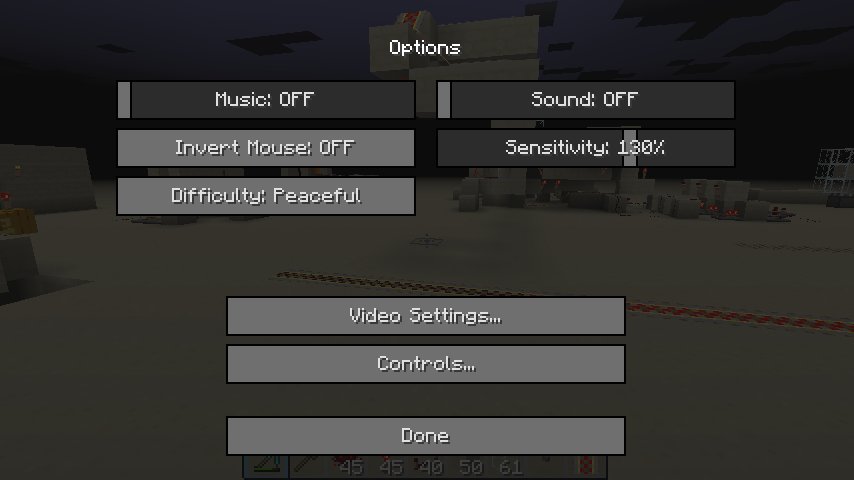
Changing game difficulty in Minecraft is done through the game settings menu, where you can select from Peaceful, Easy, Normal, or Hard mode.
Ever found yourself battling endless creepers or perhaps wishing for a more relaxing building session? The good news is you control the challenge. Knowing how to change game difficulty in Minecraft is essential to tailoring your gameplay experience to fit what you’re in the mood for, from peaceful exploration to intense survival.
It’s very simple and adaptable. This ensures that regardless of your experience level, you’re playing at the setting that’s just right for you.

How to Change Game Difficulty in Minecraft
Minecraft is a super fun game where you get to build amazing things and go on awesome adventures! But sometimes, you might find that the game is too easy or too hard. Maybe the zombies aren’t spooky enough, or maybe the creepers are just too much to handle! Don’t worry, Minecraft lets you change how difficult the game is. It’s like choosing your own challenge level! This lets you enjoy the game at your own pace. Whether you’re a beginner builder or a fearless explorer, understanding how to change the difficulty in Minecraft can make your experience much more enjoyable.
Understanding Minecraft Difficulty Levels
Before we dive into how to change the difficulty, let’s understand what the different difficulty levels mean. There are four main difficulty settings in Minecraft. Each one affects things like how much damage you take from monsters, how hungry you get, and how often monsters appear. Let’s take a look:
- Peaceful: This is the easiest setting. There are no monsters at all! You also don’t get hungry, and your health regenerates automatically. It’s perfect for building and exploring without any threats.
- Easy: Monsters will appear, but they don’t do as much damage. You will get hungry, but not as quickly. It’s a good setting for beginners who want to try some combat without getting overwhelmed.
- Normal: This is the standard setting for most players. Monsters are more aggressive and do more damage. Hunger drains at a normal rate, so you have to eat to keep your health up.
- Hard: This is the most challenging setting. Monsters do the most damage and are the most aggressive. You get hungry very quickly. This mode is best suited for experienced players looking for a true challenge. Some things like zombies breaking down doors and creepers causing much bigger explosions are a possibility in this mode.
Changing Difficulty in Singleplayer Worlds
Changing the difficulty in your singleplayer worlds is pretty easy. Here’s how you can do it:
Using the Pause Menu
The easiest way to change the difficulty in your single-player world is using the pause menu while you’re already playing the game. Here are the steps you need to follow:
- Pause the Game: While playing in your single-player world, press the ESC key (on a computer) or the equivalent button for your device (like the Start or Options button on consoles). This will bring up the pause menu.
- Click on ‘Options’: In the pause menu, look for the “Options…” button and click on it.
- Find ‘Difficulty’: In the Options menu, you will see a setting called “Difficulty.” This will usually show what your current difficulty setting is.
- Change the Difficulty: Click on the arrow button next to the difficulty setting. This will cycle through the different difficulty options: Peaceful, Easy, Normal, and Hard. Click on it until you reach your desired difficulty setting.
- Confirm the Change: Once you’ve chosen your new difficulty level, close the Options menu. The game will automatically change the difficulty.
Using the Command Console
If you want to change your game difficulty in a quick manner, you can use the command console to change it, with this following steps:
- Open the Console: Press the / key on your keyboard. This will open up the chat console.
- Type the Command: Type in the command /difficulty [difficulty]. For example, if you want to change the difficulty to Easy, you would type /difficulty easy. Remember, you can also use the words “normal”, “hard” and “peaceful” to select these difficulties.
- Press Enter: Press the Enter key to execute the command. The game difficulty will immediately change.
Important Note: If you haven’t turned on “cheats” for your world, this command will not work. You can turn on cheats in the settings when creating a new world or by using the “Open to LAN” option (but be careful, this will also make the world accessible to others on your local network if you choose to allow cheats). If cheats are not enabled, you will receive an error message in the chat console.
Changing Difficulty on Multiplayer Servers
Changing the difficulty on a multiplayer server is a little different than changing it on a single-player world. Usually, you can’t change the difficulty on servers unless you are an operator. The operator role has the power to change the difficulty of the server.
For Server Operators
If you’re an operator or owner of a Minecraft server, you have the power to change the difficulty for everyone who plays on it. Here’s how you can do it:
Using the Console
- Access the Server Console: You’ll need to access your server’s console. This is usually through a website, a control panel, or a command line interface, depending on how your server is hosted.
- Enter the Command: Type in the command /difficulty [difficulty] in the console. For example, to change to Hard, type /difficulty hard. You can also use “easy”, “normal”, and “peaceful” as difficulty types.
- Execute the Command: Press Enter or send the command. The game difficulty will change for everyone on the server.
Using In-Game Commands
As a server operator, you can also change the difficulty while you are inside the Minecraft server as a player.
- Open Chat Window: Open the chat window by pressing the / key.
- Type the Command: Type /difficulty [difficulty] to change the server’s difficulty. Make sure to type this command correctly, or the game will fail to recognize the command. Use “easy”, “normal”, “hard” or “peaceful” as difficulty types for this command.
- Press Enter: Press the Enter key, and the server’s difficulty will change immediately.
For Regular Players
If you’re not a server operator, you cannot change the game difficulty. Only the server operator, or those with operator access, can do this. If you feel the game is too hard, or too easy, you should ask the server owner or server operator to change it.
Specific Difficulty Features
Each difficulty level changes the way certain aspects of Minecraft work. Let’s break them down:
Mob Behavior
- Spawn Rate: The higher the difficulty, the more mobs will spawn. This means you’ll encounter more zombies, skeletons, creepers, and other monsters.
- Aggression: Monsters are more aggressive on higher difficulties. They may chase you for longer distances and be harder to escape.
- Damage: Monsters deal more damage on higher difficulties, which means that a single hit can do a lot more harm. A zombie will cause a lot more damage in “Hard” mode, compared to the “Easy” mode.
- Special Abilities: On Hard difficulty, zombies can break down wooden doors, which makes it much harder to hide. And also, creepers have a larger explosion radius and do much more damage.
- Hunger: Your hunger drains faster at higher difficulties. This means you have to eat more often to keep your health up.
Peaceful Mode Specifics
- No Hostile Mobs: In Peaceful mode, hostile mobs do not spawn. This lets you build without worrying about getting attacked.
- Health Regeneration: Your health regenerates quickly. Even if you fall from a high place and get damage, your health will regenerate by itself.
- No Hunger: In peaceful mode you don’t even have a hunger bar, so you won’t need to eat any food at all.
Why Change Difficulty?
You might wonder why you would want to change the difficulty. Here are a few reasons:
- Personal Preference: Some players enjoy a challenge, while others prefer a more relaxed experience. Changing the difficulty lets you enjoy the game at the pace you like.
- Learning the Game: New players may want to start on Peaceful or Easy to get comfortable with the game’s mechanics before taking on the tougher challenges.
- Adjusting to a New Situation: You might want to switch to Peaceful to focus on building or exploring, then switch back to a higher difficulty for combat.
- Challenge Runs: Experienced players often enjoy challenging themselves by playing on Hard difficulty. Some players may even try using hard difficulty with added rules for additional challenge.
Tips for Different Difficulties
Playing on Peaceful
- Focus on Building: Take advantage of no mobs to construct massive structures and explore your creativity.
- Explore Without Fear: Venture into caves and the Nether without worrying about getting ambushed by monsters.
- Practice Building and Crafting: Use peaceful mode to learn how to build and craft all of the blocks and items in the game.
Playing on Easy
- Learn Combat: Practice combat with the weaker enemies and get comfortable using your weapons.
- Start Small: Begin with simpler buildings and slowly learn how to create better and bigger buildings.
- Experiment with Food: Learn which foods replenish your hunger the best.
Playing on Normal
- Build Defenses: Create secure structures with strong walls and doors to protect yourself from nighttime monsters.
- Craft Powerful Gear: Make use of the materials around you to craft swords, armors and other powerful gear.
- Manage Resources: Learn to gather and use resources wisely for crafting, building, and fighting.
Playing on Hard
- Plan Your Moves: Approach every situation with a strategy. You need to be extra careful when you’re on hard mode.
- Master Combat Techniques: Practice using shields, and different attacks to get used to combat.
- Be Resourceful: Use traps, potions, and all the resources you can find to help you survive.
It’s always a good idea to start on the normal or easy difficulty until you understand most of the game’s mechanics.
So, there you have it! Changing the difficulty in Minecraft is simple and very useful. Whether you want a relaxing building session or a pulse-pounding combat adventure, you can change the difficulty to suit your playstyle. Don’t be afraid to experiment with different settings to find what you enjoy the most. Have fun playing Minecraft!
How to change the difficulty in Minecraft
Final Thoughts
Changing difficulty in Minecraft is simple. Access game settings via the pause menu. You will find a difficulty option. Select peaceful, easy, normal, or hard mode.
Remember that switching modes impacts gameplay significantly. Peaceful prevents hostile mobs. Hard mode makes the game more challenging. It allows players to customize their experience.
So, how to change game difficulty in minecraft is straightforward. You can tailor gameplay to match your preference. This makes Minecraft accessible to everyone.

