
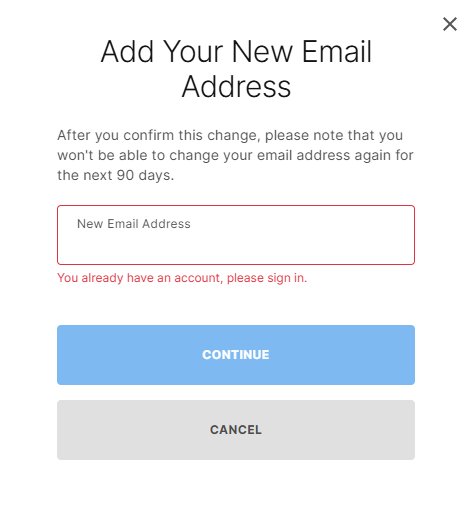
Changing your Epic Games email without a security code directly through account settings is generally not possible; you will typically need access to the security code for verification.
Frustrating, isn’t it? You want to change your Epic Games email but that pesky security code is missing or inaccessible! Many gamers find themselves in this situation and wonder how to change your epic games email without security code. It seems like a simple task, yet the required verification step becomes a major hurdle.
Unfortunately, Epic Games prioritizes account security, meaning bypassing this step isn’t straightforward. You’ll usually need to go through their official support channels for any assistance with this kind of issue to get it solved.

How to Change Your Epic Games Email Without Security Code
Okay, so you’re in a pickle. You need to change the email address linked to your Epic Games account, but that pesky security code is nowhere to be found. Maybe you lost access to the old email, or perhaps you never set up proper security in the first place (we’ve all been there!). Don’t panic; while it’s not always straightforward, it’s definitely possible to get your email updated. Let’s walk through the steps and explore your options, with clear, easy-to-understand explanations.
Understanding the Security Code Barrier
Before we jump into solutions, let’s talk about why Epic Games uses security codes. These codes are like a lock on your account, protecting it from unauthorized changes. When you try to change your email address, Epic Games usually sends a code to your current email. You then have to enter that code to prove you’re really the owner of the account. This makes it very difficult for someone who is not the account owner to steal the account. It’s a good security practice, but it can cause trouble if you can’t access the email address associated with your account!
Why You Might Not Have the Security Code
There are many common reasons why you might not be able to get that crucial security code:
- Old Email Account Access Lost: Perhaps you switched email providers years ago and completely forgot about the old account. Or you’ve had that email account suspended.
- Forgot Email Password: Sometimes it’s as simple as forgetting the password to the associated email account, and the recovery process itself has other security measures.
- Email Hacked: Sadly, your old email account might have been compromised, and you might be unable to get into it.
- Typo in the Original Email: Sometimes a simple typo during account creation can lead to a mismatch.
- Never Properly Set Up Two-Factor Authentication: Maybe you didn’t set up 2FA with email or another method, and now you’re locked out.
Directly Changing Email Without a Code: Why It’s Usually Not Possible
Epic Games, like most online platforms, doesn’t normally offer a way to change your email without a security code. This is for the safety of every user. Imagine if anyone could just change an account’s email; your account could be taken over with a simple email change. So if you are searching for a secret hack to bypass this system, then sorry that doesn’t exist.
The Standard Procedure and Why It’s Important
The regular method to change your email involves getting a security code sent to your old email. This method verifies that you are the account owner. The regular process is done like this:
- You log into your Epic Games account.
- You go to the account settings, finding the email section.
- You input your new email address.
- Epic Games sends a security code to your old email address.
- You type the code on the screen, and your email is changed.
If you can’t access your old email, this procedure can’t be used.
Contacting Epic Games Support: Your Best Option
When you’re stuck without a security code, your next and most effective step is to contact Epic Games Support directly. They have a process in place to handle these types of issues. While they won’t change your email address directly without any verification, they will do their best to help after you verify that you’re really the account owner. Let’s see how we can get in touch with them:
How to Reach Epic Games Support
- Go to the Epic Games Website: Head over to the official Epic Games website.
- Find the Support Page: Look for a “Support” or “Help” link, which is usually at the bottom of the page.
- Choose Your Issue: Search or select “Account Issues”, or “Email Change Request”, or anything similar that matches your situation.
- Submit a Ticket: You’ll see a form or a place where you can explain your issue in detail. Make sure you give as much information as possible.
When you submit a support ticket, be clear and direct. State that you need to change your email and that you don’t have access to the current address. Support teams deal with thousands of similar issues, so you should be as specific as possible.
Information You Will Likely Need to Provide
To convince Epic Games that you are the real account owner, you will have to provide proof to the team. The more information you can give, the faster the team can help you. Here is some information that support will probably ask you for:
- Your Epic Games Display Name: That’s the name you use when playing games like Fortnite.
- The Email Address You Are Trying to Change: Provide the new email address you want.
- The Old Email Address: The one you can’t get into anymore.
- Any Purchase History: If you’ve bought games or items on your account, have those ready. This helps as proof of account ownership. Epic Games might ask for transaction IDs, purchase dates, and other information.
- Location Details: Where you usually access your account from.
- Dates of Account Creation: As best as you can remember, provide when you made the account.
- Game IDs: Any game id if you have it.
- Linked Accounts: If you have connected your Epic account to game consoles, Steam, or other accounts, provide those.
- Screenshots: If you have some screenshots that prove your ownership, like your game profile or receipts for your purchases, attach those to the ticket.
Having all of this ready before you reach out can speed up the process.
The Verification Process: What to Expect
Epic Games support will review your request. This process can sometimes take a few days, so have patience. They may ask additional questions to be sure you are really the owner of the account. They are trying to avoid account theft, so they have to be certain. Be honest and thorough in your responses, and keep checking your inbox, because sometimes follow-up questions might be sent.
Possible Scenarios and Outcomes
After the verification, a few things could happen:
- Email Change Approved: If everything is satisfactory, they will change the email address for you, and notify you. You should now be able to log in with your new email.
- Additional Verification Needed: They may ask for more proof of ownership if the initial details aren’t enough. This is normal, so don’t panic, you should just cooperate.
- Request Denied: This is rare, but they may reject the request if you cannot prove that you are the owner of the account. In this case, ask for an explanation and try to provide any missing pieces of proof.
Preventing Future Problems
After finally getting your email changed, let’s see how to avoid these headaches in the future. These steps are really important to keep your account safe and make sure you always have access to it.
Setting up Two-Factor Authentication (2FA)
Two-factor authentication (2FA) adds an extra layer of security to your account. It means that even if someone gets your password, they still can’t access your account without that second factor. Here’s why setting it up is really important:
- Extra Security Layer: 2FA makes your account much harder to get into.
- Various Options: You can use authenticator apps or your phone number to get security codes.
- Recovery Codes: Always keep your 2FA recovery codes in a safe place. These will be helpful if your phone is lost or broken.
Setting up 2FA usually takes just a few minutes. Go to your Epic Games account settings, find the “Password & Security” section, and follow the instructions. Don’t skip this step; it’s worth the time and will prevent many problems in the future.
Keeping Email Information Up-to-Date
Make it a habit to check your account information at least once a year, or if you have any changes in your life, like switching email accounts, so you always have the current information for security purposes. Keep the information accurate and current.
- Double Check Email Addresses: Be sure your email address is correct and active on your profile.
- Update if Needed: If you change your email address, change it in your Epic Games account too.
- Use a Reliable Email Provider: Go for a reliable provider that offers better security and recovery options.
Alternative Scenarios and Approaches
If You Have Access to a Linked Account
Sometimes, if your Epic Games account is connected to other accounts (like Steam, PlayStation Network, Xbox Live or your social media accounts), you might be able to use these for verification.
- Check Linked Accounts: See if your Epic account is linked to any other game platform or social media account.
- Use Linked Account for Verification: If you can still log into your linked account, Epic Support may be able to use that for verification.
- Reach Out to Support: Mention all these linked accounts to Epic Support when creating your ticket.
If You Have Forgotten Your Password
Sometimes, when you cannot remember your password, it can appear to be you cannot access the account when the issue is just your password.
- Password Recovery: Try to recover the account password. Most email providers have this recovery option.
- Use the Password Reset: Use the “Forgot Password” feature on the Epic Games website.
- Check Your Spam Folder: Check your spam folder just in case the password reset email went there.
Things to Avoid
While trying to get your email changed, avoid these common mistakes:
- Using Third-Party Services: Don’t use unverified services or websites promising to change your email without a code. These can be scams.
- Sharing Account Info: Never share your account details or passwords with strangers.
- Rushing the Process: Be patient and follow the instructions correctly from Epic Support.
Changing your Epic Games email without a security code can seem tricky, but it’s definitely not impossible. By following the proper steps, staying patient, and providing all the needed information, you’ll be able to get your account back under your control. Remember that Epic Games’ support team is there to help, and by being prepared and cooperative, the process will go more smoothly.
How To Change Epic Games Email Without Verification
Final Thoughts
Changing your Epic Games email without a security code involves contacting support directly, which is the must method. They’ll verify your identity using other account information. This process is essential for regaining control if you lose access to your security code.
The support team handles such requests with care to ensure account safety. Remember to provide accurate details when you contact them. This helps with the quick resolution.
Therefore, to change your epic games email without security code, always contact their support team as mentioned. This is the primary way for users to recover their accounts and update information securely.

