
Creating a multiplayer game requires establishing a network connection between players, synchronizing game states, and handling player input across all clients.
Have you ever dreamt of building your own online world where friends can play together? The process of learning how to create a multiplayer game can seem daunting, but it’s achievable with the right knowledge and planning. The journey will involve some technical hurdles, sure, but it’s also incredibly rewarding seeing your creation come to life.
This means learning about networking concepts and how game engines can assist with the task.
We will explore the key elements, simplifying the complexities of development. We will also cover general principles necessary for building a functional and fun multiplayer game. Get ready to embark on this exciting adventure!

How to Create a Multiplayer Game
Making a game where people can play together is a super exciting challenge! It’s like building a playground where everyone can have fun at the same time. But how do you actually do it? It might seem like magic, but it’s really about understanding a few key ideas and working step-by-step. In this article, we’ll walk through the process of making a multiplayer game, from the very first idea to getting your friends online to play.
Understanding the Basics of Multiplayer Games
Before diving into code, let’s think about what makes a game multiplayer. It’s more than just having two players; it’s about how they interact within the game world.
What is Networking?
Imagine you and a friend are playing a board game, but you are in different houses. How would you know what the other person is doing? That’s where networking comes in! In a multiplayer game, networking is how all the different computers (or phones or consoles) talk to each other. They send messages like, “Player 1 moved left,” or “Player 2 just scored!” These messages make sure everyone sees the same game world.
- Client: This is your computer or device. It shows you what’s happening in the game. It sends your actions to the server.
- Server: This is a special computer (or sometimes a program running on a computer) that acts like the brain of the game. It keeps track of all the players and the game world. It gets messages from all the clients, figures out what should happen, and tells everyone what changed.
Different Types of Multiplayer Games
Multiplayer games aren’t all the same. They have different ways of connecting players and making the game work. Here are a few common types:
- Local Multiplayer: This is where players are in the same room, using the same TV or computer. Think split-screen racing or couch co-op adventures.
- Online Multiplayer: This is where players are in different places, connected by the internet. This includes games like battle royales, massively multiplayer online games (MMOGs), and online sports games.
- Turn-Based Multiplayer: Players take turns, like in chess or card games.
- Real-Time Multiplayer: Players act at the same time, so everything happens fast, like in a racing game or a first-person shooter.
Choosing Your Game Type and Platform
Okay, let’s get into making your own game! First, you need to decide what kind of game you want to make and where you want it to be played.
Deciding on Game Genre
What kind of game do you want to play? Do you like building things, racing, solving puzzles, or battling monsters? Think about your favorite games and what makes them fun. The genre you pick will affect everything else you do.
- Action Games: Fast-paced games like shooters, beat ’em ups, or platformers.
- Strategy Games: Games that require thinking and planning, like real-time strategy or turn-based strategy games.
- Puzzle Games: Games that challenge players to solve problems.
- Sports Games: Games based on real-world sports.
- Simulation Games: Games that simulate real-world activities like building cities or farming.
Choosing a Platform
Where will your game be played? Will it be on a computer, a phone, or a game console? Your choice of platform will affect the tools you use and the way you build your game. Here are a few common platforms:
- PC: This is a very common platform for game development, offering lots of tools and options.
- Mobile (iOS and Android): Phones and tablets are a huge market, but you’ll need to consider touch controls.
- Web Browser: Games played in browsers are easy to share, but can have limitations.
- Game Consoles: These are powerful, but can be harder to develop for because you may need special hardware kits.
Selecting Your Development Tools
Now that you have an idea of what kind of game you want to make, let’s pick the tools you’ll need to create it. Game development tools can help you do everything from creating game objects and world environments, to adding sound effects and music, and of course adding networking to your game.
Game Engines
A game engine is like a big toolbox with all the things you need to build a game. It helps you do the hard stuff so you can focus on making your game awesome.
- Unity: A very popular engine with tons of tutorials and resources. It is great for both 2D and 3D games.
- Unreal Engine: Another very powerful engine known for its amazing graphics. Great for high-end 3D games.
- Godot Engine: A free and open-source engine that’s very good for beginners.
- GameMaker Studio 2: Good for 2D games, especially if you are a beginner.
Programming Languages
Games are made with code. Programming languages are how you tell the computer what to do in your game. The language you use often depends on the engine you pick.
- C# (C Sharp): Very popular with Unity.
- C++: Used by Unreal Engine and other more advanced projects.
- GDScript: The programming language used by Godot Engine.
- GML (Game Maker Language): Used by GameMaker Studio 2.
Asset Stores
Need cool-looking characters or buildings, but don’t want to create everything from scratch? Asset stores are like online shops where you can find ready-made game art, sounds, and code. They can save you lots of time!
- Unity Asset Store: A large collection of assets for Unity.
- Unreal Engine Marketplace: Assets for Unreal Engine.
Networking Libraries
To make your game work online you need networking libraries, these are special collections of code that help handle the complex job of communicating across networks.
- Mirror (for Unity): A good networking library that’s easy to use.
- Photon (for Unity): Another popular networking library used by many Unity games.
- Unreal Engine’s Networking System: Has its own set of tools for networking.
Setting Up Your Game’s Structure
Now let’s get down to the building of your game. This is where you take all your ideas and put them together into the actual game world.
Creating the Game World
Your game world is the place where players will play. Will it be a fantasy world, a sci-fi spaceship, or a simple race track? You need to create the visuals and layout of this world. If you are using an engine like Unity or Unreal you will set up your scenes, that will act as your game level locations.
- Terrain and Environment: Create mountains, forests, cities, or whatever fits your game.
- Game Objects: Create things your players can interact with: walls, doors, boxes, coins etc.
- Characters: Create or import your players and any other non-player characters (NPCs).
Implementing Game Logic
Game logic is the rules of your game. How do players move? How do they score? What happens when they collide with something? This is all coded and programmed into your game.
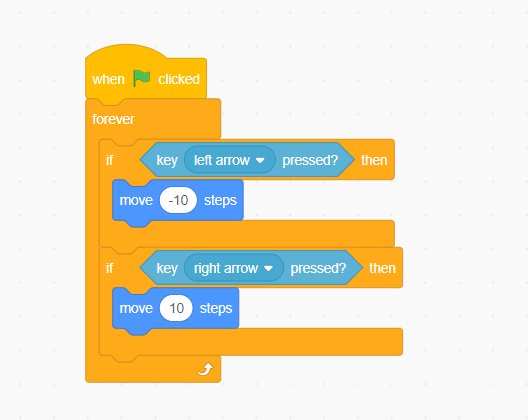
- Player Movement: Set up controls for players to walk, run, jump, or drive.
- Game Rules: Create rules for scoring points, winning, and losing.
- Interactions: Make sure the players and the game world are reactive to each other.
Implementing Multiplayer Functionality
This is where your game becomes multiplayer. Let’s look at the way you make it so that multiple players can connect and interact in the game world.
Connecting to the Server
First, your game needs to connect to a central server. This server will be the brains of your game, keeping track of all players and what is happening in the game world. This process involves setting up how the players find the server, establish a connection, and then stay connected.
- Matchmaking: Let players find and join games.
- Connecting to Server: Establishing a connection between the client and server.
- Keeping Connections Alive: Implementing checks to stay connected.
Sending and Receiving Game Data
Once connected, players need to send information to the server so that the actions they take in game are also reflected for all the other players, and also to receive updates about the game state.
- Client Actions: When a player moves, shoots, or does something else, send that info to the server.
- Server Updates: The server sends back updates about what has changed in the game.
- Data Synchronization: Make sure the game state is the same for everyone.
Handling Player Actions
Now you need to actually make the game world react to all these actions by the players, make it feel like a real game and not just like a series of messages.
- Processing Input: The server figures out what a player did and what that action means for the game.
- Updating Game State: The server changes things in the game world based on what happened.
- Sending Updates to Clients: The server tells every player what has changed, so everyone sees the same thing.
Testing and Refining Your Game
You’re not done after you’ve made a basic multiplayer game. Now you need to try it out and make it better.
Playing With Others
Invite your friends and family to play your game. You will need them to be on different computers so that they can connect to the server and play as if they were other players. See if it works like you think it should.
- Testing Connection: Make sure everyone can connect and play smoothly.
- Checking Game Logic: Are all the rules working correctly? Does scoring work? Does anyone have any unfair advantages?
- Gathering Feedback: Ask your friends what they think and what they’d change.
Fixing Bugs
There will be bugs, that’s normal, that can happen in any game, they are often small errors or problems in the code or in the design of your game. Fix them as you find them.
- Debugging Code: Look for errors in your code and fix them.
- Testing Again: After you fix something, try the game again to make sure it is now working properly.
Improving Performance
Does your game slow down? Does it lag? Make sure it runs smoothly. There are certain things you can do to make sure your game is performing correctly.
- Optimizing Code: Make your code run faster and more efficiently.
- Improving Graphics: Adjust the graphics quality if your game is too slow.
Adding Polish
A little polish can make a big difference to your game, you will find a lot of ways to improve your game.
- Adding Sound Effects: Good sound makes your game more fun and engaging.
- Improving Graphics: Make your game look more beautiful and consistent.
- Adding User Interface (UI): Make sure menus and buttons look good and are easy to use.
Creating a multiplayer game is a journey that requires patience, learning, and plenty of testing. It’s a challenging process, but incredibly rewarding when you see people enjoying the game you built. Don’t be discouraged if your first attempts aren’t perfect, every great game starts somewhere. Keep learning, keep experimenting, and keep making games. You’ll get better with each game you create.
Why Multiplayer Games are so HARD to Make.
Final Thoughts
To create a multiplayer game, you must choose your technology carefully. You’ll need a game engine and networking solution. Begin with simple game mechanics.
Start with a very basic test game. Iterate, testing often to ensure the experience remains solid for each player. how to create a multiplayer game becomes easier with practice.
Remember, user experience is key. Ensure your game is fun and functional before scaling up.

