
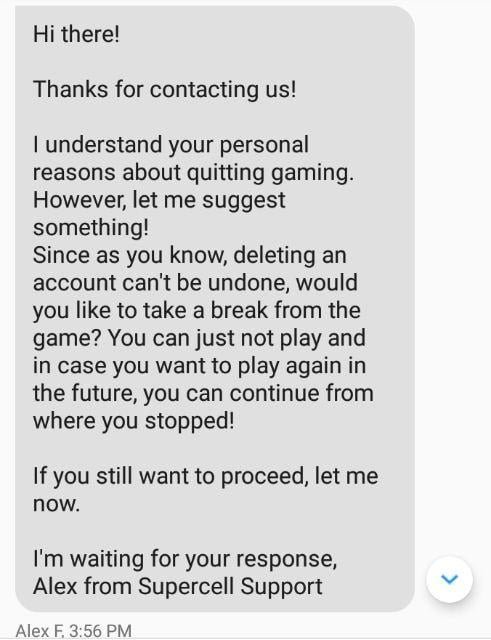
To delete a specific game account in Supercell’s games, you must contact their in-game support through the settings menu, explain your situation, and they will guide you through the process.
Ever found yourself wanting to remove a specific gaming identity from your Supercell account? Maybe you have multiple accounts, or you simply wish to start fresh. The process isn’t always clear-cut, and that’s where this guide comes in. We will clarify how to delete a specific game account in supercells game. Let’s dive into how you can do this.

How to Delete a Specific Game Account in Supercell’s Games
Have you ever played a Supercell game, like Clash of Clans, Brawl Stars, or Hay Day, and then wanted to start fresh or just say goodbye to an old account? It happens! Maybe you’ve outgrown the game, want to give a friend your village, or just need a clean break. Figuring out how to delete a game account can seem a bit tricky at first, but don’t worry, it’s totally possible. This guide will walk you through everything you need to know to say goodbye to your old Supercell game account.
Understanding Supercell ID
Before we get into the nitty-gritty of deleting accounts, it’s really important to understand what a Supercell ID is. Think of it like a master key to all your Supercell game accounts. When you play a Supercell game, you have the option to create a Supercell ID to save your game progress. This ID is linked to your email address. It helps you keep your progress safe if you switch phones or want to play on different devices.
The thing about Supercell ID is that it’s not tied to one specific game account. You can link multiple game accounts for different games to a single Supercell ID. That means if you delete your Supercell ID, it might affect not just the one game you want to say goodbye to, but also others. This is why it’s vital to understand exactly what you’re doing.
The Difference Between Deleting and Disconnecting
It’s important to know the difference between deleting an account and disconnecting it from a Supercell ID. Disconnecting means removing the link between a game account and your Supercell ID. This doesn’t get rid of the game account itself, but it makes it harder to access. The game account still exists in Supercell’s system. Deleting, on the other hand, means asking Supercell to remove the game account permanently, including the data associated with it.
Here is the summary of Disconnecting vs. Deleting:
| Action | What Happens | Accessibility |
|---|---|---|
| Disconnecting | Removes the link between your game account and Supercell ID. | Account still exists, but harder to access. |
| Deleting | Permanently removes the game account and its data. | Account is completely gone. |
Why There Isn’t a Simple “Delete Account” Button
You might wonder, “Why can’t I just push a button and delete my account?” Supercell handles account deletion differently than some other game companies. They don’t usually offer a quick delete option directly in their games. This is because they want to protect your accounts. It’s like having a safe with a really strong lock. They want to make sure that no one can accidentally delete your hard work or your game progress. Also, they need to follow privacy laws and need to be careful about how they handle all the data. Therefore, they have a special process in place to handle account deletion.
How To Initiate Account Deletion Process
The actual process of deleting a Supercell game account usually involves contacting their support team. There is no button to click directly in game to do this. It requires an official request to get the ball rolling. Here’s how to do it step-by-step:
Step 1: Go to Game Settings
First things first, open the Supercell game with the account you want to delete. This could be Clash of Clans, Brawl Stars, Hay Day, or any of their other popular titles. Look for the settings menu. It’s usually represented by a gear icon or something similar. In different games, it may be located differently in different games. In clash of clans, this button is in the top left side, in brawl stars, it’s in the top right side. Look in these locations and if it isn’t there, search for other locations within the game’s UI.
Step 2: Find Help and Support
Inside the settings menu, you need to find a section called “Help and Support”. This is where you can reach out to the game’s support team. This is different from a FAQ. This option will typically redirect you to an in-game message area where you can interact with their support team.
Step 3: Contact Support
Here you need to start a new conversation. You may have to go to “Contact Us” or a similar option. You will be redirected to a chat where you can start a new message. Sometimes a bot will try to understand your issue. Do not fall for their suggestions, and move on to the agent, by typing something like “Talk to an agent” or something that directs you to a real person.
Step 4: Clearly State Your Request
When you start a conversation with the support agent, you need to clearly state what you want. Be straightforward and use simple words. Something like “I want to delete my game account for [Game Name]” will do. Also be sure to include any account information if it is required to help them understand what account you need deleted.
Step 5: Be Prepared for Questions
The support agent will probably ask you some questions to make sure you are really the owner of the account and to confirm that you really want to delete it. They might ask for your in-game name, your clan name (if applicable), the player tag of your account, or when you created the account. Try to have these things ready and if you don’t remember be truthful, the support agent can usually check this information with the account data they already have on hand.
Step 6: Confirm Your Decision
After you answer all the questions, the support agent will usually double-check if you really want to delete your account. This is a very important step because once the account is deleted, it can’t be retrieved. Be absolutely sure before you agree.
Step 7: The Waiting Game
After you confirm your decision, it might take some time for the account to be fully deleted. The support agent will tell you how long it will take. Usually, they give you a time frame, such as 24 hours, 48 hours or sometimes even longer. Be patient, as they are handling many other requests as well and are trying to ensure that the deletion is being processed correctly. Don’t be alarmed if it takes some time for your account to be totally gone from the game.
What Happens After Deletion?
Once your Supercell game account has been deleted, it is gone forever. The associated data, such as your player progression, in-game resources, and other virtual items will be removed permanently. You cannot restore it. This is a one way street. So please understand this before moving forward.
Important Things To Consider Before Deleting
Before you make the final decision to delete your Supercell game account, here are some very important things you should think about. These can help you make the right choice and avoid later regrets:
The Inevitable Loss Of Progress
Once an account is deleted, there’s no turning back. You will lose all your progress, all of your hard work, and any special items you earned. It’s like deleting a whole notebook filled with your stories. So you need to understand what this means for you.
Impact on In-App Purchases
If you have spent money to purchase in-app items, it is important to know these things will be lost with the account deletion. Those items are tied to the game account, and when it’s gone, so are they. There is no way to get your money back from Supercell. These virtual items do not have a real-world value and can’t be transferred or refunded.
The Supercell ID Connection
Remember, your Supercell ID may be connected to other game accounts. Deleting your Supercell ID can cause other games to lose progress. Ensure you have taken proper steps to disconnect other game accounts from this Supercell ID, if that is what you want. If you plan to still use this Supercell ID for other accounts, then do not delete the supercell ID. Only delete the game account that you are trying to get rid of.
Consider Starting Over
Sometimes, instead of deleting, you might want to consider starting over with the same game. In many games you can create a new game account with a brand new village, base or town on a different server. This way you can have a fresh start without deleting your original account. You can always switch between them if you want.
Tips for a Smooth Deletion Process
To make the account deletion process go more smoothly, here are some helpful tips that you can use:
- Be polite and clear when talking with the support agent.
- Be ready to give details like your player name, game ID, and clan name.
- Make sure you are using the correct Supercell account and correct Supercell game.
- Be patient, as the deletion might take a bit of time.
- Once the account is deleted, there is no turning back. Understand this before taking the final step
Alternatives to Deletion
Sometimes, deleting the account isn’t the only solution. There are other ways you can manage your game accounts:
Disconnecting from Supercell ID
If you don’t want to play a particular game account but don’t want to delete it either, you can disconnect the account from your Supercell ID. This way you can stop using the account for the moment, but the account itself will still be there. The game account will not be easily accessible, but it does exist.
Starting a New Account
Instead of deleting an account, consider starting a new one. This is helpful if you want to begin at the beginning. Many games allow multiple accounts on one device. Just make sure you are switching between different supercell id’s and they aren’t linked to each other.
Taking a Break
Sometimes, the best solution is to take a break. You can always come back to your game later if you miss it. You might find that you enjoy the game more after a rest. This is better than deleting the account and never being able to play again.
Deleting a Supercell game account is a process that requires a little bit of patience and understanding. It’s not as simple as pressing a delete button, but with the correct steps and a clear understanding, you can easily do it. Always remember to think through your decision carefully, because deleting the game account is permanent. If you are still on the fence, consider some of the alternatives that were listed above before making a final decision. The tips we covered here should help you have a better understanding and have a much smoother experience while deleting your unwanted Supercell game account.
You have to delete a game forever, make your choice! 🗑️
Final Thoughts
To delete a specific game account in Supercell’s game, you need to contact their support team directly through the game’s settings. They will guide you through the necessary steps, confirming your identity for account security.
Remember, this action is permanent, so carefully consider it before proceeding. Follow the support team’s instructions to delete a specific game account in Supercell’s game successfully.

