
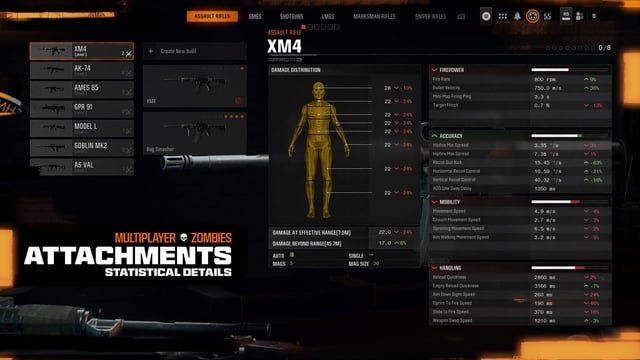
Finding detailed weapon stats and data for Battlefield 6 often involves checking community-driven websites like sym.gg or Battlefield-specific wikis after the game’s release. These resources meticulously collect and analyze in-game weapon information.
Want to optimize your loadout in Battlefield 6 and dominate the battlefield? The key is knowing your weapons inside and out. But how do you find detailed weapon stats and data for Battlefield 6?
Getting your hands on accurate weapon data can be a game-changer. Fortunately, dedicated communities and resources often compile this information, allowing you to make informed decisions about your arsenal.

How to Find Detailed Weapon Stats and Data for Battlefield 6
Finding accurate weapon stats for Battlefield 6 is crucial for optimizing your gameplay. You need to understand damage, range, and recoil to pick the right weapons. Let’s explore the methods for discovering this vital information.
Official Battlefield 6 Resources
Official sources are your best bet for the most accurate data. These sources include the game itself, the official Battlefield website, and community forums managed by DICE.
In-Game Weapon Stats
The game itself is a primary source. Look within the weapon customization and loadout screens.
These screens often display basic stats like damage, accuracy, and fire rate. However, the in-game stats can be simplified and lack the depth some players desire.
Battlefield 6 Official Website
The official Battlefield website is another place to look. DICE often posts blog articles and patch notes that contain weapon balance changes.
These changes can indirectly reveal detailed weapon statistics. Search for these details in patch notes and developer posts.
Official Battlefield Forums
DICE community managers and developers sometimes interact on the official Battlefield forums. This is a great place to seek clarifications on weapon stats.
Sometimes, you can even find detailed spreadsheets or charts shared by community members. But remember to verify information found on forums.
Community-Driven Battlefield 6 Resources
The Battlefield community has always been resourceful in collecting and analyzing game data. Several websites and tools are maintained by dedicated players.
Battlefield Stat Tracking Websites
Websites like sym.gg (Symthic-like), BattlefieldTracker, and similar platforms collect weapon stats. These sites often datamine the game files.
They present detailed statistics such as damage drop-off, bullet velocity, and recoil patterns. Be aware that the accuracy of these sites depends on the source and maintenance.
Battlefield Community Spreadsheets
Dedicated players often create community spreadsheets containing detailed weapon stats. These spreadsheets are usually found on Reddit or dedicated Battlefield forums.
These sheets collect data from various sources, including in-game testing and datamining. Always double-check community-sourced information against multiple sources.
YouTube Channels and Content Creators
Many YouTube channels focus on Battlefield gameplay and weapon analysis. These creators often perform in-depth testing and analysis of weapons.
They present their findings in video format, which can be very helpful. Some creators also share their stat spreadsheets or data sources.
Understanding Battlefield 6 Weapon Stats
Knowing where to find the stats is just the first step. You need to understand what the stats mean and how they affect gameplay.
Damage Stats
Damage is the amount of health a weapon takes away per hit. This is a crucial stat for determining a weapon’s effectiveness at different ranges.
Typically, damage is shown as damage per bullet and damage drop-off over distance. Higher damage per bullet means fewer shots to kill.
Range Stats
Range affects how far a bullet travels before damage starts to decrease. Understanding range is essential for choosing the right weapon for a specific map or playstyle.
Effective range is often displayed in meters. Knowing this allows you to engage enemies from optimal distances.
Accuracy and Recoil
Accuracy refers to how close the bullets land to the center of your crosshair. Recoil is the upward or sideways movement of your weapon when firing.
These stats are often interconnected. Higher accuracy and lower recoil make a weapon easier to control.
Bullet Velocity
Bullet velocity is the speed at which bullets travel through the air. A faster bullet velocity makes it easier to hit moving targets at long ranges.
This is often measured in meters per second (m/s). Higher bullet velocity reduces the need to lead your shots.
Rate of Fire
Rate of fire (RoF) is the number of bullets a weapon fires per minute. A higher RoF means more bullets are being sent down range quicker.
This is often measured in rounds per minute (RPM). This stat affects the weapon’s damage output over time.
Reload Time
Reload time is the amount of time it takes to reload a weapon. A faster reload time allows you to get back into the fight quicker.
This is often measured in seconds. Faster reload times are crucial in close-quarters combat.
Comparing Battlefield 6 Weapon Stats
Once you’ve gathered the stats, you need to compare weapons to determine which suits your play style best.
Using Spreadsheets for Comparison
Create or find a spreadsheet containing weapon stats. This allows you to easily compare numbers side-by-side.
Highlight the key stats that are important to your play style. This will help you quickly identify the best weapons for your needs.
Considering Weapon Archetypes
Different weapon archetypes (assault rifles, SMGs, sniper rifles, etc.) have different strengths and weaknesses. Understand the role of each archetype.
Compare weapons within the same archetype to find the best option. Each weapon has strengths and weaknesses.
Adapting to Map and Game Mode
Consider the map and game mode when choosing a weapon. A sniper rifle might be great on a large open map, but not on a small, close-quarters map.
Adapt your weapon choice based on the situation. Switching classes to fit the map and mode can greatly improve your game.
Advanced Strategies for Analyzing Battlefield 6 Weapon Data
Go beyond basic stats to find hidden advantages and optimize your loadouts. Consider advanced metrics like time-to-kill (TTK).
Time-to-Kill (TTK) Calculation
TTK is the amount of time it takes to kill an enemy with a specific weapon. It is a key indicator of a weapon’s overall effectiveness.
Calculate TTK based on damage, rate of fire, and accuracy. Use the rate of fire and damage per bullet to determine how long it takes to empty a clip into an enemy.
Damage Drop-Off Curves
Understand the damage drop-off curve for each weapon. This shows how damage decreases over distance.
Some weapons have a steeper drop-off than others. This affects their effectiveness at long ranges.
Recoil Patterns and Control
Study the recoil patterns of each weapon. Practice controlling the recoil in the practice range.
Mastering recoil control can significantly improve your accuracy. Some weapons have predictable recoil patterns, making them easier to control.
Attachments and Their Effects
Understand how attachments affect weapon stats. Some attachments can improve accuracy, while others can increase damage or range.
Experiment with different attachments to find the optimal setup for each weapon. Attachments will effect the way the weapon handles in game.
Ethical Considerations When Accessing Battlefield 6 Weapon Data
Respect the terms of service and avoid cheating or exploiting the game. Focus on using legitimate data sources and tools.
Avoiding Datamining Abuses
Datamining can sometimes be against the terms of service of a game. Be mindful of the potential consequences.
Focus on using publicly available information. Only use sources that have a good reputation in the community.
Respecting Fair Play
Avoid using weapon stats to gain an unfair advantage over other players. Focus on improving your skills and teamwork.
Play fair and have fun. Cheating ruins the experience for everyone.
Staying Updated on Battlefield 6 Weapon Changes
DICE frequently updates Battlefield 6 with weapon balance changes. Stay informed about these changes to keep your knowledge current.
Following Patch Notes
Read the patch notes carefully whenever a new update is released. These notes often contain details about weapon balance changes.
Pay attention to changes in damage, range, and recoil. Understand how the changes will affect your weapon choices.
Monitoring Community Discussions
Follow community discussions on forums, Reddit, and YouTube. Players often share their experiences and insights about weapon changes.
Engage with the community to learn from others. Share your own experiences and insights.
Revisiting Stat Websites and Spreadsheets
Stat websites and community spreadsheets are often updated to reflect weapon changes. Check these resources regularly.
Ensure the data you are using is accurate and up-to-date. Outdated information can lead to poor weapon choices.
Battlefield 6 Editions and Weapon Availability
Different editions of Battlefield 6 may offer different weapons or weapon unlocks. Understand the differences between editions.
Standard Edition
The standard edition typically includes the base game and access to all core weapons. This is the most basic version of the game.
Players will unlock weapons as they progress. They can unlock weapons by earning XP and completing challenges.
Gold/Deluxe Edition
The Gold or Deluxe edition usually includes additional content, such as early access to weapons and cosmetic items. These editions often give players a head start.
These weapons may or may not be significantly better than standard weapons. They just offer more choices early in the game.
Ultimate Edition
The Ultimate edition typically includes all available content, including all weapons, cosmetic items, and season passes. This is the most comprehensive version of the game.
This edition is usually the most expensive. Consider whether the extra content is worth the cost.
Tools and Software for Analyzing Battlefield 6 Weapon Data
Using dedicated tools can streamline the process of collecting and analyzing weapon data. Consider using spreadsheet software, stat trackers, and comparison tools.
Spreadsheet Software
Microsoft Excel, Google Sheets, and other spreadsheet software are essential for organizing and comparing weapon stats. These tools allow you to create custom charts and graphs.
Use spreadsheets to track TTK, damage drop-off, and other key metrics. Use the graphing functions to visualize your data.
Battlefield Stat Trackers
Websites like BattlefieldTracker and other stat-tracking sites offer detailed weapon statistics. These sites often update their data quickly after game updates.
Use these sites to monitor your own performance and compare it to other players. Track the performance of different weapons to help you choose the best loadouts.
Comparison Tools
Some websites offer dedicated weapon comparison tools. These tools allow you to compare two or more weapons side-by-side.
These tools can quickly highlight the strengths and weaknesses of each weapon. Use these tools to make informed decisions about your weapon choices.
Battlefield 6 Beta – Ultimate Beginners Guide, Tips and Tricks
Final Thoughts
Ultimately, accessing comprehensive weapon information is crucial for Battlefield 6. Data miners and community-driven websites are your best bets immediately following the game’s launch.
Keep an eye on prominent Battlefield content creators on platforms like YouTube and Twitch. They often analyze and present detailed weapon statistics early on.
Therefore, how to find detailed weapon stats and data for Battlefield 6 involves actively searching community resources. This is a must for optimizing your gameplay.

