
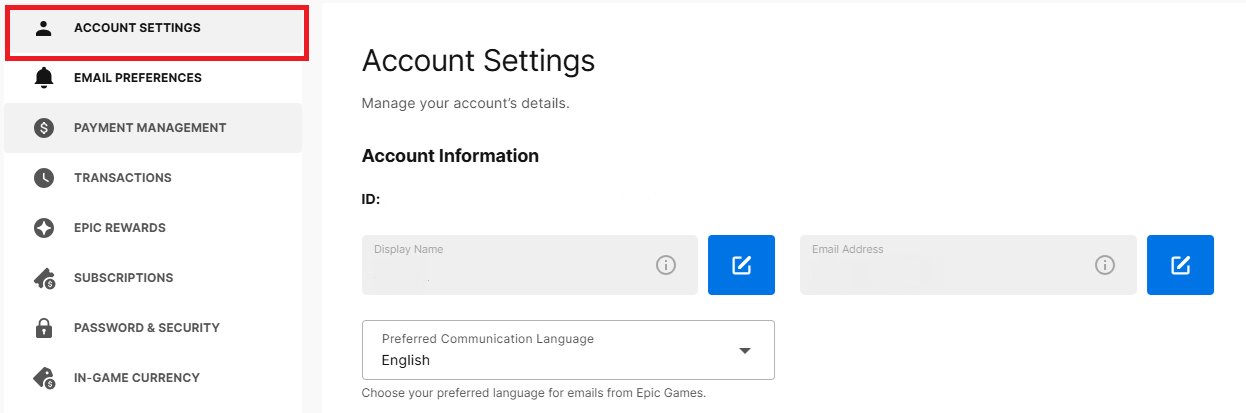
To find the email for your Epic Games account, check the email inbox you used when you originally created the account. You can also verify the email within your account settings on the Epic Games website.
Lost your login details and wondering how to find email for epic games account? Many of us have faced that moment of forgetfulness, especially with so many online accounts. It can be frustrating, but retrieving your email is usually quite straightforward.
Let’s explore a few simple methods that can help you quickly get back into your Epic Games account. You’ll be gaming again in no time.

How to Find Email for Epic Games Account
Ever wondered, “What email did I use for my Epic Games account?” It’s a common question! We all have so many emails and sometimes it’s easy to forget which one is connected to what. If you’re having trouble getting back into your Fortnite, Rocket League, or other Epic Games adventures because you can’t remember your email address, don’t worry. This guide will walk you through all the ways you can find it, step-by-step. We’ll cover everything from checking old devices to contacting support. Let’s get started and get you back to your games.
Why is it Important to Know Your Epic Games Email?
Knowing the email address linked to your Epic Games account is super important for several reasons. Firstly, it’s the main way you log into your account. Without it, you can’t access your games, saved progress, or purchases. Also, if you ever forget your password, the email is how Epic Games sends you a reset link. Additionally, the email account associated is used for important alerts and information about your account, such as any suspicious activities. If you’ve enabled two-factor authentication, that’s another place where it plays a major role.
The Email is the Key to:
- Logging into your account.
- Resetting your password.
- Receiving important account updates.
- Using two-factor authentication (if enabled).
- Accessing game progress and purchased items.
Without access to your email, you can run into trouble. Let’s dive into the methods for finding it.
Method 1: Checking Saved Passwords in Your Browser
The first place to look is where you may have told your computer to remember your logins. Your web browser might have saved your login details, including your Epic Games email. Many browsers have built-in password managers. This function is like a little memory bank for passwords.
How to Check Saved Passwords in Chrome:
- Open Google Chrome.
- Click on the three dots at the top right corner (the “Customize and control Google Chrome” menu).
- Select “Settings”.
- Click on “Autofill” and then “Passwords”.
- Look for “epicgames.com” or “fortnite.com” in the list.
- If found, click the eye icon to reveal the saved email.
How to Check Saved Passwords in Firefox:
- Open Mozilla Firefox.
- Click on the three lines at the top right corner (the “Open menu” button).
- Select “Settings.”
- Click on “Privacy & Security” on the left.
- Scroll down to “Logins and Passwords” and click “Saved Logins.”
- Search for “epicgames.com” or “fortnite.com”.
- Click the eye icon to reveal the saved email.
How to Check Saved Passwords in Safari:
- Open Safari.
- Click “Safari” in the menu bar at the top of the screen.
- Select “Preferences”.
- Click “Passwords”.
- If asked, verify using your Mac password or Touch ID.
- Search for “epicgames.com” or “fortnite.com”.
- Select the website and the email should appear under “Username”.
Check all browsers you usually use. You might have saved the email on your main browser and not on the others. It’s also helpful to check any old devices you may have used to login into Epic Games previously, even if you don’t use them frequently anymore.
Method 2: Checking Your Email Accounts
This may seem obvious, but a common reason we forget which email we used is because we have multiple accounts. Try checking all the email addresses you frequently use, not just the one you think you should’ve used.
How to Search for Epic Games Emails in Your Inbox:
- Log in to each email account you own, one by one.
- Use the search bar in your email program (like Gmail, Outlook, or Yahoo Mail).
- Search for keywords like “Epic Games,” “Fortnite,” “Epic Games verification,” or “Epic Account.”
- Look for emails like welcome messages, verification emails, or purchase receipts.
- Once you find an email, the sender’s address will be the one associated with your account.
Sometimes, emails can get moved into different folders like “Promotions” or “Spam.” Make sure you are looking in all the different areas of your inbox.
Method 3: Checking Your Saved Game Data
Some games might store your account email within their configuration files or saved data, though this is less common than the other methods. While this method can be a little more technical, it’s still worth trying.
How to Check Game Files (PC):
- Navigate to the game’s installation folder. This is usually under “Program Files” or in your “Steam” folder, or the Epic Games folder if it’s a game you downloaded directly from the Epic Games store.
- Look for configuration files, often named something like “config,” “settings,” or with “.ini” or “.cfg” extensions.
- Open these files using a text editor like Notepad.
- Use Ctrl+F (or Command+F on Mac) to search for keywords like “email,” “account,” or your username (if you remember it).
- Sometimes, your email will be listed in these files.
Important Note: Be very careful when checking files because some files are critical for the game to work properly. Do not edit anything unless you know what you are doing. If you are not comfortable with this method, it might be better to try the other ones.
Method 4: Using a Linked Social Account
If you connected your Epic Games account to other services like Facebook, Google, Apple ID, PlayStation Network, or Xbox Live, it’s possible to use those linked accounts to try and login to your Epic Games account. This process might reveal the linked email address.
How to Check with Social Media:
- Go to the Epic Games website.
- Click “Sign In”.
- Select the social media account you think you linked with your account.
- If you can access your account using this, the displayed email should be the email you are searching for.
- If you can’t see it directly, navigate to your Epic Games account settings, where the email is usually displayed.
This method might require you to remember which social accounts you connected previously. Be sure to try each one, if you don’t get it right away.
Method 5: Contacting Epic Games Support
If you have tried all the methods and still can’t find the email address, reaching out to Epic Games support should be your next move. They have a team dedicated to helping you with issues like this.
How to Contact Epic Games Support:
- Go to the Epic Games Support page.
- Look for the “Contact Us” or “Submit a Ticket” option.
- Choose the correct category of issues (like “Account Help”).
- Fill in all the required details in the form.
- Give as much information as possible about your account. This might include your username, any payment information, game progress, or connected social media accounts.
- They will ask to verify that the account is yours by asking you questions like which games you own, or when you last played.
- Explain you are trying to recover your email address and follow all the instructions given by the support team.
Epic Games support might ask for some personal details to make sure they are talking to the actual owner of the account. Do not share your password, as Epic Games will never ask for your password. Once you verify that it is your account, they can help you find the email linked to your account.
Tips For the Future: How to Avoid Forgetting Your Email
After you’ve found the email for your account, it’s a good idea to set up ways to avoid forgetting it again in the future. Here are a few helpful suggestions.
Tips to Keep Your Email Safe:
- Use a password manager: These apps keep track of your login information, including emails and passwords, in a secure way. This means you only have to remember one password to access all your other passwords.
- Keep a physical list: Write down your email address and username in a notebook or somewhere safe.
- Choose one primary email: Try to use a single main email address for all your gaming accounts. This can help you keep things organized and much easier to remember.
- Update your contact information: Always make sure your information is up-to-date. If you use a new email, remember to go to your Epic Games account and update it there.
- Use two-factor authentication: This adds extra security to your account and can help when you need to verify your information. When you enable 2FA you need to verify the login with your phone or email, this will always remind you what email you have connected to your account.
It is also a great idea to enable an authentication system, such as 2FA, so you are asked to verify via your email when you log in to the system, allowing you to remember which email address was used to register on the Epic Games website. By following these tips, you can avoid many headaches in the future.
Finding the email associated with your Epic Games account can be a little tricky, but it’s definitely not impossible. By systematically going through each of the methods listed above, you should be able to track down the elusive email address and get back into your games in no time. Start by checking your browser’s saved passwords and email inboxes, then move to checking game files and linked social accounts. If you still can’t find it, don’t hesitate to contact Epic Games support. Remember to take steps to avoid this problem in the future by organizing your logins and contact information. Now that you are equipped with the information to find your email, go get your games and get playing!
How to Find your Epic Games Account Email from PS4/PS5
Final Thoughts
In short, finding your Epic Games account email involves checking associated email accounts, reviewing your connected platform settings, or contacting Epic Games support. If you cannot locate it through other methods, support is your key recourse.
Remember, using familiar email addresses and connected accounts proves most effective. Sometimes, the email used isn’t the one you regularly expect, so a broader search might be necessary.
Finally, to find your email for epic games account, utilize the methods described. If these approaches fail, reach out directly to Epic’s customer service for assistance with account recovery.

