
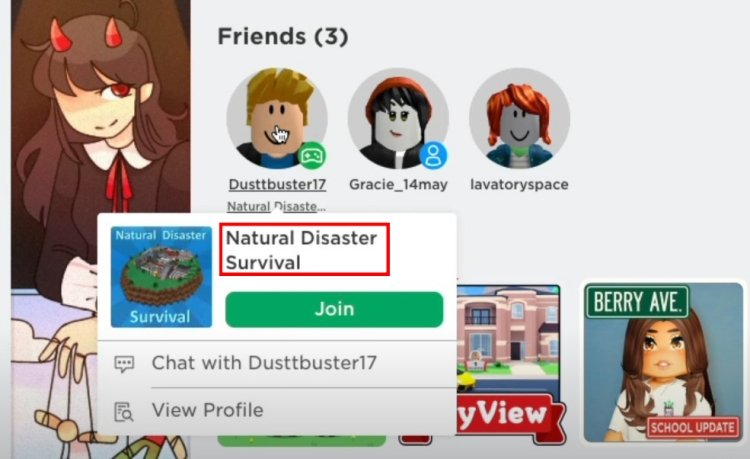
To find what game someone is in Roblox, you can check their profile page. If their privacy settings allow it, their current game will be displayed below their username.
Ever wondered what your friend is playing on Roblox? It’s common to want to join in on the fun, but sometimes knowing where they are can feel like a mystery. It’s actually quite simple to figure out how to find what game someone is in Roblox with a little know-how.
You see, Roblox provides ways to see this information if the user hasn’t changed their privacy settings. This is a helpful feature for quickly joining friends. Let’s explore the methods you can use to locate their current game.

How to Find What Game Someone Is In Roblox
Ever wondered what amazing Roblox world your friend is exploring? Maybe you want to join their adventure, or perhaps you’re just curious. Finding out which game someone is playing in Roblox isn’t always obvious, but don’t worry! There are a few simple ways to track down your friend and get in on the fun. This guide will walk you through all the methods so you’ll be a pro at finding your Roblox buddies in no time.
Using the Roblox Website
The Roblox website is your first stop for finding your friends. It’s like having a control panel for all things Roblox! Here’s how to use it to see what game someone is playing.
Checking Friend Activity
Roblox keeps a record of what your friends are up to. Here’s how you can find this info:
- Go to the Roblox website and log into your account.
- Look for the “Friends” section. You will see it on the left side of your screen, or you can go to this link: https://www.roblox.com/friends.
- You’ll see a list of all your friends. Look at the right side of each friend’s name. If they are currently playing a game, you’ll see “Playing” and the name of the game.
- Click on the game name, and if the game allows, you’ll see an option to “Join” the game.
If it says “Online,” but doesn’t show a game, that means your friend is on Roblox but isn’t playing any game at the moment. They might be in the menu or looking for a new game, or just hanging out with other friend in the Roblox app itself. Check back later to see if they have started playing a game.
Viewing Profile Details
Sometimes, the “Friends” page won’t show you the exact game. If that happens, you can go to their profile for more information.
- From your “Friends” list, click on the username of the person you want to find.
- This will take you to their Roblox profile page.
- Look at the “Currently in Game” section, which is usually on the right side of the screen. If they are in a game, you will see its name and a green “Join” button.
- If you don’t see a “Currently in Game” section, it means your friend isn’t in any game right now.
By using these methods, most of the time you can see which game your friend is playing on Roblox. But if the friend has their settings private, they might be hidden. We’ll talk about that in the section about privacy settings.
Using the Roblox Mobile App
Do you use Roblox on your phone or tablet? The Roblox mobile app also lets you see what games your friends are playing, and it works very similar to the website. Here’s how:
Checking the Friends List
The app has a very clear way to see what your friends are up to.
- Open the Roblox app on your device and log into your account.
- Tap the “Friends” icon which is usually at the bottom of the screen, or in the menu (the three dots). It looks like two people.
- You’ll see a list of your friends. Just like on the website, you’ll see “Playing” followed by the game name if your friend is currently in a game.
- Tap on the game, and you’ll have the option to join them.
Just like the website, if your friend is online but not playing, it will just say “Online.”
Viewing Profile Info
Sometimes, you might want to go directly to their profile for more info.
- From the “Friends” screen in the app, tap on your friend’s username. This will take you to their profile.
- Look for the “Currently in Game” information, which is usually on the screen. You will see the name of the game, and a “Join” button.
- If you do not see the game info, your friend is not in any game right now.
Understanding Privacy Settings
Sometimes, you might not see what game your friend is playing. This is because of privacy settings on Roblox. People can choose to hide their game activity from others. Here’s what to know about these settings.
How Privacy Settings Work
Roblox has settings that let people control who can see their game activity. It allows players to have more privacy, especially if they don’t want everyone to see what games they play all the time.
- Everyone: If your friend sets their privacy to “Everyone,” anyone can see what game they are in.
- Friends: If they choose “Friends,” only their Roblox friends can see what game they are playing. This is a common option.
- No one: If they choose “No one,” their game activity will be hidden from everyone, even friends.
What to Do if You Can’t See a Game
If you can’t see the game your friend is playing, it could mean one of three things:
- They might not be in a game right now.
- They have chosen to hide their game activity from everyone.
- They might have chosen a privacy setting where you cannot see their current game activity.
If you think your friend has hidden their game activity, the best thing to do is to ask them if they would like you to join them in the game or not.
Using Third-Party Websites and Apps (Use with Caution)
There are some websites and apps that claim to help you find what game someone is in Roblox. You should be very careful when using these, because they could be dangerous.
Why to Be Careful
Websites and apps that aren’t made by Roblox might try to steal your account information. They may ask for your login details, which is never a good idea. It’s much safer to stick to the official Roblox website and app.
Here are some risks of using third-party websites and apps:
- Stealing your username and password: Unofficial sites can sometimes be designed to steal your login information.
- Getting viruses: These websites and apps might have viruses that can damage your device.
- Being banned from Roblox: Using unofficial apps could be against Roblox’s rules and could get you banned.
Staying Safe
The best rule is to use only the official Roblox website and app to find your friend’s game. Never give your login information to any website or app that isn’t made by Roblox. It’s much safer to stick to what you know. If you are unsure about something ask a parent or a guardian before using it.
Tips for Finding Your Friends
Sometimes, finding your friend can be a little tricky, but with a few tips, you can be a Roblox detective. Here are some additional things you can try.
Checking Frequently
Roblox friends might hop in and out of games. If you don’t see them playing one minute, check back in a few minutes. They might have joined a new game.
Communicating Directly
The easiest way to find what game someone is in is to ask them! If you can’t find your friend’s game, send them a message through Roblox or other messaging app, and ask them directly.
Using Discord or Other Chat Apps
If you and your friend have accounts on Discord or other chat apps, use them to connect outside of Roblox. This is a good way to coordinate your games.
Checking Group Games
If your friend belongs to a Roblox group, check if they’re playing a group game. Sometimes, if they’re playing group game, the main profile may not display that info.
Following Friends on Roblox
Following friends allows you to see their activity on your main feed. Sometimes that is a easier way to see their information.
When Things Don’t Go as Planned
Sometimes, even after trying all of these methods, you might not be able to find your friend’s game. Here are some common issues and how to deal with them.
Friend Isn’t Online
First, make sure your friend is online. If you don’t see them in your friend’s list, they might be offline and can’t play.
Friend is Hidden
If the friend has set their profile to private, you might not be able to see what they are up to. This means their settings may block your view.
Roblox Glitches
Sometimes, there might be a glitch on Roblox, and the website or app doesn’t show the right information. If you think this is happening, try to close Roblox and open it again. Or, check back later to see if it starts working as normal.
Network Problems
A bad internet connection can also cause you to not see game information. Make sure that your internet is working.
Finding your friend’s Roblox game is usually straightforward, but sometimes, you may have to be a detective. By using the Roblox website, the mobile app, and understanding privacy settings, you’ll have the tools you need to track down your friend’s game and have fun playing together! Remember to always stay safe by using only official Roblox resources and by talking to your friend directly if you can’t find their game.
How to find out what game someone is playing in Roblox (Outdated)
Final Thoughts
To find a user’s current Roblox game, utilize the platform’s friend list or user profile. Check their activity status, which often displays their ongoing game. Alternatively, use third-party websites that track player activity, although this may not always be accurate.
These methods give you options for figuring out where your friend is currently playing. You might have to use a few of them to find the correct information. Knowing how to find what game someone is in roblox allows you to join their game easily.

