
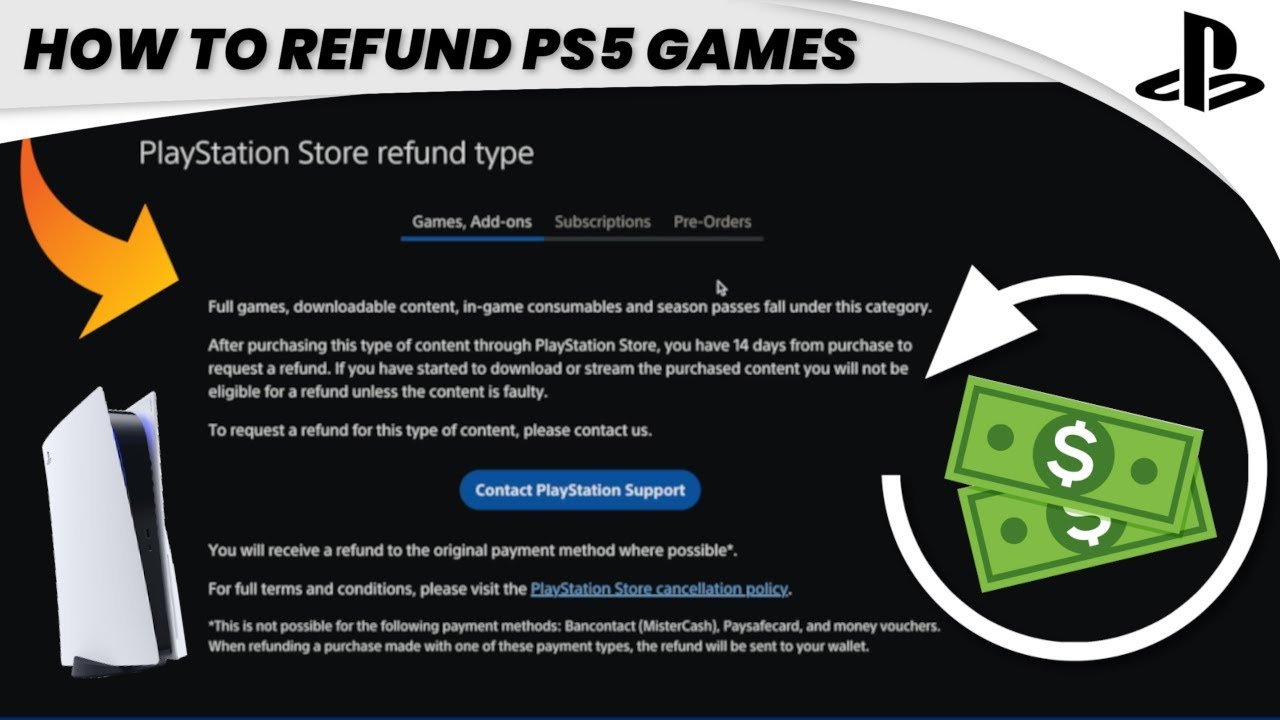
To get a refund on a PS5 game, you typically need to request it through the PlayStation Store within 14 days of purchase, provided you haven’t downloaded or started playing it.
Ever bought a game on your PS5 and instantly regretted it? It happens to the best of us. Knowing how to get a refund on a ps5 game is crucial in those moments of buyer’s remorse.
We’ll guide you through the steps you can take when you realize a game isn’t quite what you expected. From checking the refund policies to navigating the PlayStation support system, we aim to make the process easier.

How to Get a Refund on a PS5 Game
So, you bought a new game for your PlayStation 5, and maybe it’s not quite what you expected. Maybe it’s too hard, or maybe it just isn’t fun for you. The good news is, getting a refund on a PS5 game is possible! It’s not always super easy, but with the right information, you can navigate the process. Let’s take a closer look at how you can try to get your money back.
Understanding the PlayStation Store Refund Policy
Before we dive into the steps, it’s super important to know the rules of the game. Sony, the company that makes the PlayStation, has a specific refund policy for games purchased through the PlayStation Store. This policy is what determines if you can get a refund and under what conditions. It’s not like returning a pair of shoes to a store where you can just change your mind; digital games have different rules.
Key Points of the PlayStation Store Refund Policy
Here are some of the important things you need to know:
- Time Limit: The main thing to remember is that you usually have 14 days from the purchase date to request a refund. But this isn’t the only rule.
- Download and Play: If you have downloaded and started playing the game, even if it is just for a little while, it can make it harder to get a refund. If you haven’t downloaded or streamed the game at all, your chances are much better.
- Pre-Orders: For pre-ordered games, there’s a different rule. You can request a refund anytime before the game is released, or within 14 days of the release date if you have not downloaded or streamed the content.
- Exceptions: There are a few things that can’t be refunded, like games that you have already used all the features, and pre-orders where you got access to some benefits.
It’s always a good idea to check the official PlayStation refund policy on their website. Things can change, and it’s best to have the most up-to-date information.
Steps to Request a Refund
Now that you know the rules, let’s talk about how you actually ask for a refund. You can’t just return a digital game like a physical one in a shop. There is a process you have to follow.
Using the PlayStation Support Website
The primary way to request a refund is through the PlayStation support website. Here’s what to do:
- Go to the PlayStation Support Page: Open your web browser and search for “PlayStation Support” or go directly to their website.
- Find the Refund Section: Look for the section related to refunds, purchases, or billing. Usually, there’s a link to start a refund request.
- Sign In to Your Account: You will need to sign in to your PlayStation Network account that you used to buy the game.
- Fill Out the Refund Form: There will be a form asking for details about your game purchase. You will need to choose the game you are seeking a refund for and provide the reason why you want a refund. Be clear and truthful in your explanation. For example, if it’s because you do not like the game, just say that.
- Submit Your Request: Once you’ve filled out everything, submit the form.
- Wait for a Response: PlayStation support will then review your request. This process can take a little bit of time. Usually, you’ll get an email letting you know if your refund has been approved or not.
Contacting PlayStation Support Directly
Sometimes, the website might not be the easiest way, or you might want to explain your situation further. In that case, you can try contacting PlayStation Support directly. Here are a few ways to do that:
- Live Chat: On the PlayStation Support website, you can often find an option for live chat. This lets you talk to a support person in real time. It can be really helpful to explain the issue clearly and ask any questions you may have.
- Phone Support: In some regions, you can also reach PlayStation Support by phone. This may be a good way if you are not very tech savvy or you find it easier to talk to someone instead of writing. You can find the phone number on their support website.
- Email Support: There might also be an email address you can use. This might take more time, but can be better if you need to include lots of details.
When contacting support, it is a very good idea to have your account details, purchase information, and specific reasons for a refund all ready to go. This can make the process go much faster and smoother.
Reasons for Refusal and How to Handle Them
It is possible that your refund request might get denied. This can be frustrating, but there could be a good reason why. Here’s what you need to know:
Common Reasons for Refund Denial
Some typical reasons why Sony might not give you a refund include:
- Time Limit Exceeded: If you are requesting a refund more than 14 days after buying the game, this will almost definitely be a problem.
- Game Already Downloaded and Played: If you’ve downloaded the game, even just a little bit, it can be very difficult to get a refund. Especially if you have played the game for a long time.
- Pre-Order Content Used: If you have used the bonuses that came with your pre-ordered game, you probably won’t get a refund.
- Violation of Terms: If you’ve broken some of the terms of service, your request might be denied.
What to Do If Your Refund Is Denied
If your refund request gets denied, it’s not necessarily the end of the road. Here’s what you can try:
- Contact Support Again: You can try contacting support again and explain your situation with even more details. Sometimes, a different support person might see it in a new way.
- Check the Policy Again: Go back over the PlayStation Refund Policy carefully and see if you missed something. Maybe there’s something you can still do.
- Be Polite and Persistent: Always be respectful and clear when you are communicating with support. It also might help if you keep trying to seek an answer to your question.
Remember, every situation is different, so try to understand the specific reason for the denial. Sometimes, there are exceptions, so it doesn’t hurt to ask again, as long as you are respectful.
Tips to Increase Your Chances of a Successful Refund
Getting a refund is not always a guarantee, so here are some tips that might help you have a better chance.
Acting Quickly
The most important thing is to request the refund as soon as possible after you realize you don’t want the game. The longer you wait, the less likely you are to get your money back.
Documenting Your Purchase
Keep your purchase information handy. This includes your purchase date, the game name, and your transaction ID. This information can help make the refund process go faster.
Being Honest and Clear
When you are asking for a refund, be very clear and honest about why you do not want the game. If you didn’t like the gameplay, then say that. Don’t make up fake reasons. Explain everything carefully and in a polite way.
Understanding the Game
Before buying any game, take a moment to watch some gameplay videos or read some reviews. This can give you a better idea about the game and if you will like it. It can save you a lot of trouble later.
Avoid Downloading If Unsure
If you are still not sure about the game you have purchased, do not download it or play it. The rules say that you might not get a refund if you download and play. So if you have doubts, don’t start the game.
Alternative Options If You Can’t Get a Refund
Sometimes, even if you try your very best, you might not get a refund. Here are a few other things you can do instead of giving up.
Trade-In Your Physical Game
If you bought a physical copy of the game, you could try to trade it in at a game store. You will not get all of your money back, but you might get some of it. Even a small amount helps!
Sell Your Game Online
Another option for physical copies is to sell them online. You can use websites like eBay or Facebook Marketplace to list your game. Again, you won’t get all of your money back, but it is a good way to get some of it back.
Share With a Friend
If you don’t want to sell the game, you could share it with a friend or family member. This way, at least someone can enjoy the game, and it’s not a total loss.
Learn From The Experience
Sometimes, even when things go wrong, you can learn something from the experience. Maybe next time, you will be even more careful when you are choosing your games!
Getting a refund on a PS5 game can sometimes seem a little bit hard, but by knowing the rules and what steps to follow, you can increase your chances of getting your money back. The key points are to act fast, be honest, and be patient with the support team. Remember to always be polite, and you might just get a successful refund. If not, there are other options available. Have fun gaming!
How to request a refund for a PS5 game?
Final Thoughts
To get a refund on a PS5 game, first check PlayStation’s refund policy. Typically, you can request a refund within 14 days of purchase if you haven’t downloaded or started playing it.
Contact PlayStation support through their website or via phone; they will guide you through the process. You must provide your purchase details.
Following these steps makes it easier for how to get a refund on a PS5 game if you qualify under their guidelines.

