
To get a refund on Epic Games, you must submit a refund request through their website or launcher, typically within 14 days of purchase and with less than two hours of playtime.
Purchasing games digitally can sometimes lead to buyer’s remorse. That feeling when you realize a game isn’t quite what you expected can be frustrating. So, how to get a refund on epic games becomes a crucial question for many players. This guide provides clarity on navigating their refund policy.
Epic Games does have a system for refunds, though certain conditions apply. Understanding these requirements can make the refund process much smoother and quicker for you. Let’s explore the steps involved.

How to Get a Refund on Epic Games
So, you bought a game on the Epic Games Store, and maybe it wasn’t quite what you expected? That’s okay! Sometimes games aren’t a perfect fit, and the good news is that Epic Games has a refund policy that can help you get your money back. This guide will walk you through everything you need to know to get a refund on Epic Games, making the process easy and stress-free.
Understanding Epic Games’ Refund Policy
Before you start the refund process, it’s a good idea to understand the rules. Epic Games has a specific set of conditions that determine if you are eligible for a refund. Knowing these upfront will save you time and frustration. It’s important to check if your purchase meets the criteria before proceeding, so let’s dive into the details.
The 14-Day and 2-Hour Rule
The main rule to remember is that you typically have 14 days from the purchase date to request a refund. Also, if you’ve played the game, it has to be for less than 2 hours. This “14-day and 2-hour rule” is very important. Think of it like this: You have two weeks to decide if you like the game, and you can only try it out for a short amount of time before deciding. If both conditions are met, you’re likely good to go for a refund.
Exceptions to the Refund Policy
Like most rules, there are exceptions. Here are a few situations where a refund might be difficult or impossible:
- Items marked as non-refundable: Some items, like certain in-game currency or downloadable content (DLC), might be specifically marked as non-refundable. Always read the fine print before purchasing.
- Banned accounts: If your account gets banned from a game, you usually can’t get a refund for it. Breaking the rules usually has consequences.
- Violating terms of service: If you break the Epic Games terms of service or any game-specific rules, this can also affect your refund eligibility.
- Pre-purchases: Refunds for pre-purchased games are generally available until the official release date. However, once the game is released and you’ve started playing, the standard 14-day/2-hour rule will apply.
It’s best to always play by the rules to ensure smooth refunds in the future.
Step-by-Step Guide to Requesting a Refund
Now that you understand the refund policy, here’s how you can actually request one. We’ll break it down into simple steps, so you don’t miss anything.
Accessing Your Epic Games Account
First, you need to go to the Epic Games website and sign in to your account. Use the same email and password that you used to buy the game. Make sure you are logged into the correct account as this can create confusion later on.
Navigating to the Account Settings
Once logged in, find your profile and go to the account settings section. Usually, you’ll see your account name in the corner and clicking it will open a menu with options, including settings. This is where you will manage your account and get to your purchase history.
Finding Your Purchase History
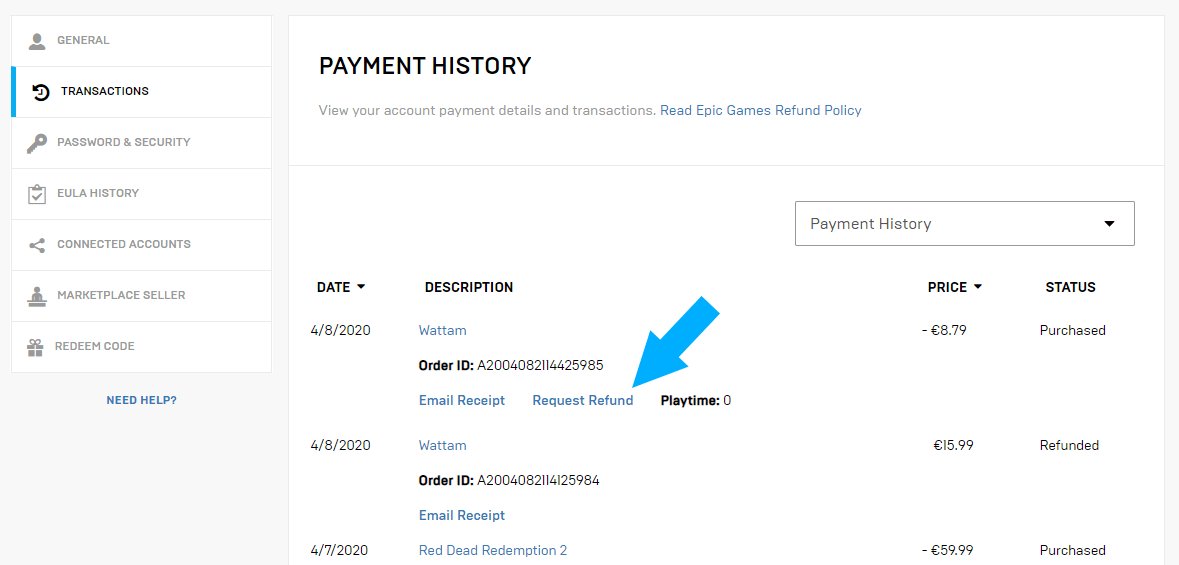
Within the account settings, look for something called “Transaction History,” “Purchase History,” or something similar. This page will list all of your purchases on the Epic Games Store. You can usually filter by date if needed to find the exact game for which you are requesting a refund.
Selecting the Game for Refund
Once you find the game you want to return, there should be an option near it to request a refund. It might be a button labeled “Request Refund,” “Return Game,” or something similar. Click on this button to start the refund process. If you don’t see this button that means the refund time period has passed or the game is non-refundable.
Choosing Your Refund Reason
You’ll likely be asked to provide a reason for requesting a refund. There are usually pre-set options like “I didn’t like the game,” “It doesn’t run well,” or “I bought it by mistake.” Choose the reason that best fits your situation. You might also get an option to add some extra text to further explain your refund request.
Submitting Your Refund Request
After you choose a reason (and maybe added some text), double-check everything and then click the “Submit” button. Now it’s time to wait. Epic Games will review your request and decide whether to approve it. You will get an email notification for any update on the refund.
What Happens After You Submit Your Request?
Submitting the request is only half of the process. Let’s take a look at what happens next.
The Review Process
Epic Games reviews every refund request to make sure it follows their policies. They’ll check when you bought the game and how long you’ve played it. This process usually doesn’t take too long, and you’ll often get an answer within a few days.
Email Notifications
Keep an eye on the email address associated with your Epic Games account. You’ll receive updates about your refund request there. Epic will let you know if the request is approved or denied. They may also contact you if they need more information.
Refund Approval
If your refund is approved, you’ll usually get your money back within a few business days. The amount will be refunded to your original payment method. This could be your credit card, debit card, or PayPal.
Refund Denials
If your refund is denied, Epic will also tell you the reason why. If you think there was a mistake, you might be able to contact their support team and ask for another review. Make sure you follow up with the support team immediately. It is worth trying to talk to the customer service team if you think they might have made a mistake.
Troubleshooting Refund Issues
Sometimes things don’t go as planned. Here are some common issues and how to address them.
The Refund Option Isn’t Available
If you don’t see a refund option for a game, it might mean that it has been more than 14 days since the purchase or that you have played it for more than 2 hours. Check the purchase date and playtime. If you believe this is an error, reach out to the support team.
Refund Not Processed After a Week
If you have waited a week or more and still haven’t received your refund, contact Epic Games support team right away. Sometimes there might be a delay because of payment issues. The customer care team should be able to solve this easily.
Getting Assistance From Epic Games Support
If you’re having trouble with the refund process, the Epic Games Support team can help. Here are a few ways to reach out:
- Epic Games Support Website: You can find a contact form or knowledge base on their official support website. This is the best way to get detailed help.
- Email: You can try to email their customer service team. They will usually reply within 24 hours.
- Social Media: You can try reaching them through social media, but this may be slower than other methods.
When you contact support, be sure to include your account information, the game’s name, and any other relevant details about the refund issue.
Tips for a Smooth Refund Process
Here are some tips to ensure the refund process is as easy as possible.
Keep Track of Your Purchase Dates
Always keep track of the date when you buy games. This will help you ensure that you don’t miss the 14-day window for requesting a refund.
Monitor Your Playtime
Pay attention to the amount of time you spend playing a new game. If you think you might want to refund it, don’t play more than 2 hours. This is a very important aspect of refund requests.
Read the Fine Print
Before buying any game or content, always read the description and refund policy. This will give you important information about what you’re buying and whether a refund is possible.
Act Quickly
If you decide you want a refund, request it sooner rather than later. Don’t wait until the last minute. The faster you make the request, the quicker you will get your money back. This is a general rule for anything refund related.
By following these tips and the steps outlined in this guide, getting a refund from Epic Games should be quite straightforward. Remember to stay within the guidelines, keep track of your purchases, and don’t hesitate to contact support if you need extra help.
Getting a refund doesn’t have to be a headache. With the right approach and by keeping their policy in mind, you can navigate the process smoothly. Enjoy your games, and don’t be afraid to ask for a refund when you need one!
How To Refund Games From Epic Games – Full Guide
Final Thoughts
To summarize, requesting a refund from Epic Games is straightforward. Access your account, find the transaction history, and initiate a refund if eligible. Remember that refund eligibility depends on purchase date and playtime.
You generally have 14 days after buying a game and less than two hours of playtime for a successful request. Knowing these conditions is vital for how to get a refund on epic games.

