
You must legally acquire the game files you wish to play, typically from purchasing them on platforms such as GOG or from old game discs you own. ScummVM is an engine; it doesn’t provide games.
Have you ever wanted to replay those classic adventure games from the past, but struggled to get them running on modern computers? ScummVM is your answer, but how to get games for scummvm is a crucial question. The program itself is just an interpreter.
You will need to obtain the game files separately, usually by finding them on online stores that specialize in retro titles. Remember to check your local laws before obtaining games.

How to Get Games for ScummVM
So, you’re excited to play some classic point-and-click adventure games using ScummVM? That’s fantastic! But where do you actually get those games? This is a common question, and thankfully, there are several great ways to find the games you’re looking for. Let’s dive in and explore the world of acquiring games for your ScummVM adventures.
Understanding Game Ownership
Before we get into the specifics of finding games, it’s super important to understand the concept of game ownership. Just like owning a book or a movie, you need to have the legal right to play a game. This usually means you either bought the game originally or have some other type of license that allows you to use it. Downloading games from unofficial places can be risky and illegal, and can also expose you to viruses or malware. Let’s make sure we are playing safely and legally!
The Importance of Legitimate Copies
It is crucial to start with legitimate copies of the game. Just like you wouldn’t copy a friend’s homework, we should respect the hard work and creativity of game developers. Purchasing or using games that you legally own makes sure that the developers who poured time and effort into making these games can continue to create new and amazing things for us to enjoy. When you support the creators legally, everyone wins! It’s also safer for your computer, because official game sources have been checked to make sure they don’t contain anything harmful.
Where to Find Legal Games
Now that we know the importance of owning games legally, let’s talk about some great places where you can find them. Don’t worry, getting legal copies is often easier than you think!
Digital Distribution Platforms
The internet has made getting games much easier! Platforms like GOG.com are excellent sources for older games that are compatible with ScummVM. These sites work with the game publishers to make sure that everything is legal.
- GOG.com: GOG specializes in offering classic games that are DRM-free, meaning that once you buy them, they’re yours to use without any extra hassle. Many older adventure games that ScummVM can play are available here. It’s a great place to start looking for those hidden gems. GOG also often has sales, so you might just find a bargain.
GOG frequently updates their platform and game libraries. So, if you don’t see the game you’re searching for at the moment, check back later! GOG also provides customer service in case you run into any issues. They make it really easy to find, purchase, and download the classics.
Physical Copies of Games
If you’re a fan of collecting things, or happen to have a dusty box in the attic, you might already have some game copies on disks that ScummVM can run. While this might seem like an old-fashioned way, it’s still a valid way to get games. The beauty of physical copies is that once you own them, they’re yours to keep, but, finding working old disks can sometimes be challenging and sometimes not all of the disks can work due to age.
- eBay: You can find lots of used copies of games on eBay. Just be sure to check the seller’s feedback and product descriptions, because it’s a used game, it will not be perfect.
- Second-Hand Stores: Don’t forget local second-hand stores! You never know when you might stumble upon an old game there. Some of these games that were found in secondhand stores can become valuable over time, so it’s very interesting to look through the older games sometimes.
Things to Consider with Physical Copies
When you’re looking for physical copies, remember a couple of important things. First of all, make sure the game is actually in good condition, because scratched disks might not work. Secondly, make sure the box includes all the disks and any required manual or any other required materials, because some games need special copy protection that is found in the manual in order for the game to be able to run. Sometimes, the box might be in bad condition, but the disks will work fine, and sometimes vice versa, so be sure to always check the condition of both before buying.
Understanding Game Data
Once you have your game, you need to understand that games come with all sorts of files and data. ScummVM doesn’t run the game like a regular computer program (exe file); instead, it looks for specific game data files. Typically, you are looking for data files inside the game’s folder, like .dat, .lab, .sou, .000, etc. Your aim is to extract these game files from your disks or from any installed folder.
The Extraction Process
So, you’ve found your games, now comes the task of getting the game data into a format that ScummVM can understand. This is pretty easy once you know how, and doesn’t require any complicated computer knowledge.
Extracting from Digital Downloads
If you get your game from a digital store like GOG.com, usually the installation process will put all the game files into a folder that you can easily find. Once the game is installed, you can copy that folder to another place on your computer. Then, when you add a game to ScummVM, you will be directed to that game folder. ScummVM will recognize that game folder as the data for the game.
The beauty of these games from GOG.com, or other sites that provide games for ScummVM, is that they are already prepared and ready to go. You simply point ScummVM to the correct folder, and you can start the game. You don’t need to worry about extracting any complicated files from a CD-ROM or any of the other processes you would have had to go through in the past. The games are conveniently prepared for you.
Extracting from Physical Media
If your game comes on a CD-ROM or floppy disks, you might need to copy the game data to your computer yourself. Here’s how you would do it:
- Insert the disk: Put the game disk into your computer’s CD or floppy disk drive.
- Explore the disk: Open the disk from your computer’s file explorer.
- Create a folder: Make a new folder somewhere easy to find on your computer (like on your desktop) and name it after the game.
- Copy the game files: Drag and drop the game data files from the disk into the folder you just made. Sometimes, it might be better to copy and paste, but usually drag and drop should be enough.
- Repeat if needed: If your game has multiple disks, repeat these steps for each disk. It’s a good practice to name your folders with the name of the game, and to add the part of the game, for example, Monkey Island 2 part1 and Monkey Island 2 part2, etc.
Dealing with Copy Protection
Older games sometimes had copy protection. This means you would need a special code or word from the game’s manual to play. If you come across this, you will need to find either the original manual, or find the copy protection online. This is a very specific issue to old games and there is no way around it, other than to use the original manual or find the answers online. Usually, you can find the answers to these copy protection puzzles on the internet, but again, make sure you are getting the answers from a reputable and reliable source. Sometimes, even the old forums have this kind of information about old games.
Adding Games to ScummVM
Now, you’ve legally obtained your games and have the game data safely extracted onto your computer. It’s time for the fun part – adding the games to ScummVM so you can start playing. It’s a straightforward process, and we’ll guide you through it.
Step-by-Step Guide to Adding a Game
- Open ScummVM: Launch the ScummVM application.
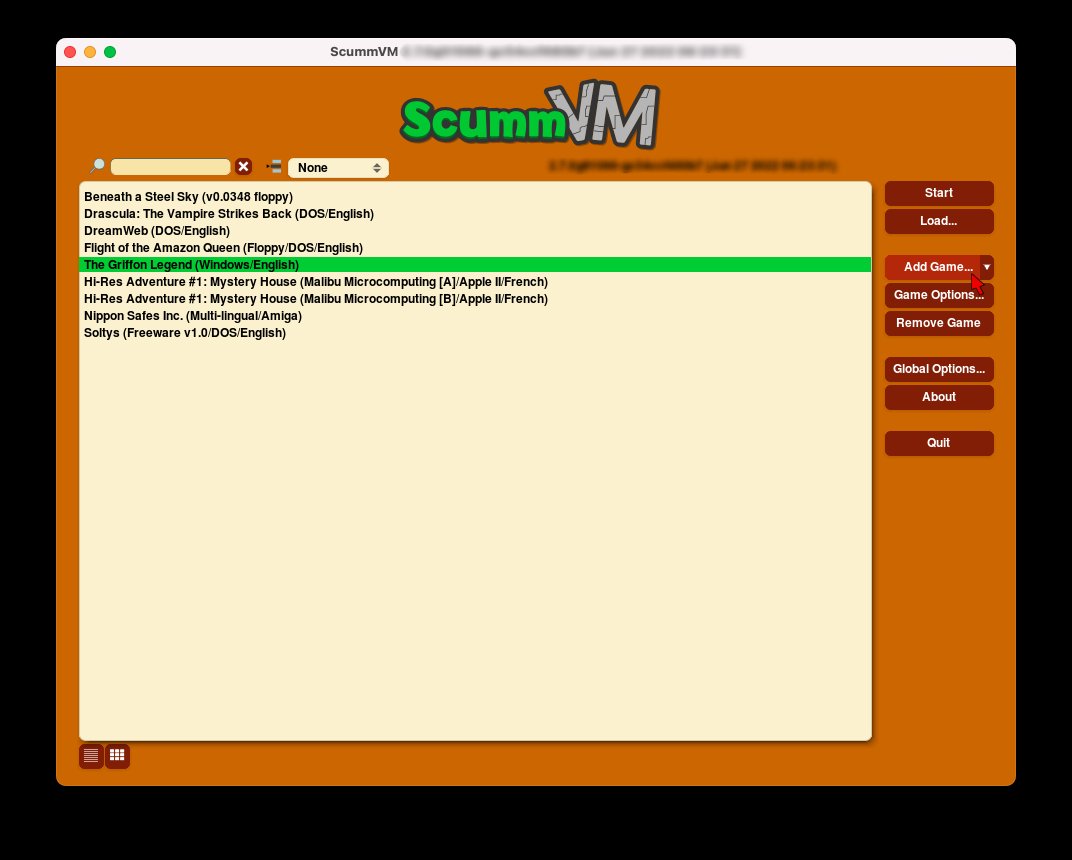
- Add Game: Click on the “Add Game” button, usually located on the right-hand side of the window.
- Navigate to Game Folder: A window will pop up, prompting you to find the game data folder. This folder is the one you created on your computer (as described above when extracting games) and you should click on “Choose”, and select the folder for the game.
- Select Choose: After clicking on the game folder, click on the “Choose” button or similar button, which should appear in the bottom right hand side corner of that pop-up window.
- The Game Should Appear in the List: The game should now be visible in your ScummVM game list. If the game is not showing up, or if you are having issues with the game, then there might be something wrong with the folder structure, or you might have pointed the ScummVM to the wrong folder. Always double check that.
- Start Playing: Select the game from the list, and click “Start.” Your classic adventure will begin!
Troubleshooting
Sometimes, things might not go perfectly smoothly the first time. Here are a few common problems and how to handle them:
- Game Doesn’t Appear: If the game doesn’t show up in ScummVM, double-check that you have selected the correct folder, which contains all the game’s data. Also ensure that the folder has data files that ScummVM can understand.
- Game Won’t Start: Make sure your game files are not corrupted, and if possible try re-installing the game, or re-copy the data from your disk. If you still have trouble starting the game, then, perhaps, you should double-check ScummVM compatability with your game, or look up some specific troubleshooting steps for that game online.
- Audio or Graphics Problems: If the game has audio or graphics issues, try adjusting the ScummVM settings. Sometimes, changing the graphics mode, the scaling settings, or the audio device can resolve these problems.
Community Resources
Remember, there’s a huge community of ScummVM users out there, and they are often happy to help. If you run into trouble, do not hesitate to check out the following resources:
- ScummVM Website: The official website is a great resource with lots of useful guides, FAQs, and compatibility lists.
- Forums: There are many forums where users discuss ScummVM and its games. Look for specific topics related to the games you want to play.
- Reddit: Subreddits like r/scummvm are places where people ask questions, share their experiences, and offer tips.
A Final Word
Getting games for ScummVM is a fairly simple process, once you get the hang of it. Be sure to only use legal copies of the games, and make sure that you have the correct files in the correct folders. There is a great community out there for ScummVM and its games, and if you are having trouble, you can always check for assistance on forums or other related community channels. Now that you know how to get games for ScummVM, go ahead and start playing your favorite classic adventures!
How to add a game in scumm VM
Final Thoughts
Finding compatible games is crucial for ScummVM. You can acquire them from several online stores that sell classic adventure games. Ensure the games you get are compatible with the ScummVM engine.
Another option includes purchasing physical copies of old games, then extracting the game data. These methods provide various ways on how to get games for scummvm. You can also explore abandonware sites, but be aware of copyright issues. Always get your game files responsibly.

