
To get Jackbox games, you need to purchase them from a digital storefront like Steam, the Nintendo eShop, PlayStation Store, or Xbox Marketplace.
Ready for a night of laughter with friends? Figuring out how to get Jackbox games is simpler than you might think. These party games are a great option when you want some fun with a group, and thankfully, getting your hands on them is easy.
You can find Jackbox games on various platforms, making it accessible for most players. They offer a variety of hilarious, interactive titles perfect for any gathering. Select your preferred device and dive into the party fun.

How to Get Jackbox Games: A Complete Guide
So, you’re ready to dive into the hilarious world of Jackbox Games? Fantastic choice! These party games are perfect for gatherings of friends and family, whether you’re all in the same room or playing remotely. But where do you even begin? Getting set up to play Jackbox might seem a little tricky at first, but don’t worry! This guide will walk you through all the different ways you can get your hands on these fun-filled games and start playing.
Understanding Jackbox Game Packs
Before we get into the “how,” let’s quickly talk about what you’re actually getting. Jackbox Games aren’t like your traditional video games; they come in “packs,” also called “Party Packs.” Each pack contains multiple different games within it. Think of it like a variety pack of your favorite snacks, each a bit different but all from the same delicious family! Instead of buying each game individually, you get a bundle of them, which usually works out to be a better deal. Each pack varies but generally includes 5 different games.
Where to Buy Jackbox Games
The first step in getting your hands on some Jackbox fun is figuring out where to actually buy the games. The good news is, there are several places you can purchase these games, depending on what you prefer. Here are the most common platforms:
Digital Game Stores
The most straightforward way to purchase a Jackbox Party Pack is through digital game stores. These are online stores where you buy the game and download it to your system. Here are a few places where you can find them:
- Steam (for PC, Mac, and Linux): Steam is a popular platform for downloading games on computers. It’s user-friendly and provides a place where you can easily manage all of your downloaded games. If you’re planning to play on a computer, Steam is one of your best options.
Key point: You need to create a Steam account to purchase and download games on this platform. - PlayStation Store (for PlayStation consoles): If you own a PlayStation 4 or PlayStation 5, this is your go-to place to buy Jackbox games for your console. Simply head to the PlayStation Store using your console and search for “Jackbox Party Pack.” You can find all the various packs available, plus download them right onto your PlayStation.
Key point: You must have a PlayStation Network account linked to your console to purchase and download games from the PlayStation Store. - Nintendo eShop (for Nintendo Switch): Nintendo fans can find their Jackbox fix through the eShop. Similar to the PlayStation Store, you’ll find all the Jackbox Party Packs on this digital platform for the Nintendo Switch. Just make sure your console is connected to the internet and that you have a Nintendo Account.
Key Point: Remember to link your Nintendo Account to your console before making any purchases. - Microsoft Store (for Xbox consoles and Windows PC): Xbox and some Windows PC gamers can use the Microsoft Store to acquire their Jackbox Party Packs. Similar to the above, it allows you to buy and download directly onto your Xbox console, as well as Windows 10/11 systems.
Key Point: Requires a Microsoft Account to buy and download the games. - Epic Games Store (for PC): Similar to Steam, the Epic Games Store is a place where you can download games on computers. If you have an Epic Games account already, look for the Jackbox Party Packs here.
Key point: You will need to make an account on Epic Games to purchase and download games. - Amazon Appstore (for Android devices): For those who have an Amazon Fire TV, they can use this app store to purchase the Jackbox party packs as well.
Key Point: You will need to create an Amazon account in order to use their appstore.
Key Differences between Platforms
It’s important to note that even though you’re getting the same Jackbox games, the experience might vary slightly across different platforms. For instance, the interface of the game menu will vary from platform to platform. However, the gameplay itself remains consistent across all platforms.
- Cross-Platform Play: You need to purchase the game on a platform to host it. All players can connect to the hosted game via their phones or other devices regardless of whether they are on the same platform. For example, someone playing on an Xbox can have a friend connect to their game through their phone browser.
- Game Availability: Not every Jackbox Party Pack is available on every platform, so you may want to verify if the one you want is available before deciding where to purchase.
Choosing the Right Platform
So how do you choose which platform to use? The answer is that it comes down to what devices you already own, and what is most convenient for you.
Things to Consider
- What devices you own: Do you have a console (Playstation, Nintendo Switch, or Xbox), or a Windows/Mac computer? That will determine the basic list of platforms you can use to buy Jackbox games.
- Who you will be playing with: Does your friend already have a particular console? If you plan to play with them often, you might choose to buy the game on the platform that they are using.
- Price: Sometimes there are special promotions on a particular platform that you might want to take advantage of. Check each platform for price comparison before buying.
Playing Jackbox Games: The Basics
Once you have the game downloaded, it’s time to get playing! Here’s how Jackbox games generally work:
The Host
One person needs to be the “host.” This means this person is using the console or computer the game is downloaded on. They will be selecting the game within the party pack, and starting the game itself. The host should be the only person who actually needs to purchase the game.
The Players
Everyone else joins using their own personal phones, tablets, or computers, going to Jackbox.tv, and entering a special room code, usually 4 letters. They do not need to own the game or have the game downloaded onto their devices in order to play.
How to Connect
- The host starts the game and sees a room code pop up on their screen.
- Everyone else goes to their web browser and types in www.jackbox.tv
- They enter the unique room code that was displayed on the host’s screen.
- If the code is entered successfully, they’ll see their username appear on the host’s screen.
- The host clicks the start button to get the game going!
Key Point: Everyone who wants to play should be connected to the internet.
Getting Started: Step-by-Step
Let’s break it down into some simple steps to help you start playing Jackbox Games today.
Step 1: Decide on Your Platform
As we talked about before, this will depend on the kind of device you want to play on (computer, Playstation, Xbox, etc.). Choose the platform that suits you the most.
Step 2: Pick Your Party Pack
There are many different Jackbox Party Packs. Some are more popular than others, so take some time to check out the descriptions of each and decide which one seems the most appealing to you. Read reviews from players to help you decide which party pack you want to buy first.
Step 3: Buy and Download
Once you’ve decided on a pack and your platform, go to the corresponding digital store and buy and download the game. Make sure you have enough space available to store the game on your device.
Step 4: Gather Your Friends
If you’re playing in person, gather everyone in the same room. If playing remotely, tell everyone to be on standby and have their phones or other devices nearby. Make sure that everyone has access to the internet.
Step 5: Start the Game
The person who purchased the game will launch the game from their device. When the game starts, the lobby screen will show on the host’s screen with the 4 letter room code. That is when the other players should go to Jackbox.tv on their web browser and enter that code to connect to the game.
Step 6: Play and Enjoy
Now that everyone has connected, get ready to laugh, strategize, and have a great time with the Jackbox games! The host will begin the game and you’re off!
Remote Play Options
Jackbox games shine when you play together in the same room, but they work great for remote parties too. Here are some tips for playing online:
Video Chat is Key
When playing remotely, it’s essential to see and hear each other. Use video conferencing software like Zoom, Google Meet, or Discord. This helps with the social interaction and also helps you see your friends reactions to the game.
Screen Sharing
The host should share their game screen via the video chat. This way all players can see the game action. Most video conference software offers a screen sharing option.
Tips for a Smooth Remote Game
- Good Internet: Make sure everyone has a stable internet connection. This will reduce lag and keep the game running smoothly.
- Set Up Early: Have everyone join the video chat and set up their devices a bit ahead of time. This gives you some buffer room in case someone has any issues connecting.
- Communicate: Encourage everyone to talk and interact. The social aspect is a big part of what makes Jackbox so fun.
Troubleshooting
Sometimes things don’t go as planned, so here are some common issues and solutions for when you’re trying to play Jackbox Games.
Connection Issues
- “My device won’t connect to Jackbox.tv”: Make sure your device is connected to a Wi-Fi network. Try closing and re-opening your web browser.
- “The room code isn’t working”: Double check the room code on the host’s screen to make sure you typed it in correctly. The room code is case-sensitive.
- “The game is lagging”: It may be an internet connection issue. Have the host and other players check their internet connections.
Game Issues
- “The game is frozen” Try restarting the game. If it still doesn’t work, then the device may need to be restarted.
- “I don’t know how to play”: Each game has instructions that the host can read, to guide new players. Some of the games also provide a tutorial to new players.
Which Jackbox Party Pack to Buy
Choosing which party pack to purchase can be difficult. There are now ten different party packs, plus additional games available as stand-alone purchases. Many players wonder which is the best party pack, or which one they should buy first. Here is a quick look at some of the different party packs.
Jackbox Party Pack 1
-
Notable Games: You Don’t Know Jack 2015, Fibbage XL, Drawful, Word Spud, Lie Swatter.
A solid starter pack to introduce you to the Jackbox world. It has multiple classic Jackbox games that are considered fan favorites, such as You Don’t Know Jack and Fibbage.
Jackbox Party Pack 2
-
Notable Games: Fibbage 2, Quiplash XL, Bidiots, Bomb Corp., Earwax.
Includes the fan-favorite game Quiplash, plus Fibbage 2, which has more questions than the original Fibbage. It is a great pack for parties, especially for those who like making others laugh.
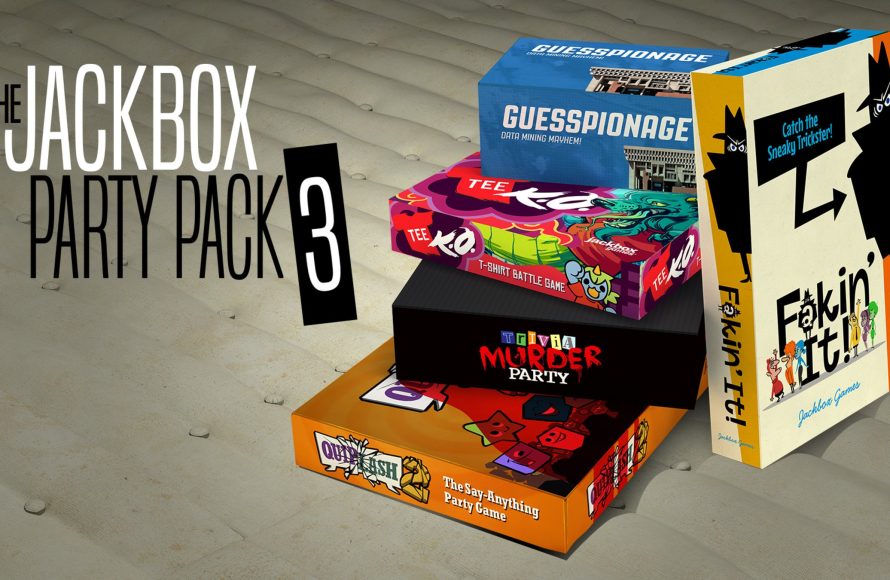
Jackbox Party Pack 3
-
Notable Games: Quiplash 2, Trivia Murder Party, Guesspionage, Tee K.O., Fakin’ It.
This pack has some of the most popular Jackbox games, including Trivia Murder Party. These games are great for larger groups and for laughs with the whole party.
Jackbox Party Pack 4
-
Notable Games: Fibbage 3, Survive the Internet, Monster Seeking Monster, Bracketeering, Civic Doodle.
This party pack includes Survive the Internet, where players make humorous responses based on social media prompts. Monster Seeking Monster is a funny game about dating monsters.
Jackbox Party Pack 5
-
Notable Games: You Don’t Know Jack 2018, Split the Room, Mad Verse City, Patently Stupid, Zeeple Dome.
You Don’t Know Jack 2018 offers more trivia fun with a new format. Mad Verse City is another fan favorite, where players create their own rap verses.
Jackbox Party Pack 6
-
Notable Games: Trivia Murder Party 2, Role Models, Joke Boat, Dictionarium, Push the Button.
Push the Button is a social deduction game, where players try to figure out who are the aliens among the crew. Trivia Murder Party 2 offers another version of the fan-favorite trivia game, Trivia Murder Party.
Jackbox Party Pack 7
-
Notable Games: Quiplash 3, The Devils and the Details, Champ’d Up, Talking Points, Blather ‘Round.
Quiplash 3 introduces new prompts for the fan-favorite game. Champ’d Up, in which players draw characters and try to come up with funny names for them is very humorous.
Jackbox Party Pack 8
-
Notable Games: Job Job, The Poll Mine, Drawful: Animate, The Wheel of Enormous Proportions, Weapons Drawn.
This party pack has a great variety of different games, from silly drawings to solving riddles. Job Job is a good icebreaker for parties, where the players share personal experiences to match job applications. Drawful Animate is a new version of the classic Drawful game.
Jackbox Party Pack 9
-
Notable Games: Fibbage 4, Roomerang, Junktopia, Nonsensory, Quixort.
This party pack has some fun new versions of classic Jackbox games like Fibbage. It is often chosen as a popular starter pack for new Jackbox players. Junktopia is a fun game that encourages players to have creative ideas and funny explanations about items.
Jackbox Party Pack 10
-
Notable Games: Tee K.O. 2, Timejinx, Hypnotorious, Dodo Re Mi, FixyText.
This is the latest Jackbox party pack. Tee K.O. 2 has the same premise of creating funny t-shirt designs as the original, but has new content. Hypnotorious is a great game for parties who enjoy social deduction games.
Cost of Jackbox Games
The cost of the Jackbox games depends on the platform, and whether there is a sale going on at that time. Generally each party pack costs around $30, which is reasonable considering that each pack contains multiple games.
When you think of the cost per game, it makes Jackbox very affordable, when compared to individual video games. A single purchase of a Jackbox party pack gives you access to a whole library of fun.
Enjoying the Games
Once you start playing Jackbox games, you’ll be coming back again and again. Their simple mechanics and humor appeal to a wide range of players. With various game types, from drawing and writing to trivia and social deduction, there’s always something new to try.
How to Play Jackbox Games | Official Tutorial (2020)
Final Thoughts
To get Jackbox games, you primarily purchase them digitally on various platforms. These include Steam, PlayStation Store, Nintendo eShop, and Xbox Marketplace. You must decide which platform works best for you and your friends.
After purchasing a pack, one player starts the game, then others join using phones or tablets via a web browser. The process is quite simple and ensures anyone can participate easily.
Therefore, knowing where to buy them and how to get jackbox games is easy. Now you can start having fun with your friends.

