
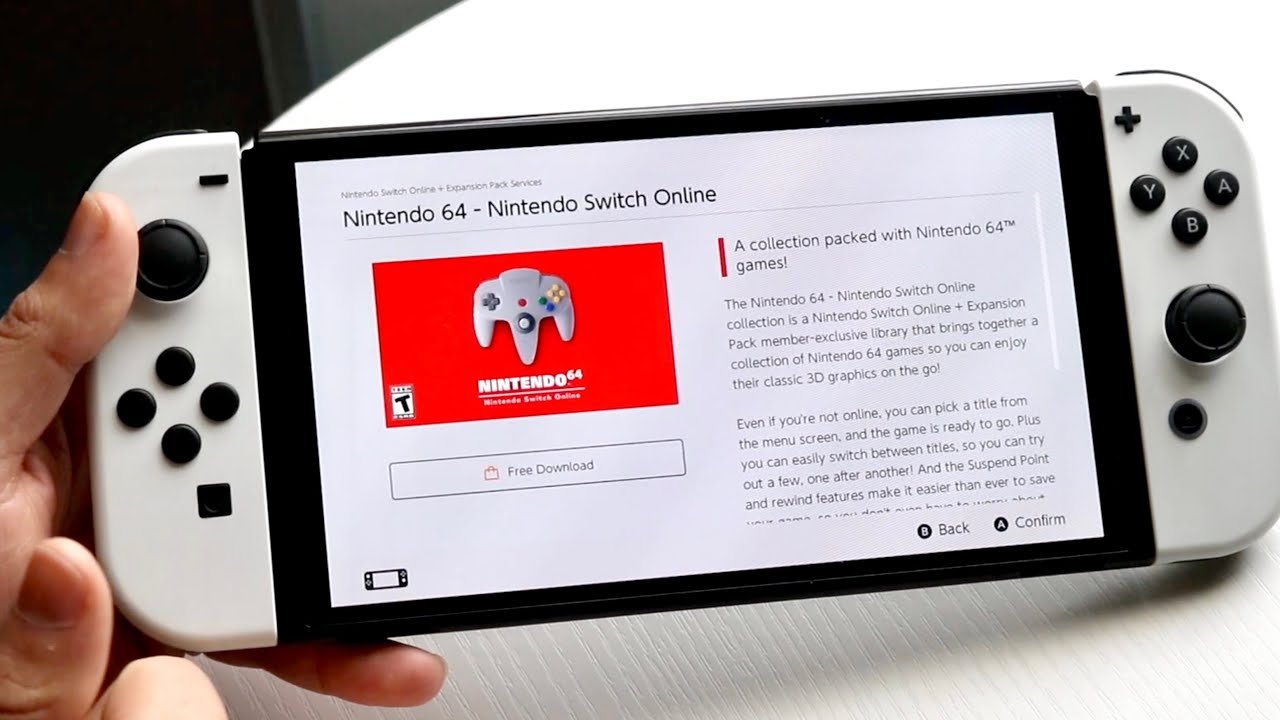
To get N64 games on Switch, you need a Nintendo Switch Online + Expansion Pack subscription. This allows you to access a library of N64 titles.
Remember the golden age of gaming? The N64, with its blocky yet beloved graphics, offered experiences that shaped many childhoods. Now, many players want to know how to get N64 games on Switch, bringing those classics into a modern format.
The desire to replay Mario 64 or relive those epic battles in Ocarina of Time is certainly understandable. It’s a journey of nostalgia, and thankfully, Nintendo has provided a way to access these classics again.

How to Get N64 Games on Switch
Want to play those awesome Nintendo 64 games again? You’re not alone! Many gamers have fond memories of classics like Super Mario 64, The Legend of Zelda: Ocarina of Time, and Mario Kart 64. The good news is, you can bring those nostalgic experiences to your Nintendo Switch. This guide will show you the different ways to play N64 games on your Switch.
Nintendo Switch Online + Expansion Pack
The easiest and most official way to play N64 games on your Switch is through the Nintendo Switch Online + Expansion Pack subscription. This is a premium tier of the Nintendo Switch Online service, and it gives you access to a library of classic N64 games, alongside other benefits. Think of it like a special club just for classic game lovers. Here’s what you need to know:
What is Nintendo Switch Online + Expansion Pack?
This is not just your regular Nintendo Switch Online. It’s an upgraded service that gives you more goodies. It includes everything from the standard online service, such as online play and cloud saves, and adds a bunch of retro games from Nintendo 64 and Sega Genesis as well as DLC for some of Nintendo’s first party titles. That’s a lot of gaming goodness in one package.
Benefits of the Expansion Pack
- N64 Game Library: Get access to a growing list of N64 games. Nintendo keeps adding more over time, which is awesome!
- Sega Genesis Library: You also get access to a library of classic Sega Genesis games. So, you’re getting double the fun.
- Animal Crossing DLC: Get the Happy Home Paradise DLC for Animal Crossing: New Horizons. It’s like a whole new game inside your Animal Crossing world.
- Mario Kart 8 Deluxe DLC: Access to the Booster Course Pass for Mario Kart 8 Deluxe. More tracks equals more racing fun!
- Online Play: You can play many of these retro games online with your friends. Imagine racing through Mario Kart 64 with friends far away!
- Cloud Saves: Keep your game saves safe in the cloud, so you don’t lose your progress if something goes wrong.
How to Subscribe to the Expansion Pack
It’s pretty straightforward to subscribe, simply follow the steps below:
- Go to the Nintendo eShop on your Switch. It’s the orange shopping bag icon on your home screen.
- Select “Nintendo Switch Online” on the left side of the screen.
- Choose the “Individual Membership” or “Family Membership” for the Expansion Pack option.
- Follow the prompts to complete your subscription.
- Once subscribed, you can download the Nintendo 64 app and start playing!
There’s also the option for family membership, which can be great for larger households, or you can split the cost with friends.
What N64 Games are Available?
The library is always changing, but here are some of the popular games you might find:
- Super Mario 64
- The Legend of Zelda: Ocarina of Time
- Mario Kart 64
- Star Fox 64
- Yoshi’s Story
- Banjo-Kazooie
- F-Zero X
- Paper Mario
Nintendo adds more games periodically, so check the app for the latest list.
Is the Expansion Pack Worth It?
Whether it’s worth it depends on how much you value these things:
- If you’re a big fan of N64 and Sega Genesis games, it’s a great way to play them.
- If you already play Animal Crossing or Mario Kart 8, the DLC is a nice bonus.
- Consider that the subscription costs more than the regular Switch Online subscription.
- If you only want to play a few games and don’t care about online play, this option might be expensive.
In general, if you play these games often, the cost can be worth it. If not, then consider other options before committing to the annual cost.
Alternative Options – Homebrew and Emulation
If the official Expansion Pack isn’t for you, or if you want to play games that aren’t part of the library, you can consider homebrew and emulation. This is a more technical method, but it can give you more freedom. Be aware that this process is much more involved, and potentially risky. It also requires more effort to set up and maintain.
What is Homebrew?
Homebrew refers to custom software that runs on your Switch. This software is made by independent developers and not by Nintendo. It lets you do things that Nintendo usually doesn’t allow, like running unofficial games and other apps. It’s like a secret passage into the depths of your console, but be aware of the risks involved.
Understanding Emulation
Emulation is using software to make your Switch behave like an N64. This software is called an emulator. An emulator can run N64 game files called ROMs. Think of it as a translator, allowing your Switch to understand the language of the N64.
Risks of Homebrew and Emulation
It’s very important to understand that homebrewing and emulation come with risks. Here are a few to keep in mind:
- Voiding Your Warranty: Modifying your Switch can void your warranty. If something goes wrong, Nintendo might not fix it.
- Bricking Your Switch: If you do things wrong, you could damage your Switch and make it unusable. This is known as bricking.
- Piracy: Downloading ROMs of games you don’t own is illegal. You should only play games that you have the physical copy of.
- Software Issues: Homebrew software can be unstable and have glitches.
If you’re not comfortable with these risks, it’s best to avoid homebrew and emulation.
Steps for Setting Up Homebrew (General Outline)
If you are willing to take the risks, here’s a general outline of what’s involved. Remember, the exact steps can vary and get technical.
- Research: Do a lot of research before you start. Make sure you understand the risks and steps involved. Read forums, watch videos, and make sure you know what you’re doing.
- Check Compatibility: Not all Switch consoles can be homebrewed. Check your Switch’s serial number and make sure it’s compatible. There are lots of resources online to check this.
- Prepare Your SD Card: You’ll need a formatted SD card to store the homebrew software and your games.
- Download Homebrew Tools: You’ll need specific software to modify your Switch. This might include things like a custom firmware (CFW).
- Follow a Guide Carefully: There are guides online that walk you through the process. Follow them step-by-step and be patient.
- Download an Emulator: Once homebrew is set up, you’ll need to download an N64 emulator like RetroArch.
- Obtain ROMs (Legally): Make sure you only use ROMs of games you own.
- Transfer the files: Transfer the emulator and roms on the formatted SD card.
- Play the games: Launch the emulator on your Switch and start playing your games.
Setting Up the Emulator
Once your console is homebrewed, you can install an emulator. These emulators, like RetroArch, allow you to play N64 games. Here’s a simplified overview of the emulator process:
- Install the Emulator: Transfer the emulator to your SD card. Usually, this is a .nro file which gets moved to the switch/retroarch/ folder on your sd card.
- Find the game files (ROMs): Obtain game files legally (if you own the physical game). N64 games usually come in a .z64 or .n64 file formats.
- Copy ROMs to the SD Card: Place the game files onto your SD card.
- Launch the Emulator: Run the emulator on your homebrewed Switch.
- Load the Game: Select your game from the emulator’s menu.
- Play!: Configure your controls and enjoy the game!
Troubleshooting Tips
Homebrew and emulation can be tricky, so be prepared to troubleshoot. Here are some common things to check:
- Make sure your software is up to date: Keep your homebrew software and emulators updated.
- Verify ROM file: Check the ROM files are in the correct format.
- Check Compatibility: Some games might not work perfectly. Check the compatibility lists of the emulator you are using.
- Look for help: Search the forums and online communities. There are many experts who can help you with complex issues.
Comparing the Two Methods
Let’s compare the official way (Nintendo Switch Online + Expansion Pack) with the alternative option (homebrew and emulation).
| Feature | Nintendo Switch Online + Expansion Pack | Homebrew and Emulation |
|---|---|---|
| Ease of Use | Very Easy. Download the app and go. | Difficult. Requires technical knowledge and effort. |
| Cost | Requires a paid subscription. | Free, but the risks are there. |
| Safety | Safe and legal. | Risky and could cause issues. |
| Game Library | Limited library of curated titles. | Potentially any N64 game. |
| Legality | Completely legal, official. | Potentially illegal if you are downloading games you don’t own. |
| Features | Includes online play, cloud saves, extra DLC | Can be customised, but has no online play. |
| Reliability | Very stable and reliable. | Can be unstable with crashes and glitches. |
Making the Right Choice
So which option is right for you? Here are some things to consider:
- If you want a simple, legal, and official way to play: The Nintendo Switch Online + Expansion Pack is your best option.
- If you’re comfortable with technical challenges and the risks of homebrew: Emulation can give you more freedom but is not for beginners.
- If you only want to play a few popular N64 games: The Expansion Pack might suffice.
- If you want to play specific games that are not on the Expansion Pack: Homebrew might be worth considering, but only if you understand the risks.
- If you want to play online: Stick to the official Nintendo Switch Online + Expansion Pack.
Playing N64 games on your Switch is a fantastic way to relive old memories and discover classics for the first time. Think about what matters most to you—simplicity, cost, risk, or game selection—and choose the option that fits your needs.
Choosing how to bring N64 games to your Switch really comes down to personal preference and comfort level. Whether you subscribe to Nintendo’s official service or dive into the world of homebrew and emulation, the power to revisit these classics is now in your hands.
How To Play Nintendo 64 Games On Nintendo Switch
Final Thoughts
You can get N64 games on Switch via Nintendo Switch Online + Expansion Pack. This subscription service provides access to a library of classic N64 titles. The selection includes popular games.
To play, navigate to the Nintendo eShop on your Switch. Subscribe to the “Nintendo Switch Online + Expansion Pack” tier. After subscribing, you’ll find a dedicated app for N64 games. Enjoy playing many games using this service.
Therefore, how to get N64 games on switch is simple. You need the correct Nintendo service and then the game is readily available.

