
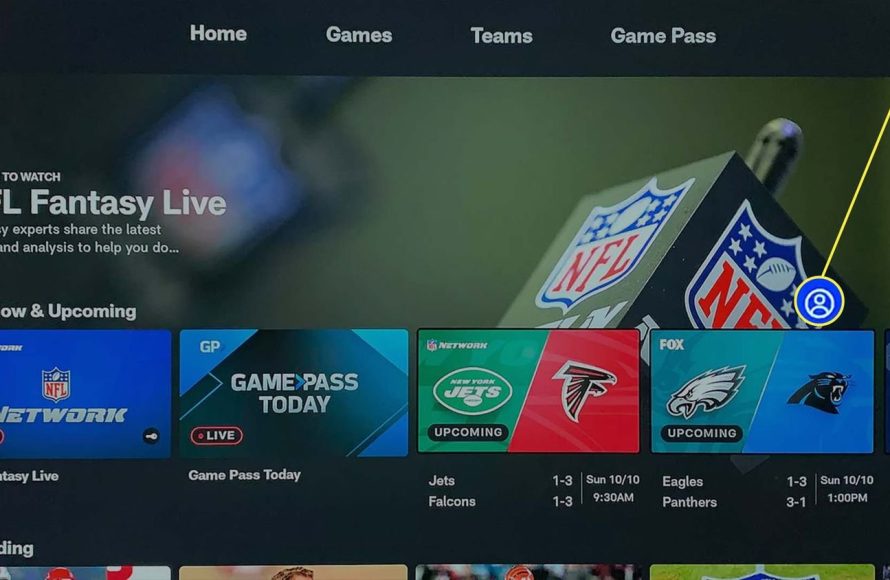
To get NFL games on Firestick, you’ll need to use apps like NFL+, ESPN, or streaming services that carry NFL games, such as FuboTV or YouTube TV.
Want to catch every touchdown and tackle directly on your TV? Many fans are asking how to get NFL games on Firestick. It’s simpler than you might think, and this guide will walk you through the best methods. You can watch your favorite teams in action with the right setup and apps.
There are several ways you can access live games. Various subscriptions and options make this easy. This guide will explain these for your Firestick.

How to Get NFL Games on Firestick
Okay, football fans! You’re itching to catch all the bone-crunching tackles and amazing touchdowns, right? And you want to do it right from your comfy couch using your Amazon Firestick. Great news! It’s totally possible, and we’re going to break down exactly how to do it. It might seem a little tricky at first, but trust me, it’s simpler than you think. We’ll explore different ways you can watch NFL games on your Firestick, from official apps to some clever workarounds, making sure you don’t miss a single snap this season. Get ready to turn your Firestick into your ultimate football hub!
Official NFL Streaming Apps for Firestick
The best place to start your quest for NFL games is with the official streaming apps. These are the most reliable and offer the best picture quality. Plus, they’re usually pretty easy to use. Think of these apps like your go-to football headquarters. Let’s check out some of the top choices:
NFL+
NFL+ is the league’s very own streaming service. It lets you watch live local and primetime games on your phone or tablet. If you have a higher tier subscription, you can get access to replay past games on your tv through your firestick and also view a variety of other NFL contents. Keep in mind that this service usually doesn’t include all the games, so make sure to check before committing.
- Pros: Official source, high-quality streaming, offers extra features.
- Cons: May not have all games, requires a subscription.
- How to Get It: Search for “NFL” in the Firestick app store, then download and subscribe through the app.
ESPN App
The ESPN app is another fantastic choice, especially if you are a fan of Monday Night Football. The ESPN app is an official app and offers live streaming of games as well as replays and other related content, however you need to have a cable TV subscription for the most part, so you cannot use this to watch NFL for free. This app streams live NFL games that ESPN is broadcasting, so the games they show will vary week to week. It also has other sports content, so you’ll have something to watch even when it isn’t game day.
- Pros: Streams a range of live NFL games (MNF), a mix of other content
- Cons: Only streams games shown on ESPN, requires cable tv subscription
- How to Get It: Download the ESPN app from the Firestick app store, then sign in with your cable TV provider details.
Amazon Prime Video
Guess what? Amazon Prime Video also streams Thursday Night Football! If you are an Amazon Prime subscriber, you get the Thursday games included in your subscription without any extra cost. This makes watching Thursday night games super easy. You just open the Prime Video app on your Firestick and look for the games. This way you can enjoy Thursday night football right from your Amazon Firestick.
- Pros: Includes Thursday Night Football for Prime subscribers, easy to access.
- Cons: Only includes Thursday night games, requires Prime subscription.
- How to Get It: The Prime Video app is usually pre-installed on Firestick. If not, download it from the app store, then just sign in with your Amazon account.
Live TV Streaming Services
These services are like cable TV but streamed over the internet. They often include channels that show NFL games, offering a broader range of games than individual apps. These are great if you want the feel of traditional TV but with the convenience of streaming. Remember, each service has its own channel lineup and pricing, so do a little research before you choose.
YouTube TV
YouTube TV is a popular choice for many. It carries channels like CBS, Fox, NBC, and ESPN, all of which show NFL games. This is good for a lot of different options. Usually, you will be able to watch the games being played on local networks as well as games on ESPN. It is very convenient and has a large selection of channels.
- Pros: Extensive channel selection including networks showing NFL games, cloud DVR.
- Cons: More expensive than individual app subscriptions.
- How to Get It: Download the YouTube TV app on Firestick, sign up for a subscription.
Hulu + Live TV
Hulu + Live TV is another excellent option for catching NFL games. It also offers a wide variety of channels such as CBS, Fox, NBC, and ESPN which frequently broadcast games. This gives you a mix of local and national broadcasts. Hulu + Live TV includes the whole Hulu on-demand library, so you’ll have lots of other shows and movies at your fingertips when not watching football.
- Pros: A good selection of channels showing NFL games, includes Hulu on-demand content.
- Cons: Can be pricey, some local networks might not be available in all areas.
- How to Get It: Download the Hulu app from the Firestick app store, then sign in or create an account.
FuboTV
FuboTV is known for being very sports-focused and thus it is also a great choice for watching NFL games on your Amazon Firestick. It offers a wide variety of sports channels and usually has all the channels that show NFL games, such as CBS, Fox, NBC, and ESPN. This will give you a very broad viewing experience. It is a very solid choice for serious sports fans.
- Pros: Huge number of sports channels, includes channels for most NFL games.
- Cons: Expensive compared to some other options.
- How to Get It: Download FuboTV app on Firestick, then sign up for a subscription.
Sling TV
Sling TV is designed to be a more budget-friendly option, it offers different packages that include channels that broadcast NFL games. Sling TV can be a good middle ground between individual apps and the more costly services. With Sling TV you pick a base package and can also add a sports package for extra access to your favorite sports channels and games.
- Pros: Cheaper than some other streaming services, customizable channel packages.
- Cons: Might need add-ons for complete NFL coverage.
- How to Get It: Search for Sling TV in the Firestick app store and then download and choose the desired packages.
DIRECTV STREAM
DIRECTV STREAM is a premium streaming service that offers a comprehensive selection of channels, including those that regularly show NFL games. DIRECTV Stream offers a channel list that rivals traditional cable TV. You are getting a lot of channels and they also have a good cloud DVR, so you can record the games you want to watch later. It does come at a higher price tag though.
- Pros: A huge variety of channels, most NFL games covered, good cloud DVR.
- Cons: More expensive than most streaming services.
- How to Get It: Download the DIRECTV STREAM app from the Firestick app store, then subscribe.
Using a VPN for NFL Games
Sometimes, if you are traveling or live in certain areas you may find that some games are not available. This can be due to blackouts or other region-specific restrictions. This is where a Virtual Private Network (VPN) can come in handy. A VPN allows you to connect to servers in different locations, making it seem like your Firestick is located somewhere else. In most cases, this will enable you to bypass those pesky blackouts and geo-restrictions.
How a VPN Works
A VPN sends your internet traffic through an encrypted tunnel to a server in another location. By doing this, it is changing your IP address and therefore your location. This helps you avoid geo-restrictions and watch the game you want.
Choosing a VPN
Not all VPNs are the same! Here’s what to look for when selecting a VPN:
- Speed: You will need a fast connection to stream games without buffering.
- Server Locations: Choose a VPN with many servers so you can change your location.
- Compatibility: Make sure your VPN works with Firestick devices.
- Security: Choose a VPN that keeps your data private and secure.
Steps to Use a VPN on Firestick
- Install the VPN: Download the chosen VPN app from the Firestick app store.
- Sign in: Enter your account details to log in to your VPN account.
- Connect: Choose a server location, preferably somewhere in the US, where games are not blacked out.
- Stream: Once connected, open your desired streaming app and enjoy the game!
Important Considerations When Using a VPN
- Legal: Using a VPN to watch sports is usually okay, but it is best to check local laws.
- Subscription: VPNs are usually not free, so you will need to pay for a good one.
- Reliability: Some free VPNs might not be good enough for streaming, as they are often slow or unreliable.
Free Options (Use with Caution)
Now, let’s talk about the not-so-official options. You might find some websites or apps that claim to stream games for free. While these might be tempting, it’s vital to approach them with caution. These options can be unreliable and sometimes even dangerous. Always be careful with free streaming services and make sure you have good antivirus software.
Free Streaming Websites
There are numerous websites that stream sports for free. These sites may look appealing, but they usually have a lot of pop-up ads that can be annoying. They also may not always work or provide high-quality streams. Some websites might even try to trick you into downloading things that can harm your devices, so it is important to be very careful!
Unofficial Apps
There are apps that are available outside the Amazon Appstore that claim to provide free NFL games. These apps are not verified by Amazon and can be very risky to download. They may not always stream in good quality and may even contain malware that can damage your Firestick. Always be careful when downloading anything from unofficial sources.
Why Be Careful
It is very important to keep in mind that:
- Legality: Free streams can be illegal, and you could get into trouble for watching them.
- Security: Unofficial sources can expose your Firestick to malware.
- Quality: Free streams are very unreliable and often have very low picture quality.
Troubleshooting Common Issues
Even with the best apps and plans, things can go wrong. Here’s how to deal with some common problems when trying to watch NFL games on your Firestick:
Buffering Problems
Buffering is when your game keeps stopping and starting. This can be very frustrating. Here are some solutions:
- Check your internet: Make sure you have a strong Wi-Fi signal. Try restarting your modem and router.
- Close other apps: If other apps are running on your Firestick, close them so that they don’t slow down the game.
- Reduce streaming quality: Sometimes lower picture quality means less buffering.
App Crashing
If your app keeps crashing or closing during a game:
- Restart your Firestick: This will usually solve the problem.
- Update your apps: Make sure you have the latest version of your streaming app.
- Reinstall your app: Delete the app and download it again from the app store.
Blackouts
If your game is being blacked out, even if you are on a legit channel:
- Use a VPN: This can help you avoid blackout issues by changing your location.
- Check your location: Make sure you are within the viewing area for the game.
No Sound
If you can see the game but hear no sound:
- Check your volume: Make sure your TV and Firestick aren’t muted.
- Restart your Firestick: Sometimes a simple restart will fix the sound problem.
- Check the app settings: Make sure sound is not turned off in the app.
The Importance of a Good Internet Connection
One of the most important things to have for good streaming is a fast and reliable internet connection. Make sure you get a good internet package from your provider, with a strong speed and good stability. If your internet is bad, it doesn’t matter how you stream your games, it will still buffer.
Watching NFL games on your Firestick is very possible with a little bit of planning and preparation. From official apps to live TV services, and even the option of using a VPN, there are many different ways to catch all the action. Always be careful with free options, and make sure you follow the appropriate steps to make sure your watching experience is very safe and enjoyable. Now that you know how to stream on your firestick it is time to grab some snacks and get ready to watch some football!
How to watch all NFL games on Amazon Firestick Jailbreak with schedule
Final Thoughts
Getting NFL games on Firestick involves using apps like Amazon’s own Prime Video, ESPN+, or the NFL app. You may need a subscription for some. These apps often require a cable or satellite TV login.
Alternatively, some third-party apps offer live games, but be cautious of their legitimacy. Make sure to check reviews before using them. Always verify the sources to protect your device.
Ultimately, to get NFL games on firestick, choosing a trusted app with a valid subscription is key. This ensures you enjoy the games without issues. Always check app availability and costs.

