
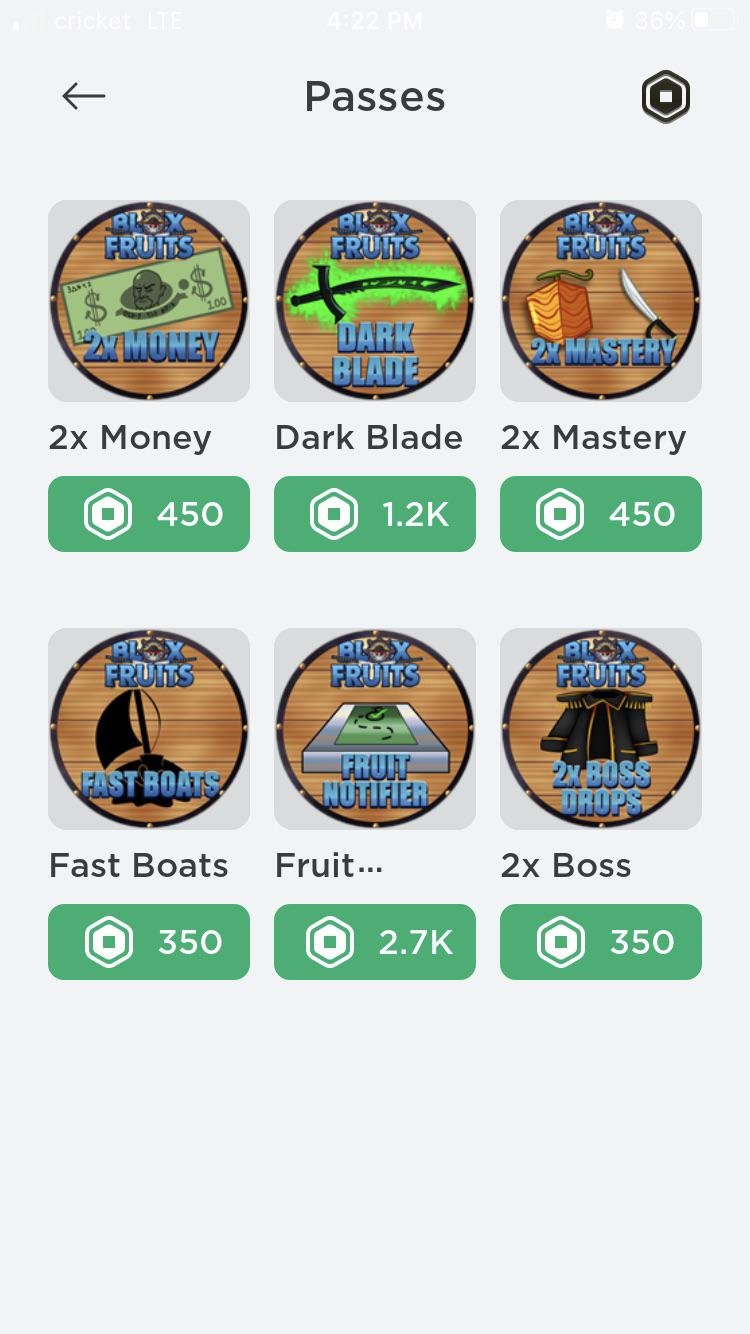
To get Robux from a game pass, you must first create the pass within your Roblox game and then players purchase it using Robux. You receive a portion of the Robux spent when someone buys your game pass.
Ever wondered how some players seem to have endless Robux? One popular method involves creating and selling game passes within your own Roblox games. The question, “how to get robux from game pass,” is quite common among aspiring creators. It’s actually simpler than you might think.
Essentially, players purchase your game passes using their Robux, and you, as the creator, earn a percentage of that purchase. This creates a path for generating an income from your gameplay creations. So learning the ins and outs of game pass creation could be very useful for you.

How to Get Robux From Game Pass: A Kid-Friendly Guide
So, you’re dreaming of more Robux, huh? Maybe you want that cool new hat, a sweet animation, or even a whole new game! Well, one of the coolest ways to earn Robux is by creating and selling Game Passes in your own Roblox games. It’s like having your own little shop in the Roblox world! It might sound tricky, but trust me, it’s easier than you think. Let’s dive in and learn how you can get those precious Robux from your Game Passes.
What Exactly is a Game Pass?
Think of a Game Pass like a special ticket or a VIP pass for your game. It gives players who buy it extra features, abilities, or items that other players don’t have. These could be anything from a special sword, access to secret areas, or even a super-speed boost! When players purchase your game passes, you get some Robux. It’s a win-win! They get cool stuff, and you get closer to getting that new item you’ve been eyeing.
Game Passes vs. Developer Products: What’s the Difference?
You might have heard about “Developer Products” too. While both can earn you Robux, they work a bit differently. Game Passes are purchased once and give a player a permanent benefit in your game. A Developer Product, on the other hand, is usually a one-time use item, like a single healing potion or a temporary increase in strength. Think of Game Passes as ongoing perks and Developer Products as single-use items. When you sell either of these, you earn Robux, but Game Passes usually have better potential to keep providing Robux if you create something exciting for your game and your users. Keep in mind, that roblox takes a percentage of each sale, so you won’t get the exact amount. The cut is roughly 30% that goes to the roblox company.
Creating Your First Game Pass
Ready to start making some Robux? Here’s how to create your very own Game Pass:
-
Go to Roblox Studio: Open up Roblox Studio. This is where you create your games. If you don’t have Roblox Studio yet, you can download it for free from the Roblox website.
-
Choose a Game: Pick the game you want to add a Game Pass to. You can either create a new game or use one you’ve already made. If you don’t have any, create something simple like a basic place with a few blocks.
-
Head to the Game’s Page: Once your game is chosen, find the game’s page on the Roblox website. You can find this page by opening your Roblox creator page, choose your game and then choosing the edit page. You’ll be looking for the game detail page.
-
Create Game Pass: On the game details page, look for the “Associated Items” section, and click “Passes”. Then, find the button “Create A Pass”. Once you’ve clicked the button, a new page appears where you can upload a picture for your game pass.
-
Upload an Image: Choose a fun picture to represent your Game Pass. It could be a picture of the item or ability that the pass gives the player. It is important to upload an appropriate image, so keep it appropriate for everyone, this will increase the likelihood of the approval and ensure everyone can enjoy it.
-
Name Your Game Pass: Give your game pass a catchy and descriptive name. For instance, “Super Speed Boost” or “Golden Sword”.
-
Add a Description: Write a brief description of what the game pass does. Players need to know what they’re buying!
-
Set a Price: Now, the important part! Decide how much Robux you want to charge for your Game Pass. Start with a lower price to see how it goes and then you can raise it later if you wish.
-
Click “Create Pass”: Once you’ve completed all the fields, click the ‘Create Pass’ button and your game pass is created, you are now one step closer to getting robux from game pass.
-
Go back to game detail page and now make it “For Sale”: Once you created it, go to the game detail page and choose passes and now click the created pass and click the “For Sale” button. Now it’s ready to be bought.
Making Your Game Pass Appealing
Creating a Game Pass is only half the battle. You also need to make sure people actually want to buy it! Here are some tips to make your game passes more tempting:
Offer Unique Benefits
Don’t just make something that’s already available in your game. Think about special and unique things that players can only get with a Game Pass. This can be anything that gives the player more control or speed or new ability.
Make it Fun
What is the most important thing is that your game pass adds to the fun of your game. It shouldn’t just be something that players think they need. It should be something they want because it makes the game more enjoyable. Fun game passes include things like a pet companion, special clothes for your avatar, or a cool item that adds new elements of interaction in your game.
Set a Fair Price
Pricing your game pass is key. If it’s too expensive, no one will buy it. If it’s too cheap, you might not earn much Robux. Try to find a good middle ground that feels fair to the players. Look at other game passes in your game or similar games to see what people are paying. You can always change the price later too.
Use Appealing Images
The image for your Game Pass is the first thing players will see. Make sure it’s eye-catching and clearly shows what the Game Pass is about. Use bright colors and make sure it is appropriate. Do not use any images that include violence or things that are not allowed on Roblox.
Promote your Game Pass
Make sure to tell your friends or others in the game to have a look at the game passes you have created. Tell them what benefits the pass provides, make sure you promote your game pass. You can do this using messaging, social media or other avenues.
Integrating Your Game Pass into Your Game
Now that you’ve created your awesome Game Pass, you need to make sure it actually does something in your game! This part involves a bit of scripting, but don’t worry, it’s not as scary as it sounds.
Basic Scripting: Giving the Player the Benefits
Roblox uses a coding language called “Lua”. You don’t need to be a coding expert to do this. Here’s a simplified way to make your game pass work:
-
Find a Scripting Location: In your game, add a new script in ‘ServerScriptService’ or within an object you want to affect. ServerScriptService is a good place for scripts that apply to the whole game. If you only want a certain object to be affected, insert a script inside the object.
-
Write the Code: Here’s a basic code example. Please note, that I will only give an example in simple manner, more complex programming may be required. Let’s say you have a game pass called “Super Speed”. You’ll use a script similar to this:
         local MarketplaceService = game:GetService("MarketplaceService")
         local gamePassId = 123456789 -- Replace with your actual Game Pass ID

         game.Players.PlayerAdded:Connect(function(player)
           player.CharacterAdded:Connect(function(character)
           local hasPass = MarketplaceService:UserOwnsGamePassAsync(player.UserId, gamePassId)
             if hasPass then
                 local humanoid = character:WaitForChild("Humanoid")
                 humanoid.WalkSpeed = 26 -- Default is 16. Now player with pass will walk faster
               end
           end)
         end)
Important notes regarding this example:
-
Replace the id number: Make sure you replace the 123456789 number with your game pass ID. You can find your game pass ID on your game pass page on Roblox. If you do not update this value the script will not work as intended.
-
The code explained: The code above checks if a player owns your game pass with a certain ID. If they do, it sets their character’s walk speed higher than usual. This is a very basic example and you can do many more things with scripting and game passes. You could for example give them a new tool, create a special effect that only they can see or a special place they can access, the sky is the limit, just let your creative ideas flow!
Testing Your Game Pass
Always test your Game Pass to ensure it works correctly. Make sure you are using the account that owns the game. You don’t want players paying for something that doesn’t actually do anything. Double check all the things and test before promoting your game.
Understanding Robux Earnings
It’s important to know that when someone buys your game pass, you don’t get the full amount. Roblox takes a commission (usually around 30%). So, if someone buys a game pass for 100 Robux, you will get around 70 Robux.
How to Check Your Robux
You can see your Robux earnings in the Roblox ‘Creator Dashboard’. It’ll show you how many Robux you’ve earned from game passes. Also, it will also show Robux earned from selling other in game products. Remember it will take some time until the Robux you earned appear in your account as there is a pending period. If your robux has not arrived, do not panic, it is likely that your robux will be transferred after the pending period is over.
Getting Robux: Patience is Key
Earning Robux from Game Passes can take time and effort, be patient. It might take some time before players will buy your passes. It all depends how good is the game you are making. Don’t be discouraged if you don’t see Robux rolling in right away, keep practicing and keep improving. Keep trying different things and keep testing. Learning this new skill will eventually pay out. Keep learning and growing!
Tips for Maximizing Your Game Pass Robux
Want to get the most out of your Game Pass? Here are some extra tips:
-
Keep Your Game Updated: Players are more likely to buy Game Passes in a game that’s fun and regularly updated. If you keep your game current, and up to date with latest trends and changes, players will be more likely to use your products.
-
Listen to Player Feedback: Pay attention to what players are saying about your game and your Game Passes. Are they happy with the benefits? Are the prices too high? You can get a lot of ideas from listening to your community and making appropriate changes.
-
Offer Different Game Passes: Try making various game passes with different benefits at varying price points. This can appeal to different players with different budgets and give the players a choice, which will make it easier for them to choose and potentially buy more than one.
-
Collaborate with Others: Work with other Roblox developers. You can promote each other’s games and game passes, reaching more players. Having a wider audience will make it more likely for someone to buy your game passes.
-
Market Your Game: Promote your game and game passes on social media. Let people know what makes your game special. The more exposure the better. Create promotional material like short videos to showcase your game or game passes. You can then distribute this material in different places.
Creating Game Passes and earning Robux can be a fun and rewarding experience. It gives you a chance to be creative, learn some basic coding, and even earn some Robux to spend on your own Roblox adventures. Remember, it takes time and effort to create a popular game with successful game passes. So don’t give up. Keep experimenting, keep learning, and keep having fun!
This Roblox Game Actually Gives Free Robux
Final Thoughts
To get Robux from game pass, first create an engaging game pass within your Roblox experience. Price it reasonably, considering its value. Promote your game pass to attract buyers.
Players purchase game passes directly which automatically adds Robux to your account. Keep creating and selling more game passes to increase your Robux earnings. This is how to get Robux from game pass.

