
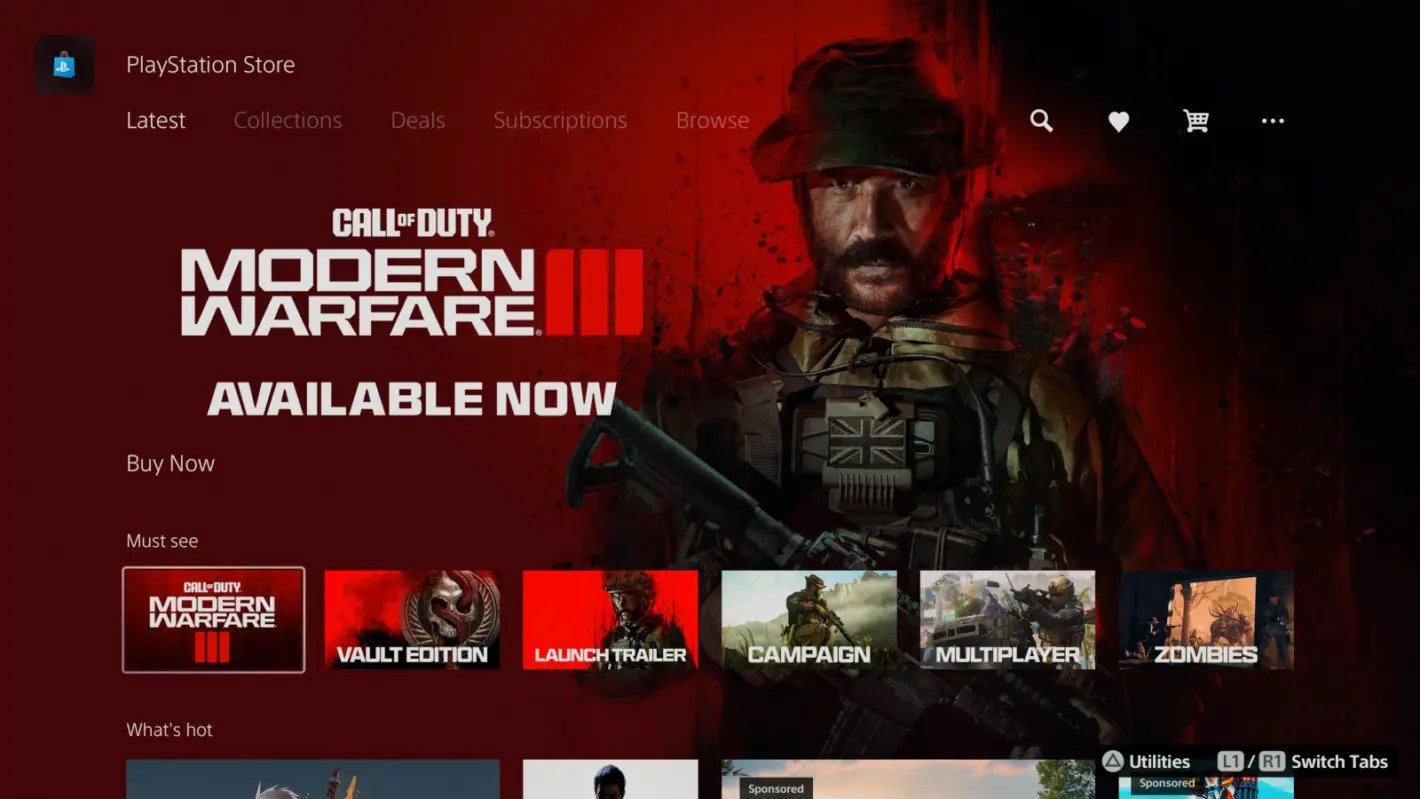
To gift games on PS5, you must purchase a digital game from the PlayStation Store and select the “gift” option during checkout, entering the recipient’s PlayStation Network ID.
Want to share the joy of gaming with friends? It’s simple to learn how to gift games on PS5 and surprise someone with their next favorite title. The process is straightforward, making it easy to send that awesome new game directly to their console.
Gifting a game provides a fantastic way to celebrate a birthday or simply show you care. With just a few clicks, you can make someone’s day with a great digital present.

How to Gift Games on PS5: A Complete Guide
Getting a new video game for a friend or family member is a great way to show you care, especially if they have a PlayStation 5. But, you might be wondering, “How do I actually gift a game on the PS5?” It’s not as straightforward as handing over a physical disc these days. Don’t worry! We’re here to walk you through all the ways you can share the joy of gaming on the PlayStation 5.
Understanding Your Gifting Options
Before we dive into the specifics, let’s talk about the different ways you can gift a game on PS5. There are two main methods: digital gifting through the PlayStation Store and giving a physical copy of the game. Each has its own advantages and disadvantages, so let’s explore them.
Digital Gifting via the PlayStation Store
This method involves purchasing a digital game directly from the PlayStation Store and sending it to someone as a gift. It’s super convenient and means your friend can start playing right away without needing to wait for shipping or a trip to the store. Here’s what you need to know:
- Availability: Digital gifting is generally available for most games on the PlayStation Store. However, there might be occasional exceptions.
- Delivery: The game is delivered as a code directly to the recipient’s PlayStation account. They will get a notification on their PS5 and an email as well.
- Payment: You’ll pay for the game using your own PlayStation Store payment methods (like credit cards, debit cards, or PSN wallet funds).
- Region Restrictions: Both you and the recipient must be in the same region. If you’re in the USA, you can’t send a digital gift to someone in Europe, for example. This is important to keep in mind.
- No physical disc needed: With digital gifting, there is no need for physical disks to be involved, all processes will happen online via PlayStation Store.
- Immediate Gameplay: As soon as the recipient redeems the code, the game is ready to download and play. This is really great for spur-of-the-moment gifts.
Gifting Physical Copies
This option involves purchasing a physical disc of the game from a store or online retailer and then giving it to your friend. It’s the more traditional way of gifting a game, and it has a few things to consider as well:
- Tangible Gift: Physical copies offer that classic feeling of unwrapping a present, and for some people, that adds to the joy of the gift.
- Trading & Reselling: Once your friend is done playing the game, they can trade it in or resell it, which is something you cannot do with digital copies.
- Shipping: If you’re not giving it in person, you need to factor in shipping time and costs. This might not be the best choice if you need a gift quickly.
- Availability: Physical game availability can vary. Some games are only released digitally.
- Possible delays: If you have ordered the disc online, then there are possibilities that there might be a delay in getting delivered to you and then to your friend.
- Availability in stores: Sometimes there might be shortage of supply, so there are chances that you might not get the physical game at all.
Step-by-Step Guide to Digital Gifting on PS5
Alright, let’s get to the heart of the matter and go through the steps of how to gift a game digitally through the PlayStation Store. This is the easiest way to send a game to your loved ones.
Finding the Game on the PlayStation Store
- Turn on your PS5: Make sure your console is powered on and you’re logged into your PlayStation Network (PSN) account.
- Navigate to the PlayStation Store: On the PS5 home screen, find and select the PlayStation Store icon (it looks like a shopping bag).
- Search or browse: You can either search for the specific game you want to gift using the search bar, or browse through the different categories and new releases.
- Select the game: Once you’ve found the game, select its icon to go to the game’s details page.
Choosing the Gift Option
- Locate the “Add to Cart” or “Purchase” button: This button is usually prominently displayed on the game’s page. Don’t click it straight away!
- Look for the three dots (…): Next to the “Add to Cart” or “Purchase” button, there are three little dots. This is the key to gifting.
- Select “Gift”: When you select the three dots, a menu should pop up. Select “Gift” option here. If the “Gift” option is not displayed, then the game is not available for digital gifting.
Selecting the Recipient
- Choose your recipient: A list of your PSN friends will appear. Select the friend that you want to send the gift to.
- Important Note: If the friend is not on your PSN friends list, you will have to add them first before you can gift them any game.
- Double-check: Make extra sure that you’re selecting the correct friend so you are not sending the game to someone by accident.
Completing the Purchase
- Confirm the gift: The PlayStation Store will show a summary of the gift, including the game and the friend you selected. Make sure this is correct.
- Add a message (Optional): You have the option of adding a personalized message to the gift. This is a nice touch to make the gift more personal and special.
- Proceed to checkout: Select “Confirm Purchase.”
- Payment: Choose your preferred payment method and complete the transaction. You can use funds already in your PSN wallet or a credit/debit card linked to your account.
- Confirmation: Once the purchase is complete, both you and the recipient will receive confirmation emails about the gift.
Troubleshooting Common Digital Gifting Issues
Sometimes things don’t go perfectly according to plan. Here are a few common issues and ways to fix them.
The “Gift” Option is Missing
- Not all games are giftable: Some games, especially those that are very new, might not support digital gifting.
- Check for restrictions: Verify if there are region or age restrictions related to the game or the receiver’s account.
- Try again later: Sometimes it’s a temporary issue. Try again after a while.
Recipient Didn’t Receive the Gift
- Check spam/junk folder: Ask your friend to check their email’s spam or junk folder to make sure the email isn’t there.
- PSN notifications: Tell your friend to check their PS5 notifications, as the gift notification should also appear there.
- Wait a bit: It can take a few minutes for the gift to be delivered.
- Contact PS Support: If nothing else works, contact PlayStation customer support for help.
Payment Issues
- Insufficient funds: Make sure you have enough funds in your PSN wallet or that your credit/debit card has enough funds.
- Expired payment method: Make sure your card isn’t expired and the details are entered correctly.
- Try a different payment method: If one payment method doesn’t work, try another one.
Tips for Gifting Games on PS5
Here are some extra tips to help you make your game gifting experience even better:
Consider the Recipient’s Preferences
- Genre: Make sure the game you are giving to your friend is a genre that they like.
- Previous Games: If you’re unsure, look at games they have played before to get an idea.
- Ask discreetly: You can always try asking them in a subtle way to see which game they are excited about, or which game they are thinking of getting.
Keep an Eye on Sales
- Check for deals: The PlayStation Store has sales frequently, so keep an eye out for special deals to get the best price.
- PS Plus Discounts: If you or your friend is a PS Plus member, you often get extra discounts.
Personalize Your Gift
- Write a note: Include a nice and kind message with the digital gift.
- Wrap it up (physically): If you are gifting a physical copy of the game, wrap it in fun paper.
Gifting a PSN Gift Card
If you are still unsure of which game your friend would like, another fantastic option is to gift them a PlayStation Network (PSN) gift card. With a PSN gift card, your friend can choose any game, DLC, or other content they want from the PlayStation Store. Here’s why it’s a great idea:
Flexibility
The receiver can pick what they truly want instead of getting a game they might not enjoy.
Easy to Purchase
You can purchase PSN gift cards online or at many retailers.
Multiple Denominations
They come in various amounts, so you can choose the one that fits your budget.
No Region Lock
As long as they are in the same region, you can give this gift to anyone without worrying about specific game availability.
How to Gift a PSN Gift Card
- Purchase a PSN Card: Buy a physical or digital PSN gift card online or from a store.
- Send the Code: If digital, send the code to the recipient. If it’s physical, you can give them the card to scratch off and redeem.
- Redeem Code: The recipient can redeem the code in the PlayStation Store to add funds to their wallet.
- Enjoy! Now they have money to spend on games or anything they would like on the store!
Gift Ideas for Different Occasions
Thinking about why you might be giving a gift helps you pick the perfect one! Here are some ideas.
Birthday Gifts
- New Release: A game that recently came out and they are very excited about.
- Their Favorite Genre: A game from their favorite category.
- A game they’ve wanted: A game you know they have been waiting for a while now.
Holiday Gifts
- A Popular Title: A game that everyone is talking about.
- Co-op Game: A game that you can play together.
- A bundle: A package that combines the base game and extra content.
“Just Because” Gifts
- Something New: A game from a new genre that you think they might like.
- An Indie Game: A smaller title that is fun and easy to play.
- A classic game: A game that has stood the test of time and is fun to play.
Gifting games on PS5 is a wonderful way to spread joy among friends and family. By understanding the various methods, how-to steps, and potential issues, you can make gifting video games a smooth and exciting process. Whether you choose digital gifting for its speed and ease or physical copies for that classic unwrapping experience, your thoughtful gesture is sure to be appreciated.
How To Game Share On PS5 – Easy Guide
Final Thoughts
Gifting digital PS5 games is easy. You can purchase a game from the PlayStation Store and select “Gift” at checkout. The recipient will receive a code to redeem.
Alternatively, use a PlayStation Store gift card. This option lets the recipient choose their preferred game. Remember, how to gift games on ps5 needs both players to be in the same region.
These methods ensure someone can quickly receive and play a game. You have different choices to make it easy for them.

