
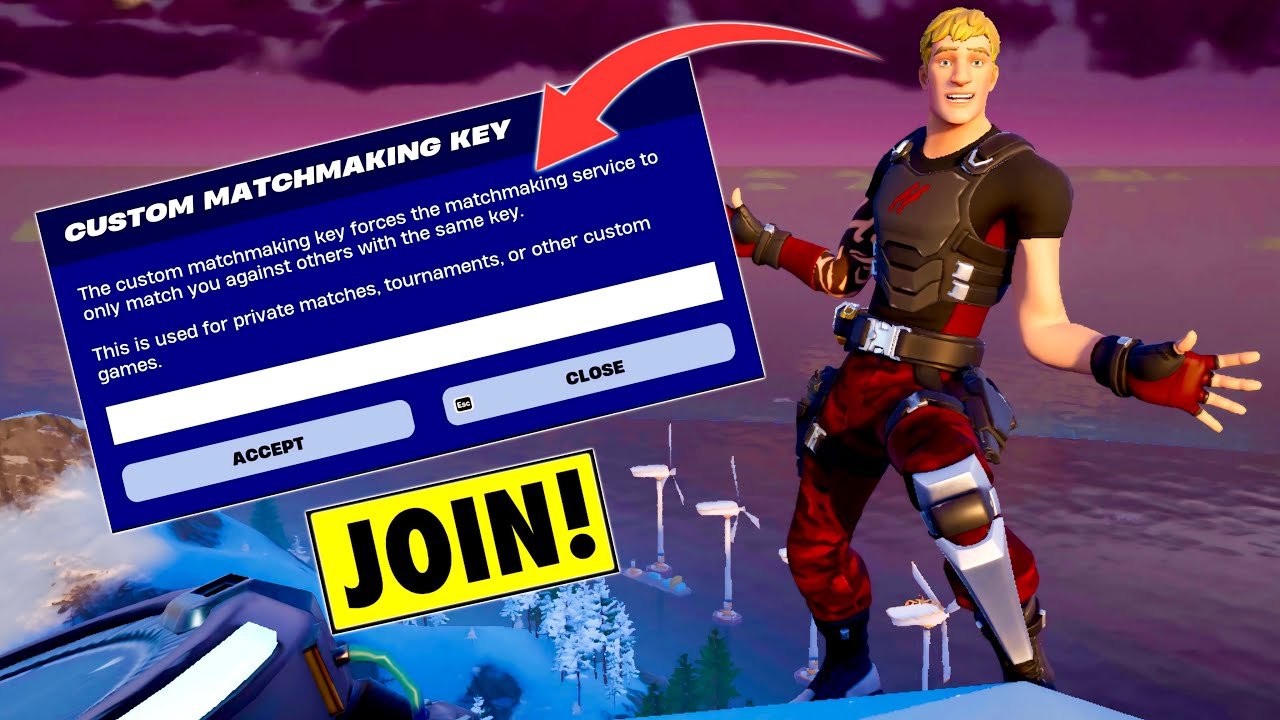
To join a custom game in Fortnite, you’ll need the custom matchmaking key or code from the game’s host. Enter this code in the game mode selection screen.
Have you ever wanted to play Fortnite with a specific group of friends, without random players? Then you’re probably wondering how to join a custom game in fortnite. It’s easier than you might think.
The process involves getting a unique code from the person who created the custom match. Once you have this code you can quickly jump into the match. Let’s get you ready to play with only who you choose.

How to Join a Custom Game in Fortnite
Want to play Fortnite with your friends in a private match, setting your own rules? That’s where custom games come in! Joining a custom game in Fortnite is a fantastic way to have fun and play differently, whether you’re practicing your building skills, having a tournament with your buddies, or just messing around in a unique setting. It’s not quite the same as diving into a regular Battle Royale match, but it’s an exciting way to experience Fortnite. Let’s break down how you can get in on the action.
Understanding Fortnite Custom Games
Before we get into the steps, let’s understand what a custom game actually is. A custom game, often called a private match, is a special match of Fortnite that a player creates. The creator gets to decide the game mode, the settings, and who can join. It’s like having your very own Fortnite playground! This differs from the standard public matches, where you join with random people. Custom games are perfect for playing with specific groups of friends or for special events. For example, you might want to practice for a competition, or just play around with certain settings with friends. In custom games, you’re in control and get a more personalized Fortnite experience. It’s important to know that not everyone can create a custom game – usually, you need to be a creator or have a special code to participate.
The Key: A Custom Matchmaking Key
The most important thing you’ll need to join a custom game is a custom matchmaking key. This key is like a special password for the match. The person who created the custom game will share this key with the people they want to join. Without this key, you can’t get into that specific private match. It acts as an identifier and ensures that only those who are supposed to be in the game can enter. The key will be a series of letters and/or numbers and the game organizer usually shares this key via social media, discord channels, or in private messages. Think of it as a digital invitation to your friend’s special Fortnite party!
How to Join a Custom Game Step-by-Step
Okay, now for the part you’ve been waiting for – the actual steps to join. Let’s get right to it:
Step 1: Get the Custom Matchmaking Key
This is the most crucial step. You will need the custom matchmaking key from the person who set up the private game. Ask your friend, tournament organizer, or whoever is in charge of the game to share the key with you. This key could be anywhere – in a Discord message, email, or even just sent via text message. Make sure you copy the key exactly, including capitalization. A single wrong character will prevent you from joining the match.
- Double-Check the Key: Before moving on, make sure the key matches the one given to you exactly.
- Copy vs. Type: Copying the key is the best way to avoid typos, but if you type it, be careful.
- Ask if Unsure: If you have any doubt, ask the game host to share it again.
Step 2: Launch Fortnite
Once you have the key, go ahead and open Fortnite on your device. It could be your computer, your game console (PlayStation, Xbox, or Switch) or your phone. Make sure your game is updated to the latest version. If not, go ahead and download the updates. Otherwise, you might face issues trying to join.
Step 3: Go to the Game Mode Selection Screen
After your game has launched, you will find yourself in the Fortnite lobby screen. Go to the “Game Mode” selection screen. This is the screen where you pick what game type you want to play. You will usually find it just above the “Play” button. It might say ‘Battle Royale’, ‘Zero Build’, or a similar option.
Step 4: Find the Custom Options
On the game mode selection screen, look for a button labeled ‘Custom Options’ or something similar. It might be hidden, so look for it carefully. It is usually in the bottom left corner of your screen. It might appear like a small text box, or a button that shows three dots (…). Clicking this will reveal the custom matchmaking options.
If you can’t find it, make sure that you are looking at the right game modes. Some custom modes only work in specific scenarios. Usually they work best under the Battle Royale game mode.
Step 5: Enter the Custom Matchmaking Key
Now that you have found the “Custom Options” button, a new text box will appear asking for the “Custom Matchmaking Key”. Click on that box and enter or paste the key that you received. Carefully type in the key. Make sure that you don’t have any spaces before or after your key. It is recommended to paste it directly if you copied it.
- Accuracy Matters: Type or paste the key correctly.
- No Spaces: Make sure there are no extra spaces before or after your key.
- Confirm Input: Double check if the key you entered is correct before pressing accept.
Step 6: Confirm and Join
Once you’ve entered the key correctly, press the “Confirm” or “Accept” button. The game will then try to connect you to the custom match that is running. If the key is correct, you will join a waiting lobby for the custom game. It is important to keep in mind that the game does not automatically start when you enter the lobby. You might have to wait for the game organizer to start the match, so don’t panic if you are sitting in the lobby for a little bit.
Things to Keep in Mind When Joining a Custom Game
Joining a custom game isn’t always as simple as just having a key. Here are a few extra things you should remember to have the best custom game experience.
Timing is Everything
Custom games are not always available. The game organizer needs to be ready to start the game and might need to make adjustments to the settings. Make sure that you have the right timings in terms of availability of the organizer. If the host isn’t active or has not launched the game yet, you might be waiting for a while. Make sure you know when the custom game starts and try to join around that time. Try communicating with the host to better understand when the game will begin.
Game Mode and Settings
Each custom game can have different settings. The creator chooses the game mode, such as standard Battle Royale, Zone Wars, or even something entirely unique. They can also choose things like the number of players, weapons, and even starting materials. Be prepared for a different experience than a regular match. Ask the host about the settings if you want to know what to expect. This will allow you to better prepare for the specific game type and settings.
Troubleshooting Tips
Sometimes things don’t go as planned, and you may face difficulties when trying to join a custom game. Here are a few common problems you might face and ways to handle them:
- Incorrect Key: The most common reason you can’t join is typing the key incorrectly. Double-check the key.
- Game Not Started: The game host might not have started the game yet, or the lobby might be full. Be patient or check with the host.
- Game Server Issues: Sometimes, Fortnite’s servers might have problems. This can affect your ability to join custom matches. If this is the case, you need to wait till the server is back online.
- Game Version Mismatch: Make sure your Fortnite game is updated to the latest version, otherwise you will be unable to join custom matches.
Why Play Custom Games?
Custom games offer a different way to experience Fortnite. Here are the reasons that you may be interested in joining a private match:
Practice and Improvement
Custom games are ideal for practicing your skills without the pressure of a public match. You can focus on specific areas, like building, shooting, or navigating the map, with friends or teammates. You can create your custom maps and practice on specific scenarios that you would like to improve on.
Fun with Friends
Playing with friends in custom games is just more enjoyable. You can team up and play together, or you can have free for all. You have control over who you are playing with, and you get to make your own rules. This adds another level of fun and lets you have better time with your close friends.
Tournaments and Events
Many online tournaments and events use custom games. If you like to compete, joining a custom game is a great way to improve your skills and compete at a high level. This is especially true for tournaments that feature unique game modes and rules.
Creative Experimentation
Custom games let you get really creative with how you play Fortnite. You can try new strategies, weapons, and even game modes that aren’t found in the standard game. This is great if you want to find new and fun ways to play the game.
Joining a custom game in Fortnite is a great way to mix up your gameplay, spend time with friends, and improve your skills. Just make sure you have that all important custom matchmaking key, and you are good to go. Follow the steps and you’ll be in a private match in no time! Have fun playing Fortnite!
How to Create or Join CUSTOM GAMES in Fortnite!
Final Thoughts
Joining a custom Fortnite game involves receiving an invite or code from the host. Enter this code within the game’s mode selection screen to access the custom match.
Remember, you must have the correct code. After that you are ready to go. ‘how to join a custom game in fortnite’ is simple once you know the steps.

