
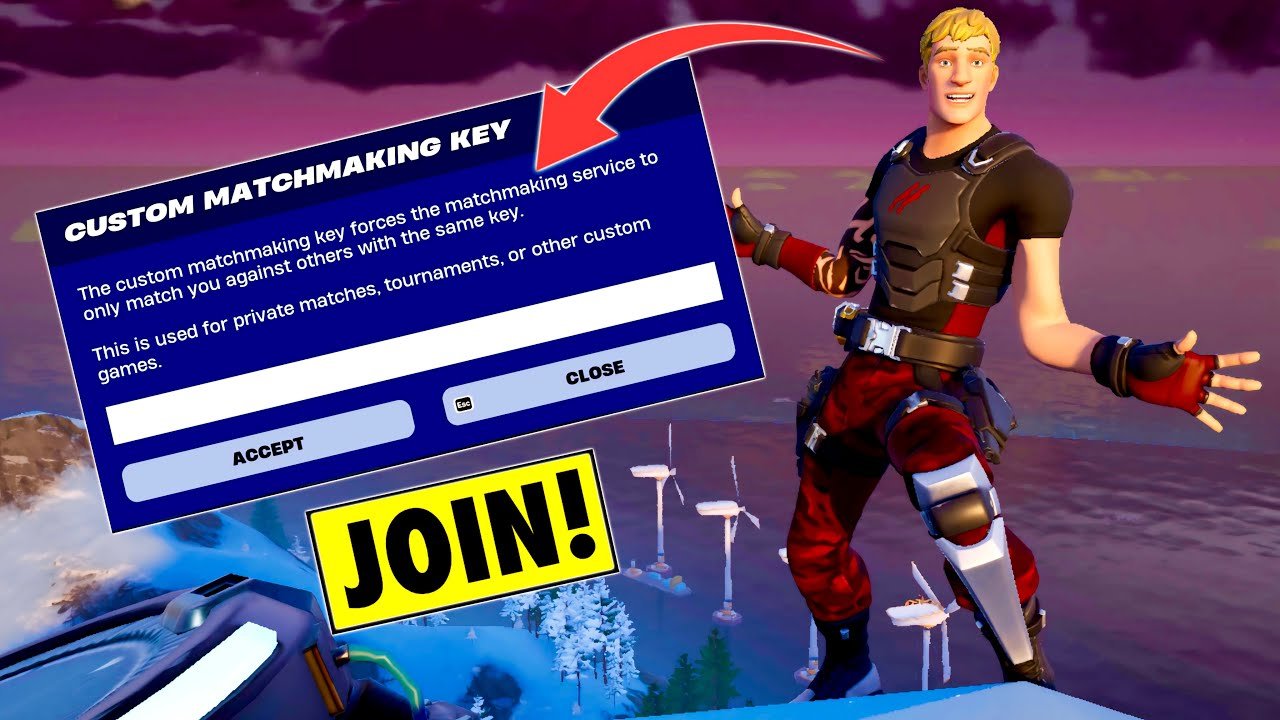
To join a custom game in Fortnite, you need a custom matchmaking key from the game’s host. Enter this key in the ‘Custom Matchmaking Key’ field within the game mode selection screen.
Want to play Fortnite with a specific group of friends or in a controlled environment? Understanding how to join custom game fortnite is key to making that happen. It’s not as simple as clicking a button, but with the right steps, you can quickly jump into private matches.
The process hinges on getting a special code from the player hosting the custom match. You will then use this code to access their specific game, which could be a private battle royale or another custom mode. Get ready to learn and enjoy.

How to Join Custom Game Fortnite
Ever watched your favorite streamer playing a special Fortnite match with a bunch of other players and wished you could join in? That’s likely a custom game! These aren’t your typical public matches. They’re special lobbies created by a player (the host) where they get to set the rules and who plays. Joining one can be super fun, but it’s different than just hitting “Play” in Fortnite. Let’s break down everything you need to know to jump into these exciting custom games.
Understanding Custom Games in Fortnite
Before we dive into the “how-to,” it’s important to understand what makes a custom game unique. Think of it like a private party for Fortnite. The host gets to decide things like:
- Game Mode: They might pick Battle Royale, Zero Build, or even a creative map they built.
- Lobby Size: They choose how many players can join.
- Specific Rules: Some custom games might have unique rules – like everyone gets only one type of weapon, or there are special challenges.
These games are often used for tournaments, special events with streamers, or just friendly matches between friends. They offer a more controlled and sometimes more challenging experience than your typical Fortnite match. Now that you have a better picture of what a custom game is, let’s look at how to actually join one.
The Golden Ticket: Getting a Custom Match Key
The biggest difference between a normal match and a custom game is the need for a “matchmaking key.” This key is like a password to get into the special lobby. It’s not something that you’ll automatically get, you must get this key from the person hosting or by finding it on social media platforms.
Finding a Match Key
Here are a few ways to find a match key:
- Social Media: A lot of hosts (especially streamers or content creators) will post their match key on their Twitter, Instagram, or Discord server. Pay close attention to these accounts if you are looking for custom game keys.
- Friend Groups: If you know someone hosting, they’ll probably share the match key directly with you. If you have a friend that is hosting, ask if they are making a custom game and maybe they will share the key with you!
- Community Discord Servers: Many Fortnite communities have Discord servers. Some of them might host or share custom match keys in dedicated channels.
- Online Forums: Keep an eye out for online forums about Fortnite, players may post custom keys there.
Once you find a match key, keep it safe. You’ll need it to join the custom game. Be cautious where you find your keys though, as some may not be genuine. Be sure you trust the source where you have got it from. It is usually safe to get it from a reputable streamer, creator, or a friend.
How to Enter a Custom Game in Fortnite
Now that you’ve got a match key, let’s walk through the steps to join the custom game in Fortnite.
Step-by-Step Guide
- Launch Fortnite: Start the Fortnite game on your device (PC, console, or mobile).
- Navigate to the Game Mode Selection: Once you’re in the main lobby screen, go to where you normally select the game mode (like Solo, Duos, Squads).
- Find the “Custom Match” Option: Don’t select your normal game type, look for an option labeled “Custom Match.” It’s usually located below the normal game types, you will be able to find it easily.
- Enter the Matchmaking Key: Clicking “Custom Match” will open a box where you can type in the match key. Carefully enter the key you got from the host, be sure not to add extra spaces or other characters as this will not work.
- Confirm your choice: After entering the key correctly, press the “Accept” button. The game will now try to join the custom match that the host has created.
- Wait in the Lobby: If the key is correct, you will be put into a special pre game lobby. Just wait here until the host starts the game.
- Prepare to Play: Once the host starts the game, get ready to have fun. The game will be different from the usual game modes you play.
Important Notes:
- Case Sensitivity: Match keys are case sensitive, so be sure you’ve entered the letters correctly (capital letters and lower case letters).
- Full Lobbies: If the lobby is full, you may not be able to join, you will be unable to join the custom match. Be sure to join fast once you have received the match key.
- Incorrect Keys: If the game tells you the key is incorrect, double-check it and try again. If it still doesn’t work, the key might be incorrect or the game might have already started. Ask the host or the person who provided you with the key.
Things to keep in Mind When Joining a Custom Match
Here are some extra things to think about when joining a custom match.
Be Patient
Custom games may not start right away. The host might be waiting for all players to arrive, or they might need to adjust game settings. So, be patient after joining the lobby, if the host hasn’t started yet.
Respect the Host
The host has created the game. Be respectful of their rules and any requests they make. It’s their game, and we should follow their lead.
Communication is Key
Sometimes, hosts may communicate through voice chat or text chat. Be prepared to participate and follow any instructions they give. Make sure you check if they are using voice chat or text chat to communicate. It’s always helpful to know before joining.
The Fun Factor
Remember to have fun. Custom games can be a cool way to enjoy Fortnite, make sure you are in the match to have fun with your fellow players. Don’t be afraid to try out new things and enjoy the unique gameplay.
Troubleshooting Common Issues
Sometimes, even with the correct key, things might not go as planned. Let’s go through some common issues and ways to fix them.
Invalid Matchmaking Key
If you get an “Invalid Matchmaking Key” error, double-check the key for typos. Remember, keys are case-sensitive. If you’re sure the key is correct, ask the person who gave it to you if it’s still valid. It is possible that the host has created another game, so make sure you get an updated key.
Lobby is Full
If the lobby is full, you will get an error saying that there is no space. This means the custom match has reached the limit for the number of players allowed. You will need to try and join another time, or you will need to ask the host to make another match for you.
Game Not Starting
If you’re in the lobby and the game isn’t starting, be patient. The host might be waiting for more players. Or, they might need to change settings. If it takes too long you can message the host in chat, but it’s always best to wait.
Game Mode Mismatch
Be sure that you are using the correct client of Fortnite, this is most important as sometimes custom matches are created in different versions of the game. If this has happened, the match key will not work and you will be unable to join. You will need to ask the host of the custom game if you are using the wrong client of the game.
Game Crashes
In the unfortunate event that the game crashes, it is best to try re-starting the game and re-trying to join again. Keep in mind that some games may be running very demanding maps, so this can happen.
Benefits of Joining Custom Games
Joining custom games in Fortnite offers a special and exciting way to play. Here’s why you might want to try it.
Unique Game Experiences
Unlike regular matches, custom games often include unique rules, game modes, or challenges. This variety can add a new level of fun to your Fortnite experience. It’s a great way to change up your regular gameplay.
Play with Friends
Custom games let you play with a specific group of friends. This creates a relaxed and social gaming environment, very different from playing with random players.
Learn from the Best
If you join a custom game with more experienced players, you can observe and learn from their strategies. It’s a great way to get better at the game.
Participate in Events
Many streamers and communities use custom games for tournaments and special events. You will have to check their social media pages to find out about any events. Joining one of these will create new experiences and maybe win some prizes.
Creative Play
Some custom games use Creative maps. These maps allow you to explore new and exciting environments that aren’t available in regular games. This type of map can be great to have fun with friends or new people you meet.
Tips for a Better Custom Game Experience
To get the most out of your custom game experience, consider these tips:
- Have a Plan: If you’re playing with friends, discuss the game plan and rules before the game starts.
- Be Respectful: Always treat your host and other players with courtesy, in the pre game lobby, in game, and after the match.
- Follow the Rules: Pay close attention to any special rules and follow them throughout the game.
- Have a Good Attitude: Be positive, it helps the whole game experience for everyone.
- Engage with Others: Talk in the chat, make friends and have a good time.
And that covers it all! Joining a custom game in Fortnite might seem tricky at first, but once you know the steps, it’s quite straightforward. From grabbing that essential key to navigating the lobby and enjoying a special game experience, custom games open up a whole new dimension of fun. So go out there and try it, and remember, the most important thing is to have fun and follow the host’s instructions!
How to Create or Join CUSTOM GAMES in Fortnite!
Final Thoughts
To join a custom game in Fortnite, you need a specific code provided by the game’s host. They will usually share this code via a platform outside of Fortnite. Once you get the code, you enter it in the ‘custom match’ section.
Navigate to the ‘game mode selection’ screen. Find the option for ‘custom match’, often at the bottom of the menu. Input the provided code and you’ll connect to the private match. This completes how to join custom game fortnite.

