
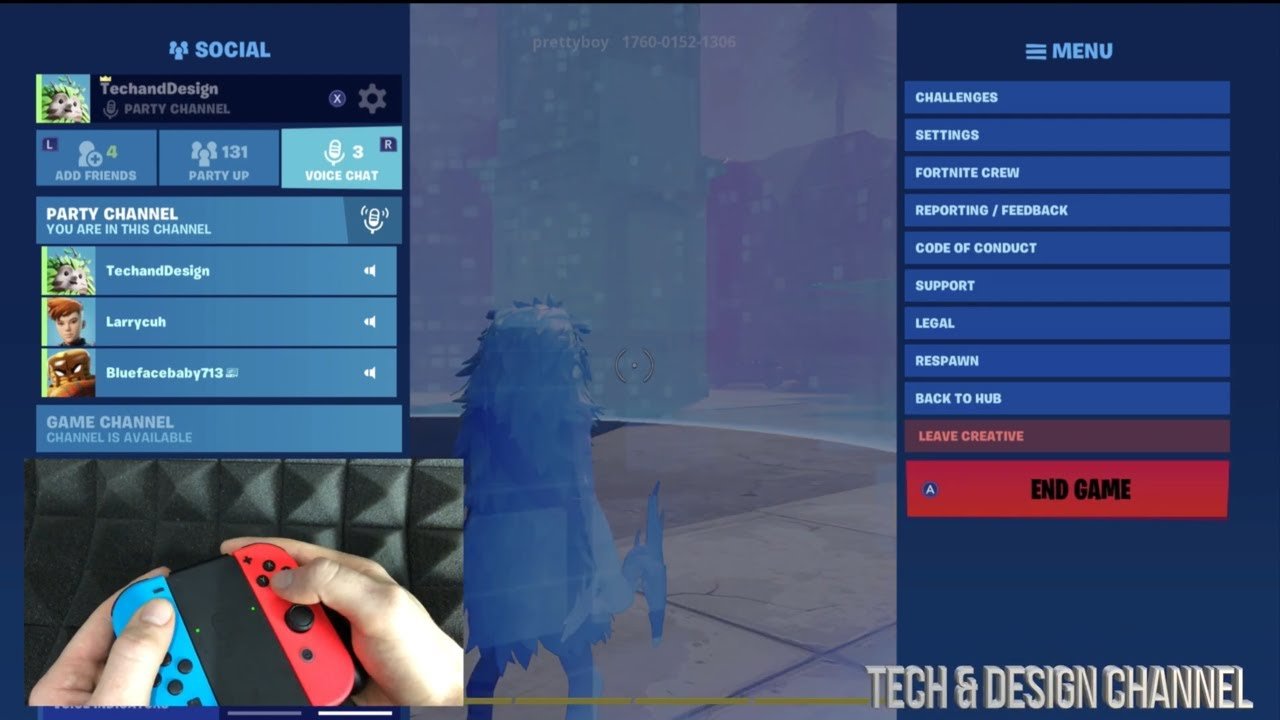
To leave a Fortnite game, open the in-game menu, and select the “Leave Match” option.
Frustrated by a tough match or simply ready for something else? Knowing how to leave a Fortnite game is key to quickly moving on. You don’t need to be stuck in a match you don’t enjoy.
The game offers an easy way to exit, saving you time and getting you back to the lobby. This allows you to jump into a new experience without delay. We are going to cover the exact steps to achieve that.

How to Leave a Fortnite Game
Okay, so you’re in a Fortnite match, maybe you’ve had enough action, need to grab a snack, or just want to play with different friends. No problem! Leaving a Fortnite game is super easy once you know how. But, there are different ways to do it depending on what you’re playing and what you want to achieve. Let’s break it all down, step-by-step, so you can get out of the game and back to the lobby without any fuss.
Leaving a Regular Battle Royale Match
Most of the time, you’ll be playing the standard Battle Royale mode in Fortnite. This mode pits 100 players against each other, and only one player (or squad) will emerge as the winner. But, what do you do when you want to exit mid-match? Here’s how:
Steps to Exit the Battle Royale Match
- Open the Menu: First, you need to bring up the game’s menu. You can usually do this by pressing the “Esc” key on your keyboard if you’re on PC, the “Options” button on PlayStation, the “Menu” button on Xbox, or the “+” button on the Nintendo Switch.
- Find the “Leave Match” Option: Once the menu is open, you’ll see a list of different options. Look for the one that says something like “Leave Match” or “Quit”. It’s usually near the bottom of the list.
- Confirm You Want to Leave: After you select the “Leave Match” option, the game will likely ask you to confirm that you really want to exit. You’ll see a pop-up screen. Simply select “Yes” or the equivalent to confirm your decision.
- Return to the Lobby: After you confirm, you’ll be taken back to the main lobby where you can choose a different game mode, change your outfit, or team up with your friends again.
Remember, when you leave in the middle of a battle royale match, your character will stay in the game, controlled by the computer, or be eliminated depending on when you leave the match. You won’t receive any credit for the match, like the experience points you’d get for completing a game. You’ll have to play the match to the very end to achieve this.
Things to Keep in Mind when Leaving
There are some points you should remember when you’re leaving a match.
- Timing Matters: If you leave early in the match, it’s less of a big deal, but if you’re the last one standing on your team in a squad game, or if you’re near the end, it might be a bit unfair to your teammates. Try to leave only if you need to, or it is completely necessary.
- No Penalty: You won’t get a penalty for leaving a normal battle royale game. You can come and go as you like, so don’t worry about getting in trouble.
- Your Character: Remember that your character will be left behind, like a sitting duck. This is usually not ideal, so try to leave when you’re at a point where your remaining team members can carry on without you.
Exiting Creative Mode Games
Creative mode in Fortnite allows you to explore maps that other players have built, or even design your own. The process to leave is a little different than the standard battle royale mode, so let’s see how it’s done:
Steps to Leave a Creative Map
- Access the Menu: Just like in Battle Royale, the first step is to open the menu. Again, you can press the “Esc” key on PC, “Options” on PlayStation, “Menu” on Xbox, and “+” on Switch.
- Find the “Return to Hub” Button: Instead of “Leave Match”, in Creative Mode, you will be looking for a button that says “Return to Hub” or similar. The ‘Hub’ is like the center point for all the creative maps. This is usually an icon at the top of the options menu.
- Confirm and Leave: Select “Return to Hub”, and the game might ask if you are sure. Click the “Yes” option to leave.
- You’re Back in Creative: You’ll then be taken back to the main creative hub, where you can explore other maps, make your own, or do something completely different.
Creative Mode Exit Details
- No Penalties Again: Just like in battle royale mode, you won’t get any penalties for leaving creative matches. You are free to leave any time you want.
- Your Creations: If you were building something, leaving may or may not save your progress depending on the specific settings of the map you’re in. Always double check that your work is saved, before leaving a Creative island.
Leaving Team Rumble and other Limited-Time Modes
Fortnite sometimes introduces limited-time game modes (LTMs), like Team Rumble, where two big teams battle it out, with respawns allowed. Leaving these is almost identical to the Battle Royale mode, but there may be slight variations.
Steps to Exit Limited-Time Modes
Usually, the process is the same, but let’s double check the steps.
- Open the Menu: Use the same key or button as before to open up the game’s menu.
- Select “Leave Match”: Look for the same “Leave Match” or “Quit” option that you would find in the normal Battle Royale mode.
- Confirm and Return: Confirm you want to leave the game, and you’ll be returned back to the main lobby.
Specific Things in Limited Time Modes
- Team Dynamics: Like Battle Royale, leaving during these modes can negatively impact your team, especially in games like Team Rumble. Consider finishing the match if you can to help your team win.
- Mode Rules: While leaving these modes will not penalize you, it’s better to finish matches, where possible, as this is also an important part of the gaming experience.
Exiting Party Royale
Party Royale is a special mode in Fortnite that focuses on having fun and hanging out instead of combat. You can drive around, do fun activities, or just chill with your friends. So, how do you leave? It is very similar to the creative mode, but let’s go through it.
Leaving Party Royale Mode
- Open the Menu: Access the menu using the usual key or button.
- Choose “Return to Lobby”: In Party Royale, you’ll be looking for a “Return to Lobby” or “Return to Hub” option, similar to Creative.
- Confirm and Exit: Confirm you want to exit, and you’ll be taken back to the lobby, where you can choose any other game mode.
Party Royale Exit Considerations
- Chill Vibe: Since Party Royale is all about chilling and having fun, there is less of a need to stay in a game until the end. Just leave when you’re done.
- No Pressure: There is absolutely no pressure to stay in Party Royale, unlike in other game modes. So, don’t feel bad when you need to go.
What Happens When You Leave Early?
Let’s quickly revisit what happens to your character and your game experience if you leave a game early:
Consequences of Leaving Mid-Game
- Character Stays Behind: If you leave a game early, you’re leaving your character behind, so it’s going to be left exposed for other players to eliminate.
- No Rewards: You don’t get experience points, quest progress, or other rewards if you leave before the end of the game. So you miss out on the game progression that you were aiming for.
- Teammates Affected: In squad modes, leaving can put your team at a disadvantage. Leaving might mean they will have fewer team members to help them, and they will be at a big disadvantage.
- No Penalties (Usually): In most game modes you will not get a penalty for leaving the game, so there is no need to worry about any repercussions.
Tips for Leaving a Fortnite Game
While leaving is easy, here are some tips to make the process smoother for everyone:
Make it Easy for Everyone
- Communicate with Team: If you’re playing with friends or in a squad, it’s good to tell them that you’re going to leave the game. This is just basic courtesy.
- Try Not to Leave at the End: Try to avoid leaving when your team is close to winning, or when you’re the last member left. It’s always more fun when you complete a game.
- Find a Safe Spot: If you must leave mid-match, try to do it when your character is in a safe location, where they are less likely to be eliminated. This will at least give your remaining team a better chance.
- Think About Saving Progress: If you’re in Creative mode, make sure your changes are saved before leaving so that you can keep working on them in the future.
Using the “Spectate” Option
Sometimes, you might want to leave but still see how the game unfolds, especially if your teammates are still playing. Instead of completely leaving, you can use the Spectate option:
How to Spectate
- Get Eliminated: If your character is defeated, you’ll automatically become a spectator and can watch the remaining players.
- Stay and Watch: As a spectator, you can’t play, but you can watch the game, see how your teammates are doing, and learn some new tricks.
- Return to Lobby When Ready: When you’re ready, you can still return to the lobby from the spectating screen.
Spectate Mode Tips
- Learn from Others: Watching others play is a great way to learn. You can pay attention to the tactics of successful players, see how they approach combat, and observe their building techniques.
- Support Your Team: You can cheer on your teammates or provide useful advice while spectating. This could really help your team win the game.
The Importance of Good Game Etiquette
While there aren’t strict rules for leaving games, it is good to be respectful towards your teammates and fellow players. It is always good to adhere to good game etiquette, and not negatively impact the game for others.
Being a Good Player
- Try to Complete Matches: If you can, it is better to finish the matches that you start. This will help your team get to the end and win the game, or at least have a go at winning.
- Communicate Clearly: Always let your team know if you have to leave so that they’re not left confused in the middle of a battle.
- Avoid Leaving Repeatedly: If you know you might need to leave soon, consider not starting a new game until you have more time.
- Be Respectful: If someone on your team has to leave, be understanding and try to work around it.
Leaving a Fortnite game is a simple process but understanding the different ways to do it for different modes and being considerate of other players can make for a better gaming experience for everyone involved. Whether you’re exiting a tense Battle Royale, exploring the Creative Hub, or chilling in Party Royale, knowing how to leave the game gives you control over your gaming sessions. You can now confidently jump in and out of Fortnite games as needed!
So, that’s it. You have now learned all you need to know about how to leave a Fortnite game! Happy gaming, and may your Victory Royales be plentiful!
How to leave a match in Fortnite Chapter 3 (Exit Fortnite on Playstation, Xbox, Switch PC, PS4, PS5)
Final Thoughts
To exit a match, simply navigate to the menu. Find the ‘leave match’ option and select it. This will swiftly return you to the lobby.
You must consider that quitting during a match impacts your team in team-based modes. So, choosing the correct moment is important.
Knowing how to leave a fortnite game quickly helps you transition between matches smoothly. This process is basic, yet essential for a seamless experience.

