
To link your Epic Games account to your PS4, you need to do it through the Epic Games website or when you launch an Epic Games title on your PlayStation console.
Want to play your favorite Epic Games on your PS4 and access all your progress and skins? The process of how to link epic games account to ps4 is actually quite simple. You only need a few minutes and a stable internet connection.
We will guide you through the necessary steps to quickly connect your accounts. This will allow you to continue your gaming journey without losing any data. Let’s get started with the linking process.

How to Link Epic Games Account to PS4
Getting your Epic Games account linked to your PlayStation 4 is super important if you want to play your favorite games on both platforms. Imagine playing Fortnite on your computer and then hopping onto your PS4 to continue right where you left off! That’s the power of linking accounts. It’s like having a magical bridge between your different game worlds. It might sound complicated, but it’s actually quite easy. This guide will walk you through all the steps you need to take to get it done.
Why Link Your Epic Games and PS4 Accounts?
Before we dive into the how-to, let’s talk about why linking these accounts is such a good idea. It’s not just about convenience; there are real benefits:
Shared Progress and Items
This is a big one! When your accounts are linked, you can keep your game progress no matter which device you use. If you’ve worked hard to get cool skins, emotes, or other items, they won’t get left behind. Whether you’re gaming on your PS4 or computer, all of it follows you. Your level, your quests, everything you’ve earned will be accessible. No need to start over when you switch devices.
Playing with Friends on Different Platforms
This feature is a game changer. Let’s say your best friend plays on their PS4, but you play on your computer. If you both have linked accounts, you can play games together, even if you’re not using the same system! This is called cross-platform play, and it makes playing with friends much easier and more fun. It helps you connect with more players and widen your gaming community.
Accessing Exclusive Content
Sometimes, games might offer exclusive rewards or items for players who have their accounts linked. By linking your PS4 and Epic Games accounts, you make sure you don’t miss out on cool stuff. These rewards can be anything from special character skins to unique in-game items. It’s like getting a little bonus for being connected.
Simplified Account Management
Linking your accounts can also help make managing your games easier. Everything is connected under one umbrella, which can be a lot less confusing. Instead of remembering multiple accounts and passwords, you just have to worry about keeping your Epic Games account safe. It’s also helpful for support in case any issue arises.
What You’ll Need Before You Start
Before you begin linking your accounts, you’ll want to make sure you have a few things ready. This will help the process go faster and more smoothly:
- A PlayStation Network (PSN) account: This is the account you use to play games on your PS4. Make sure you know your username and password.
- An Epic Games account: This is the account you use to play games like Fortnite, Rocket League, and Fall Guys. Have your login information ready. If you don’t have one, we’ll talk about creating one.
- A computer or mobile device with internet access: You’ll need a device that can browse the internet to do the account linking. This can be your laptop, tablet, or phone.
Step-by-Step Guide: Linking Your Accounts
Now, let’s get to the main part: actually linking your accounts! Here’s a detailed step-by-step guide:
Using the Epic Games Website
This is often the most reliable method for linking your accounts. Here’s how you do it:
- Go to the Epic Games Website: Open your web browser on your computer or mobile device and go to the official Epic Games website.
- Sign into Your Epic Games Account: Click the “Sign In” button, usually in the top-right corner. Use your Epic Games account email and password to log in.
- Navigate to Account Settings: After you sign in, click on your account name or profile icon. A menu will open up. Look for the “Account” or “Account Settings” option and click it.
- Find the Connections Section: In your account settings, you’ll see several options. Look for “Connections” or a similar tab. Click on it to open the Connections area.
- Select PlayStation Network: Inside the “Connections” area, you should see a list of services you can link your Epic Games account with. Find the “PlayStation Network” icon and click on the “Connect” or “Link” button next to it.
- Sign into Your PSN Account: You’ll be taken to a PlayStation Network login page. Enter your PSN account email and password.
- Authorize the Connection: After logging in, you will be asked to authorize the link between your Epic Games account and PSN account. Click “Accept” or “Authorize” to complete the process.
- Confirm the Connection: Once done, you should see a confirmation message, usually on the Epic Games website, that indicates your accounts are now linked. This might also mean that you will be redirected back to the Epic games account settings page with your PSN account showing linked.
Linking Through a Game on PS4
Sometimes, you can link your accounts directly through the game itself on your PS4. It usually works like this:
- Start a Game: Open one of your Epic Games games like Fortnite on your PS4.
- Look for the Connection Prompt: When you start the game, it will sometimes ask you to connect an Epic Games account. You’ll see a prompt on the screen to either sign into an existing account or create a new one.
- Sign into Your Epic Games Account: If you already have an account, choose the option to sign in. Use your Epic Games account’s email address and password.
- Follow the Prompts: The game will guide you with a series of on-screen instructions to complete the account linking. You might need to visit a website on your phone or computer for final authorization.
What to Do if You Don’t Have an Epic Games Account
If you don’t have an Epic Games account yet, don’t worry! Creating one is very easy. Here’s how to do it:
- Go to the Epic Games Website: Go back to your browser and navigate to the Epic Games website.
- Click “Sign Up”: Look for the “Sign Up” or “Create an Account” button. It’s usually near the “Sign In” button.
- Enter Your Details: You’ll be asked to fill in some basic information, like your email address, a display name, and a strong password. Follow all the instructions and make sure all the data you provided are accurate.
- Verify Your Email: After filling the forms, Epic will send an email to verify the address. Go to your inbox and click the link in the email.
- You’re Ready to Go: Now, you’ll have an Epic Games account that you can use. Follow the linking steps above to link it to your PS4.
Troubleshooting Common Problems
Sometimes things don’t go as smoothly as planned. Here are some of the common issues that people run into, and what to do about them:
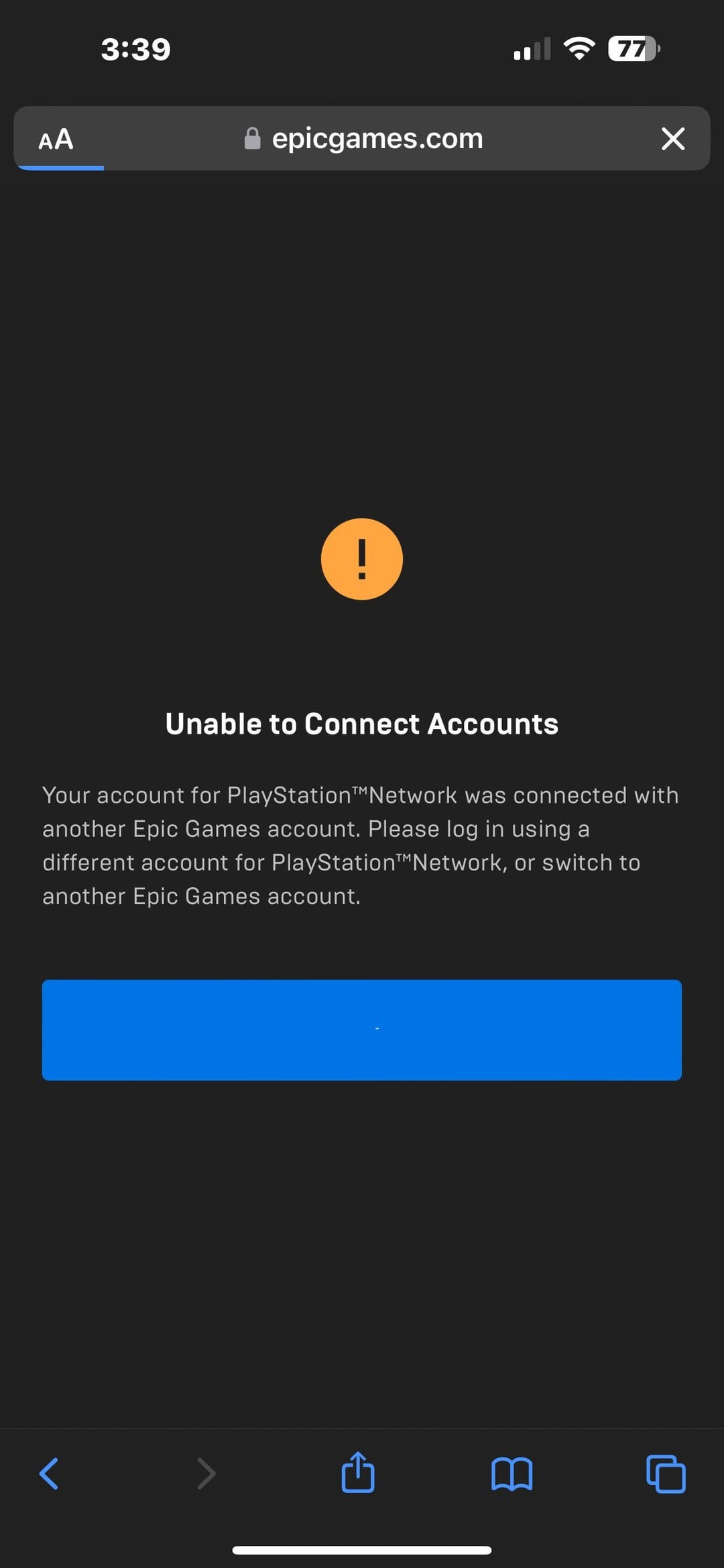
Account Already Linked
A common problem is that you might have linked your Epic Games account to a PSN account in the past, maybe on another PlayStation console or through a different game. If you see an error message like “This PlayStation account is already linked,” you’ll need to unlink the old account first.
How to Fix:
- Go to your Epic Games Account Settings: Sign in to your Epic Games account on their website, navigate to the “Connections” section as described before.
- Unlink the Existing PSN Account: You’ll see the connected PSN account there. Click on the “Unlink” or “Disconnect” button. This might be named something similar but all means the same.
- Try Linking Again: After unlinking, go back to the steps for linking your PS4 account, and try to connect your account to your PSN again.
Login Issues
If you can’t sign into either your Epic Games account or your PSN account, double-check your email address and password. Also, make sure caps lock isn’t on. If you forgot your passwords, you can use the “Forgot Password” option on each website, and they will send you recovery emails to help you change your password. Remember, you need to be connected to the internet to sign in.
Error Messages
Sometimes, you might get an error message during the linking process. These messages often give you some clue about what’s happening. Usually, they mention internet connection, account issues, or problems with the services themselves.
How to Fix:
- Check Your Internet Connection: Make sure your computer and your PS4 have a stable internet connection. Sometimes the problem is your internet, not the linking process.
- Restart Your Devices: Restart your PS4 and your computer or mobile device. Sometimes that fixes temporary glitches.
- Try Again Later: If the issue persists, it might be an issue on Epic Games or PlayStation’s side. Wait for a bit and try again.
- Contact Support: If the issue continues, contacting Epic Games or PlayStation support might be the next step. They can provide specific help and information.
Browser Issues
Sometimes, the browser you are using can cause the issue. Try a different browser like Chrome, Firefox, or Safari to see if that helps. Also, make sure your browser is up to date. An outdated browser can also cause such problems. Lastly, try clearing the cookies and cache of the browser. This removes the old data and allows the webpage to load correctly.
Two-Factor Authentication Issues
If you’ve set up two-factor authentication on your accounts, make sure you have access to your verification methods. Two-factor authentication adds an extra layer of security but can also be a hurdle if you don’t have the device that has the code or email address that receives the verification code.
How to Fix:
- Have Access to Your Verification Methods: Make sure you can receive your verification codes via your device or email.
- Use Backup Codes: If you have backup codes for your accounts, use them. Make sure to keep the backup codes in safe places for a situation like this.
What Happens After Linking?
Once your accounts are linked, you can enjoy cross-play, keep your game progress, and access all your items on either your PS4 or computer. You don’t need to do anything else. Everything should work the way you expect. If you still face issues contact the support teams.
Linking your Epic Games account to your PS4 brings a lot of great things. You get to keep your progress, play with friends on different platforms, and access extra content. It is not as difficult as it seems. Just follow the steps we talked about in this guide, and you will be playing in no time. And remember, if you face a problem, there is always help available.
How To Link Epic Games Account To PlayStation Account – Easy Guide
Final Thoughts
To connect your accounts, you first need to start a game on your PlayStation. After that, the game will prompt you to link or sign in with your existing Epic Games account.
Follow the on-screen instructions carefully, which usually involves entering your Epic Games account information, like your email and password. Successful linking ensures game progress and purchases are available across platforms.
Ultimately, knowing how to link epic games account to ps4 is essential. This process lets you access your Epic Games content on your PlayStation. Make sure the accounts are correct before confirming to avoid any issues.

