
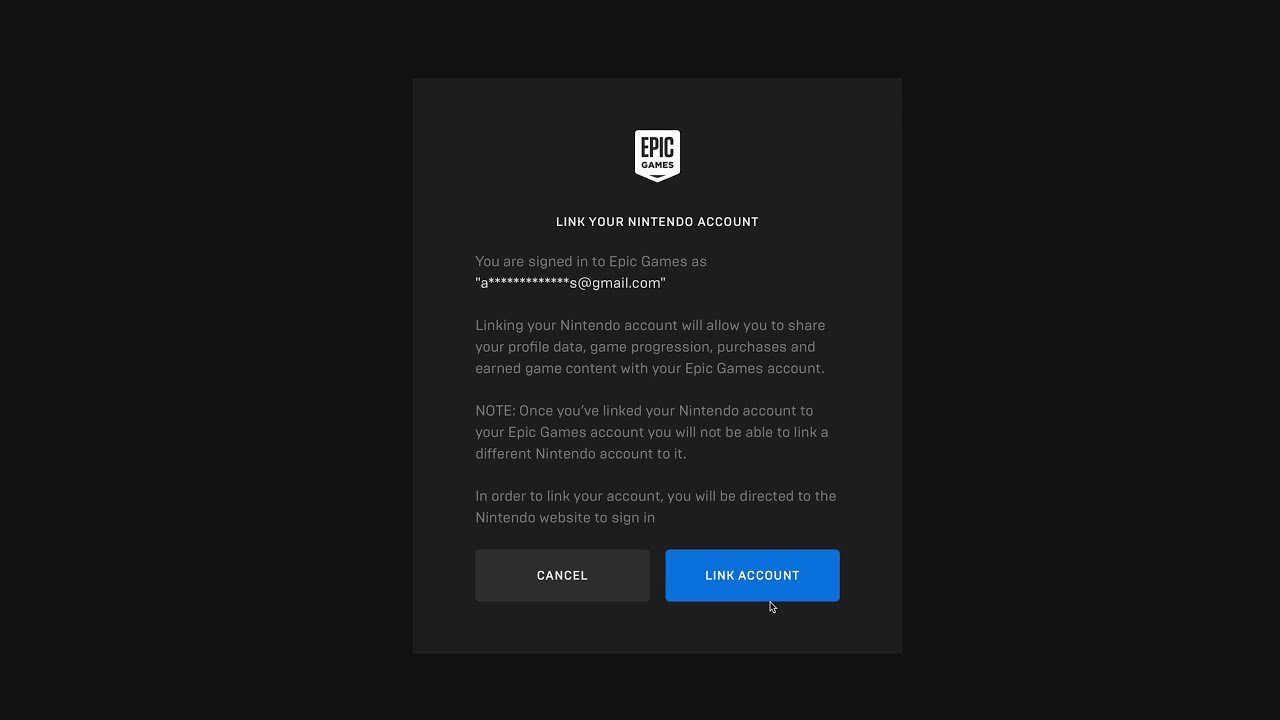
To link your Nintendo account to Epic Games, visit the Epic Games website, log in, go to “Connections,” select the Nintendo icon and follow the on-screen prompts to authorize the link.
Want to use your favorite skins and progress across multiple platforms? This is absolutely possible! The good news is, it’s quite easy to learn how to link Nintendo account to Epic Games. It lets you carry over your game data between your Nintendo console and other devices where you play Epic Games titles like Fortnite.
This simple process ensures you don’t lose anything when you switch between playing on the Switch and other devices. Linking the accounts also gives you access to special cross-platform events and features. So let’s get started!

How to Link Nintendo Account to Epic Games
Getting your Nintendo and Epic Games accounts connected opens up a whole world of fun! It lets you use the same progress and cool stuff in games like Fortnite across your Nintendo Switch and other devices. Think of it like having one awesome gaming passport that works everywhere. But how exactly do you do it? Don’t worry, it’s easier than you might think! We’ll walk you through all the steps, so you can get back to playing your favorite games in no time.
Why Link Your Accounts?
Before we dive into the “how,” let’s talk about “why.” Linking your Nintendo Account to your Epic Games account has several fantastic benefits:
Shared Progress and Purchases
The biggest reason to link your accounts is to keep all your game progress, skins, V-Bucks, and other goodies in one place. If you’ve been playing Fortnite on your PlayStation, Xbox, or PC, and want to continue on your Nintendo Switch, linking ensures you won’t have to start from scratch. All those hard-earned wins and cool outfits will follow you. This feature also applies to other Epic Games that support cross-progression. You work hard to earn them, why leave them behind when you want to change devices?
Playing with Friends on Different Consoles
Another amazing perk is that you can play with your friends, even if they are on different gaming systems. Imagine your best friend has a PlayStation and you have a Nintendo Switch. Linked accounts mean you can team up and play together in games like Fortnite. This is a game changer as it broadens who you can play with and enjoy the multiplayer experience with.
Access Exclusive Content
Sometimes, linking accounts might give you access to exclusive in-game items or rewards. While these special goodies aren’t guaranteed, they are an added bonus when you choose to link accounts. This is kind of like finding a fun extra surprise in your favorite game.
Step-by-Step Guide to Linking Your Accounts
Now, let’s get into the nitty-gritty! Here’s a simple, step-by-step guide to link your Nintendo account to your Epic Games account:
Step 1: Starting the Linking Process
The process usually starts when you launch an Epic Games title on your Nintendo Switch for the first time. The game will prompt you to link an existing Epic Games account or create a new one. If you already have an Epic account, choose to link an existing account. If not, select to create a new account; but remember if you already have an account with purchases and progress on other devices, make sure to link this account, not create a new one.
Step 2: Website Redirect
When you choose to link an existing account, the game will often direct you to a webpage via a QR code or by providing a website address. Use your phone, tablet, or computer to visit the website by scanning the QR code or typing in the address. This is a standard and secure way that Epic Games authenticates your account connection.
Step 3: Logging into Your Epic Games Account
On the webpage, you’ll be asked to log into your Epic Games account. Enter the email address and password associated with your account. Ensure you are using the correct email address if you have more than one. If you have forgotten your password, there is usually an option to recover it through email or other methods.
Step 4: Authorizing the Connection
After logging in, Epic Games will ask for your permission to connect your Nintendo Account. This is a confirmation page that explains what data will be shared between the two accounts. Review the information, and if you’re okay with it, click on the “Allow” or “Connect” button to continue. This is a vital step, as it is your formal permission to allow Epic Games to share data with your Nintendo Account.
Step 5: Completing the Link on Your Nintendo Switch
Once you’ve authorized the link on the website, return to your Nintendo Switch. The game should refresh and show that your accounts are now linked. You’ll be able to see all your saved data, like your skins, V-Bucks, and in-game items. Congratulations you have now successfully linked your accounts!
What if You Already Have an Epic Games Account on Your Nintendo Switch?
Sometimes, you might have accidentally created an Epic Games account when first playing a game on your Nintendo Switch without realizing it. This can cause problems when trying to link an existing account with the same email address. If this happens, you’ll need to unlink the “headless” account (an account created automatically with a basic profile) associated with your Nintendo Switch before you can link your desired account.
How to Unlink a Headless Account:
- Go to the Epic Games website on a computer or mobile device.
- Log in to the account you want to keep connected.
- Navigate to the “Connected Accounts” section of your profile settings.
- You should see a “Nintendo Account” option, but it will say “Linked” to the headless account. There will probably be an “Unlink” option next to it.
- Unlink the headless account.
- Now, when you relaunch the game on your Nintendo Switch, you’ll be prompted to link your main Epic Games account and follow the linking process from above.
Troubleshooting Common Linking Problems
Sometimes, things don’t always go as planned. If you’re having trouble linking your accounts, here are a few common issues and how to fix them:
Problem: Incorrect Email Address or Password
Solution: Double-check that you are using the correct email and password for your Epic Games account. It’s easy to make a small typo. If you’ve forgotten your password, use the “Forgot Password” option on the login page to reset it. Make sure to go through all the steps correctly in the recovery process, and make sure to check your spam folder if you are not seeing the email.
Problem: Nintendo Account Already Linked to Another Epic Games Account
Solution: If your Nintendo Account is already linked to a different Epic Games account, you will need to unlink it from the other account before you can connect it to a new one. Log in to the other Epic Games account to which your Nintendo account is already linked and follow the unlink steps mentioned above.
Problem: Website Issues
Solution: If the website is not loading correctly or the link is not working, try using a different browser or device. Clear your browser cache and cookies, and make sure you have a stable internet connection. If the problem persists, wait a few minutes and try again.
Problem: The Game Doesn’t Recognize The Account Link
Solution: Close and restart the game on your Nintendo Switch. Sometimes, a simple restart will force the game to recognize the connection. Ensure both your Nintendo Switch and the game software are up to date to avoid issues with communication.
Problem: Problems with Age Restrictions
Solution: Ensure that both your Epic Games and Nintendo accounts are registered with a valid age that matches. If there are discrepancies in the age that you input into both accounts, it can stop the linking process. Double check to make sure you did not enter a wrong birthday.
Important Things to Keep in Mind
Before linking your accounts, there are a few important points to consider:
One-Way Linking
While you can unlink and relink accounts, it’s best to get the linking correct the first time as it can make the process easier overall. Multiple linking/unlinking can sometimes cause account issues. Therefore, double check that you are using the correct email address and that your Nintendo Account is not already connected to a different Epic Account.
Data Security
Linking your accounts means sharing some data between Nintendo and Epic Games. Both companies have their privacy policies, so be sure to read and understand these before you proceed. If you have any worries, check the website for information or contact their support teams.
Account Security
Always use a strong password for both your Epic Games and Nintendo accounts. Also, set up two-factor authentication if you have the option. It’s like having an extra lock on your accounts to keep them safe. This provides an extra layer of safety to protect your game data and prevent unauthorized access.
Account Merging
It’s important to note that, as of writing, you cannot directly merge multiple Epic Games accounts into one. So be sure that you are logging into the correct account that you want to link to your Nintendo account. This is another reason why it is extremely important to double check your log in details when linking an account.
Connecting your Nintendo and Epic Games accounts is a fantastic way to keep your progress, items, and friends all together. It lets you jump between your Nintendo Switch and other consoles without losing any of your achievements. By following the simple steps we’ve provided, you can be set up in no time! Take your time, and you can be playing with all your goodies on your Nintendo Switch very quickly. Remember, gaming is about having fun, and linking your accounts makes it even more convenient and enjoyable!
How To Connect Nintendo Account To Epic Games – Full Guide
Final Thoughts
To connect your accounts, visit the Epic Games website. Navigate to the connections area within your account settings. Choose the Nintendo option and follow the prompts.
You must log in using your Nintendo account credentials. This links both platforms. After the process finishes, your game data will synchronize between them.
Linking grants cross-platform play and progression for supported games. It is also a great way to share progress with friends. Therefore, knowing ‘how to link nintendo account to epic games’ is important for many players.

