
To play a solo battles game in CFB 25, navigate to the ‘Solo Battles’ mode from the main menu, choose your difficulty, then select your opponent to start the game.
Ready to test your skills against the AI in College Football 25? Many are eager to know exactly how to play a solo battles game cfb 25. This mode provides a great way to practice and earn rewards. You will face off against a variety of teams with different skill levels.
The solo battles option gives you a chance to test your team in controlled matches. This helps familiarize you with the game mechanics. Let’s get right into the steps!

How to Play a Solo Battles Game in CFB 25
So, you’re itching to dive into some college football action but want to do it your way? Solo Battles in CFB 25 are just what you need! It’s like having your own mini-tournament where you control everything. You get to play against teams picked by the game, all while earning rewards and improving your skills. Let’s break down exactly how you can get started and become a Solo Battles champion.
Understanding Solo Battles
Before we jump into playing, let’s talk about what Solo Battles are. Think of it as a single-player game mode where you play against teams that the game picks for you. These teams are based on other players’ Ultimate Team squads, but don’t worry, you’re playing against the computer, not the actual person. The cool thing is, the teams you face have different difficulty levels and squad ratings, so there’s always a challenge. You get rewards based on how well you do, which you can then use to get better players for your own Ultimate Team.
Key Features of Solo Battles
- Computer-Controlled Opponents: You play against teams controlled by the computer AI.
- Varying Difficulty Levels: Each game offers different difficulty settings, giving you options to choose from.
- Squad Rating Based Opponents: Teams you compete against are based on others user’s Ultimate Teams.
- Rewards: You earn rewards such as coins and packs for winning games, that helps you to improve your team.
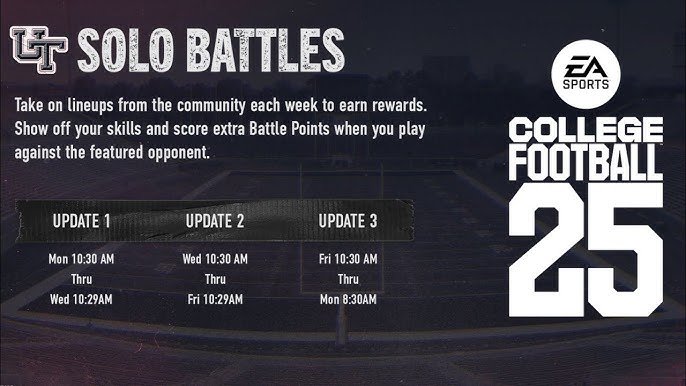
- Weekly Schedule: There’s a set schedule of games to play each week, keeping things fresh.
- Leaderboards: You can compete against others to see who can score highest each week.
Getting Ready to Play Solo Battles
Before you start throwing touchdowns, there are a couple of things you need to get ready. First, you need to have an Ultimate Team set up. That’s the team you’ll be using in Solo Battles, and it will improve with the rewards you earn. If you haven’t built your Ultimate Team yet, that’s the very first step you need to do, by collecting player cards, which is explained in the game itself.
Building Your Ultimate Team
Your Ultimate Team is like your personal dream college football roster. You’ll get player cards that you can collect and add to your lineup, just like you would in a trading card game, except these cards are your players. Different players will have different stats and skills, so it’s important to pay attention to your players’ strengths and weaknesses. As you keep playing Solo Battles, you’ll get more player cards to improve your team, so it’s like a cycle, the more you play, the better you get, and the better your players get as well.
- Opening Packs: You get player cards from packs. Some packs are free, and some need to be bought with game currency you earn.
- Checking Ratings: Look at the ratings of each player card. A high rating means that the player is generally better.
- Building Chemistry: Try to have players with good chemistry together, for example players from the same team. That will provide a boost to your team performance.
- Upgrading Positions: As your team grows, make sure you fill any weak spots on your roster. For example, if your defensive line is not doing well, find players that can improve them.
Navigating to Solo Battles
Once you have your Ultimate Team ready, it’s time to go find those Solo Battles. From the main menu, you should see an option for Ultimate Team. Select that, and then you’ll see the Solo Battles area. It should be pretty easy to see, usually in the main hub of Ultimate Team. Once you’re there, you’ll be greeted by a list of games waiting for you.
- Start from Ultimate Team: Go to the main menu of CFB 25 and click on Ultimate Team option.
- Find Solo Battles Option: Once in the Ultimate Team hub, the Solo Battles option will be easily visible, it’s usually in the main menu.
Choosing Your Opponents
When you look at the Solo Battles screen, you’ll see the opponents the game has lined up for you. Each opponent will have a difficulty level associated with it. You will see some of these words next to the team you are going to play, like easy, medium, hard and legendary. You can pick who you want to play against from the list. The higher the difficulty, the more you will be rewarded.
Difficulty Levels Explained
Here is what you need to know about the difficulty levels:
- Easy: Great for starting out or if you’re looking for a quick win. The opposing team’s players will not be that good and not very hard to play against.
- Medium: This level provides a decent challenge, and is a good balance between difficulty and reward.
- Hard: Get ready for a challenge here, as teams are stronger and smarter. This option is recommended for players that know how the game works.
- Legendary: The hardest setting, you will play against the toughest opponents that will try to destroy you. However, if you win, the rewards are very good.
Understanding the Opponent’s Squad Rating
Along with difficulty level, you will also see the squad rating of your opponents, this tells you how good the other team is overall. A higher rating means the other team has players that are better, so expect a tougher match. You need to look at both the difficulty and squad rating to decide what team to go against.
- Check the Rating: This rating gives you an idea of how strong the opponent’s team is.
- Balance Difficulty and Reward: Choose teams with the right balance for your skill level.
Playing the Solo Battles Game
Okay, it’s time for kickoff! When you start a Solo Battles game, you’ll be playing just like you would in any other CFB 25 game. You’ll be controlling your Ultimate Team and trying to score as many points as possible, while trying to prevent the other team from scoring as well. Make sure you have your plays ready and know your team well, and most importantly, have fun!
Tips for Playing Solo Battles
- Use Your Best Plays: Call plays that you have mastered, and that are most effective.
- Watch Player Stamina: Players get tired as they run, if they are tired they are more likely to make mistakes, pay attention to how much they have left.
- Use Audibles: Audibles are useful to change to plays that are better if the play you called is not going to be effective.
- Try Different Plays: Don’t call the same plays all the time, the computer will figure you out and you will not be able to score as effectively.
- Adjust Difficulty: If you are having an issue, there is no shame in changing the difficulty to a lower one. You can go back to harder difficulties once you get better.
- Stay Focused: Focus on the current play, and don’t get carried away by previous plays you may have had. Stay in the present and keep improving.
Game Controls
If this is the first time you play college football games, it’s good to take a look at the basic controls, to better understand the game.
Here are some basic controls that you can use in CFB 25
- Move Players: Use the left analog stick to move the player you are controlling.
- Pass Ball: Press the buttons that match the icon of the receiver you want to pass to, or just press the throw button and use the left stick to point at a player.
- Run With Ball: Use the left stick to run, the square/X button to break tackle, and the circle/B button for a speed boost.
- Tackle Players: Press the cross/A button to perform a basic tackle, or the square/X button to perform a hit stick tackle.
- Play Call: Press the directional pad to call a new play, while on offense or defense.
There are many more options and controls you can use, but these are the basic ones that will help you start playing.
Scoring and Winning
Like real football, the goal of a Solo Battles game is to outscore your opponent. You do this by making touchdowns, field goals, and extra points. It’s also important to stop the other team from scoring by sacking the quarterback, making interceptions, and doing good tackles.
- Touchdowns: 6 points each, if you run or receive the ball in the end zone.
- Field Goals: 3 points, if you kick it correctly in the area between the posts.
- Extra Points: 1 point, if you kick the ball after scoring a touchdown.
- Defensive Plays: You can create defensive plays that lead to sacks or interceptions.
- Focus on Offense and Defense: Both the offensive and defensive sides of the game are important if you want to win.
Earning Rewards and Ranking Up
After you finish a Solo Battles game, you’ll see the rewards you’ve earned. These rewards can be things like coins, which you can use to buy player packs, and player cards themselves. The amount of rewards you get depends on how well you played and the difficulty level you choose. The more you play and win, the higher you will rank in the solo battles leaderboard.
Types of Rewards
- Coins: Game currency you use to buy player packs.
- Player Packs: Packs that contain player cards you can use in your ultimate team.
- Experience Points: Experience that helps you level up your account.
- Additional Items: Sometimes, other items like stadium decorations and jerseys.
Weekly Leaderboards
Every week, there are leaderboards that you can look at. This is how you compare yourself to others. The more you play and win the more you go up on this list. At the end of the week, if you have played more games and won more matches, then you will be rewarded accordingly.
- Competitive aspect: Compete with others to see who is the best player, and if your score is good you will have better rewards.
- Leaderboard Ranking: Check your ranking and improve it each week by playing matches.
- Weekly rewards: The higher you rank the more prizes you get.
Tips to Excel in Solo Battles
Playing Solo Battles is more than just running plays, it’s about making good decisions and improving your team over time. Here are some tips to improve in Solo Battles, and become the best player you can be.
Team Management
- Upgrade Players: Always upgrade your team with the best player cards that you have, as they will perform better.
- Adjust your roster: If you have too many players in one position, it may be good to sell or trade some of the players and have a more balanced roster.
- Try different players: Don’t be afraid to experiment with new players, you might find hidden gems in players you wouldn’t try out.
Game Strategy
- Master Key Plays: Learn a few plays well and use them effectively in the match.
- Watch for openings: Pay attention to the field and look for open receivers, so they can catch the ball and score.
- Learn opponent behaviors: The computer will use some patterns, pay attention to it and know how to defend against it.
Practice Makes Perfect
- Play Regularly: Play often, and you will improve faster, it’s the best way to learn.
- Review Your Losses: See what you did wrong, so that you can improve and not make the same mistake again.
- Stay updated: Watch videos or read articles, so that you learn new tactics or tips.
Solo Battles in CFB 25 is a great way to test your skills, earn rewards, and have a lot of fun. Remember, it’s all about practice, smart team management, and having a good time playing college football. So, get out there, build your Ultimate Team, and go for the win!
How to access EA Sports College Football 25 Ultimate Team Solo Battles Game Orientation Objective
Final Thoughts
To play a solo battles game in CFB 25, first, navigate to the solo battles menu. Next, choose your desired difficulty. Then, select the opposing team. Finally, confirm to begin the game.
This allows you to experience single player matches against varied AI teams. You must remember to choose the right difficulty to maximize your rewards. Following these steps will enable you to easily play a solo battles game CFB 25.

