
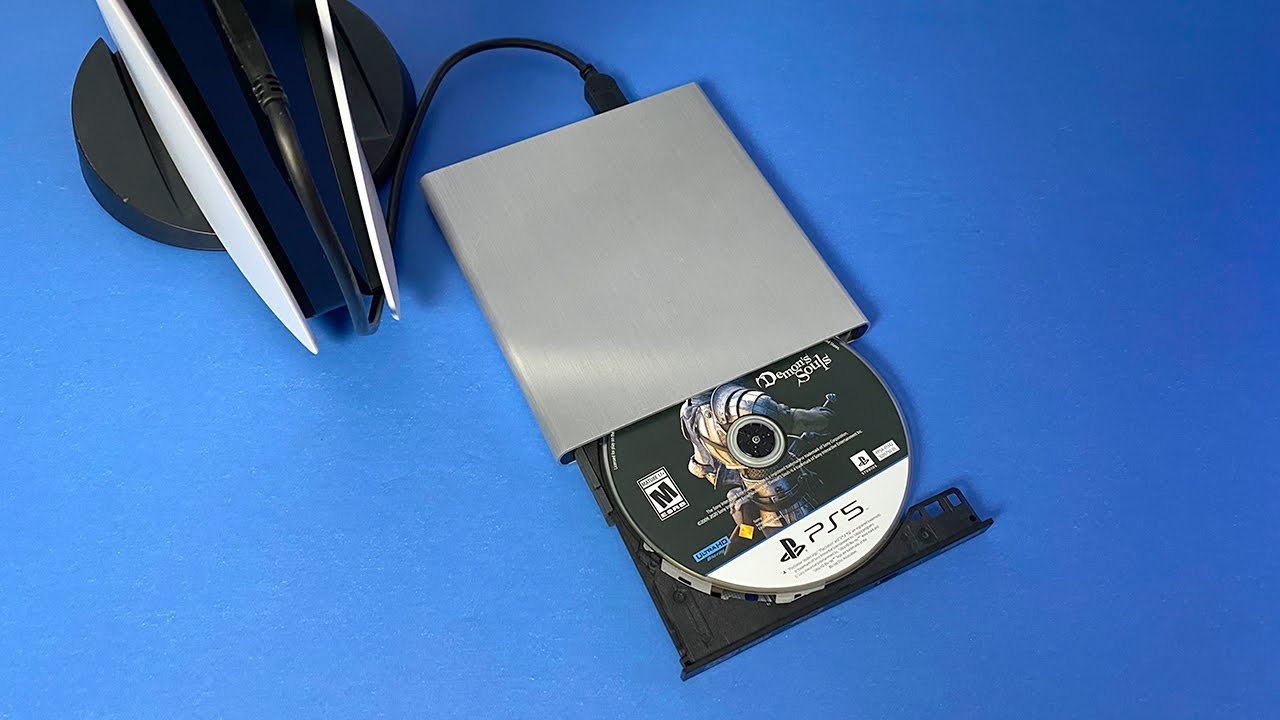
You cannot play disc games on the PS5 Digital Edition; it lacks a disc drive.
It’s a common question: how to play disc games on ps5 digital. The simple truth is, the PlayStation 5 Digital Edition is designed to be a disc-free console. Sony created this version for gamers who prefer to buy and play games through digital downloads only.
This means it doesn’t include the physical disc drive that traditional PS5 consoles have. Therefore, if you own a disc copy of a game, there’s no way to play it on the PS5 Digital version.

How to Play Disc Games on PS5 Digital
Okay, so you have a PlayStation 5 Digital Edition, and you’re holding a shiny disc game you were really excited to play. That’s like finding a key but not having the right lock! It can be a bit confusing, right? The PS5 Digital Edition, unlike the standard PS5, doesn’t have a disc drive. That means you can’t just pop a game disc in and start playing. Don’t worry, though! This guide will walk you through all the ways you can still enjoy your disc-based games on your digital PS5.
Understanding the PS5 Digital Edition
First, let’s talk about what makes the PS5 Digital Edition special. It’s built for a completely digital gaming experience. This means all the games you play are downloaded directly from the PlayStation Store, or redeemed with a code. There’s no slot to insert a physical game disc, which makes the console a bit smaller and sleek looking.
The Difference Between PS5 Models
The main thing is this: the standard PS5 has a disc drive; the Digital Edition does not. That’s why disc games won’t work directly on the Digital Edition. They need to be read by the disc drive to play. It’s like trying to play a record on a device that only plays music from a computer. The Digital Edition is designed to be like that device, only accessing games that are stored on its hard drive.
Why Your Disc Won’t Work
The most obvious reason is that the PS5 Digital Edition simply doesn’t have the hardware needed to read the disc. Think of it like trying to put a square peg in a round hole – it just won’t fit, or in this case, work. The game information on the disc needs a disc reader to access it, and a Digital Edition PS5 just doesn’t come with this feature.
The Technology Behind Disc Reading
Game discs have tiny bumps and grooves that hold the game’s data. A laser inside the disc drive reads this information, sending it to the console for gameplay. Without that laser and drive, there’s no way for the PS5 Digital Edition to understand what’s on the disc. It’s a bit like having a book written in a language you don’t understand – without translation, you can’t read it. The disc drive acts as that translator for the game.
What Options Do You Have?
Even though the PS5 Digital Edition doesn’t accept discs, you still have some great options for playing your games! Let’s explore the different paths you can take to enjoy disc games on your digital console.
Buying Games Digitally
The most direct way to play your games that are on disc is to purchase a digital version on the PlayStation Store. This means you’ll be downloading the game directly to your console. It’s like swapping out your old book for an e-book version that you read on a tablet. While it means buying the same game again, it allows you to play it on your Digital Edition.
How to Buy Games on the PlayStation Store
- Turn on your PS5 and go to the PlayStation Store.
- Use the search function to find the game you want to buy.
- Select the game.
- Look for the ‘Buy’ button and follow the on-screen instructions.
- You’ll need to provide your payment details.
- Once the purchase is complete, the game will begin to download, you need to have an active internet connection for the download and installation process.
This method gives you immediate access to the game after it downloads completely, and saves you the clutter of physical game cases.
Using Game Sharing (with Limits)
Game sharing can be a potential option, but this does require another PS5, specifically a standard version which has a disc drive. if one of your friend has a standard PS5, then you need to take the disc from him/her and then after putting the disc, you can copy the data of that game on your friend’s PS5 and then you can play that game in your account. but please keep in mind that, you can’t use your friend’s account to play the game, you will have to use your own account in your ps5. this is the only way to play disc games on the digital version of PS5. but please keep in mind that, this is not an ideal solution for every one, because for this you have to go to your friend’s home and do the steps. so purchasing digital games, is one of the best way, which we mentioned before.
Game Sharing Limitations
- This requires a friend who has the standard disc based PS5.
- You can’t play the disc directly on a Digital Edition console, even via sharing.
- Game sharing is not always a straightforward, or easy procedure.
Considering the Cost
Buying a digital version of a game you already own on disc can seem frustrating. It’s like buying the same movie twice, once on DVD and then again on digital. Let’s face it; spending twice the money for a game is not good. Consider that the PS5 Digital Edition is built around this idea of purely digital games, it’s the price you pay for the sleek, disc-free design. However, digital games sometimes go on sale, and if you are patient, you may be able to get the game at a discounted price.
Waiting for Sales
The PlayStation Store often has sales and promotions where you might find digital versions of your disc games at lower prices. So if you aren’t in a rush to play, waiting for a good deal could be a smart decision. Keep an eye on the PlayStation Store and look out for sales.
The Benefits of Digital Games
While it can be annoying to purchase games you already own, digital games have some real advantages.
- No Discs: You don’t have to keep track of game discs. They won’t get lost, damaged, or scratched.
- Instant Access: You can switch between games quickly without having to change discs.
- Pre-Loading: You can often download games before they’re released so you can play them right away on launch day.
- Convenience: You can buy games from your couch without leaving your house.
Can I Convert My Disc to a Digital Game?
This is a common question. Unfortunately, there is no direct way to turn your game disc into a digital copy for your PS5 Digital Edition. The disc is designed to be used with the disc drive, and there isn’t a method to transfer the data to your console’s storage. Think of it like how you can’t use a regular key for a digital lock. Even though they both open a door, they work in completely different ways.
Why No Disc-to-Digital Conversion?
The technology behind game discs and digital game downloads is completely different, and there isn’t an easy way to make them compatible. So, the conversion process is not something that is readily available for the console and can’t be implemented, unfortunately.
Managing Your Digital Game Library
With a Digital Edition PS5, you’ll be building a digital library of games, this means that you need to learn to manage them. Here are a few tips to keep your digital library neat and tidy:
- Folders: You can create folders to group your games by genre, such as action, sports, or strategy.
- Storage: If you run out of space, consider using an external hard drive to store games you aren’t playing. The digital games takes a lot of storage space.
- Cloud Saves: Remember to back up your game progress using PlayStation Plus cloud saves, that you don’t lose your progress.
- Prioritizing Downloads: If you have more than one game downloading, you can prioritize which game downloads first.
The Future of Gaming: Digital?
The PS5 Digital Edition gives us a view of the future of gaming, where everything is downloaded. This means that you no longer need to deal with discs anymore, all you need is digital game that you can download and play. It does come with a bit of a challenge of not playing physical games, but there are many advantages as we have mentioned before. Ultimately, both the digital and disc-based consoles offer great gaming experiences and the choice depends on personal preference.
The transition to an all digital console may feel like a big step but there is still many options available to continue enjoying your games. In conclusion, while using a disc with a PS5 Digital Edition is not possible, you’ve learned about other exciting avenues, like purchasing digital copies, utilizing game sharing (with limitations), and taking advantage of PlayStation store sales. So, keep exploring your options, and enjoy the wonderful world of gaming on your PS5.
How to install the disc into the PS5 Slim Digital Edition
Final Thoughts
You cannot directly play disc games on a PS5 Digital Edition. This console lacks a disc drive, making physical games incompatible. The Digital Edition only supports games purchased and downloaded from the PlayStation Store.
Therefore, there’s no workaround for ‘how to play disc games on ps5 digital’. The must solution for playing disc games involves using a standard PS5 with a disc drive. You will need that specific console.

