
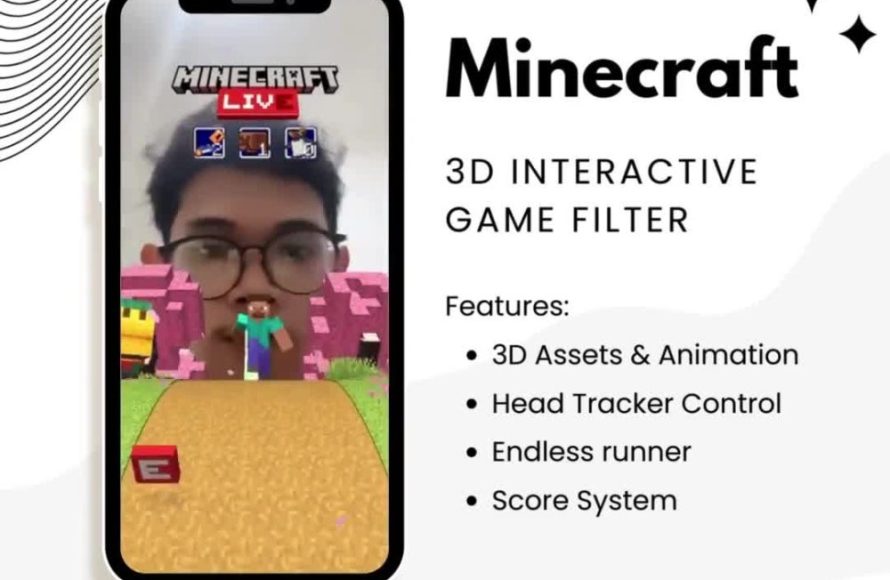
Playing filter games on TikTok requires you to first find a filter that has a game element, then tap the “use effect” button, record your video following the game’s instructions, and finally post it.
Have you noticed those entertaining videos popping up on your TikTok feed, with people reacting to funny scenarios or guessing answers? Many of these use interactive filters, and it’s quite easy to join the fun. The real question often is, how to play filter games on TikTok? It involves a few simple steps that anyone can quickly pick up.
First, you need to locate a TikTok filter that features some sort of game or challenge. Once you find a good one, simply hit the ‘use effect’ button. Then record yourself engaging with the filter’s game and share with the world.

How to Play Filter Games on TikTok
TikTok is super popular, and one of the coolest things about it is the fun filter games! These aren’t your regular filters that just make you look a little different. Filter games are interactive – they ask you questions, challenge you to do things, or even let you play simple games right on your screen. Think of them like little mini-games you can play on your face! This makes creating TikToks much more engaging and keeps us all entertained for hours. Let’s dive into how you can start enjoying these games too.
Finding Filter Games
Before you can play, you need to find these games! Here’s how to spot them:
Using the Effects Tab
The easiest way to find filter games is through the effects tab:
- Open the TikTok app.
- Tap the “+” button at the bottom of the screen, which you usually use to start making a video.
- Look for the “Effects” icon on the left side of the record button, it’s usually a little smiley face. Tap that.
- Now you’ll see a whole library of effects and filters. Look around! You might see some with game-like icons or titles. You can also browse the different categories. Sometimes, game filters are put in trending or gaming categories.
- Tap on any filter to see what it does. If it looks like a game, try it out!
Browsing the ‘For You’ Page
Another way to find them is by browsing the ‘For You’ page. If someone you follow is using a filter game, you will see their video. Here’s how to spot it:
- Keep scrolling through your ‘For You’ page.
- Look for videos where people are interacting with their screen, like they are answering questions or doing challenges.
- If you like the look of a game, tap on the filter name that shows up above the user’s name in the video. This usually looks like a sparkling name, or something that says ‘Try this effect’.
- Tapping that brings you directly to the filter, and you can use it yourself!
Searching Directly
You can also search directly for specific filter games:
- Tap on the “Discover” button, which is usually a magnifying glass at the bottom of the screen.
- Type in keywords like “filter game,” “quiz filter,” or the name of a specific game you’ve seen.
- TikTok will then show you all the filters and videos that match your search.
- Look through the results to find a game you want to try out.
How to Play Different Types of Filter Games
Now that you know how to find them, let’s talk about how to actually play them. Filter games come in many different forms:
Question-Based Games
Many filter games ask you questions. These often pop up on your screen and you have to react or say your answer aloud. They could be things like:
- “What’s your favorite color?”
- “Would you rather…?”
- “How well do you know your friends?”
To play these games, you just need to read the questions on the screen and either say your answer or make a face. Sometimes you need to tap on the screen to move to the next question. These filters are great for sharing your thoughts and opinions with your followers.
Challenge-Based Games
Challenge-based filter games often ask you to perform some action. You might have to:
- Make different facial expressions.
- Try to catch an object moving on the screen.
- Move your head in different ways.
These types of games can be a lot of fun because they often are funny and silly. They test your coordination and reactions. Just follow the instructions that appear on the screen. You usually need to be quick to keep up!
Randomizer Games
Randomizer games show you a list of options and then randomly choose one for you. These could include:
- “Which animal are you?”
- “What’s your future career?”
- “Who is your soulmate?”
These are easy to play because you mostly just wait to see what the filter decides for you. Sometimes these can be quite surprising and very entertaining to share on your TikTok profile.
Matching Games
Some filter games ask you to match certain images or symbols that pop up on the screen. These games test your visual skills. You may have to:
- Match faces.
- Match objects.
- Match colors.
These kinds of games require your full focus and sometimes you have to be very quick to find the match. They’re great for a little brain exercise and can lead to funny videos when you get it wrong!
Character-Based Games
These games transform you into different characters or place you into fantastical scenarios. Examples include:
- Becoming a cartoon character
- Transforming into an animal
- Being placed in a popular game
Character-based games are very popular because they provide fun visuals and allow you to get creative with your videos. You can act out the character and make up your own skits. These can lead to very engaging TikTok videos.
Tips for Playing Filter Games
Playing filter games is easy, but here are some extra tips that can help you make the most of your experience:
Read the Instructions Carefully
Before you start recording, look at the filter screen to see if there are any instructions. Some games need you to tap the screen, speak, or move your face in a specific way. Reading the instructions carefully will help you understand how to play the game correctly and get the best outcome.
Record Multiple Takes
Don’t be afraid to record multiple takes! Sometimes filter games can be tricky. You may want to do a few takes and pick your favorite. This way you are sure to have a good video at the end.
Add Music and Sound Effects
Once you’ve played the filter game, you can add music to your video. This makes it more engaging. You can also add sound effects to make it funnier. Find trending music that goes with the game’s theme, this makes your video more relatable to viewers.
Use Hashtags
Make sure you use relevant hashtags, like #filtergame or the name of the game you played. This helps other people find your video. You also increase your chances of being seen by others who are also looking for and enjoying the same games.
Share Your Results
Share your results! Let your friends and followers see what you get in the games. If you play a randomizer game, ask them if they got the same results. This can spark conversation and get people to try the same filters themselves.
Experiment with Different Filters
Don’t be afraid to try out lots of different filter games. There are so many different ones to explore. Trying a wide range ensures that you find all the games that you enjoy and you may also discover new ones that you really love! Keep an eye out for new filters that come up daily, as the app is constantly updating with fresh and exciting content.
Making Your Own Filter Games
While playing filter games created by others is fun, you can also create your own! TikTok doesn’t directly let everyone create complex games, but there are ways to create engaging filter experiences:
Using TikTok’s Built-In Effects
TikTok has a built-in effects library. You can combine different effects and filters in creative ways.
Start by browsing all the different effects that are already available. Think of ways to combine them for fun new results.
Using Third-Party Apps
You can use third-party apps like Spark AR Studio (from Facebook, which owns Instagram and is connected to TikTok), to make your own effects. While this process is a bit more technical, it gives you a lot more freedom with customization.
This app allows you to design your own interactive filters and games that you can then upload to the TikTok platform. This takes some time to learn but it’s a good way to create your very own interactive filter game experiences.
Create a Challenge Based on an Existing Filter
You can create a filter game concept by setting up a challenge around an existing filter. For example, pick a filter that shows a random word or item and make up your own rules. This encourages users to engage and create their own video interpretations around your challenge.
Staying Safe While Using Filter Games
While TikTok is a fun app, it’s also important to stay safe, especially when interacting with filters. Here are a few quick safety tips:
Be Mindful of Privacy Settings
Always check your privacy settings, who can see your videos, and who can send you messages. Make sure you are only sharing your content with people you trust.
Be Aware of Data Collection
Remember that TikTok and other apps collect data when you use them. Be aware of what information you are sharing and keep private information safe.
Don’t Share Too Much Personal Information
Don’t share your real name, address, school name or phone number in your videos or on your profile. Keep your personal information protected.
Report Inappropriate Filters or Content
If you see a filter or content that is inappropriate, report it to TikTok right away. This helps keep the app safe for everyone.
Take Breaks
Playing filter games is fun but don’t spend too much time on the app. It’s important to take breaks and do other things, like reading a book, playing outside, or hanging out with friends.
Playing filter games on TikTok is a great way to have fun and get creative. Whether you are answering quiz questions, completing challenges, or seeing what the randomizers come up with, there are countless ways to enjoy the interactive filter experiences. Remember to explore, experiment, and most of all, have fun! By following the tips above, you’ll be a pro at playing these games in no time. Be creative, be safe, and enjoy expressing yourself on the app.
How to Find and Use Filters on TikTok | TikTok Guide
Final Thoughts
To play filter games on TikTok, browse the effects tab. Then select a filter with game capabilities. Tap the record button to start.
Follow the game’s on-screen instructions. This could involve moving your face or tapping the screen. Have fun and share your results.
Effectively, ‘how to play filter games on tiktok’ involves choosing the right effect, understanding its requirements, and participating fully. It is a must to try different games to get the best experience.

