
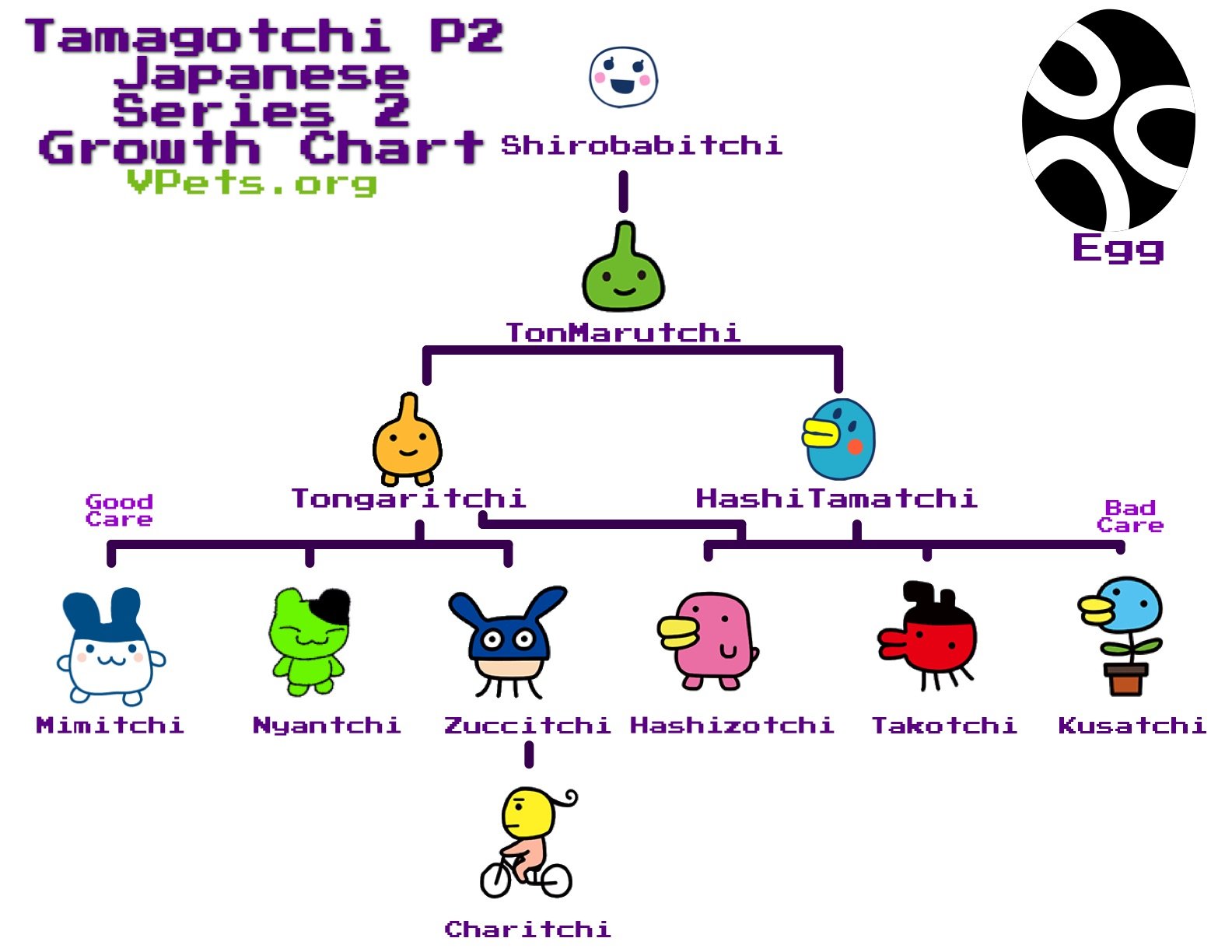
To play Tamagotchi game gen 2, you hatch an egg, then feed, play with, and care for your digital pet by pressing the device’s buttons.
Remember those tiny, egg-shaped gadgets from the 90s? We’re diving back into nostalgia to explore how to play Tamagotchi game gen 2. These virtual pets were a huge craze, and understanding their basic operation still holds some charm.
This guide will walk you through the simple steps involved in keeping your digital friend happy. It’s all about those buttons and paying attention to your pet’s needs. We’ll get you back to caring for a pixelated pal in no time.

How to Play Tamagotchi Game Gen 2
Alright, let’s dive into the fun world of the Tamagotchi Gen 2! If you’ve got one of these cute little virtual pets, you’re in for a treat. This isn’t just a game; it’s like having a tiny, needy friend that lives in your pocket. But don’t worry, taking care of your Tamagotchi isn’t as hard as you might think. We’ll go through all the important things you need to know so you can become the best Tamagotchi parent ever!
Getting Started: Your Tamagotchi Egg
The first thing you’ll see when you turn on your Tamagotchi Gen 2 is an egg. This is where your adventure begins! The egg will wobble and shake for a little bit. It’s preparing to hatch. Don’t worry, you don’t need to do anything special yet, just be patient. It won’t take too long before it hatches into your brand-new Tamagotchi character. You might get a little baby that looks like a blob, or maybe a cute little alien-like creature. Each Tamagotchi is different, and that’s part of the fun!
Turning on your Tamagotchi
To turn on your Tamagotchi Gen 2, you usually just need to pull out the plastic tab that’s sticking out the side. Once you do that, the screen will come to life, and you’ll see that wobbly egg we talked about. If your Tamagotchi has been played with before, it might already have a character on the screen. If this happens, just reset the game using the small button on the back of the device, typically with a paperclip or pin. Make sure you are careful not to poke too hard.
Understanding the Screen
Your Tamagotchi screen might seem simple, but it shows a lot of important information. Here’s what you need to know about the different parts of the screen:
- Your Tamagotchi: This is the main star of the show – your little virtual pet.
- Status Icons: These icons tell you what your Tamagotchi needs. We’ll talk more about these later.
- Time: There’s usually a small clock in the corner, so you know what time it is.
Understanding the Buttons
Your Tamagotchi has three buttons: A, B, and C. These buttons are your way to interact with your pet. Here’s what they do:
- Button A (Left): This button is mainly used to select or cycle through options. Think of it as your “choose” button.
- Button B (Middle): This button is your action button, used to confirm choices or perform actions like feeding your pet or playing a game.
- Button C (Right): This button is your cancel or status button. Press this to see how your Tamagotchi is feeling, check their age, weight and more.
Caring for Your Tamagotchi: The Basics
Now that you know about the buttons and screen, let’s talk about caring for your Tamagotchi. It’s a lot like having a real pet, but way smaller and virtual!
Feeding Your Tamagotchi
Your Tamagotchi gets hungry! You’ll know when they need food because a little icon that looks like a piece of food will pop up. Here’s how to feed them:
- Press the A button until you see the food icon.
- Press B to select the food icon.
- You’ll see two choices: a meal (usually meat) and a snack (usually candy).
- Use the A button to switch between them.
- Press B to feed your Tamagotchi what you have selected.
Make sure you don’t feed your Tamagotchi too many snacks, as they can get sick. A balanced diet is key for a happy Tamagotchi!
Cleaning Up After Your Tamagotchi
Just like real pets, your Tamagotchi also creates waste. A poop icon will appear on the screen when this happens. Here’s how to clean it up:
- Press A button until you see the poop icon.
- Press B to select the icon.
It’s super important to clean up quickly, or your Tamagotchi will get sad. No one likes living in a messy house, not even virtual pets!
Playing Games with Your Tamagotchi
Playing games is one of the most fun parts of owning a Tamagotchi Gen 2. Playing games keeps them happy and helps them grow healthy. Here’s how to get to the game selection:
- Press the A button until you see the game icon (usually looks like a little game controller).
- Press B to select the game icon.
There’s usually one single game you can play and it’s a guessing game. Your Tamagotchi will either face left or right, you must guess which way they will face. If you guess right, your Tamagotchi will be happy! If you guess wrong, it might be a bit sad, but don’t worry, they’ll be okay! Always try to keep playing the game. Playing games regularly is a great way to keep your little friend happy.
Disciplining your Tamagotchi
Sometimes, your Tamagotchi might beep or cry for attention even when it doesn’t need anything. If this happens you can discipline your pet using the discipline icon. It’s important to not over discipline your Tamagotchi as this can make them unhappy. Here’s how to discipline your pet:
- Press the A button until you see the discipline icon.
- Press the B button to discipline your pet.
Health and Happiness: Keeping Your Tamagotchi Thriving
Your Tamagotchi’s health and happiness are super important. If they’re not happy, they might get sick, and no one wants a sick Tamagotchi! So how can you tell if your Tamagotchi is happy? Here are some things you’ll need to keep track of:
Status Check
Press the C button to check your Tamagotchi’s status. You’ll see a few important things here:
- Age: How many years old your Tamagotchi is.
- Weight: Tamagotchi can get too fat if they eat too much.
- Happiness/Hunger: This shows how your Tamagotchi is feeling. When the little hearts or lines are full, your Tamagotchi is happy! When they’re empty, your pet is hungry or needs some attention.
Checking the status of your Tamagotchi will let you know if they need food, a game, or just some clean up time!
Understanding Sickness
Sometimes, despite your best efforts, your Tamagotchi might get sick. You’ll know it’s sick if it has a skull icon appear on the screen. You’ll need to give your Tamagotchi medicine by going through the following steps:
- Press the A button until you see the medicine icon.
- Press the B button to give them medicine.
Make sure you take care of your pet as soon as possible if it’s feeling unwell!
Sleep Time
Tamagotchi also need their sleep! They will go to sleep at a set time each day based on how they are programmed. Usually they go to sleep at about 8pm, but this can vary. You will see your Tamagotchi go to sleep on the screen. Try not to bother your pet while they are sleeping!
Evolution: Watching Your Tamagotchi Grow
One of the coolest things about Tamagotchi is watching them evolve. They don’t stay babies forever! As you take good care of your Tamagotchi, it will grow into different forms. There are many different characters they can evolve into. What they evolve into depends entirely on the kind of care you have given to them over time. Some are cute and cuddly, while others are a little bit silly looking! It’s a big part of the surprise and fun of owning a Tamagotchi.
Different Tamagotchi Characters
There are many different Tamagotchi characters you can get. Each Tamagotchi grows into a number of different characters based on the care that you provide them. These different characters can affect how your Tamagotchi behaves, and how difficult they are to take care of. Some care more about being fed, and others enjoy more time playing games.
Here are some examples of popular Tamagotchi characters:
| Character Stage | Description |
|---|---|
| Baby | The first stage of your Tamagotchi. They are simple blobs that need a lot of care. |
| Child | The next stage after the baby. They start to take on a more distinct shape and still require a lot of care. |
| Teen | The third stage of your Tamagotchi. They start to take on their more developed shape and need care, but not as often as earlier stages. |
| Adult | The final and most advanced stage of your Tamagotchi. Their needs become less frequent and they are often easier to take care of. |
Tips for a Happy Tamagotchi
Here are a few extra tips to make sure your Tamagotchi has the best life possible:
- Check Regularly: Don’t forget to check in on your Tamagotchi often, especially if you’re a beginner. Don’t leave them too long, or they could get sad and maybe even sick!
- Balance is Key: Make sure to give your pet a mix of food, play, and cleaning up. A happy Tamagotchi is a well-balanced Tamagotchi.
- Be Patient: Tamagotchi needs some time to grow. Don’t get frustrated if you miss a need. Just keep trying, and you’ll get the hang of it.
- Explore and Experiment: Try different things and see how your Tamagotchi responds. This is part of the fun and you’ll quickly learn what your pet likes!
Tamagotchi Care Over Time
The care your Tamagotchi needs will change over time as it grows. When they are babies, they will need the most care, often waking frequently to be fed or cleaned. As they grow into child and teen stages, they will sleep more and need less care. Finally, when they reach their adult stage, they can go longer without care. This is all part of the game, and it can be interesting to experience these different growth periods.
Playing with a Tamagotchi Gen 2 is a fun way to learn about responsibility and caring for a pet. It’s a small toy, but it can teach you big lessons. So go ahead, hatch that egg and see what kind of pet you get! Have fun, and always remember to take good care of your virtual friend!
Guide to tamagotchi gen 1 and gen 2. -dragon pearl
Final Thoughts
To successfully play tamagotchi game gen 2, you must feed your virtual pet when hungry, indicated by an empty stomach icon. Discipline is key; scold it when it misbehaves.
Regularly play games with your Tamagotchi. This keeps it happy and improves its overall well-being. Monitor its health carefully, and administer medicine when it gets sick.
Proper care ensures the longevity of your digital friend. Following these steps allows you to understand how to play tamagotchi game gen 2 effectively and enjoy the experience.

