
Playing TikTok games typically involves following on-screen prompts, using filters, and reacting to challenges or trends set by other users.
Ever scrolled through TikTok and wondered how everyone seems to be effortlessly participating in those fun, interactive games? It’s actually quite simple! Many of these aren’t traditional video games, but instead utilize the platform’s features in creative ways.
Learning how to play tiktok games mainly boils down to understanding trends and engaging with the content. You’ll usually see visual instructions or audio cues that guide you in how to participate. Jump in and have some fun!

How to Play TikTok Games
Hey there, TikTok fans! You know TikTok is awesome for short videos, dances, and funny clips, right? But did you know it’s also home to tons of super cool games? Yep, that’s right! People are creating and playing all sorts of games right on TikTok, and they’re a blast. So, if you’re wondering how to join the fun, you’ve come to the right place. Let’s get into it and learn how to play TikTok games like a pro!
Understanding Different Types of TikTok Games
Before we jump into playing, it’s good to know there are a few different types of games on TikTok. They’re not like the video games you play on a console; these are usually more about challenges, trends, or interactive filters.
Challenge-Based Games
These are probably the most common type of games you see on TikTok. Someone starts a challenge, often using a specific sound or song, and other users try to copy it, but with their own special twist. For example, the “Don’t Leave Me Challenge” is a classic example where people have to act like they are trying to escape something that is chasing them. Other popular challenges include dance challenges where you learn a specific dance routine or even drawing challenges.
- How to Participate: Watch the original challenge video carefully. Understand the rules and the moves. Then, record your own video, adding your creative spin. Use the same sound or hashtag so others can find your video.
- Finding Challenges: Check the “For You” page for trending sounds or hashtags. Also, look out for videos with captions or audio explicitly asking others to participate.
Filter-Based Games
Filters on TikTok aren’t just for making yourself look cool or silly; some are designed to be games! These games use the TikTok filter effects and often involve completing tasks or answering questions. For example, there are filters that choose random things for you or show you funny faces which you need to act upon.
- How to Participate: Find a video that showcases the filter. When you want to use the same filter, click on the filter name above the user’s username. It will take you to the filter section where you can add that filter to your video. Then, follow the instructions on the filter and record yourself doing it.
- Finding Filter Games: Check the “Effects” tab at the bottom of the screen, and try out filters that look interactive. You can also find filters by seeing which ones are being used in trending videos.
Interactive Video Games
These are less common, but some users create interactive video games using multiple TikTok videos. They make use of text overlays and directions to guide you through the “game.” It can feel like you are playing a “choose your own adventure” book. You will see that you get specific directions like ‘Tap the left side of the screen for Option A’ or “tap on the right side for option B”. The options will lead you to different outcomes in the game.
- How to Participate: Follow the directions in the videos, usually to tap a particular side of your screen, or search a specific hashtag. You will hop from video to video to go through the game.
- Finding these Games: These games are a bit harder to find. Look for accounts that post several videos with similar text or look for certain hashtags. You may also find them in user’s profile who actively make interactive game videos.
Quiz-Based Games
These games are often done using text overlays in a video or using the poll sticker feature. They can test your knowledge or your opinions on certain topics. For example, you may see a video ask “What is your favourite color? (a) Red (b) Blue” and you can respond using the polls feature or in the comments.
- How to Participate: Answer the questions in the comments, or using the available poll sticker options. Some quizzes even require you to use a specific sound to complete the quiz.
- Finding Quizzes: These often appear on the “For You” page as normal videos, and may even be sponsored by brands or users. Look for videos that ask questions or have the poll stickers on them.
How to Find Games on TikTok
Finding the game you like to play on TikTok is a big part of having fun. Here are some ways to do it:
The “For You” Page
Your “For You” page (FYP) is personalized to you. It uses an algorithm to show you content that it thinks you will enjoy. This means, if you have been interacting with game-like videos, it will show you more and more of those kinds of videos. So, the best way to start finding TikTok games is to simply spend time on the app.
- How to use it: Just scroll! Pay attention to the videos that grab your attention and see if they ask you to participate in some way. Watch closely for instructions, challenges, or interactive content.
Searching with Hashtags
Hashtags are like labels. People use them to group videos on the same topics. If you are looking for a specific kind of game, use hashtags to search for them.
- How to use them: Tap the magnifying glass at the bottom of your screen. In the search bar, type things like #tiktokgame, #tiktokchallenge, #filtergame, or any other terms you might have in mind. Browse through the videos that appear.
- Example Hashtags: #tiktokgames, #challenge, #filterchallenge, #interactivegame, #quiztime #tiktokeducation, #learnontiktok.
Checking the “Effects” Tab
As said earlier, the “Effects” tab is great for finding filter-based games. When you find a filter that looks like it could be a game, tap to try it and see what it does.
- How to use it: Go to the “Effects” tab (it looks like a little smiley face) and start scrolling. Look for filters that are interactive, like the ones that give you a question or a task.
Following Game Creators
Some TikTok users create games all the time! If you find one that you like, follow the user! So you can see their new games when they are posted.
- How to use it: when you see a video of a game you like, tap on the users profile picture above the video, this will take you to their profile page. Then, click on the “follow” button, which will allow their videos to show in your ‘Following’ feed.
Participating in TikTok Games: Step-by-Step
Okay, you’ve found a game you want to play. Now, what do you do? Here is a detailed look on how to participate:
For Challenge Games
Challenges are fun! Here is how to participate in a challenge:
- Watch the Original Video: Study the original video carefully. Understand the moves, the rules, and any special effects used.
- Use the Same Sound: Tap the spinning record icon at the bottom of the original video, then tap “use this sound.” This will take you to the camera screen with the correct sound already selected.
- Record Your Video: Be creative! Try to put your own spin on the challenge. Have fun, but stay within the rules.
- Add a Caption and Hashtag: Write a caption that explains what you are doing, and use the same hashtag that everyone else is using for that challenge. This helps others find your video.
- Post it! Click the red “post” button, and share your game with the TikTok world.
For Filter Games
Playing filter games is straightforward and usually quick, here is how to get started:
- Find the Filter: Find a video that showcases the filter you want to use.
- Use the Filter: Tap the filter name above the user’s username. It will take you to the filter screen. You can click on “try this effect” to start your own video using that filter.
- Follow Instructions: The filter might ask you a question, or give you a task, so read it carefully and follow the instructions.
- Record Your Video: Press the record button and have fun!
- Post and Share: Add a caption and any other relevant hashtags, then share the video.
For Interactive Video Games
These may require a bit more attention, as you will need to be aware of the instructions provided on screen:
- Start at the Beginning: Often these games start with a beginning video, where the directions start.
- Follow the Directions: Most times, you will be instructed to tap the right or left side of your screen. Depending on where you tap, you will be taken to a different video.
- Continue the Game: Keep tapping the screen, following the directions until you reach the end of the game.
- Share and Comment: Leave a comment on the games you liked, and share it with your friends.
For Quiz Games
Quizzes are quick and easy, and require a response or answer, here is how to take part in a quiz on Tiktok:
- Watch the Video: Watch the video to see if you need to use the poll sticker, answer in the comments, or use a specific sound.
- Respond: if there is a poll sticker, use this to input your answer. Otherwise, leave your answer in the comments section.
- Share and Comment: let the user know what you thought of the quiz, and ask your friends to respond too.
Tips for Creating Your Own TikTok Games
Want to be a game creator? It’s not as hard as you might think! Here are some tips to help you make great TikTok games:
Start Simple
Begin with something that is easy to understand and participate in. Don’t try to make it too complicated at first.
Use Trending Sounds and Hashtags
Using what’s already popular can help more people find your game.
Add Clear Instructions
Make sure it’s super clear how others can play. Use text overlays to give directions or explain the rules.
Make it Fun and Creative
Come up with something interesting and different! This could be using a popular trend, or making a funny filter. Or anything creative you can think of.
Encourage Participation
Ask viewers to like, comment, or share their videos using a specific hashtag to help it go viral.
Staying Safe While Playing TikTok Games
While TikTok is a great place for fun, it’s also important to stay safe. Here are some rules to remember:
Don’t Share Personal Information
Never share things like your address, phone number, or school name in a video.
Be Respectful
Don’t create content that is mean or hurtful to anyone. Treat everyone the way you would like to be treated.
Be Aware of What You’re Doing
Always be mindful of your surroundings when you are creating videos. Don’t do anything dangerous or illegal in your videos.
Tell a Trusted Adult
If anything makes you uncomfortable on TikTok, talk to a parent, teacher, or another trusted adult.
Playing TikTok games can add a whole new layer of fun to the app. It’s a great way to express yourself, get creative, and connect with other people. Remember to be safe, have fun, and share your great games with the world!
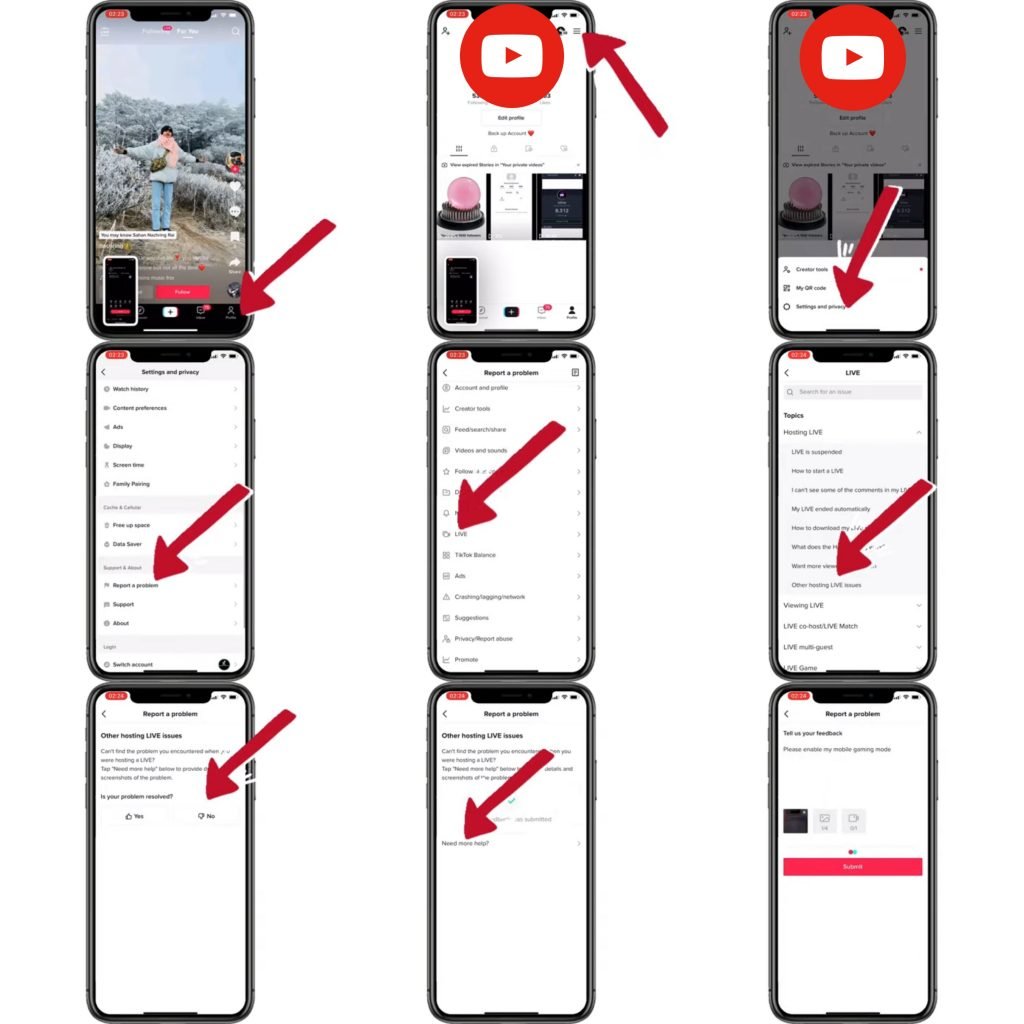
How to Play Games on Tiktok Live Without Stream Key
Final Thoughts
Playing TikTok games involves finding them through hashtags or challenges. Users usually interact by using filters or by following specific on-screen prompts. Remember to read the instructions carefully to know the rules.
You can often find these games within live videos or via trending sounds. Participating requires you to use your phone’s camera and follow the game’s flow. The key is to pay attention to the visual cues.
Thus, understanding ‘how to play tiktok games’ boils down to observation and active participation. The gameplay must feel easy if you follow the trend.

