
To post games on Steam, you must first become a Steamworks partner, then pay a fee for each game, and finally prepare your game’s build, store page, and marketing materials.
Ever dreamed of seeing your game on Steam? The process can feel daunting, but it’s definitely achievable. Many developers have successfully launched their creations there. This guide will help you navigate how to post games on Steam.
Understanding the steps is crucial before you even begin. Becoming a Steamworks partner is the first hurdle. After that, get ready to pay the fee and then focus on the necessary technicalities of launching your game.

How to Post Games on Steam
So, you’ve made a game! That’s super cool! Now you want to share it with the world, and Steam is a great place to do that. But how do you actually get your game from your computer to the Steam store? It’s like taking your awesome drawing and putting it in a big art gallery for everyone to see. This isn’t something you can just do overnight. It takes some planning and work, but it’s totally doable. Let’s break it down step-by-step so that it feels like less of a big puzzle and more like following a recipe.
Becoming a Steamworks Partner
First things first, you can’t just pop a game onto Steam. You need to become a Steamworks partner. Think of it like getting a special key to enter the Steam store as a seller. Here’s what that involves:
Creating a Steamworks Account
This is where your journey starts. You need to head over to the Steamworks website. It’s where all game developers meet. You’ll need a regular Steam account first. If you already play games on Steam, great! You’re halfway there. If not, make one. It’s super easy and free. Once you have an account, you’ll then need to make a partner account. It’s like creating a special profile just for your game development stuff. During this process, you’ll give Steam some information about you and your company (if you have one). You also need to agree to their terms. Think of these terms like the rules of the game.
Completing the Paperwork
Yep, there’s paperwork involved. It’s not as scary as it sounds! You need to fill out some forms. This includes things like tax information and banking details. Steam needs to know where to send you the money when people buy your game! This is an important step so be accurate. Some forms may need to be verified, so you might have to wait a little bit. This is all a part of making things official.
Paying the Steam Direct Fee
To post games on Steam, there’s a fee. This fee is called the Steam Direct fee. It’s like a small payment to get your game considered for the store. This fee helps Steam keep things running smoothly. The fee can change from time to time, so be sure to check the most current amount on the Steamworks website. Once you pay the fee, you are one step closer to getting your game live.
Preparing Your Game for Steam
Okay, now comes the fun part! Getting your game ready for the store. It’s not as simple as just uploading a file. Think of this like cleaning your room before having guests. You want everything to look its best.
Creating a Steam App ID
Each game on Steam has a unique ID, like a social security number for games. Once you are a Steam partner, you’ll request an App ID for your game. This is how Steam knows which files belong to which game. Don’t worry; it sounds complicated, but the Steamworks website will help you with this. After getting this ID, you’ll use it to upload your game files.
Building Your Game
Your game needs to be in a format that Steam can understand. That means creating a special kind of file. You’ll typically need to create a build for Windows, and maybe macOS or Linux, depending on which platforms you want to support. This is essentially compiling your game code and assets into a package that can be easily installed. This could be a zip file or other format. Make sure it runs perfectly on those systems. It’s like practicing your song before a concert, you want it to sound just right.
Adding Steam API
The Steam API (Application Programming Interface) is a set of special tools and functions that let your game “talk” to Steam. By using this you can add some cool things to your game, like achievements, player stats and online multiplayer if your game supports it. This may sound like very complicated stuff, but there are many guides and tutorials available if you need help. These additions really enhance the game experience for players.
Creating Store Assets
Imagine walking into a store. What catches your eye? The posters, the product photos, the labels. It’s the same with your game on Steam! Store assets are all the images and videos that show off your game. This is how you attract players to your game. Think of it as the storefront for your game.
Capturing Screenshots and Videos
You will need great screenshots. These are still images from your game showing all the cool stuff it has. Pick the moments that show what’s special. Also, you will need a short video called a trailer. Think of it like a commercial that shows off the gameplay. Don’t make the trailer too long, keep it short and sweet! Good quality and exciting videos and images help a lot.
Designing Capsules
Capsules are the little images that represent your game on the Steam store. They’re like the cover of a book, they need to be awesome! Steam needs many different sizes of these capsules. So you need to design them to look good at all sizes. The main one is quite big and shows the name of your game. The smaller ones are just the logo and some of them are really small. Make sure the designs are clear and recognizable.
Writing a Description
The description tells people all about your game. What is it about? What can players do? It’s like a mini story to make people interested. Keep the descriptions clear, easy to understand, and exciting. Use bold font to highlight what’s cool. You should also add a list of features so people know what they can expect. You might also mention updates or patches to let people know the game is being worked on.
Setting up your Steam Store Page
Your store page is like your game’s personal website on Steam. It’s where people go to learn everything about your game and decide if they want to buy it. You will need to upload all of the images, videos and descriptions we talked about earlier. Steam will take you step by step and will ask for all required information. It will also give you a preview of the page so you can see how it looks. Make sure everything looks perfect!
- Game Title: Choose a catchy name for your game.
- Genre: Pick a category for your game, like action or puzzle.
- Languages: List all the languages your game supports.
- System Requirements: Tell people what kind of computer is needed to run your game.
- Price: Decide how much your game will cost.
Uploading Your Game
Now that you have done all of the above, it’s time to put your game on the virtual shelf! This is like handing out your cool drawing in the art gallery.
Using the Steamworks SDK
The Steamworks SDK (Software Development Kit) is a bunch of tools that help you get your game onto Steam. It’s like the special equipment you need to move your heavy sculpture into the gallery. You’ll use the tools to pack up your game files and upload them to Steam. It may seem a bit technical, but Steam has good guides to walk you through it.
Testing Your Game
Before your game goes live to everyone, it’s a good idea to test it. You can get some friends to help or you can do it yourself. It’s like trying out a new recipe before you make it for all your friends. This is a crucial step. If you find any mistakes or problems, you can fix them. This will mean your game runs as smoothly as possible when it goes to the public.
Review and Publishing
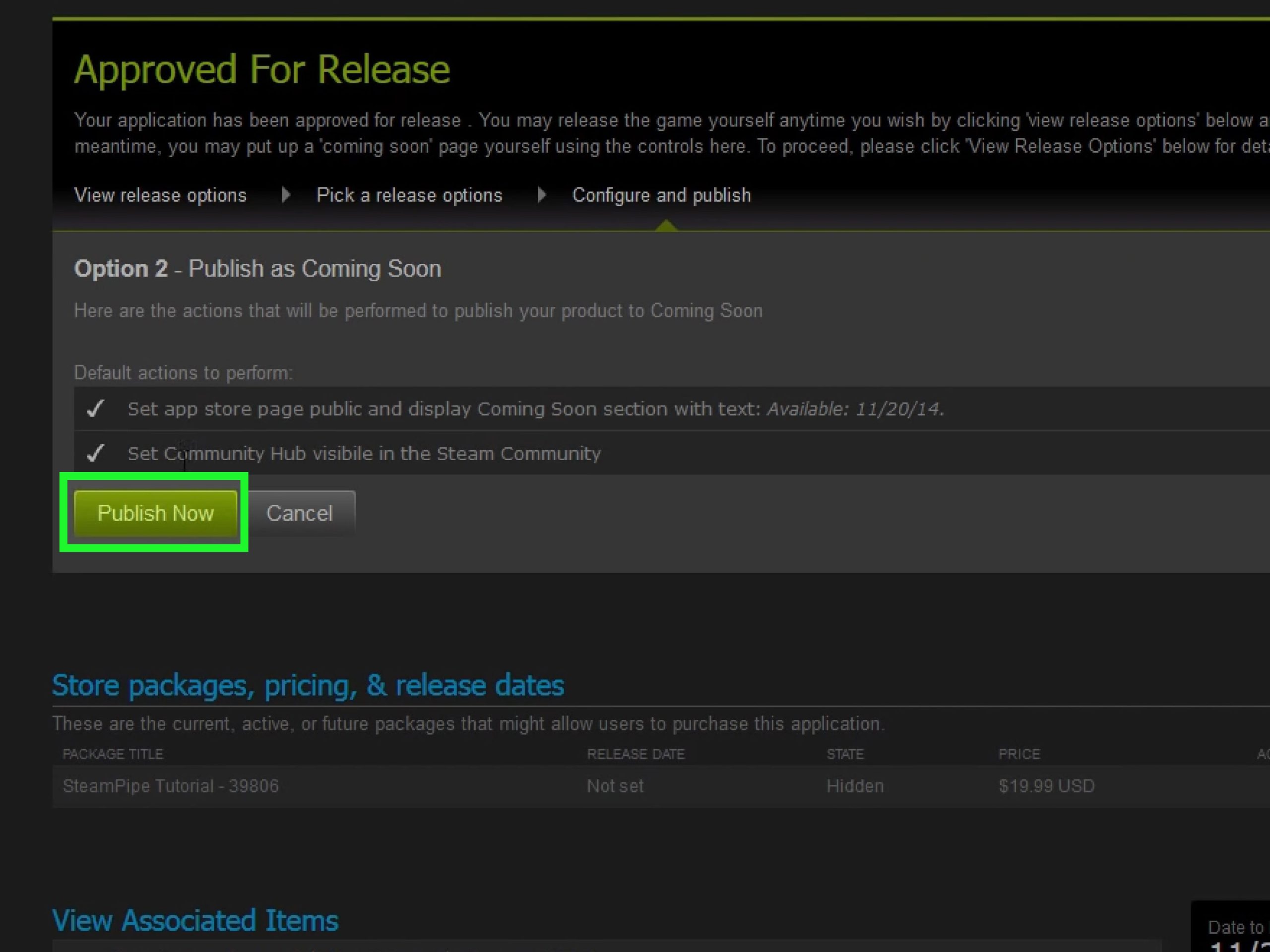
Almost there! It’s like waiting for the art critic to check out your drawing. Steam has a team to review all new games before they go live.
The Review Process
Steam will check your game to make sure it’s in working order, that it does not contain anything harmful and it’s following all the Steam rules. They might even play the game for a while. If they find any problems, they’ll tell you and you’ll have to fix them. So it’s very important to take your time and make a good game.
Setting Your Release Date
If everything goes smoothly, you’ll get a date for when your game will go live on the Steam store. This is a big day! Choose the date carefully and let everyone know on social media. Now it’s time to celebrate and get excited! Your game is almost ready for people to enjoy.
Marketing Your Game
Okay, your game is on Steam! But that doesn’t mean people will automatically know about it. It’s like having a fantastic lemonade stand, but you still need to tell people about it. Here are some ways you can get the word out about your game.
Social Media
Use social media sites like Twitter, Facebook, Instagram, and others, to post about your game. Post cool screenshots or short trailers. You should engage with people who like your posts. This is a great way to connect with future players of your game. You can answer their questions and listen to their comments.
Influencers
Contact YouTubers or Twitch streamers who might enjoy your game. They can play your game on their channel for many people to see. It’s like having someone say your drawing is awesome to a whole crowd. This is a great way to reach new potential players.
Steam Community
Use the Steam community forum for your game. Write updates about your game. Also post announcements about updates and new features. You can also take part in discussions with the people playing your game. It’s a perfect place to connect with the players. It’s like having a discussion with people who love the same things as you.
Ongoing Support
After your game is out there, the work isn’t over! You need to support your game, fix any mistakes that people find and maybe even create new stuff.
Checking User Feedback
Pay attention to what people say about your game. Are there any problems or suggestions for new things? This can help you make your game even better. It’s like listening to what people think of your drawing so you can make better drawings in the future.
Creating Updates and Patches
Games often need updates. This is to fix bugs, add new things, and make the game better. It is a good idea to update your game often. This lets people know that you care about it. It is also a way to keep people playing your game for longer.
Putting a game on Steam is a big journey. It takes effort and planning, but it’s totally worth it if you have made a game that you want the world to play. Remember to take each step slowly, learn as you go, and most importantly, have fun with it! You’ve made a game. That’s pretty amazing!
How to Publish Your Game on Steam in 2022
Final Thoughts
To post your game on Steam, you must first create a Steamworks account. Next, prepare your game’s build and associated store page content like screenshots. Then upload your game build via the Steamworks SDK.
Ensure you have completed all necessary financial and legal paperwork. After submitting, your game will go through a review process. Finally, learn how to post games on steam efficiently.

