
To publish a game on Steam, you’ll need to create a Steamworks account, pay a fee, prepare your game’s store page, and complete the necessary technical setup.
Ever dreamed of seeing your creation on Steam? It’s a fantastic goal, and achievable with the right steps. You might be wondering, how to publish a game on steam. Well, let’s break down the process.
It involves more than just uploading files. You’ll need to navigate Steamworks, understand their requirements, and make sure your game is ready for prime time. This journey requires preparation, but the reward can be significant.

How to Publish a Game on Steam
So, you’ve poured your heart and soul into creating a game, and now you’re ready to share it with the world. Awesome! One of the best places to do that is Steam, a huge platform where millions of players can find and enjoy games. But how do you actually get your game onto Steam? It might seem a little complicated at first, but don’t worry! We’ll walk you through all the steps you need to take to get your game ready for the Steam store. Think of it like building with LEGOs; each step is a different brick, and when you put them all together, you have a fantastic finished project – your game on Steam!
Setting Up Your Steamworks Account
First things first, you’ll need a Steamworks account. This is like your home base for everything related to publishing your game on Steam. It’s where you’ll manage your game, access tools, and keep track of your sales. Here’s how to get started:
Creating a Steamworks Account
You can’t just jump right in; you need to register as a Steamworks partner. Think of it like getting a key to the Steam castle. Here’s what to do:
- Go to the Steamworks website (partner.steamgames.com).
- Click on the “Join Steamworks” button.
- You’ll need to provide some information, such as your company or developer name, contact details, and legal information. It’s important to be honest and accurate with this stuff.
- You’ll also need to agree to the Steamworks Distribution Agreement, which is like a rulebook that everyone on Steam follows.
- After that, pay the Steam Direct fee, which is required for your account to become an active partner.
This is not a one-time thing, be careful about the details that you provide. Because once you submit it, it’s difficult to make changes or updates to it.
Understanding the Steam Direct Fee
Steam requires a fee, called the Steam Direct fee, for each game you want to publish. This fee is not a pay-to-play situation but more like a filter to ensure that people are serious about publishing games. It also helps Steam to manage the number of submissions they receive.
This is important and you must know that, the fee you paid is not the fee you need to pay at every time you want to publish the game. Once you paid, and steam approved your account, then you will not need to pay this fee again. However if you want to create a new account on Steamworks, you will have to pay the fee again.
It’s important to check the Steamworks website for the exact amount, because it can sometimes change. Also, remember that this fee is not refundable. After you pay it, Steam will review your application, and if everything is good, you’ll be accepted as a partner. Once you are in, you are set to go. You can publish the game anytime.
Preparing Your Game
Okay, your Steamworks account is ready, which means it’s time to prepare your game. It’s not just about the game itself, you also need to make sure everything is ready for Steam’s technical requirements. Think of it as polishing your car before taking it to a car show.
Creating a Build of Your Game
A “build” is a packaged version of your game that you can upload to Steam. This will include all the game files that Steam will need for players to download and play. Here are some things to keep in mind:
- Choose the right format: Make sure your game works on different computers, such as Windows, macOS, and Linux. You’ll need to create builds that work on each of these platforms that you want to support.
- Optimizing your game: Players don’t like games that crash or run slowly. Make sure your game is optimized to work well on different types of computers.
- Testing: Testing, testing, and more testing! Before uploading the build, test it very well. Fix the bugs, because this will ensure that players have a smooth experience when playing your game.
Remember to be very careful and spend more time in making the game well optimized and bug free. If your game has bugs, then players might write bad reviews, which will impact your game negatively.
Gathering Game Assets
Game assets are things that help players see what your game is about on the Steam store. They’re like the pictures and words that decorate the package of your product. Make sure these are of good quality and truly represent your game.
Here are some of them:
- Store page graphics: You need to make different kinds of images, like banners and screenshots, so that your game will look great on the Steam store. Make sure these look exciting and give people a clear idea of your game.
- Game description: Write a description that is interesting and makes people want to play your game. Talk about what makes your game special, and who it is for.
- Trailers: A trailer is very important. Make a video that shows people how great your game is, and why they should play it.
- Game logo: Your game should have a logo that will be shown in a different area, such as libraries and in the store. Ensure you have a creative logo that stands out.
These assets are very important because they will be the first impression on potential customers. Make sure you put an effort to make these assets good and interesting to see.
Setting Up Your Steam Store Page
Your Steam store page is like your game’s storefront on Steam. This is where players will learn about your game and decide if they want to buy it. It is important to make it attractive and informative. Think of it like setting up the window display of your store, to make it inviting to potential customers.
Creating Your Store Page
It’s important to provide all the essential details that players will need to know about your game. Here’s what you need to do:
- Game title and subtitle: Choose a name that is easy to remember and catchy. It should also reflect the type of game that it is.
- Genre and tags: Pick the correct categories that your game falls into. If your game is an RPG, make sure to tag that it’s an RPG. This makes it easier for interested players to find your game.
- System requirements: Make it clear what kind of computer players will need to play your game. Include both the minimum and recommended specs to help players understand what is needed.
- Pricing: Figure out how much you’ll sell your game for. You can try to see how similar games are priced, and set a price that you feel is appropriate.
- Launch date: Choose a good date to release your game. You can decide to release a few months later and build some hype around your game. Or you can also release it as soon as it is ready.
Remember, your store page is often the first thing players see, so make it count. Try to use high-quality images, good descriptions and other marketing material to attract players to play your game.
Utilizing the Steamworks SDK
The Steamworks SDK (Software Development Kit) is a set of tools and programming resources that you can add to your game. This can enable many additional features, such as cloud saves, achievements, leaderboards, and multiplayer features.
Integrating the SDK: Your game developer will need to include the Steamworks SDK in your game code. Don’t worry; it sounds more complicated than it really is. It’s like adding an extra Lego part that lets you connect your game to Steam features.
- Cloud Saves: This lets players save their progress, and pick it up later on different computers. This is useful if someone has multiple computers, such as a desktop at home and a laptop for travelling.
- Achievements: These are challenges that players can complete in your game. This gives a sense of pride and engagement, which can keep them playing your game for a longer time.
- Leaderboards: Players can compare their scores with others. This is great for competition.
- Multiplayer Features: If your game is multiplayer, you’ll need the SDK to make it work well. This ensures that players can join each other’s game without any issues.
These features are important for making your game feel like a full Steam experience, and adding these can enhance the quality of your game and make it look more attractive to other players.
Uploading Your Game and Builds
Now it’s time to upload your game onto the Steam servers. This is where you send all the files of your game so that players can download it. Think of it like sending your creation to Steam’s warehouse where players will pick it up.
Using Steamworks to Upload Builds
You’ll use the Steamworks tools to upload your game build. You’ll upload it in different sections, and these are called depots. Here’s how to do it:
- Create Depots: Depots are where you store the different versions of your game. For example, if you have a version for Windows and another for macOS, you’ll need two depots, one for each.
- Upload your files: You will need to use a special tool to upload your files to Steam. Make sure you follow the process correctly, and check that all files are included.
- Manage your builds: You can control which build is the one that players can download. You can also keep older versions of the game, in case you need them.
It’s important to double-check everything before releasing your build to the public. You can do some test builds so that you can see if everything is working as you expect.
Setting Up Beta Testing
Beta testing is like letting a small group of people play your game before it’s available to everyone. This lets you find and fix any problems before the official release.
- Invite Players: You can invite players to join a beta test of your game. This is a great way to get feedback and make improvements to your game.
- Collect Feedback: Ask your beta testers to share their thoughts and opinions. Use their feedback to improve your game, remove the bugs that they faced, and make it more fun to play.
- Adjust and Fix: Based on the beta tests, fix the bugs and adjust the game so that players will enjoy it even more.
Beta testing is crucial. It helps to ensure a good experience for players when the game goes live. It’s better to fix problems before the main release, rather than fixing after the release. This could impact your game negatively.
Releasing Your Game
Finally, the day has come where you can release your game! This is the part where all your hard work comes to fruition, and your game becomes available to the public. It’s like opening the doors of your store on opening day.
Preparing for Launch
Before launching, here’s a checklist of things you should do:
- Double-Check Everything: Make sure your store page is perfect, all the bugs are fixed, and that the build that you are launching is the correct version. You should check one more time before launching to ensure that the game runs perfectly.
- Set Your Launch Time: Decide when your game will become available to buy. Some developers choose to release on specific days and times to match their marketing plans.
- Prepare Marketing Material: Have a plan in place for how you will spread the word about your game. For example, you can contact gaming journalists or you can pay for an ad campaign on social media.
Making sure that you have a proper plan in place before releasing your game is important. It can help you reach a lot of players, and increase your sales.
Going Live on Steam
Once you’ve done your preparation, you can finally release your game.
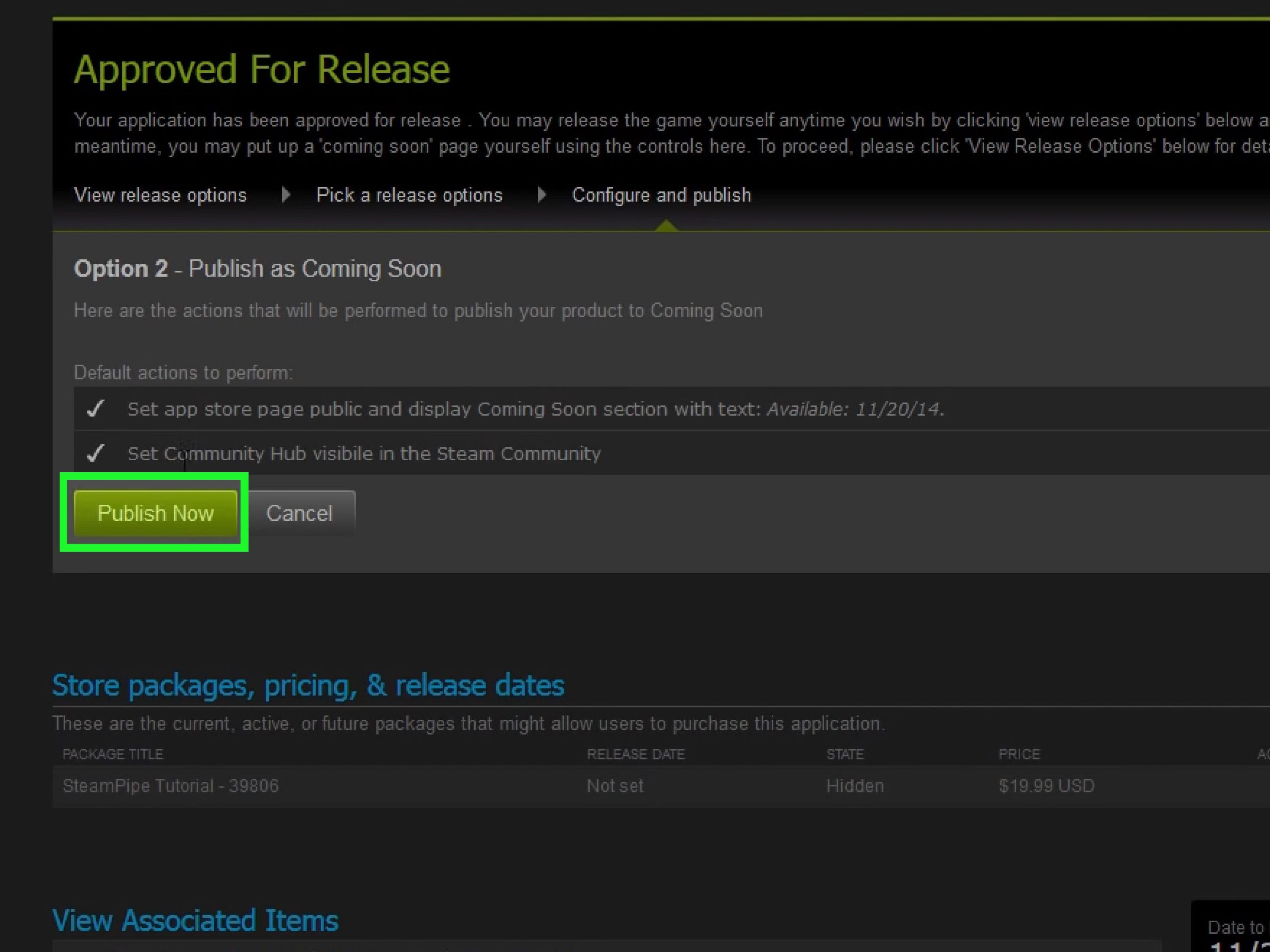
- Press the Launch Button: When the time arrives, you can go ahead and launch your game. The launch button will make your game visible on the Steam store.
- Monitor Feedback: When the game goes live, pay attention to the comments and reviews of players. If any bugs appear, you can quickly fix it, so that everyone can have the best playing experience.
- Respond to Feedback: Actively respond to player feedback. This shows that you care, and helps improve your game even more.
Launching your game on Steam is an achievement. You did all this hard work. So, now it is time to celebrate that your game is now available to players around the world.
Post-Launch Maintenance and Updates
The work doesn’t stop once your game is launched! Now it’s time to provide support and improvements to keep players happy. Think of this as taking care of your store after the grand opening.
Providing Support
Players might have questions or encounter issues. It’s important to provide a channel where they can report issues and you can help them.
- Monitor Forums: Look out for discussions on Steam or other community areas.
- Answer Questions: If players have questions about the game, try to answer them quickly and politely.
- Fix Bugs: If someone has a problem in the game, try to fix it as soon as possible so they can enjoy the game as intended.
Good customer support can make a big difference in how people see your game. If a player receives prompt help from the developer, then they might tell others how good your support is, which can boost your game sales.
Releasing Updates and Patches
Regular updates can bring new content, features, or fix any problems that players might be having with the game.
- Plan Updates: Think about what new things you can add to your game. It could be new characters, new locations, or other features that people will enjoy.
- Release Patches: If there are bugs, then release patches. This will ensure that the game will be a smoother experience for players.
- Communicate with Players: Tell players what new things and improvements have been added to the game.
By releasing new content and fixing issues that players have, this will ensure that your game remains fun for players, and they will remain engaged for longer.
Keeping Your Game Visible
Even though your game is already out, it’s good to keep it visible on the Steam store. This can be done in different ways.
- Sales and Discounts: You can do sales and discounts at different times of the year. This can bring in more players to your game.
- Marketing Campaigns: Don’t forget to keep sharing content about your game. You can share new things happening in the game, and make advertisements. This will keep players engaged with your game.
- Engage with Community: By engaging with the community, you can make more friends and promote your game to new potential buyers.
By using these methods, you can keep your game in the spotlight. This will ensure that new players will find out about your game, and help with the sales of the game.
Publishing a game on Steam is a big achievement. However, with hard work and patience, you can reach a big audience. By following the steps above, you can make your dream of releasing your game on Steam a reality. So, go ahead and start your journey of game development today!
How to Publish Your Game on Steam in 2022
Final Thoughts
To publish a game on Steam, first create a Steamworks account. Next, you will pay the required fee. After this, prepare your game’s store page with assets.
Then, upload your build. Thoroughly test your game. When you feel satisfied, you can proceed with the publishing process. Following these steps lets you understand how to publish a game on Steam.

