
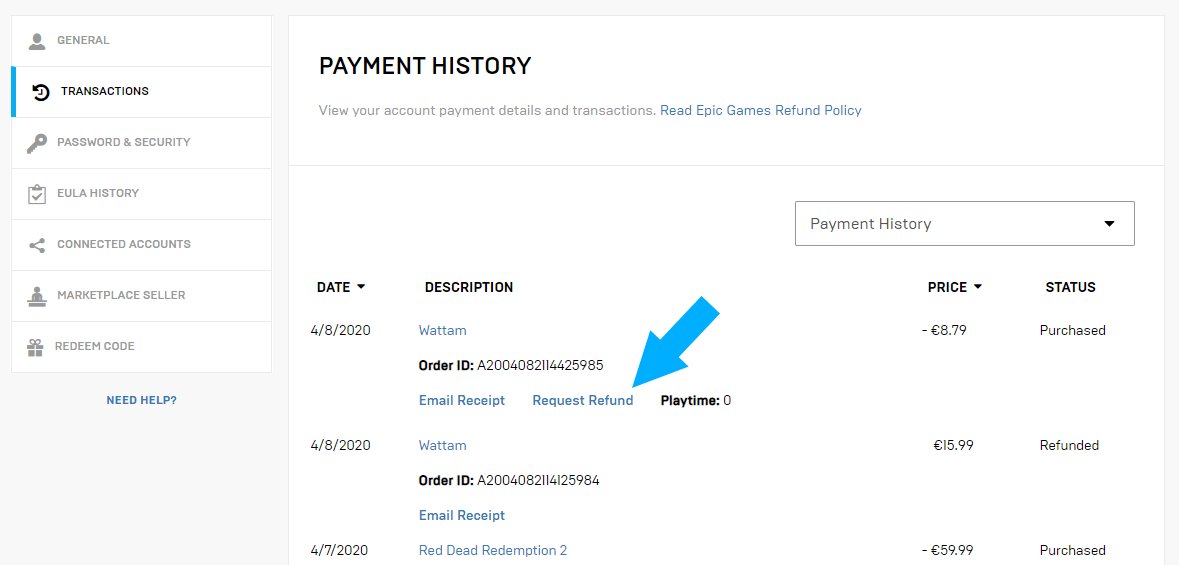
To refund Epic Games purchases, navigate to your account’s transaction history, find the eligible purchase, and request a refund, meeting their refund policy requirements.
Ever bought a game on Epic Games and then felt a pang of regret? Maybe it didn’t live up to the hype, or perhaps your system can’t quite handle it. Figuring out how to refund Epic Games purchases might seem tricky at first. Don’t worry, it’s a pretty straightforward process once you know where to look.
They have specific guidelines, like refund timelines and eligibility, that you need to be aware of. The process is generally smooth if you meet these criteria. Now let’s dive into the specific steps so you can easily get your money back on eligible purchases.

How to Refund Epic Games: A Simple Guide
Ever bought a game on the Epic Games Store and then felt like maybe it wasn’t the right one for you? Or perhaps a game just isn’t working the way you expected? Don’t worry, getting a refund on Epic Games is often easier than you might think! This guide will walk you through everything you need to know about how to refund your purchase, whether it’s a full game or in-game items. We’ll cover the rules, the steps, and what to do if you run into any problems. So, let’s jump in and learn how to get your money back when things don’t quite go as planned on Epic Games!
Understanding the Epic Games Refund Policy
Before diving into the steps, it’s super important to understand Epic Games’ refund policy. Think of it as the rulebook for getting your money back. Here’s the key information you need to know:
The 14-Day and 2-Hour Rule
The most important part of the refund policy is the “14-day and 2-hour” rule. This means that you have 14 days from the date of your purchase to request a refund. But there’s a catch! You also need to have played the game for less than 2 hours. Both of these conditions must be met to be eligible for a refund. If you’ve played more than two hours or it’s been more than 14 days since you bought the game, you won’t be able to get your money back unless there are special circumstances. For example, the game is totally broken and unplayable. Remember, this rule applies to most games, but there might be a few exceptions that we will discuss further in the article.
Refunds for In-Game Purchases
Getting a refund for in-game purchases, like V-Bucks or character skins, is a little more tricky. Generally, these types of purchases are non-refundable unless there’s a specific issue with the item. For example, if you purchased a skin and it doesn’t appear in your game, you might be able to get a refund. Another good example is, if you accidently buy a character skin that you were not intended to buy, then you can seek for a refund. However, if you simply don’t like it or changed your mind, it’s unlikely you’ll be able to return it. There are times you can get refunds for in-game purchase depending on the game policies. It’s always best to check with the game’s specific support if you have a problem with in-game items.
Pre-Ordered Games
If you pre-ordered a game, you have the right to request a refund at any time before the game is released. Once the game is out, the usual 14-day and 2-hour rule applies. This allows you to change your mind if, for instance, you’ve seen bad reviews or decided the game doesn’t interest you anymore. The rule doesn’t change for the pre-ordered game, but you are allowed to cancel the pre-order before the release.
Exceptions to the Rule
While the 14-day and 2-hour rule is generally strict, there are some rare cases where you might still be able to get a refund even if you don’t meet these conditions. If, for instance, the game is faulty and unplayable due to technical problems or it is seriously different from what was advertised, you can contact Epic Games support and explain your situation. They might consider a refund on a case-by-case basis. It’s always worth contacting them if you feel you have a valid reason. Always be polite and explain the situation with details to give your request a chance of getting accepted.
Step-by-Step Guide to Requesting a Refund
Okay, so you’ve checked your playtime and the time since you purchased the game, and you’re within the refund timeframe. Great! Now, let’s learn how to actually ask for a refund. Here’s a step-by-step guide:
Step 1: Go to the Epic Games Website
First, you’ll need to head over to the Epic Games website. You can do this using any web browser on your computer or phone. Just type “Epic Games” into the search bar, or go directly to their website at epicgames.com. Once you are on the website, sign in with the Epic Games account you used to buy the game you want to return. This will take you to your account dashboard.
Step 2: Find Your Order History
After you have signed into your account, you need to find your order history. This is where all your past purchases are stored. Usually, you can find a link to your “Transaction History” or “Order History” within your account settings. It’s often located in a drop-down menu under your name. Click on this and it will take you to the next page which shows all your past purchases.
Step 3: Locate the Game You Want to Refund
Once you are in your order history page, scroll down or search to find the specific game or purchase you want to get a refund for. You’ll see a list of all the purchases you have made on Epic Games. Make sure to find the correct one. There will likely be a button or a link next to the game with words like “Refund” or “Request Refund.” When you have found the purchase you want to return, click on that button or the link provided.
Step 4: Choose the Refund Option
After clicking the refund option, you may be presented with several refund options, if any are available. Usually, you can only request a refund if you fall under the guidelines of the policy. If you are under the allowed conditions, then the option to request a refund will be available, if not you’ll be informed that you don’t meet the conditions for a refund. If you are eligible, click or tap the option to refund the game. After that, you have to provide your refund reason.
Step 5: Explain Why You Want a Refund
You’ll typically be asked to provide a reason for wanting a refund. Choose the best answer from the list or provide a short explanation of your situation. It could be that you didn’t enjoy the game, or that it doesn’t work properly on your computer, or any other reason as long as it is the actual reason you are requesting the refund. If there are no pre-set options that fit your situation, you may be given an option to type the reason yourself, try your best to explain in detail the exact reason of refund. Be polite and honest; this will help the Epic Games support team understand your request better. Once you have written the reason, move to the next step.
Step 6: Submit Your Refund Request
Once you have completed the refund reason step, you have to submit the refund request. There should be a button or link that says “Submit” or “Request Refund.” After you click on that button, your refund request will be sent to Epic Games for review. Now, you’ll have to wait for Epic Games to look at your request and make a decision.
Step 7: Wait for Epic Games’ Response
After submitting your refund request, you will have to wait for a response from Epic Games. This usually takes a few days, but it may sometimes take a bit longer. You can monitor the status of your refund in the “Transaction History” or “Order History” section of your Epic Games account, the same location from where you requested the refund. You might also get an email from Epic Games confirming that they have received your request or if there is an update on the request. Be patient, and give them some time to process your request.
Step 8: Receive Your Refund
If your refund is approved, the money will usually be returned to the original payment method that you used when you bought the game. This might be your credit card, PayPal, or any other method you have used. Depending on your bank or payment provider, it might take several days for the funds to show up in your account. Keep an eye on your bank account or PayPal to see when the refund has been credited back to you. If the refund is rejected, you will receive an email from Epic Games explaining why your request was rejected. If you think there is an error, you may contact Epic Games Support directly to resolve the issue.
Dealing with Common Refund Issues
Sometimes, things don’t go as smoothly as planned. Here are some common issues you might encounter when trying to get a refund and what you can do about them:
Refund Request Denied
If Epic Games denies your refund request, they will send you an email that will tell you the reason. This usually happens because you didn’t meet the 14-day or 2-hour playtime rules. If you believe that the denial is a mistake, for instance if the game was faulty or broken, you can reply to the email or get in touch with their support team to explain your situation again with clear reasoning and they might re-evaluate your case. Remember to be polite and factual.
Refund Taking Too Long
Sometimes, refunds can take a while to process. This can depend on Epic Games and your bank. If it has been a longer time than you think is reasonable, you should contact the Epic Games support team. They will be able to give you information about the refund status and whether there are any problems on their end. If they are not able to resolve the issue, you can contact your payment provider and check with them if the refund has been processed on their side.
Problems with In-Game Purchases
As we discussed before, in-game purchases can be tricky. If you are having a problem, you can always contact the specific game support to see if they can help you. If that doesn’t work, or if your in-game item is faulty, reach out to Epic Games support. Be sure to provide as many details as possible and try to include screenshots of the problem, if you have any, to help the support team understand the issue.
Tips for a Smooth Refund Experience
Here are a few extra tips to help make the refund process as easy and quick as possible for you:
- Keep track of your playtime: Check how long you have played a game before you decide to get a refund. If you think you might want to return the game, try to keep the playtime under 2 hours.
- Request a refund as soon as possible: If you decide you want a refund, don’t wait too long. Try to request it within a few days of your purchase to ensure you don’t run out of time.
- Be clear and honest in your explanation: When you’re explaining why you want a refund, be honest and explain the situation clearly, so that Epic Games can understand your request better.
- Take screenshots or videos: If your reason for refunding is a technical problem with the game, take screenshots or record a video. This will give evidence to Epic Games support team that there is a problem with the game.
- Be patient: The refund process can sometimes take a little while, so be patient and wait for the email response from the Epic Games support team.
Using the Epic Games Support Team
If you ever have trouble getting a refund using the regular method, you can always contact the Epic Games support team. They’re there to help you with any issues you might have. Here’s how you can get in touch:
How to Reach Epic Games Support
- Through the Website: The most common way to contact Epic Games support is through their website. Usually, you’ll find a “Support” or “Contact Us” link at the bottom of the page. Click on that and it will lead you to a help center.
- Using Email: You can also send an email to Epic Games support. You can find their email address in the support section of their website. Remember to include all the details of the purchase and the reason you are contacting them.
- Social Media: While not always the best way to get help, you can also try reaching out to Epic Games on social media channels like Twitter. They may be able to direct you to the correct support channels.
What to Include in Your Support Request
When you contact Epic Games Support, try to have the following information ready to help them understand your situation:
- Your Epic Games username
- The name of the game or purchase you are having a problem with.
- The date of the purchase
- Your reason for requesting a refund.
- Any screenshots or video of the problem you are facing.
The more details you give them, the quicker they can help you.
What Happens After a Refund is Successful?
Once your refund is accepted and processed, the game will disappear from your Epic Games library. This means you will no longer be able to play the game. You will also receive an email to confirm that the refund has been processed. The money will be sent back to the original payment method. Remember, the time it takes for the money to arrive might depend on your bank or payment provider, so be patient.
In summary, getting a refund from Epic Games is usually straightforward as long as you follow the 14-day and 2-hour rule. Always check your play time and request the refund in a timely manner. If you face any issues, always contact Epic Games Support for additional help. With this information, you should be well-prepared to handle refunds on the Epic Games Store. Remember, reading the refund policies before you buy a game is always a good habit. Happy gaming!
How To Refund Games From Epic Games – Full Guide
Final Thoughts
To summarize, you can request a refund through your Epic Games account. Go to your transaction history and select the eligible purchase. Initiate the refund request from the provided options.
The refund process is fairly straightforward. Remember to meet the requirements for your specific item. You must understand the time limitations and eligibility criteria before requesting. This information outlines ‘how to refund epic games’.

