
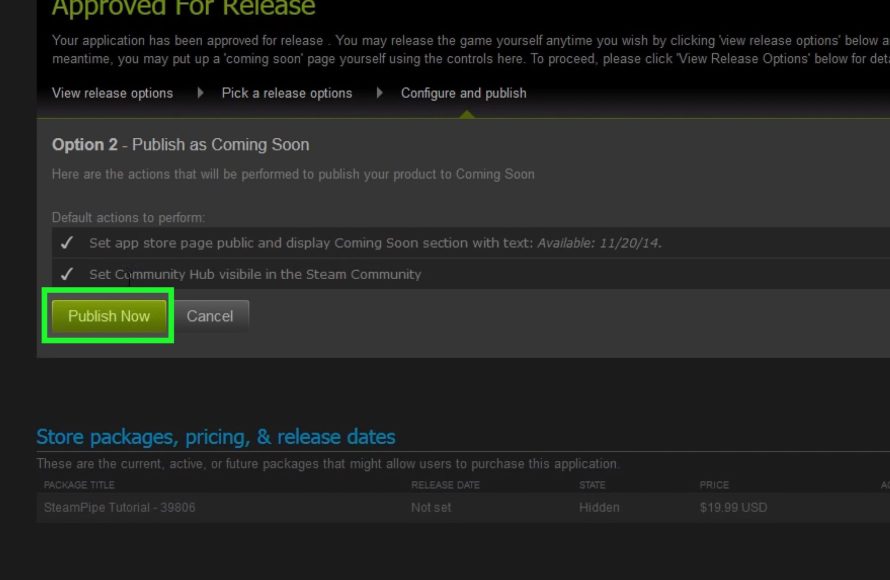
Releasing a game on Steam requires creating a Steamworks account, preparing your game build, configuring your store page, and navigating the review process.
So, you’ve poured your heart and soul into creating an amazing game, and now you’re wondering how to release a game on Steam. It’s a big step, but with a clear process, it’s achievable. This guide will provide simple steps to help get your creation onto the world’s biggest PC gaming platform.
This journey involves more than just uploading files. It requires understanding Steam’s requirements and preparing all the necessary assets. Let’s break down the steps to get your game live on Steam.

How to Release a Game on Steam: A Comprehensive Guide
So, you’ve poured your heart and soul into creating a video game, and now you’re ready to share it with the world. That’s fantastic! Steam is a super popular place for gamers to find new adventures, but getting your game onto this platform takes some planning and work. Don’t worry, this guide will help you understand the steps you need to take to get your game published on Steam.
Understanding Steam Direct
Before you even think about uploading your game, you need to know about Steam Direct. This is the system Valve, the company behind Steam, uses to allow developers to publish their games. Think of it as the entry gate to the Steam store. It replaced the old Steam Greenlight process, which was a bit different. Steam Direct means that pretty much any game can get onto Steam, as long as it meets their guidelines and you pay a small fee. It’s a big change that opened the doors for many more independent game makers.
The Steam Direct Fee
To join Steam Direct, you’ll need to pay a fee. This fee is per game and helps prevent people from putting a lot of low-quality or unfinished games on the platform. This is not an ongoing fee. It’s a one time, non-refundable fee. Think of it like a small investment in your game’s future. The fee is currently $100 USD (check Steam’s website for the most updated pricing). This fee is to make sure that people are serious about publishing their game and not just uploading anything that is made on any game development engine.
Setting Up Your Steamworks Account
Alright, let’s get practical. First things first, you need a Steamworks account. This is separate from your regular Steam account (the one you use to play games). Here’s how to get started:
- Go to the Steamworks website: Find it by searching “Steamworks” online.
- Sign in with your Steam account: Use the same login as your regular Steam account.
- Follow the instructions to enroll: You’ll need to provide some information about yourself or your company, such as your legal name, address, and tax information. Steam needs this information for legal and payment purposes, and for paying you once your games starts generating revenue.
- Pay the Steam Direct Fee: Remember that small fee we talked about? It’s time to pay it. This is done during the Steamworks account setup. You’ll use one of Steam’s accepted payment methods.
Preparing Your Game for Steam
Now that you have a Steamworks account, you can start preparing your game for the Steam store. This involves quite a few important steps. It is like preparing a cake, you need to measure the ingredients, prepare the baking pan and then put it in the oven for baking the cake. Let’s go through some of them.
Creating Your Game’s Steam Store Page
Your store page is like the storefront for your game. It’s where people will learn about your game and decide if they want to buy it. A good store page is very important to make people buy the game.
- Game Title and Description: Choose a catchy title and write a clear, exciting description of your game. Explain what it’s about, what makes it fun, and what kind of experience players can expect.
- High-Quality Screenshots and Videos: Use professional-looking images and videos that show off your game’s best features. The visual aspects are very important, so try to add gameplay videos as well.
- Tags and Categories: Tag your game with words that accurately describe its gameplay style, genre and theme. This helps players find your game when searching on Steam.
- System Requirements: List the minimum and recommended computer specifications so players know if their computer can run your game. Mention the operating system, RAM, graphics card, etc.
- Pricing: Decide on a price that is fair and competitive. Research other games in your genre for a benchmark. You also have the option to put it on sale, and that will attract even more players.
Game Builds and Technical Requirements
This is where the real technical stuff comes in.
- Creating a Game Build: A build is basically the packaged game ready for distribution. It’s a version of your game that is playable, and it is what people will download.
- Steamworks SDK: You’ll need to integrate the Steamworks SDK into your game. This allows your game to connect to Steam’s services, such as achievements, leaderboards, cloud saving, and multiplayer functions. Many game engines (like Unity and Unreal Engine) offer easy ways to do this.
- Testing Your Build: Before you upload your build to Steam, test it thoroughly to make sure it works without any bugs. It is very frustrating to play a game full of bugs. Make sure your build has all the right files.
- Uploading Your Build: Steam has a system for uploading your game build through Steamworks. You’ll need to follow specific instructions to make sure everything is uploaded properly. It is important to make sure you add all the necessary files otherwise the game might not work correctly on players computers.
Legal Considerations
Don’t forget about the legal stuff!
- Copyright and Trademarks: Make sure you own or have the rights to everything in your game, including the code, music, and artwork. If you don’t own the right to use, it might cause some problems down the line.
- Terms and Conditions: Have clear terms and conditions for players. This is important for protecting your game and for users.
- Privacy Policy: If your game collects any user data, you’ll need a privacy policy in place. This is a legal requirement and gives more trust to players.
- Age Ratings: Determine the appropriate age rating for your game. Steam requires you to provide this information. There are different organizations that handle this for different countries.
Steam’s Review Process
Once you’ve submitted your game, Steam will review it. This is a quality control check.
- Review Time: The review process can take a few days or even weeks. It depends on how many games are currently in the queue.
- What They Check: They’ll check to make sure your game runs well, that the store page is accurate, and that you’re not using anything illegal or violating any other rules.
- Receiving Feedback: If they find any issues, they’ll give you feedback so you can fix them. You may need to update your game or your store page.
Launching Your Game on Steam
Congratulations! Your game has been approved. Now it’s time to launch.
Setting a Release Date
Choose a date that makes sense. Don’t launch too close to other big releases and give yourself time to promote the game before the launch. Try to aim for a weekday and not a weekend as it gives you more time to react to the issues in the first few days.
Marketing Your Game
It is important to promote your game on social media, forums, websites and with influencers. Do it before the launch as it is one of the best ways to get people aware of your game. Engage with your audience on social media.
Post-Launch Support
Launching your game is just the beginning. You’ll need to continue to support it and listen to your players. Here’s what to think about after launch:
- Bug Fixing: You will likely need to release some patches to fix bugs that players find, this is a very normal thing in game development.
- Updates and Content: Keep players interested by adding new content, features, and updates. Games that update and get new content are played by more people.
- Community Management: Interact with your community on forums and social media. Listen to feedback and be responsive. Players appreciate developers who interact with them.
- Monitoring Performance and Sales: Keep track of how well your game is selling and how players are enjoying it. Use the feedback to improve your game.
Using Steamworks Features
Steam provides lots of great tools for game developers. Here are a few that can be very helpful:
- Achievements: Add achievements for players to earn. This encourages players to explore all the content.
- Leaderboards: If your game has competitive elements, leaderboards can create fun competitions among players.
- Cloud Saves: Enable cloud saving so players can continue their progress across different devices. It’s very convenient for the players.
- Multiplayer Support: If your game supports multiplayer, use Steam’s systems to make it easy for players to connect with their friends.
- Steam Workshop: If you want to let players create and share their own content, consider using the Steam Workshop.
Tips for a Successful Launch
Here are some extra tips to help you have a smooth and successful launch:
Plan Ahead
Don’t wait until the last minute. Start preparing your store page and game build well in advance. It helps to make a detailed plan.
Get Feedback
Let other people play your game before you launch. Their feedback can help you find bugs and make the game more fun. Try to find different people who are good in playing games.
Be Patient
Releasing a game takes time. Don’t expect to become an instant millionaire overnight, especially if it is your first game. Keep working on it and improving the game.
Engage with Your Players
Be active in your community. Listen to what they have to say. Make players feel that they are being heard and it helps in making the game better.
Releasing a game on Steam is a journey that takes dedication, attention to detail, and understanding of Steam’s platform. While it might seem overwhelming, breaking it down into steps makes it easier to manage. From creating your Steamworks account to engaging with players post-launch, each phase is vital for your game’s success. Now that you know the process, you’re one step closer to sharing your game with the world. Don’t give up and keep making games!
What it's like to release a game on Steam
Final Thoughts
To summarize, releasing a game on Steam requires setting up your developer account, preparing your game build and store page content. You must navigate the Steamworks partner portal, fulfill legal and tax requirements, and manage your game’s visibility.
This involves pricing strategy, marketing plan, and community engagement after launch. Carefully follow Steam’s guidelines for a smooth release process. So, remember these key steps when considering how to release a game on Steam.

