
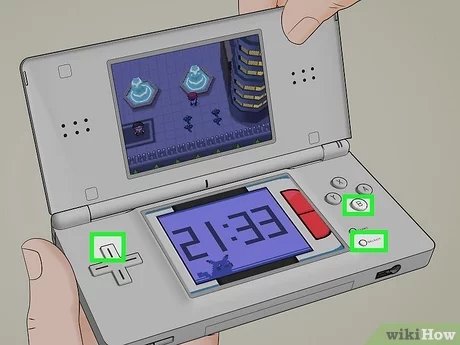
To restart a DS game, simply power off your Nintendo DS console, and then power it back on while the game cartridge is still inserted.
Ever found yourself stuck in a DS game, wanting a fresh start? Maybe you picked the wrong starter Pokémon or messed up an important choice. The good news is, it’s usually very simple to get back to the beginning. Knowing how to restart a DS game is a handy trick for any player.
Different games have slightly different methods, but the basic principle is consistent across the board. We’ll walk you through the standard procedure so you can jump back in from the start! It is a super quick method and easy to do.

How to Restart a DS Game: A Comprehensive Guide
Have you ever been playing a Nintendo DS game and wished you could just start over? Maybe you made a wrong choice, want to try a different character, or just feel like experiencing the game from the beginning. Don’t worry, it’s easier than you might think! Restarting a DS game is a common desire, and this guide will walk you through all the different ways to do it. We will cover everything from the simple software reset, to dealing with games that require a bit more effort.
Understanding Game Saves and Restarting
Before diving into the how-to, it’s important to understand how DS games store your progress. Most games save your data directly onto the game cartridge itself. This is different from modern consoles that typically save to a hard drive or cloud. This means when you reset a game, you’re directly affecting the save data on that little cartridge. It’s crucial to know what to expect, as some methods wipe everything while others just bring you to the main menu. Let’s break it down:
Types of Saves in DS Games
The kind of save method a game uses impacts how you will reset it. Here are common types:
- Single Save Slot: Many DS games only have one save slot. This means every time you play, you are writing over your previous game. Resetting can involve deleting this single save.
- Multiple Save Slots: A few games allow you to have multiple save files. In this case, you can start a completely new adventure without deleting your old one. You would pick a new slot to start on.
- Auto Save: Many games use auto-saving which is saving progress automatically. This feature can make restarting a bit trickier, but we will show you methods to navigate around this.
Simple Software Resets: The Easiest Method
The easiest way to try restarting a game is using its built in reset function, often a “soft reset”. Many games will have a soft reset feature that usually returns you to the game’s title screen. This does not wipe the data, but it’s a first step in case you need to start a new game.
How to Perform a Soft Reset
A soft reset is usually done by pressing a specific button combination on your DS. Here are the most common combinations:
- L + R + START + SELECT: This is the most common combination used to soft reset a DS game. Press and hold all four buttons at the same time to return to the game’s title screen.
- Other combinations: Some less common games may use a slightly different combo. You can consult the game’s instruction booklet or the online forums for those. If a game does not have a soft reset, you should turn off the console and then turn it on again.
What Happens After a Soft Reset
Usually, after a soft reset, the game will bring you back to the main menu screen. From here, you can often select options like “New Game”, “Continue”, or “Load Game.” If you want to restart, be prepared to chose “New Game”. If you don’t see a “New Game” button then check if there is an option to erase save data, as explained in the next sections.
Deleting Save Data: When a Soft Reset Isn’t Enough
Sometimes, a simple soft reset won’t do the trick. Some games have a more persistent save system, meaning you’ll need to go a step further and actively delete your save data. This is especially true if a game does not have a “New Game” option directly from the main menu.
Locating the Delete Save Option
The location of this option depends on the specific game. However, here are some places to look:
- Main Menu: After a soft reset, check the main menu. Some games will have a “Delete Save Data”, “Erase Game”, or “New Game” option located there.
- Settings Menu: Sometimes, the option to delete save data is hidden within the game’s settings. Check menus with titles like “Options” or “Configuration”.
- Title Screen: Some games require you to start up the game and then look for a text prompt on the main title screen before you even get to a main menu. For example, games may prompt to “Press X + B + L + R to Erase save” at the title screen.
Steps to Delete Save Data
Once you find the correct option, follow these general steps. Note that the prompts may be slightly different depending on the title:
- Select the Option: Use the stylus or D-pad to highlight the option to delete save data.
- Confirm Your Decision: The game will likely ask you to confirm your choice. This is to prevent accidental deletions. Usually, you will be prompted with a question like “Are you sure you want to erase all save data?” and you may have to click “Yes” to proceed.
- Wait for Completion: Let the game complete the process. Do not turn off the DS console during the deletion, as this could corrupt the game.
Important Note: Deleting save data is permanent. Be certain you truly want to start over before doing this! Double check to make sure you are on a new game slot or are okay with deleting the original data.
Dealing with Games That Lack a Reset Function
Some very old DS games lack a direct reset or delete save option. This requires a less direct approach, but still allows you to start fresh. Here are the methods to use in this case:
The ‘New Game’ Method
The game may not explicitly have a ‘Delete Save’ option. Look carefully, since many games have an option to start a ‘New Game’ within their main menus. If this option is there, that would be the method to reset.
The Manual Method
If there is no obvious option on the screen to restart, this is where it gets a little trickier. The solution in this case requires turning off the DS and restarting the game from scratch. Here is how to do it:
- Completely Turn Off the Console: Press the power button to fully turn off your DS.
- Restart the Game: Turn the DS back on and start the game.
- Start New: The game will usually start you at the beginning with no previous progress. Some games will retain settings but most will start as a new game.
The Special Case of Specific Games
Certain DS games have unique ways of saving progress. For instance:
- Pokemon Games: Pokemon games usually have save data that is very resistant to reset. You can not usually simply press a button on the title screen. The steps to delete data are often a little more complicated and require that you hold down more complex button combinations on the main title screen. Usually the methods are listed on online guides if you are having trouble finding out how to do it on your specific game.
- Animal Crossing: Animal Crossing requires starting a new town and deleting the old town. The method to do this is usually listed within the game’s menu, but it can be easy to overlook.
- Other Unique Titles: Always refer to online guides or the game manual for the title you are playing as it might have very unique methods to delete progress.
Tips for a Successful Restart
Restarting a game is pretty simple, but here are some quick tips to make sure it goes smoothly.
Backup Strategies (If Possible)
While most DS games save directly to the cartridge, there are ways to back up data using third party devices if you have a homebrew system or a save game backup device. For most users, this step isn’t necessary but is listed here for informational purposes. These kinds of methods are typically for advanced users.
Documenting Save Files
If you are playing a game with multiple save slots and want to save your data, make sure to document which save slot is which. You can use a small piece of paper or a text document to make notes of the progress you made on each file so you can load the correct save.
Double Checking Before Deleting
Before confirming your decision to delete a save, double-check that you are okay with deleting the data. It’s very difficult to undo a save deletion.
Seeking Additional Help
If you’re still having trouble restarting a specific game, check out online forums and communities. Other players have likely encountered the same issue and can offer specific advice.
Restarting a DS game is a common thing that all players have to do, and as we have learned, the method of how to restart it will depend on the game you are playing. From simple soft resets to deeper data deletion methods, you now have the tools to start your game anew! Happy gaming!
How To Restart Nintendogs (New Vid)
Final Thoughts
To restart a DS game, simply power off your console. Then, power it back on and load the game again. This process will start the game anew. The system does not typically save progress until instructed.
The process of how to restart a ds game is quite simple and you can repeat it anytime. This method applies for most ds games.

